
According to this post at MSDN:
Excel 2007 should be giving significant performance improvements on multi-core processors.
Some simple benchmarks on an Acer laptop with 2.0 GHz dual-core processor and 2 GB RAM show some improvement (over Excel 2000), albeit quite modest:
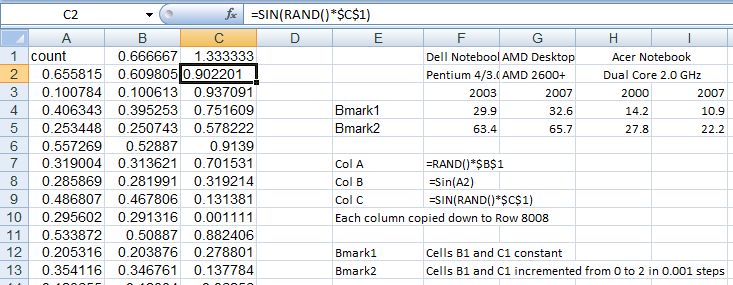
Click on image to see full size.
In all cases with the dual core processor it was shown to be working at close to 100% under 2007, and about 50% with 2000. Possibly with a less linear calculation process 2007 would show a bigger advantage.
Looking at situations where VBA is interacting with a workbook, either reading or writing data, or using .worksheetfunction, things are quite different however. I have found Excel 2007 to be substantially slower than 2000; of the order of 3 times slower or more. These results comparing the use of .worksheet function with a UDF evaluated entirely inside VBA illustrate this difference.:
Worksheetfunction vs UDF
In this case Excel 2007 took about 25% longer using the UDF (dual core processors are not supported in VBA), but more than 3 times longer using .worksheetfunction.
Overall, in real applications I have found 2007 to be generally about the same speed as 2000, but in some cases using VBA dramatically slower, sometimes needing a re-write of the code to make the application usable.
On the plus side I have found that 2007 saves substantially quicker, especially in binary format, and when there is a lot of VBA code used.
I would be interested to hear the comments of others.
The comment button is just down there on the right 🙂


 Newton Excel Bach, not (just) an Excel Blog
A shameless bid for comments. I’ll bite. 🙂
Excel 2007 has some famous performance issues with charts. One was so bad that a special hotfix preceded SP1.
Even with the hotfix, there is a marked difference in response between 2003 and 2007.
1. 500 xy pairs consisting of =RAND(). Recalculate using F9 key.
a. Excel 2003 chart responds instantly (~1 sec for 100 loops).
debug.print now : for i=1 to 100 : activesheet.calculate : next : debug.print now
5/6/2008 9:06:27 AM
5/6/2008 9:06:28 AM
b. Excel 2007 chart takes < 1 second, but it’s noticeable (~17 seconds for 100 loops).
debug.print now : for i=1 to 100 : activesheet.calculate : next : debug.print now
5/6/2008 9:07:21 AM
5/6/2008 9:07:38 AM
2. 5000 xy pairs consisting of =RAND(). Recalculate using F9 key.
a. Excel 2003 chart takes < 1 second, but it’s noticeable. Similar to Excel 2007 with 500 points (~1 sec for 10 loops).
debug.print now : for i=1 to 10 : activesheet.calculate : next : debug.print now
5/6/2008 9:05:02 AM
5/6/2008 9:05:03 AM
b. Excel 2007 chart takes about 1 second or more, but it’s noticeable( ~10 sec for 10 loops).
debug.print now : for i=1 to 10 : activesheet.calculate : next : debug.print now
5/6/2008 9:03:57 AM
5/6/2008 9:04:07 AM
I should probably do a more precise job of characterizing this.
LikeLike
Drawing in Excel 2007 has become highly frustrating!
I cannot seem to figure out how to switch off all these new and useless features.
I cannot even draw a straight line as it seems to snap to some invisible grid, which I cannot turn off even by following help instructions
LikeLike
Wilhelm – I haven’t had that problem, or seen it mentioned before.
Do you always get this, or only sometimes?
Are you using the insert-shapes tab?
You might be interested in my drawing with VBA posts (but they won’t solve this particular problem).
LikeLike
Pingback: xl2007 speed issues | keyongtech
I wish software publishers would stop reinventing products that we rely on and are familiar with. I hate the look, I hate the feel, and I hate that I as a very experienced user of excel, it’s difficult to perform basic operations.
The menus take up 1/4 of the screen, the little pictures next to every button add nothing but distraction, and there doesn’t seem to be a way to set the interface to “classic.”
LikeLike
Pingback: Excel 2007 speed test « Number Cruncher
I guess the reason Microsoft doesn’t solicit feedback is because they already KNOW they’ve screwed all their existing users — we already know that 90% of the users can only use 10% of the capability in Excel. So to increase the users they must appeal to the lowest common denominator and dumb it down so that even an idiot who can’t open a menu can find the Sort tool. And if they do this at the expense of people who have actually been USING Excel for years and years, creating sheets & macros & toolbars and whatever, well apparently they don’t give a rat’s a$$ about that….
LikeLike