
The files presented in the recent post on Scipy Linear Algebra Solvers include a wide range of different solver types, with in some cases numerous sub-options, allowing the functions to be called from Excel, and greatly extending and speeding up Excel’s limited solver functions.
In this post the speed of all the available functions is compared for solving sparse matrices for structural frame analysis with matrix sizes of 14742×14742 and 29485×29485.
The python code and spreadsheet for the solvers can be downloaded from:
and the timer spreadsheets (including complete matrices) from:
Note that the spreadsheets require pyxll to link the Python code to Excel.
The file Time Lin-Alg2.xlsx has the larger matrix and time results for both:

The solver times show the time for complete solution in the first column, or where applicable the time for factorisation in the first column, and extraction of the results from a factorised matrix in the second:
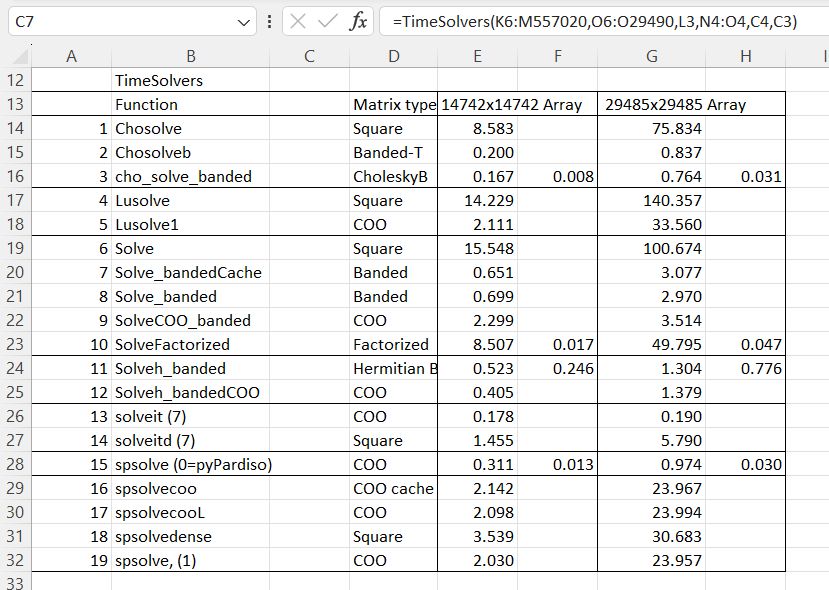
The functions solveit (iterative solver) and spsolve (sparse solver) have alternative solver types, with widely varying performance:

Times shown are for the larger matrix.
Two of the iterative solvers (4 and 10) failed to converge.
For the py_Spsolve functions Option 0 calls the pyPardiso library, which must be installed separately to Scipy. This is very much faster than the built-in Scipy options, and is the default solver called by py_Spsolve.


 Newton Excel Bach, not (just) an Excel Blog
Pingback: Scipy Functions with Excel and pyxll 7 – Linear Algebra | Newton Excel Bach, not (just) an Excel Blog
Pingback: Scipy update and Linalgfuncs speed check | Newton Excel Bach, not (just) an Excel Blog