
When a user defined function (UDF) is created in Excel with Python and pyxll the data type of each argument can be specified, either in the @xl_func decorator, or with a separate @xl_arg decorator for each argument. I prefer the latter, which I find more readable and easier to check.
A problem arises if the argument may have different data types; for instance, in my recent additions to the Scipy Stats functions, one of the inputs is often an array of x values, which can easily be created on the spreadsheet for small arrays, but for very large arrays it is may be better to generate a pyxll cache object, which displays as a single cell on the spreadsheet. I had been creating separate functions for these two cases, but I recently discovered, with the help of Tony Roberts from pyxll, that it is now possible to specify alternative data types for any argument, using Union Types
The code below illustrates this approach, with the ‘x’ argument being specified either as a ‘numpy_array’ or an ‘object’.
@xl_func(category = "Scipy-Stats", help_topic="https://docs.scipy.org/doc/scipy/reference/generated/scipy.stats.multivariate_normal.html!0")
@xl_arg('method', 'str')
@xl_arg('x', 'union<numpy_array, object>')
@xl_arg('kwargs', 'dict')
@xl_return('numpy_array')
def py_multivariate_norm(method, x = [], kwargs = None):
    """
A multivariate normal random variable.
The mean keyword specifies the mean. The cov keyword specifies the covariance matrix.
See on-line help for full list of methods and arguments
    """
    newmethod = getattr(stats.multivariate_normal, method)
    if type(x) == list:
        res = newmethod(**kwargs)
    else:
        res = newmethod(x, **kwargs)
    if isinstance(res, np.ndarray) == False: res = np.array(res)
    return res
In this case the x argument is optional, and defaults to an empty list if omitted, but if included it may be specified either as a cache object:
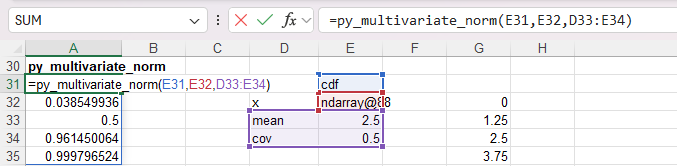
or a selected range which will be converted to a NumPy array.
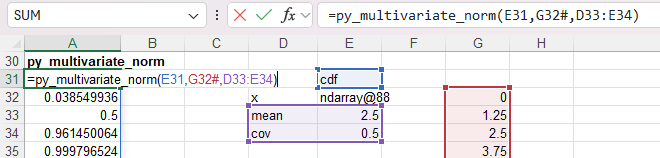
The results are the same in both cases.
The same approach may be used to return the function results either as a numpy array, displaying all the results, or a pyxll cache object, which displays as a single cell, but contains all the data, which can either be passed back to Python, or the data can be extracted, all or in part, for display in the spreadsheet.
In this case the Python data must be prepared before being transferred, as described in this pyxll FAQ:
https://support.pyxll.com/hc/en-gb/articles/360036961153-How-can-my-function-return-different-types
This approach has been used in the py_linspace function:
@xl_func(category="py-Maths", help_topic="https://numpy.org/doc/stable/reference/generated/numpy.linspace")
@xl_arg('startnum', 'float')
@xl_arg('stopnum', 'float')
@xl_arg('num', 'int')
@xl_arg('endpoint', 'bool')
@xl_arg('retstep', 'bool')
@xl_arg('rtn_cache', 'bool')
@xl_arg('dtype', 'str')
@xl_arg('axis', 'int')
@xl_return('union<var, object>')
def py_linspace(startnum, stopnum, num = None, endpoint = None, retstep = None, rtn_cache = False, dtype = None, axis = 0):

    try:
        axis = int(axis)
    except:
        pass
    kwargs = {'num': num, 'endpoint': endpoint, 'retstep': retstep, 'dtype': dtype, 'axis': axis}
    kwargs = {k:v for k,v in kwargs.items() if v is not None}

    res = np.linspace(startnum, stopnum, **kwargs)
    if rtn_cache:
        return res
    else:
        to_var = get_type_converter('numpy_array', 'var')
        res = to_var(res)
        return res
The Python code generates a numpy array, which will be displayed in Excel as a cache object. To display as an Excel range of values the pyxll get_type_converter is used to generate a to_var function that converts the array to an Excel variant array.
The updated Scipy and Numpy code will be included for download in the next post.


Pingback: Scipy-statistics with all distributions | Newton Excel Bach, not (just) an Excel Blog