It was recently reported that the VBA version of the biaxial bending spreadsheet was returning incorrect results when the neutral axis was exactly parallel to the Y axis. This problem has now been fixed, and the revised spreadsheet can be downloaded from:
I recently upgraded to Python 3.12, and installed the latest version of the Numba just-in-time compiler (0.60.0) which also required upgrading Matplotlib (3.9.3), and downgrading Numpy (2.0.2). I have also edited calls to Numba in the py_3DFrame1_1.py module, and added this to the download file at:
See Installing 3DFrame-py for installation details, and details of other Python modules required. Also see Python and pyxll for details of the required pyxll package, including a coupon code for a 10% discount.
The name of the currently active 3DFrame module is now shown on the Output sheet:
To change to the Numba version, enter 1 in cell E3, then click Reload Solvers, and update the function in cell H3:
If the “reload solvers” button doesn’t work, save the file, close Excel and restart, and the selected module will load.
The Numba compilation process takes about 15 seconds, and is required every time the file is opened, but for very large models the Numba code is significantly faster; for instance calculation time of the 3DFrame-py-vvbig.xlsb model, with over 27,500 beams, is reduced from 17.7 seconds to 6.6 seconds.
One other minor code change fixed a problem with data copied from the VBA version of the 3DFrame program. The input for the beams had left the rotation angle column blank. This is treated as zero in VBA, but when imported through a Numpy array into Python it is converted to NAN. This can be dealt with by a single line of code:
See the previous two posts for details of other software required for installation.
To check the spreadsheet results, 7 portal frames with different end conditions were analysed in Strand7:
From left to right the rotational end releases were specified at:
Top beam, both ends
Top beam, right
Top beam, left
Top of both columns
Top of right column
Top of left column
None
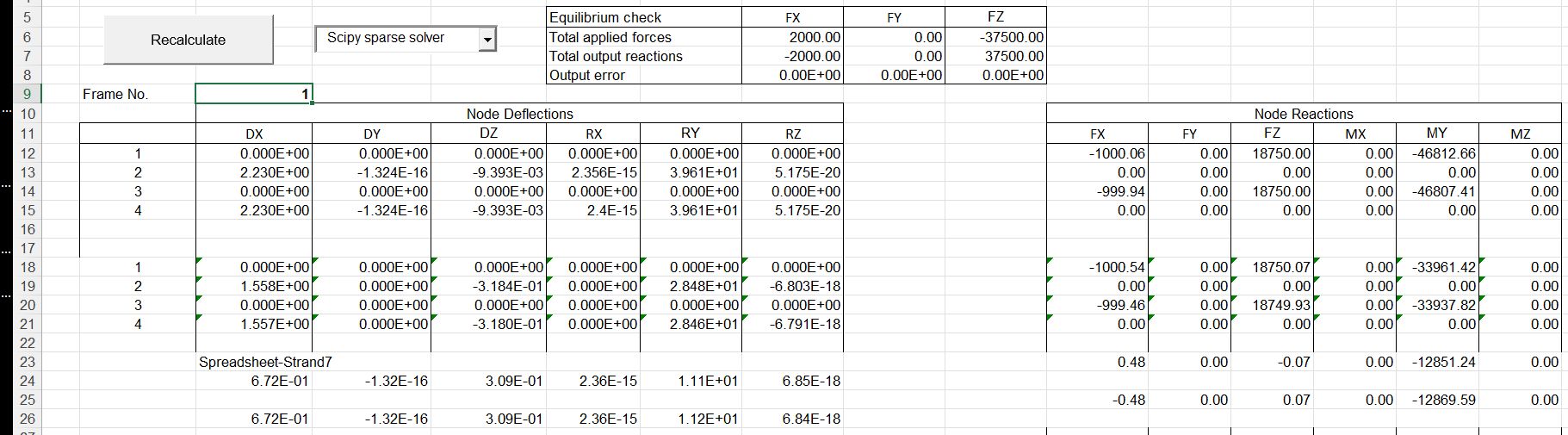
Results are shown below for a vertical distributed load of 7500 kN/m applied to the top beam, with a horizontal point load of 2000 kN applied at the top of the left column. For Case 1 and 4 (rotation release at both ends) these loads are close to the buckling load, resulting in horizontal deflections of well over 1 metre (click on image for full-size view):
For this case there are significant differences between the Strand7 and spreadsheet results for both horizontal and vertical deflections and bending moments at the base of the columns. The programs use different approximations for the non-linear geometric effects, and with very large deflections close to the buckling load these result in significant differences in the results.
To display results for other cases, enter the “frame no.” (1-7) in cell C9, and update the end releases on Sheet Input1:
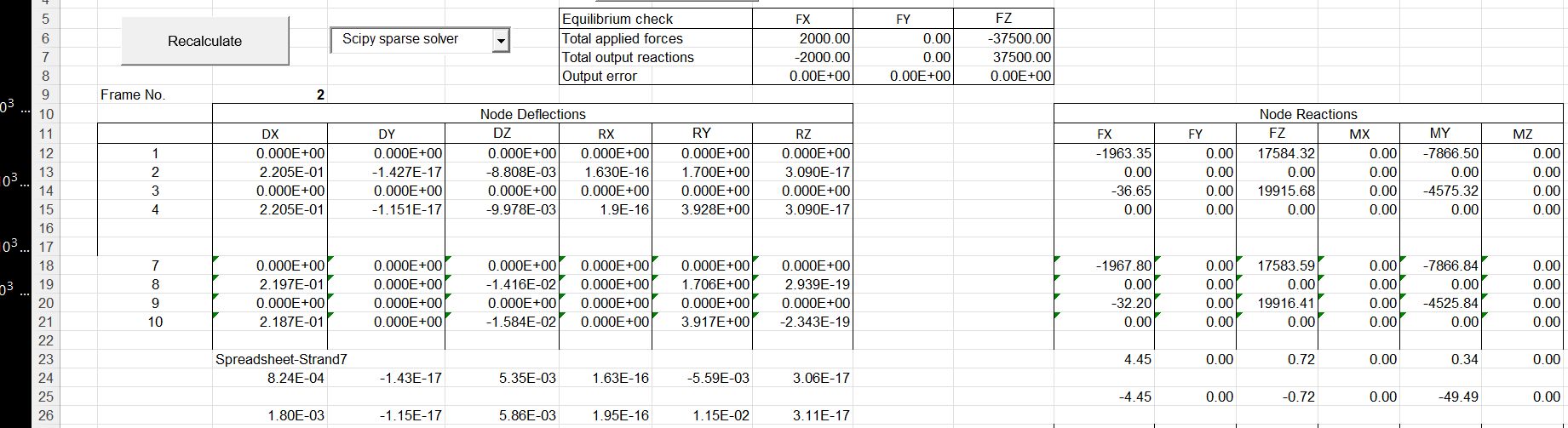
The spreadsheet results are then updated by clicking the “Recalculate” button and can be compared with the Strand7 results:
For this case there is still a significant difference in the vertical deflections at the top of the columns, but the horizontal deflections and forces are all much closer, with a maximum difference of about 1%. The actions at the beam ends are also in good agreement:
Results are also included for linear elastic analyses. These are in near exact agreement:
As mentioned in the previous post, the installation process for the 3DFrame-py spreadsheet has changed with the new version. Also there have been some significant changes to the code to fix installation problems. Updated files are at:
The frame analysis uses the Scipy linear algebra functions called from pyLinalgfuncs3, other Scipy functions called from pyScipy3, and a beam analysis function called from BeamAct_2, which must all be available on the Python path. BeamAct_2 is included in the download file. The other two are included in:
The Scipy functions include very recent updates, so download the latest version even if you already have it installed.
The 3DFrame-py download file includes:
3DFrame-py-comb.xlsb: Spreadsheet with added provision for factored load combinations and saving multiple load cases and results.
3DFrame-py.xlsb: The basic spreadsheet, including data for a small example frame
3DFrame-py Strand7 check.xlsb: Results for the small frame compared with Strand7 results.
3DFrame-py-vvbig.xlsb: Spreadsheet with input and results for a much larger frame
3DFrame-py-Mastan.xlsb, 3DFrame-py-Mastan steel1.xlsb, 3DFrame-py-Strand7 Steel1.xlsb: Results compared with the Mastan frame analysis package, and Strand7 using steel sections.
Load3DFrame.py: Python code to load the 3DFrame-py code at startup of the associated spreadsheet
py_3DFrame1_2.py: The 3DFrame-py code, using the Numba just-in-time compiler.
py_3DFrame1_2-nojit.py: The same code but without any calls to Numba jit compilation.
BeamAct_2py: Beam analysis functions
In addition to the download files, the following modules are used: Required:
The spreadsheet has VBA code to automatically load the Python frame analysis code when the file is opened:
Public Sub Workbook_Open()
Dim iErr As Long

Application.EnableEvents = True
iErr = Run("Load3DFrame")
End Sub
The Load3DFrame module should either be added to the list of files opened at startup, in the pyxll.cfg file, or the code below should be added to an existing startup file:
The Load3DFrame function has added error handling to return a message if any modules fail to load. If the Frame Analysis module is imported successfully, but the analysis does not work, have a look at the pyxll log file, which should indicate the source of the problem.
This is still a work in progress, and all results must be carefully checked.
Minor revisions to the installation files will be covered in the next post.
The new code allows for non-linear analysis for geometric effects and/or using moment-curvature tables for non-linear flexural effects.
Enter 0 or 1 in the appropriate column to exclude or include the non-linear analysis.
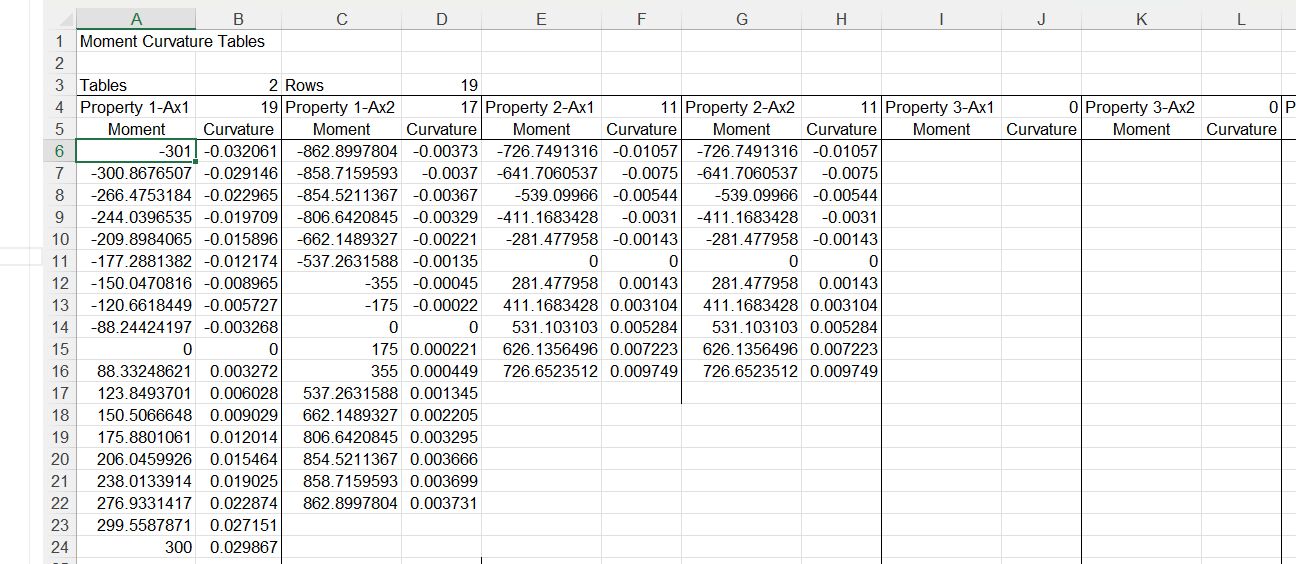
For moment-curvature non-linearity to be included, moment curvature tables must be added to the new Input3 sheet, and the table allocated to each property type added in the new “MomCurve Table” column on the right.
Note that:
The non-linear analysis does not currently work with warping effects included. The warping code still works with the linear analysis option set.
Code linking to the Numba just-in-time compiler needs more work. At present it works, but gives no performance improvement.
The non-linear code has been checked against Strand7 analyses for the frame below, with high axial loads applied to the horizontal members.
Vertical deflection results are shown below for the linear, non-linear geometry, and non-linear geometry and material effects. It can be seen there is a large increase in deflections due to non-linear effects, with good agreement between the Strand7 and 3DFrame results.
There was also a large increase in bending moments in the geometric non-linear analysis, with a small additional increase from moment-curvature effects. There was again close agreement between the Strand7 and 3DFrame results.








 Newton Excel Bach, not (just) an Excel Blog