In VBA, if you have an array named a and a variant named b, then the statement “b = a” creates a new array b with the same size and values as a. If the values of either a or b are subsequently changed, the values of the other remain unchanged.
In Python it doesn’t work that way. All variables are objects and “b=a” indicates that the object named a is now also named b. The result is that b not only has the same values as a, it is the same in every other respect. If the values of either a or b are changed, the values of the other are also changed. This behaviour can cause problems for the unwary, and also sometimes it is necessary to create a new object with the same values as the original, but not otherwise connected. Python provides ways of doing this, but the detailed workings are not always obvious, behaviour varies depending on the type of the object, and different ways of achieving the same end can have huge differences in performance. This post therefore looks at the various options for making independent copies of different objects, focussing on Python lists and Numpy arrays.
Suppose we create a list with name ‘a’:
>>> a = [1,2,3]
We can then give that list another name, ‘b’:
>>> b = a
We can check that the two names indeed refer to the same object:
>>> b is a
True
Then any operation we perform on a also affects b, and vice versa:
>>> a[2] = 4
>>> b.append(5)
>>> a
[1,2,4,5]
>>> b
[1,2,4,5]
However, if we assign a new list to one, the other remains unchanged:
>>> a = [4,5,6]
>>> a
[4,5,6]
>>> b
[1,2,4,5]
>>> b is a
False
Methods that can be used to create a new copy of a list include:
- Create a new list of the same size, then loop through list ‘a’ and assign the value of each element to list ‘b’.
- Use the copy or deepcopy functions (see below for differences between the two)
- Create a Numpy array with the values in the list, then convert that array back to a list
- For a list of lists, create a new list of the same size and shape, then loop through list ‘a’ and copy the value of each sub-list to list ‘b’.
To use the copy or deepcopy functions we must first import the copy module, then:
>>> a = [1,2,3]
>>> b = copy.copy(a)
>>> b
[1,2,3]
>>> b is a
False
Copy may also be used on a list of lists, but comes with a catch:
>>> a = [[1,2,3],[4,5,6]]
>>> b = copy.copy(a)
>>> b is a
False
>>> b[0] is a[0]
True
So copy creates a new object for the top level list, but each sub-list refers to the same object as in ‘a’. We could loop through b and create a new copy of each sub-list, or use the deepcopy function:
>>> b = copy.deepcopy(a)
>>> b[0] is a[0]
False
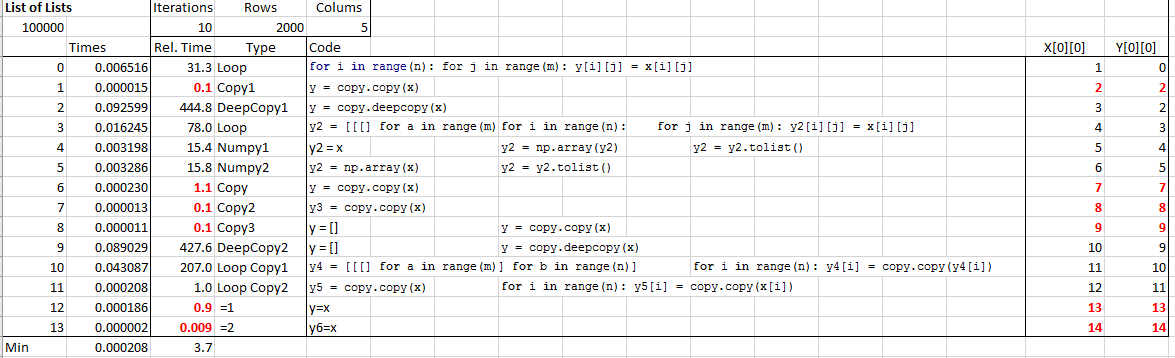
To check how these alternatives work in practice I have set up an Excel function to perform the copy operations on a large array, and return times, data types, and values from both arrays when a value in one is changed.
The screenshot below shows results for 13 different methods of copying a list of lists (click on the image for full-size view). Note that for the results shown in red the process has created an alias, rather than a new copy.

Of the results that do create a new copy of all elements of the original list, method 11 is by far the quickest, using copy to create a new array, then using copy again on each sub-list. The deepcopy function is convenient, but is very much slower.
For Numpy arrays the operation a=b works the same as for lists; b refers to the same array as a. On the other hand the copy and deepcopy functions both create a full new array. There is also a Numpy copy function and a copyto function, and several other ways to copy to a new array, as shown below:
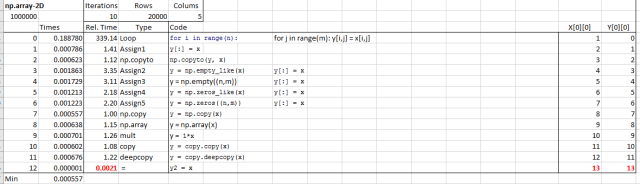
There was much less variation in the times of the different options (other than looping through the array, and assigning item by item), but the simple operation:
y = np.array(x)
was consistently the fastest.



 Note that these functions are still under development. All results must be independently verified using other software.


 Newton Excel Bach, not (just) an Excel Blog