
The ABC Radio web site has a regular Friday brain teaser:
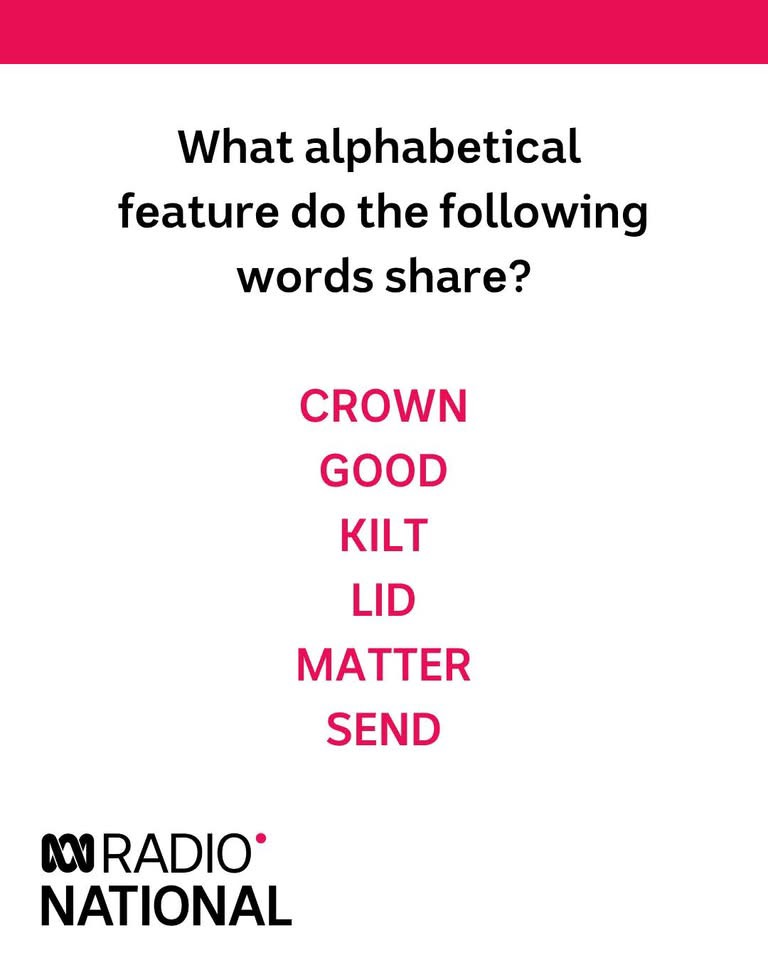
If you want to solve the problem yourself, read no further because a spoiler follows!
Investigation of the solution to this problem led me to looking at the use of Python sets, which are unordered collections of unique, hashable elements. For the current problem the important properties are:
- The members are unique, so if you try to add a member that already exists, it won’t change the set.
- The set is hashable, which means it can be searched very quickly.
For more detailed information on the use of sets see: Real Python – Sets in Python
The solution to the problem is that for each word in the list, if you substitute the first letter with the preceding or following alphabetical letter, it is still an English word. This raised the question: how many English words are there that have this property? To investigate that, first we need a list of all English words, which I found at: Words.alpha.txt
The following Python code creates an Excel user defined function (UDF) that:
- Opens the selected text file
- Copies each line to a set called words
- For each word in words, it removes the first letter and constructs new words starting with the preceding and following letters.
- If both of the new words are found in the words set, it adds 1 to the total number of qualifying words and all three words to a set called qualifying.
- Finally it returns the total number of words in the supplied dictionary, the number of qualifying words, and the list of all qualifying words and their neighbours.
@xl_func
@xl_return('numpy_array')
def wordcount(dictfile):
    __location__ = os.path.realpath(os.path.join(os.getcwd(), os.path.dirname(__file__)))
    with open(os.path.join(__location__, dictfile), encoding='utf-8') as dict :
        words = set()
        for line in dict:
            word = line.strip().lower()
            if word.isalpha():  # Only consider alphabetic words
                words.add(word)

    qualifying = set()
    numwords = 0
    # Find all words that have both a previous and next letter neighbor in the dictionary
    for word in words:
        if len(word) < 2:
            continue
        suffix = word[1:]
        first_letter = ord(word[0])
        previous_letter = first_letter - 1
        if previous_letter >= ord('a'):
            pneighbour = chr(previous_letter) + suffix
            if pneighbour in words:
                next_letter = first_letter + 1
                if next_letter <= ord('z'):
                    nneighbour = chr(next_letter) + suffix
                    if nneighbour in words:
                        numwords += 1
                        qualifying.add(pneighbour)
                        qualifying.add(nneighbour)
                        qualifying.add(word)
    qualifying = sorted(qualifying, key=lambda x: x[1:])  # Sort by the second letter of the word
    rtn = np.zeros((len(qualifying)+2, 1), dtype=object)
    rtn[0, 0] = len(words)
    rtn[1, 0] = numwords
    rtn[2:, 0] = np.array(list(qualifying), dtype=object).reshape(-1)
    return rtn
Output from the UDF.
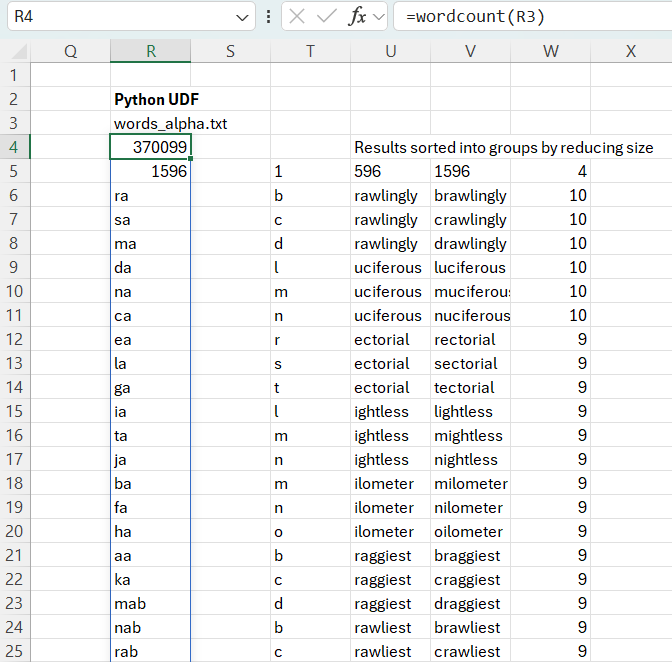
The UDF output is in column R. I have also copied the results as text and sorted by word length, descending, then alphabetically with the first character removed, then by first character.
Before creating the Python code, I did the same job directly in Excel, without any coding:
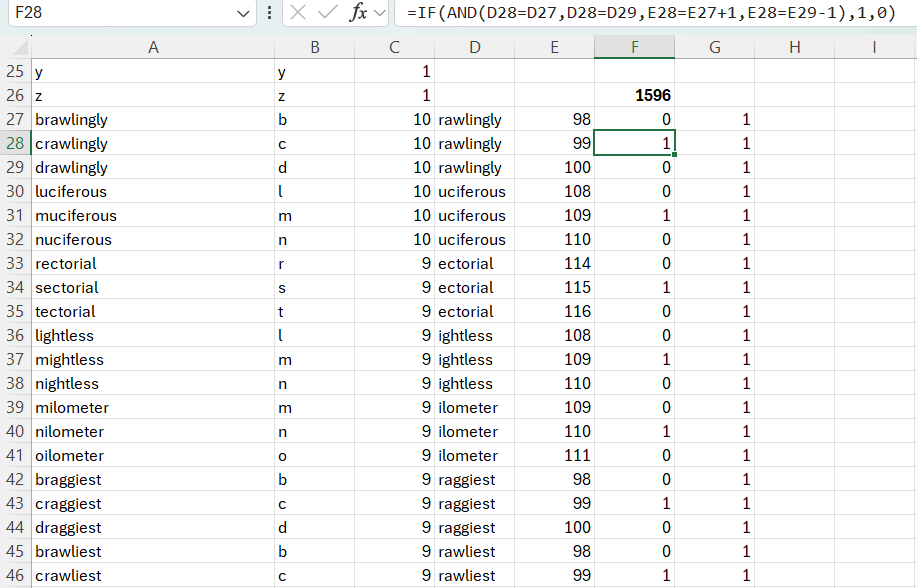
The Excel based procedure was:
- Import the dictionary file as text.
- Count the letters on each line and sort by size.
- For words with two or more letters, separate the first letter and the rest of the word in two adjacent columns.
- Sort by the tail word, then by the first letter.
- Enter a formula to check for each group of three words if the tail words were the same and the first letters were in alphabetical order (see the formula in Cell F28 in the screenshot).
- For qualifying groups, enter a 1 in Column F for the central word and in Column G for all three words.
- Sum the number of qualifying groups, which came to 1596, the same as the Python UDF.


