Scipy-statistics update

Links to the Scipy statistics functions were last presented here. The functions have since had extensive updates:

  • The functions previously listed as “not yet implemented” have now been added.
  • Each function now links to the Scipy on-line help page, and has brief descriptions for each argument in the Excel function wizard.
  • The examples in the spreadsheet have been extended to cover every included function.
  • Some examples previously retuning errors have been updated.

The py_Stats spreadsheet, with associated Python code in PythonStatsFuncs3.py and pyScipy3.py, are included in the download file:

py_SciPy.zip

Details of the required pyxll package (including download, free trial, and full documentation) can be found at: pyxll

For those installing a new copy of pyxll, a 10% discount on the first year’s fees is available using the coupon code “NEWTONEXCELBACH10”.

The py_Stats function can be used to call any function in the Scipy.stats module. Alternatively the functions can be called with specific py_ functions. The screenshot below shows the describe function called with py_Stats and py_describe.

The examples of each function have now been extended to cover every available function:

Help on any function can be displayed as text on the spreadsheet, using the get_docs function:

The Scipy on-line help for any function can now be displayed by clicking on “Help on this function” at the bottom left of the function wizard:

The function wizard now displays a brief description of the function purpose, and the data required for each argument, as for the built-in Excel functions:

The spreadsheet also has functions to return the arguments for each function (get_args and get_argtab, and to list every available function in any Python module (get_funcs):

Finally there is a list of every Scipy.ststs function that can be called from Excel with a py_ function. This list now also includes the row number where the function example can be found:

Posted in Arrays, Excel, Link to Python, Maths, Newton, NumPy and SciPy, Python Pandas, PyXLL, UDFs | Tagged , , , , , , , , | 1 Comment

py_Numpy update

The py_Numpy spreadsheet, and the associated Python module have been updated. The new files are included in:

py_SciPy.zip

The download contains full open-source Python code and example spreadsheets for a wide range of Scipy functions, as well as the Numpy functions covered in this post. For more details, see the series of posts starting at: Scipy functions with Excel and pyxll.

The update was prompted by use of the norm function, which has versions in both Numpy and Scipy, which are very similar, but not identical. The Numpy version is now called from Excel with py_npNorm, with py_Norm calling the Scipy version.

Links to the Numpy on-line help have also been extended. When any of the py_Numpy functions are entered, from any spreadsheet, the on-line help can be displayed by clicking on “help on this function”, at the bottom-left of the Function Wizard:

This takes you directly to the on-line help for the selected function:

Alternatively, the Numpy help can be displayed on the spreadsheet using the get_docs function. In the py_Numpy spreadsheet this is linked to the list of available functions, so that entering the index number for any function will display the associated help text:

Note that the get_docs function can be used from any spreadsheet, and will return the help text from any available Python function. The screenshot below shows it used for the Numpy norm function and also the Scipy version:

Posted in Excel, Link to Python, Newton, NumPy and SciPy, PyXLL, UDFs | Tagged , , , , , , , , , | Leave a comment

py_Conbeam – 5

… or perhaps one more. Following the previous post I have modified the py_BeamAct3D function to fix some problems with the non-linear analysis.

The latest version, together with an additional spreadsheet comparing results with Strand7, can be downloaded from:

py_ConBeamU.zip

Also, see Python and pyxll for details of the pyxll package required to link the Python code to Excel, including a 10% discount code for new users.

The screenshots below show results for a 32 metre long beam with 2 different cross sections loaded with a uniform transverse load, and a high axial load.

The function allows for the beam alignment to be defined in 3 dimensions, but for the purposes of comparison with Strand7 results it was aligned with the X axis:

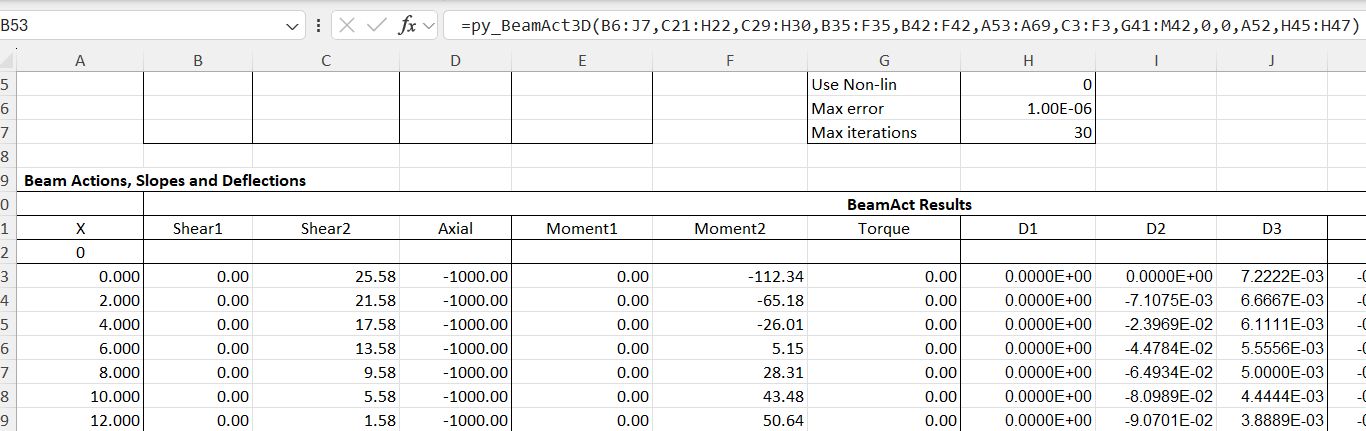
Output results (for the first 12 metres) are shown below for a linear analysis, ignoring geometric non-linear effects:

Setting the analysis to non-linear significantly increased the beam action and deflections:

Beam deflections and actions are plotted below comparing the linear and non-linear results with Strand7 geometric non-linear results:

Posted in Beam Bending, Excel, Finite Element Analysis, Frame Analysis, Link to Python, Newton, PyXLL, Strand7, UDFs | Tagged , , , , , , , , , | Leave a comment

py_Conbeam – 4

The last post in the current series compares results from the py_Conbeam function with beam analysis results from the Strand7 FEA software.

There have been further  significant changes to the Python code and the spreadsheet, so please download the latest versions from:

py_ConBeamU.zip

Also, see Python and pyxll for details of the pyxll package required to link the Python code to Excel, including a 10% discount code for new users.

The Strand7 models, with bending moment results, are shown below:

  • Three spans with cantilevers at each end and supports fixed or with spring stiffness for translation and rotation, or a specified vertical displacement.
  • The beams were analysed with and without allowance for shear deflections.
  • Two spans and one span with cantilevers at both ends, and a single cantilever fixed at the left-hand end.
  • Applied loads and section properties (other than allowance for shear deflections) were the same for all five cases.

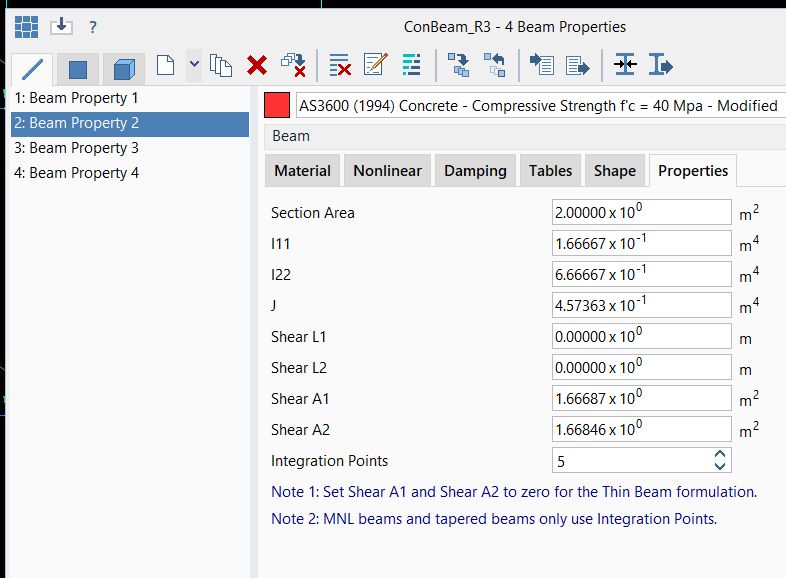
To ensure results matching as closely as possible, the beam section properties calculated in the Strand7 analysis were copied to the spreadsheet:

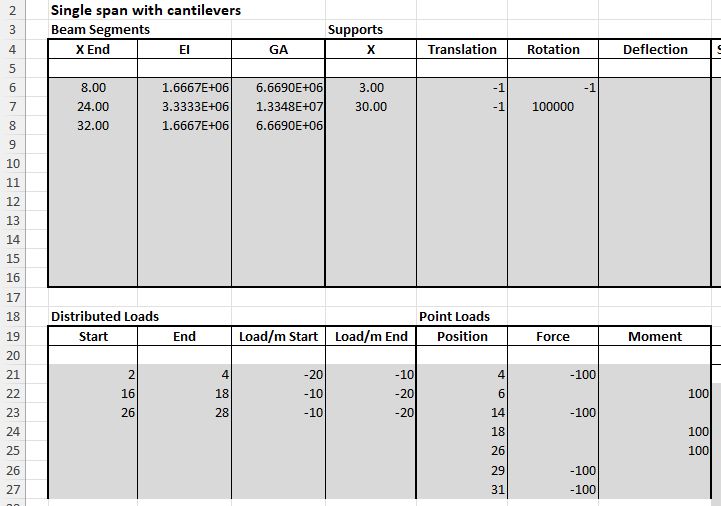
Data input for the single span beam is shown below. The same loads and beam segment lengths and EI values were used in all analyses. The supports were adjusted as required, and the section GA values were set to zero for the beam not including shear deflections.

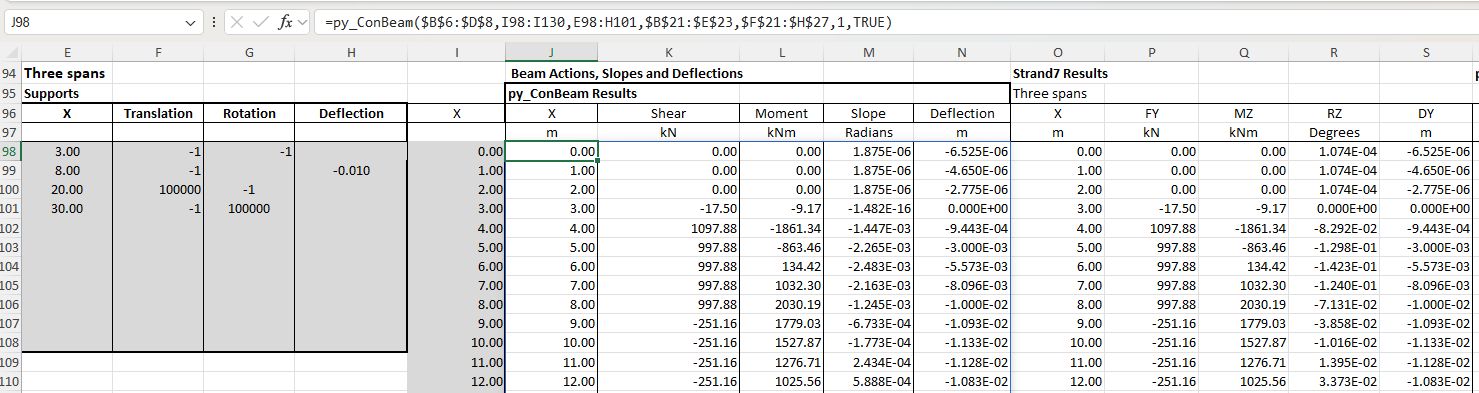
Support data is shown below for the three span beam, with results from the spreadsheet and Strand7 analyses.

The analyses were found to be in exact agreement, to machine accuracy, for all cases, including beam actions, deflections and rotations, and support reactions:

The download zip file includes the latest versions of the Python files, copies of the spreadsheet with and without the Strand7 results, and a copy of the Strand7 data and results files.

Posted in Beam Bending, Excel, Finite Element Analysis, Frame Analysis, Link to Python, Newton, NumPy and SciPy, PyXLL, Strand7, UDFs | Tagged , , , , , , , , , | 1 Comment

py_Conbeam – 3

Continuing from the previous post, we will move on to the py_Conbeam and py_MovLoad functions, that combine with the previous functions to analyse continuous beams with any number of spans and section types, under static or moving loads.

As before, there have been some significant changes to the Python code and the spreadsheet, so please download the latest versions from:

py_ConBeamU.zip

Also, see Python and pyxll for details of the pyxll package required to link the Python code to Excel, including a 10% discount code for new users.

The input and output for py_Conbeam are similar to py_SSSpan, except that there may be any number of supports, with cantilevers at one or both ends:

The py_ConbeamU function allows input and output to be in specified units. Note that in the current version units such as kNm must be separated with a . (kN.m), and exponents must have a ^ symbol (kN.m^2):

The py_MovLoad function calls py_ConBeam to analyse a specified vehicle at any number of locations along the beam. Input of section and support details is as for py_Conbeam, with the addition of axle loads and spacing, load factors, and positions of the first axle:

Input also allows static distributed and point loads to be specified, and output locations for bending moment and shear results:

Posted in Beam Bending, Excel, Finite Element Analysis, Frame Analysis, Link to Python, Newton, NumPy and SciPy, PyXLL, UDFs | Tagged , , , , , , , , , | 1 Comment