Precise Angles and XNumbers

Further to comments by Georg under: The angle between two vectors, in 2D or 3D I have added four alternative ways of calculating the angle between two 3D vectors to the VectorFunc spreadsheet.  The new version can be downloaded from: http://interactiveds.com.au/software/VectorFunc.xlsb.
Vectang2-1

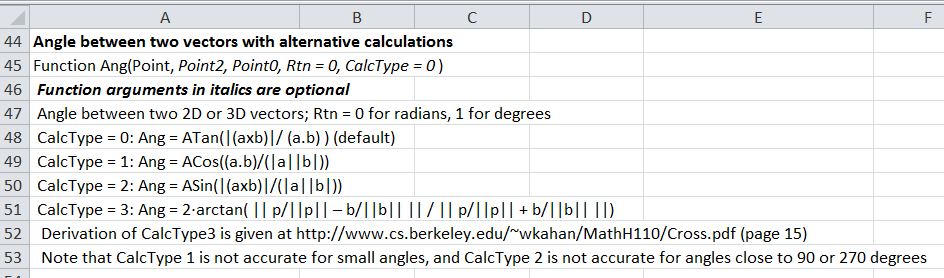
New Ang() Function

The alternative calculations are:

  • CalcType = 0: Ang = ATan(|(axb)|/ (a.b) ) (default)
  • CalcType = 1: Ang = ACos((a.b)/(|a||b|))
  • CalcType = 2: Ang = ASin(|(axb)|/(|a||b|))
  • CalcType = 3: Ang = 2·arctan( || p/||p|| – b/||b|| || / || p/||p|| + b/||b|| ||)

Derivation of CalcType3 is given at http://www.cs.berkeley.edu/~wkahan/MathH110/Cross.pdf  (page 15)

Note that CalcType 1 is not accurate for small angles, and CalcType 2 is not accurate for angles close to 90 or 270 degrees

As an illustration of the use of the different options I have calculated the radius of a certain large spherical object, based on precise measurements of the offset of a line tangential to the surface:

Vectang2-2

Ang Function Calculations of the Radius of the Earth

In this case Methods 0, 2 and 3 have all given an exact result, but Method 1 (using the Cosine of a very small angle) has an error of 7.47 km.

To compare the results of Method 1 with the same procedure using higher precision arithmetic I have installed the latest XNumbers package (6.05.5M) which can be downloaded from http://www.thetropicalevents.com/Xnumbers60/.  This package is based on the original XNumbers, but has been modified for Excel 2007 and later and improved performance.

It can be seen that even using the Cosine the additional precision has given a near exact result.

Vectang2-3

Calculation Type 1 Using XNumbers multi-precision functions

In the download version of the spreadsheet I have converted the XNumbers functions to text for the benefit of those who do not have XNumbers installed.  To make the formulas active just press F2 to edit, and delete the ‘ at the start of the line.

XNumbers Functions

Posted in Coordinate Geometry, Excel, Maths, Newton, UDFs, VBA | Tagged , , , , , | Leave a comment

Charts and Charting

I don’t do a lot on Excel charts because there are already a number of excellent blogs and sites that specialise in that area; notably: Peltier Tech Blog
but after compiling my “Downloads by Category” page I found that I had lumped together some posts specifically about charts in with posts about drawing (i.e. using Excel shapes), which made them hard to find; so this post separates out all my charting posts from the past nearly five years:

Associated download files are:

Posted in Charts, Excel, UDFs, VBA | Tagged , , , | Leave a comment

New Page

In an effort to make the information on this site easier to access I have collected all the “Daily Download” posts from last year onto a new page, listing each of the download posts by category.

It’s called “Download by Category

Posted in Excel, Newton, UDFs, VBA | Tagged , | Leave a comment

Counting unique values from a range or array

About this time last year, I posted a User Defined Function (UDF) that would return a list of unique items from a list: https://newtonexcelbach.wordpress.com/2012/01/31/retrieving-unique-values-from-a-range-or-array/

That post has recently received a few comments, and coincidentally Colin Legg at RAD Excel has recently posted an article entitled Count Distinct, Unique And Successive Values Using FREQUENCY(), so if you just want to count the number of occurrences of different numbers or strings, rather than return a list of them, using the Frequency() function is the way to do it.

Colin’s article is detailed and clear, and I have nothing to add to it, except to note the different usage of words.  Colin uses “distinct” where I used “unique” to mean one copy of each different number (or string), and “unique” to mean numbers or strings that occur only once.  So in the list “1,1,1,2,2,3” there are 3 distinct numbers (1,2,3) but only one unique number (3).

Posted in Excel | Tagged , , , , | Leave a comment

New Release Alglib Library

The Alglib Numerical Analysis Library has just been updated.  For full details of the changes see: http://www.alglib.net/arcnews.php#date_18_01_2013 , but the significant change for routines linking to my spreadsheets is that the sparse solver  has been significantly improved and now successfully solves problems that previously failed to converge.

If you already have alglibnet2.dll installed just copy the new version over it.  The new version (dated 18/01/2013) is now included in the 3DFrame download: 3DFrame.zip

If you have not yet installed any spreadsheets linking to the C# version of Alglib, see https://newtonexcelbach.wordpress.com/2012/11/16/frame4-now-with-added-alglib/ for detailed instructions on how to do it.

Posted in AlgLib, Excel, Finite Element Analysis, Link to dll, Maths, Newton | Tagged , , , | Leave a comment