This post is in response to recent discussions at Daily-Dose-of-Excel where many and various worksheet formulas have been suggested to carry out tasks that are (it seems to me) better done with a simple User Defined Function (UDF):
Adding Every Other Cell (also at the Microsoft Office Blog: Adding Every Other Cell in a Column )
and
Summing the Digits of a Number
My solutions to these, and also another at Eng-Tips: Transposing data from columns, can be dowloaded here: Sum Tab.xls
The spreadsheet includes full open source code as usual:
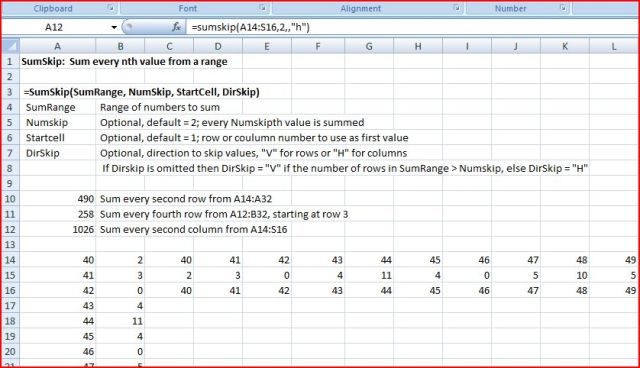
SumSkip Function
The SumSkip function will sum every n’th row or column of a range, starting from any specified cell.
Function SumSkip(SumRange As Variant, Optional NumSkip _As Long _

= 2, Optional StartCell As Long = 1, _

Optional DirSkip As String) As Double

Dim Numrows As Long, NumCols As Long, Sums As Double

Dim i As Long, j As Long, k As Long

If TypeName(SumRange) = "Range" Then SumRange = SumRange.Value2

Numrows = UBound(SumRange)

NumCols = UBound(SumRange, 2)

If DirSkip = "" Then

If Numrows > NumSkip Then

DirSkip = "V"

ElseIf NumCols > NumSkip Then

DirSkip = "H"

End If

End If

DirSkip = UCase(DirSkip)

Select Case DirSkip

Case Is = "V"

For i = StartCell To Numrows Step NumSkip

For j = 1 To NumCols

Sums = Sums + SumRange(i, j)

Next j

Next i

Case Is = "H"

For j = StartCell To NumCols Step NumSkip

For i = 1 To Numrows

Sums = Sums + SumRange(i, j)

Next i

Next j

End Select

SumSkip = Sums

End Function
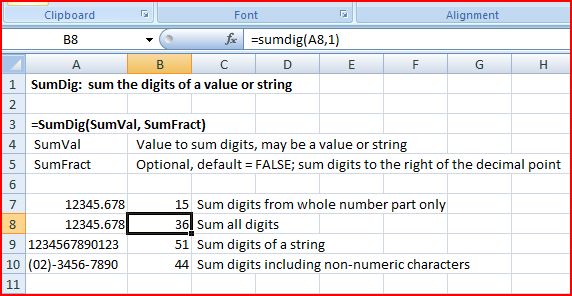
SumDig Function
The SumDig function sums the digits of a value or string (either including or excluding values to the right of the decimal point). I have incorporated the use of a Byte array to extract the numeric characters without tripping over non-numeric characters, thanks to Charles Williams who provided a neat UDF in the DDoE thread using this technique.
Function SumDig(SumVal As String, _

Optional SumFract As Boolean = False) As Long

Dim NumDig As Long, i As Long, DPPos As Long, ByteA() As Byte

DPPos = InStr(1, SumVal, ".") * 2 - 1

ByteA = CStr(SumVal)

NumDig = Len(SumVal) * 2 - 1

If DPPos > 0 Then

For i = 0 To DPPos Step 2

SumDig = SumDig + Val(Chr(ByteA(i)))

Next i

If SumFract = True Then

For i = DPPos + 1 To NumDig Step 2

SumDig = SumDig + Val(Chr(ByteA(i)))

Next i

End If

Else

For i = 0 To NumDig Step 2

SumDig = SumDig + Val(Chr(ByteA(i)))

Next i

End If

End Function
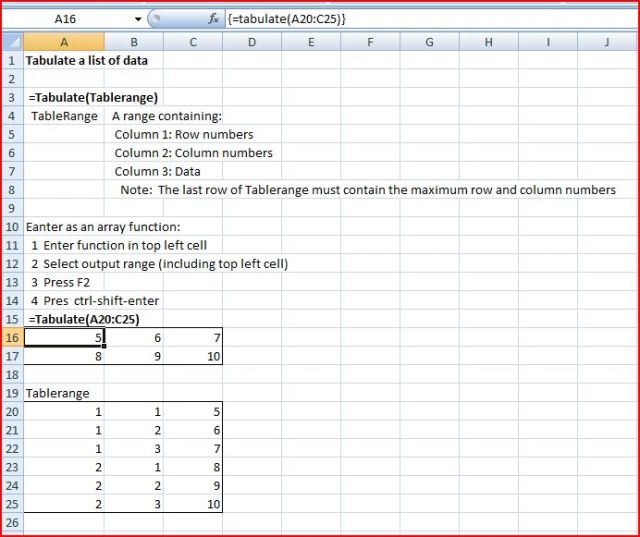
Tabulate Function
The tabulate function creates a table based on row and column numbers and data listed in a 3 column range. It was pointed out in the Eng-Tips thread that this could also be done with a pivot table, but the UDF solution seems simpler to me.
Function Tabulate(TabA As Variant) As Variant

Dim Numrows1 As Long, NumRows2 As Long, NumCols As Long, Tab2A() As Variant

Dim i As Long, j As Long

TabA = TabA.Value2

Numrows1 = UBound(TabA)

NumRows2 = TabA(Numrows1, 1)

NumCols = TabA(Numrows1, 2)

ReDim Tab2A(1 To Numrows1, 1 To NumCols)

For i = 1 To Numrows1

Tab2A(TabA(i, 1), TabA(i, 2)) = TabA(i, 3)

Next i

Tabulate = Tab2A

End Function
Does a straightforward UDF beat a convoluted worksheet function, or are UDFs best avoided?
What do you think?





 Newton Excel Bach, not (just) an Excel Blog