Geometric Tools

I was recently sent a link to:

Geometric Tools Documentation

Which has a host of pdf files with detailed instructions on all manner of geometric calculations.  The focus of the site is animation for games programs, but there is plenty here of interest to engineers.

A small part of their listing is shown below (click for full size view):

GeometricTools

Posted in Coordinate Geometry, Maths, Newton | Tagged , | Leave a comment

LatPile – Analysis of Lateral Loads on Piles

This post presents an Excel User Defined Function (UDF) to carry out the analysis of vertical piles subject to horizontal loads, using the same approach as employed in the DOS program COM624. A spreadsheet including the UDF and an on-spreadsheet solution using the same method may be downloaded from LatPile.zip.  As usual the file contains full open source code for the UDF and associated routines.

Detailed background information on the method of analysis is given in the COM624 manual, which can be downloaded from the link given in the previous post.  An outline of the method, including all relevant equations used, is given below and in the download file, together with some simple examples.

The equations used in the analysis are shown in the screenshot below (click on any image for full size view):

LPile Finite Difference Equations

LPile Finite Difference Equations


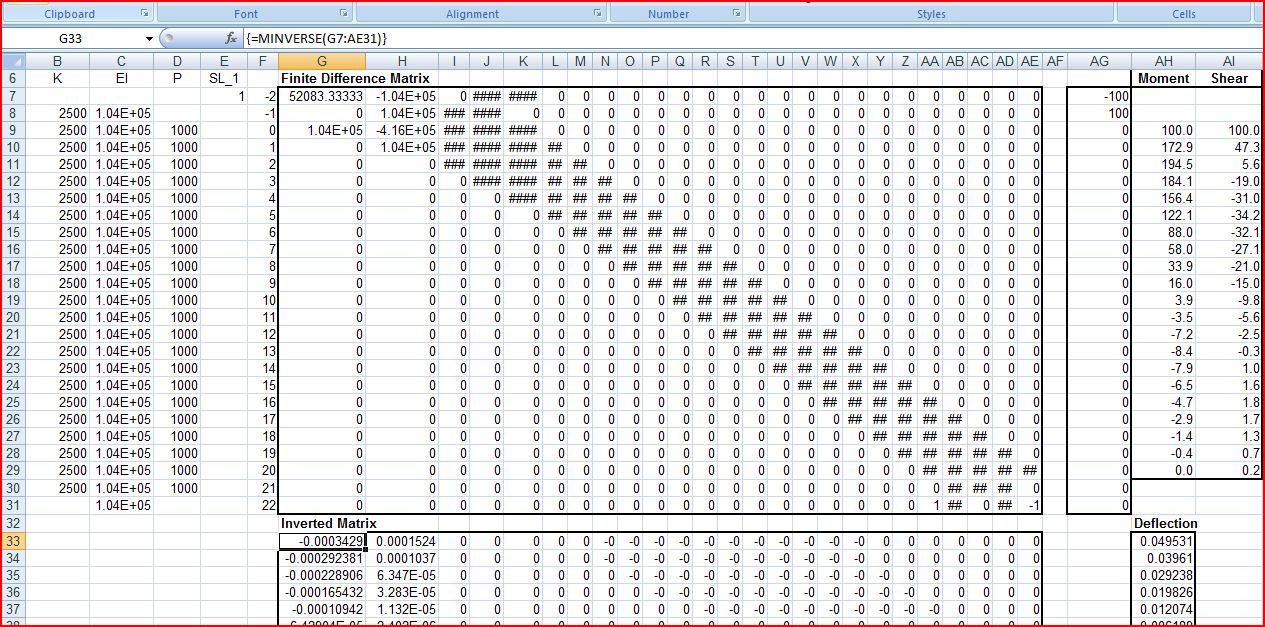
On the FinDiff sheet of the download file these equations have been entered into a 25×25 matrix, which with the MINVERSE() and MMULT() functions allows the equations to be solved and the deflections calculated for any pile with 20 segments:

Finite Difference Equations in Matrix Format

Finite Difference Equations in Matrix Format

The same basic method of analysis has also been incorporated in a UDF, allowing the solution to be carried out much more conveniently and flexibly.  Input for the UDF is shown below:

LPile UDF

LPile UDF

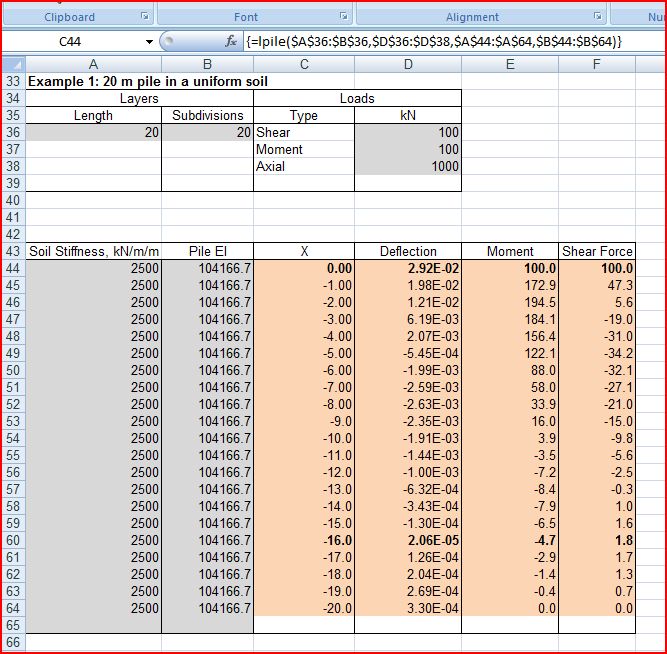
Example 1 is a 20 m long pile of uniform stiffness in a uniform soil:

UDF Input and Results; Example 1

UDF Input and Results; Example 1

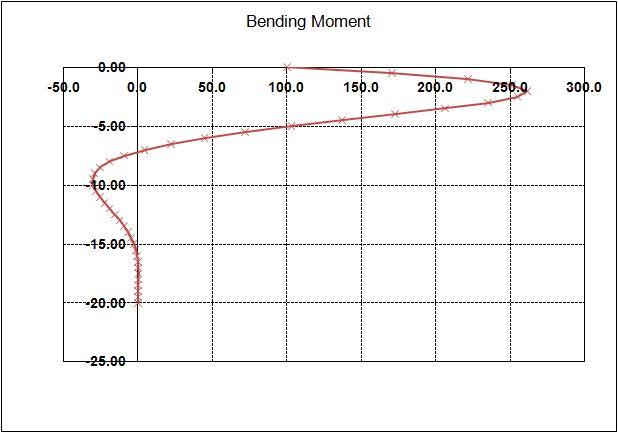
Example 1 Bending Moments

Example 1 Bending Moments

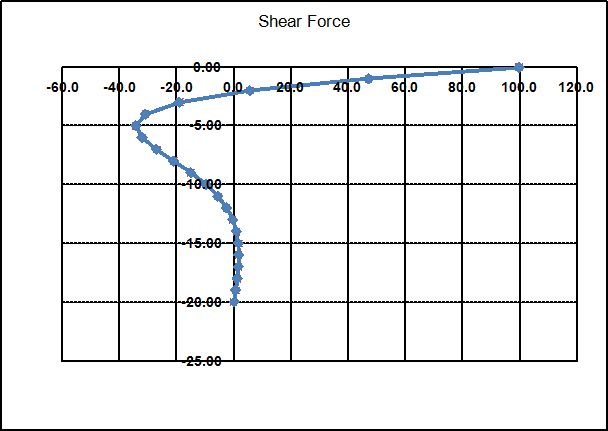
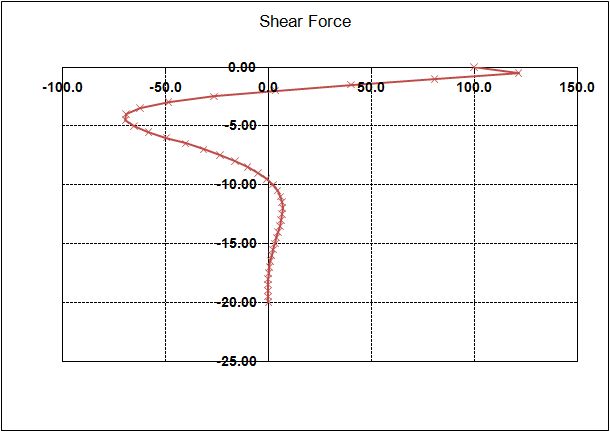
Example 1 Shear Forces

Example 1 Shear Forces

Example 1 Deflections

Example 1 Deflections

Example 2 is a reinforced concrete pile with a cracking moment of 60 kNm in a soil with stiffness increasing with depth. The pile and soil stiffness values have been adjusted by hand in this case. Future versions of the program will allow input of non-linear soil and pile section stiffness.

Example 2 Input and Results

Example 2 Input and Results


Example 2 Bending Moments

Example 2 Bending Moments

Example 2 Shear Forces

Example 2 Shear Forces

Example 2 Deflections

Example 2 Deflections

Posted in Beam Bending, Excel, Geotechnical Engineering, Newton, UDFs, VBA | Tagged , , , , , | 11 Comments

COM624 download and documentation sites

COM624 is a freeware DOS based program for the analysis of lateral loads on piles produced by the FHWA in the USA.  The program and documentation are available for free download, but are well hidden, so I’m posting links to the download sites here:

COM624 Program no longer available; see below

COM624 Manual

In coming posts I will post an Excel based pile lateral load analysis program, based on the same principles as COM624.

Update 10 Mar 2018:

The COM624 program is no longer available for free download, and the link to a commercial download is no loner active.

The link to the manual is still active.

The LatPilePY spreadsheet available here is still free, and provides most of the functionality of the COM624 program, with much friendlier input and output.  Download from the link, and see the Downloads or Downloads by category tabs for more information.

Posted in Geotechnical Engineering, Newton | Tagged , , | 11 Comments

Fred Watson on the Big Bang

The multi-talented Fred Watson paid for his studies by playing folk music alongside the likes of Billy Connolly, and now makes a living looking at stars.

Here he is talking about Life, The Universe and Everything:

Marcus Chown in Conversation with Fred Watson

Posted in Bach, Newton | Tagged , , | Leave a comment

Approximate Solutions of Polynomial Equations

Following on from the previous post, this post presents a number of methods of solving polynomial equations using approximate iterative methods in Excel.  Similar methods can be used to find solutions to any other equation that can be evaluated numerically.

The problem is to find the value of x for which:

a + b*x + c*x^2 + d*x^3 … = 0

The examples and functions presented in this post are all included in the spreadsheet: Newtons Method.xls

The example used is the evaluation of a quartic polynomial, for which exact analytical solutions are available, but the functions in the spreadsheet may be used directly for polynomials of any degree, and may be easily adapted for other forms of equation.  The spreadsheet also includes User Defined Functions (UDFs) to solve Quartic, Cubic and Quadratic  equations.

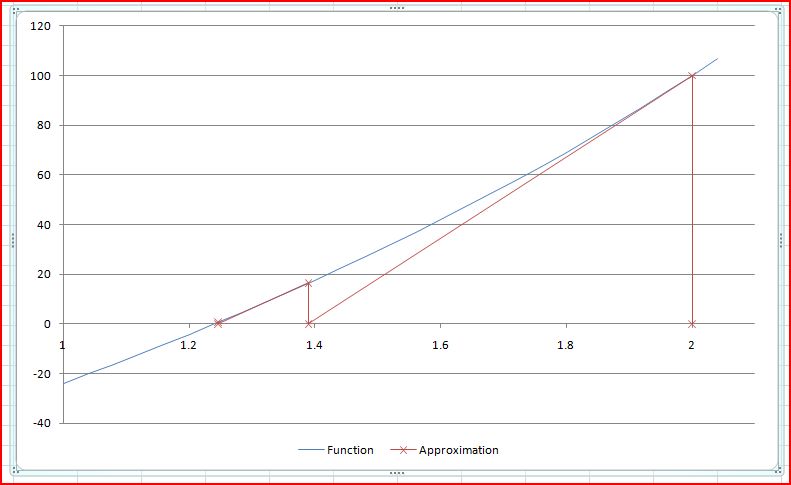
The basis of the Newton-Raphson (and related) methods is shown in the chart below.

Basis of the Newton-Raphson method

Basis of the Newton-Raphson method

 Click on any image to view full-size.

The value of the function, f(x), and its slope, f'(x), are evaluated at some estimated approximate solution value, x1.  A better approximation, x2, is then given by x2 = x1 – f(x)/f'(x).

The spreadsheet contains several alternative solutions to the equation:

-100 + 60x + 16x^2 + -2x^3 + 2x^4 = 0
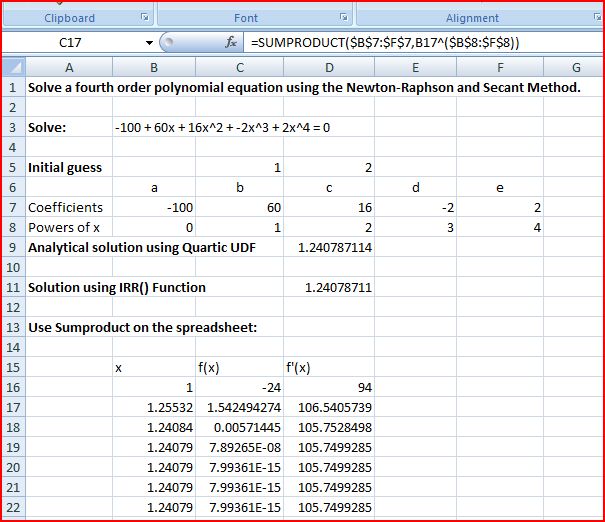
Exact solutions and spreadsheet solution using SumProduct

Exact solutions and spreadsheet solution using SumProduct

The solution to the equation is given by the UDF quartic().  The solution to a polynomial equation (of any degree) may also be found by adapting the Excel IRR() function:

 =1/(1+IRR(B7:F7,-0.2))

Where the function coefficients are listed in ascending powers of x in the range B7:F7, and -0.2 is an initial guess of the IRR.  Note that in this case an IRR value of -0.2 is equivalent to a solution value of 1/(1 – 0.2) = 1.25.

As discussed in the comments to the previous post, the function Sumproduct can be used to evaluate a polynomial function, and its derivatives.  For a list of coefficients in B7:F7, powers of x in B8:F8, and x value in B16:

  • f(x) =SUMPRODUCT($B$7:$F$7,B16^($B$8:$F$8))
  • f'(x) =SUMPRODUCT($B$7:$F$7,$B$8:$F$8,B16^(($B$8:$F$8)-1)*($B$8:$F$8>=1))

The next approximation to the solution of the equation is then:  =+B16-C16/D16

These formulas may be simply copied down to give the required level of precision.

The same approach may be followed using the UDF EvalPoly1, which returns the values of f(x) and f'(x) in a two cell array:

Solution using EvalPoly1 on the spreadsheet, and the UDF SolvePoly1

Solution using EvalPoly1 on the spreadsheet, and the UDF SolvePoly1

This approach is incorporated in the UDF SolvePoly1(), which returns the solution to the equation, and the required number of iterations.

When the equation to be solved cannot be differentiated analytically a numerical differentiation may be used, as illustrated below.  Note that in SolvePoly2 there is no check on the intermediate solutions, but in SolvePoly3 the intermediate solutions are constrained to fall between the specified lower and upper bounds, or lower and upper bounds found in previous stages of the analysis:
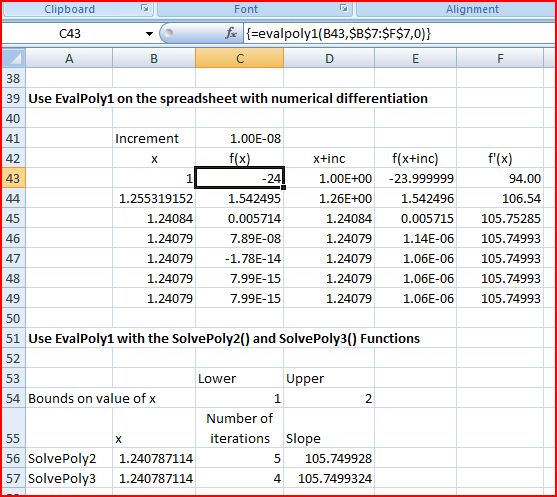
Solutions using numerical differentiation

Solutions using numerical differentiation

The functions described above will only solve polynomial equations.  The SolveNR() UDF illustrated below will solve any equation including functions that can be solved with the VBA Evaluate function:
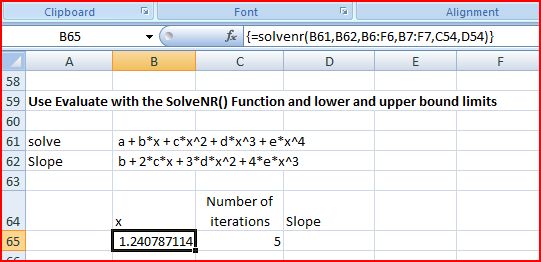
Solve equations with the SolveNR() UDF

Solve equations with the SolveNR() UDF

Finally the screenshot below shows a spreadsheet solution and UDFs using the secant method.  In the secant method the slope of the function is evaluated using the two previous solutions:
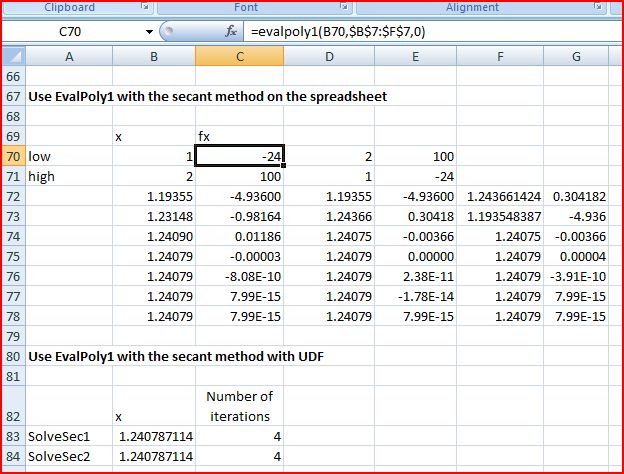
Solutions using the secant method

Solutions using the secant method

The relative speed of the UDF solutions presented in this post are shown below:

Relative speed of functions

Relative speed of functions

It can be seen that:

  1. The analytical solution is substantially quicker than any of the approximate methods, and is recommended where applicable.
  2. The secant methods are approximately the same speed as the Newton-Raphson method using analytical evaluation of the slope, and are of wider applicability.
  3. The solutions that check for intermediate solutions being within the specified bounds are slightly slower in this case, but for less well behaved functions will find solutions when the other methods may not converge.
  4. Evaluation of functions specified in text on the spreadsheet, using the Evaluate function, is very slow.  Similar functionality with much better performance can be obtained by replacing the text function with a purpose written VBA function.
Posted in Excel, Maths, Newton, UDFs, VBA | Tagged , , , , , , | 3 Comments