IP.xls updated

The spreadsheet IP.xls has been updated (previous post) with the addition of a function to find the minimum perpendicular distance from a point (or series of points) to a polyline: Pdist

=PDist(Line,Points)

Line is a range with at least two rows containing XY coordinatesof the polyline.  Points is a range with XY coordinates of one or more points.

Pdist returns an array of 3 values for each point:

The distance from the point to the nearest segment, and the X and Y components of this distance.

Open source code is included in the download file.

The screen shot below shows output from this function.

PDist output

PDist output

Posted in Coordinate Geometry, Excel, Maths, Newton, UDFs, VBA | 1 Comment

Frame Analysis with Excel – 4, 2D frame analysis

Continuing from: Frame Analysis with Excel – 3, Continuous beam or frame

Download Frame1.zip – the download file includes complete open source code.

The continuous beam spreadsheet presented in the previous post has been modified to deal with 2D frames where any nodes may be connected, and to deal with much bigger structures.  The changes that have been made are:

  1. The input has been rearranged to allow (in principle) data to be limited only by the number of rows in the spreadsheet.  I say “in principle” because the size of the problem that can be handled is still limited by Excel’s matrix handling capabilities, and for Excel 2003 and earlier this is a restrictive limitation, but this will be fixed in future versions.
  2. The routine for forming the global stiffness matrix no longer assumes that beams are connected end to end in a single line, any 2D arrangement of beams is now possible.
  3. The matrix arithmatic operations are now carried out in VBA, rather than on the spreadsheet.

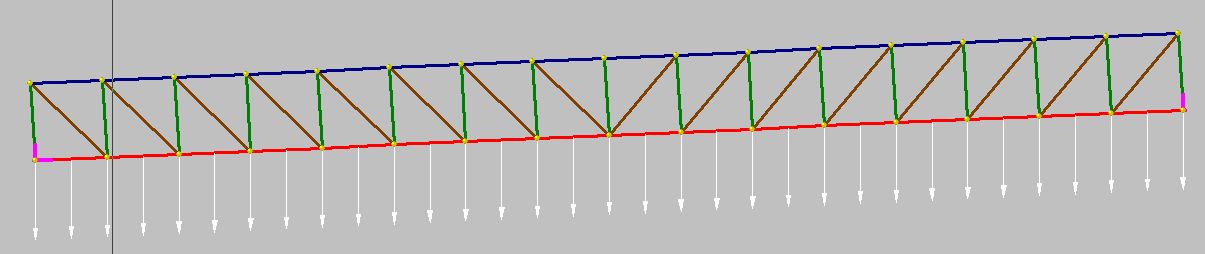
Screenshots below show the new input screens, and the results of the analysis of a 16 bay truss structure, compared with the analysis of the same structure in Strand7.  Note that in the current version this structure is too large for Excel 2003 and earlier, but in the next version a VBA routine for the solution of the stiffness matrix equations will be incorporated, which will allow the analysis of much larger structures.

Input of beam properties, node coordinates, node restraints, and beam connections and property types

Input of beam properties, node coordinates, node restraints, and beam connections and property types


Input of member loads

Input of member loads

Inclined truss

Inclined truss

Results of truss analysis compared with Strand7 results for the same structure

Results of truss analysis compared with Strand7 results for the same structure

Posted in Beam Bending, Excel, Frame Analysis, Newton, Uncategorized, VBA | Tagged , , , | 20 Comments

Happy Birthday Charles

12th February 2009 is the 200th Anniversary of Charles Darwin’s birth.

Read all about it here

Posted in Newton | Tagged | Leave a comment

Multiple Match Function

The Excel function MATCH() will find the position of the first occurrence of a specified number or string in a range of data, but what if you want to find the first row in a table that contains two or more different matching numbers?  There may be some way to do this with a fancy array function, but I couldn’t think of one, so I wrote the UDF MMATCH(MatchValues, DataRange).

MatchValues is a single column or single row range containing the values that you are looking for.  Datarange is the range that will be searched, which may be one or more rows.  MMATCH returns the number of the first row that contains all of the values in MatchValues, in any order, or zero if there are no matching rows.

Download Mmatch.zip

The screenshot below shows the function in use.  The edit line shows the contents of cell K2, which returns the first row containing all of 83, 17, 92, and 84, which is row 7.  In Column I the function has been entered to look at a single row, returning 1 if it contains all the match values, or 0 if not.
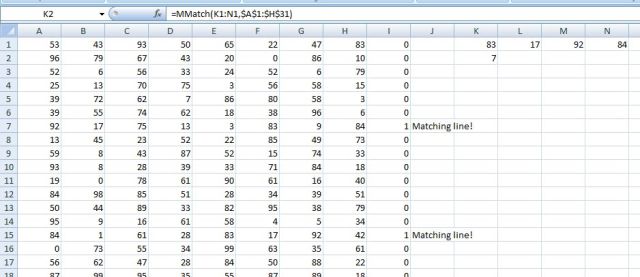
MMatch Function

MMatch Function

The code is shown below, and is also viewable on the download file:


Function MMatch(MatchValues As Variant, Datarange As Variant)
Dim NumRows As Long, NumCols As Long, NumMatch As Long, i As Long, j As Long, k As Long
Dim Matches As Long

MatchValues = MatchValues.Value
Datarange = Datarange.Value

NumRows = UBound(Datarange)
NumCols = UBound(Datarange, 2)
If UBound(MatchValues, 2) > 1 Then
MatchValues = WorksheetFunction.Transpose(MatchValues)
End If
NumMatch = UBound(MatchValues)

For i = 1 To NumRows
Matches = 0
For j = 1 To NumMatch
For k = 1 To NumCols
If MatchValues(j, 1) = Datarange(i, k) Then
Matches = Matches + 1
Exit For
End If
Next k
If Matches < j Then Exit For
If Matches = NumMatch Then
MMatch = i
Exit Function
End If
Next j
Next i
MMatch = 0
End Function

Posted in Excel, UDFs, VBA | 5 Comments

Frame Analysis with Excel – 3, Continuous beam or frame

Continuing from Frame Analysis with Excel 2 – Single inclined beam

Download Beam3.zip – the download file includes complete open source code.

The spreadsheet for a single inclined beam presented in the previous post has been modified to deal with up to six continuous horizontal or inclined beams.  Examples of a 5 span beam and a four member portal frame have been compared with a frame analysis in Strand7 and show near exact agreement.

The procedure used in the new spreadsheet is:

  • The stiffness matrix for each beam is generated as before.
  • The beam matrices are combined into a global matrix, adding coefficients for the beams meeting at each node.
  • The stiffness matrix for active freedoms is extracted from the complete global matrix
  • This matrix is inverted using the Excel Minverse() function
  • The inverted matrix is matrix multiplied by the applied nodal actions, giving the nodal translations and rotations.
  • The complete stiffness matrix is multiplied by the complete nodal deflection vector, giving the net load for each freedom.
  • Reactions at the fixed freedoms are found by deducting the applied loads from the net loads.

Formation of the global matrix for beams 1 and 2 of a continuous beam are shown below:

Global Stiffness Matrix

Global Stiffness Matrix

Screenshots below show Strand7 models for a 5 member continuous beam, and a portal frame, and comparisons of the Strand7 analysis and the spreadsheet output:

Strand7 continuous beam analysis

Strand7 continuous beam analysis

Continuous beam results

Continuous beam results


Strand7 Portal Frame Analysis

Strand7 Portal Frame Analysis

Portal Frame results

Portal Frame results

Posted in Excel, Frame Analysis, Newton, VBA | Tagged , , , | 30 Comments