Frame Analysis with Excel 2 – Single inclined beam

This post continues from – Frame Analysis with Excel 1 – Single beam

Download Beam2.zip

The stiffness matrix shown in the previous post was for a single beam with loads applied either perpendicular to the beam, or along the longitudinal beam axis, which directions were aligned with the Y and X axes respectively.  In this post the stiffness matrix will be modified for loading in other directions.  It would be possible to simply resolve the applied loads into perpendicular and axial components, but since our intention is to derive an analysis method suitable for analysing frames with members intersecting at any angle it makes more sense to change the stiffness matrix to work in the global coordinate system so that both the applied loads and the resulting translations are specified with respect to the global X and Y axes.

It is now necessary to specify a direction for the beam, which is the angle of the beam to the Global X axis (horizontal), and is positive anti-clockwise.  The input is otherwise identical to the horizontal beam case.

The modified stiffness matrix coefficients are shown below, where k_1 to k_4 are defined as before, and c and s are the Cosine and Sine of the beam angle respectively.
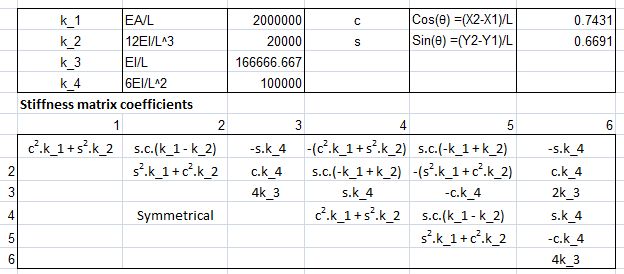
beam2-1

Select for full size image

It is also necessary to adjust the calculation of the fixed end moments and reactions to account for the slope of the beam.

The derivation of the fixed end moments for a horizontal beam subject to partial trapezoidal loading is shown below:
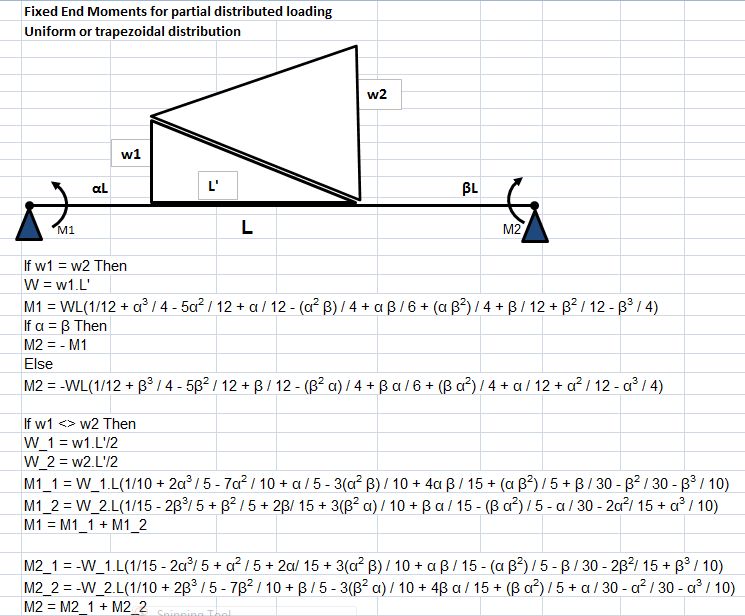
femact

Select for full size image

The spreadsheet uses the UDF FEMact to solve these equations, and also to calculate the corresponding end reactions.  The output from the UDF is a column array of the six fixed end actions. The algorithm for the UDF is:

  1. Find the fixed-end moments due to the vertical distributed loads using the equations shown above, FEMA(3,1) and FEMA(6,1)
  2. If the beam slope, Theta <> 0 then FEMA(x,1) = FEMA(x,1) * Cos(Theta)
  3. Find fixed-end moments due to point loads, MomInc(1) and MomInc(2)
  4. For vertical point loads MomInc = MomInc * Cos(Theta).  For horizontal loads MomInc = MomInc * Sin(Theta)
  5. Find fixed end moments and end reactions due to point moments
  6. Find end reactions due to distributed loads
  7. Find end reactions due to point loads
  8. Adjust end reactions for effect of out of balance moments, allowing for the slope of the beam
  9. Return the array of beam end actions, FEMA

The rest of the process is as for a horizontal beam, with the output being the translations and rotations of the active end freedoms, and the reactions at the fixed freedoms.  Full source code for the function is available in the download file: Beam2.zip

To check the output of the program an example of an inclined beam loaded with distributed loads, vertical and horizontal point loads, and point moments was analysed in the finite element package Strand7.  The results are compared with the spreadsheet output in the screen shots below, showing near exact agreement:
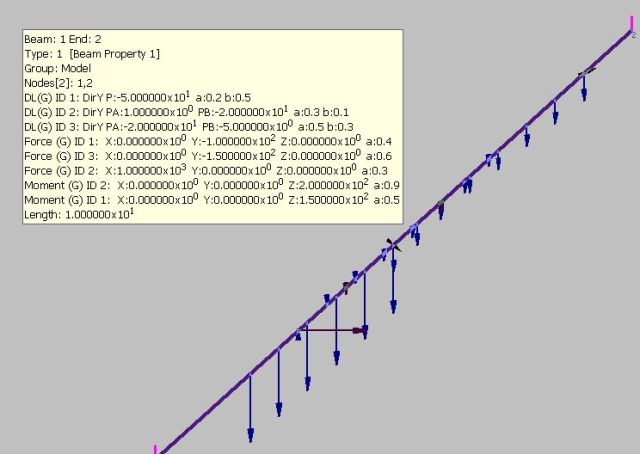
strandbeam

beam2res

Select for full size image

Posted in Excel, Frame Analysis, Newton, UDFs | Tagged , , , | 11 Comments

Putting things in perspective

Life, The Universe and everything plotted on a spiral scale:

Universal Energy Scale

Universal Energy Scale

Posted in Newton, Uncategorized | Leave a comment

Spreadsheet Hell

“I, too, am in spreadsheet hell”

Why am I linking to yet another data analysis guy whinging about Excel?

Mostly because I liked what he said on his Home sheet:

“I’m a number cruncher, SAS programmer, Linux user, and an Excel fanboy. There, I said it – and I won’t take it back. For all its flaws (and there are a few), Excel is still my pick for the best analysis tool/spreadsheet development platform out there. Hopefully I’ll be able to communicate some of my reasons for believing that here. I also will be chatting a little about free software from time to time.”

But also because there is plenty worth reading in his first few posts.

Posted in Computing - general, Excel | 1 Comment

Frame Analysis with Excel 1 – Single beam

Download Beam1.zip

This is the first of a series of posts in which I will develop a structural frame analysis program operating within Excel.  The first few stages will be mostly spreadsheet based, with later stages using VBA routines to analyse data generated in the spreadsheet, and ultimately linking to external dll programs to do the heavy number crunching involved in the solution of complex frames.

This post will look at the analysis of a single 2D beam element subject to any combination of transverse and and axial loading, with any three of the six end freedoms restrained.  This will introduce the use of the stiffness method, setting up of a beam stiffness matrix and a matrix of end actions, and solution of these matrices using the Excel matrix functions.

Future posts will:

  • Modify the beam analysis to deal with beams inclined to the global loading axes.
  • Combine and solve the stiffness matrices for a number of straight continuous beams.
  • Form and solve the stiffness matrix for a simple 2D frame.
  • Convert the spreadsheet solution to a VBA routine suitable for solving large and complex 2D problems.
  • Add provision for members with end moment or translational releases.
  • Convert to 3D frames.
  • Add provision for plotting of frame geometry, including applied loads, and plotting of analysis results.
  • Convert the VBA analysis routines to a Fortran DLL, for improved performance.

As always, all the files presented here will be available for download, and all my code will be open source.  In addition to Internet resources, which will be referenced where applicable, the main sources of background information are:

The essence of the “stiffness” method of frame analysis is to set up a series of equations:

Kw = f

where K is a square matrix representing the “stiffness” of the frame, that is the deflection of the frame when subject to unit load; w is a column matrix representing the deflections of each node of the frame; and is a column matrix representing the loads applied to the nodes of the frame.

If K and f can be generated for any specified frame subject to a known set of loads, the deflections of each node can be found using the relationship:

w =K-1 f

In this post the “frame” will consist of a single horizontal beam, and the matrices will be formed and solved on the spreadsheet, with the aid of a User Defined Function (UDF) to generate the applied nodal loads from the specified distributed and point loads and moments, that may be applied to any part of the beam.

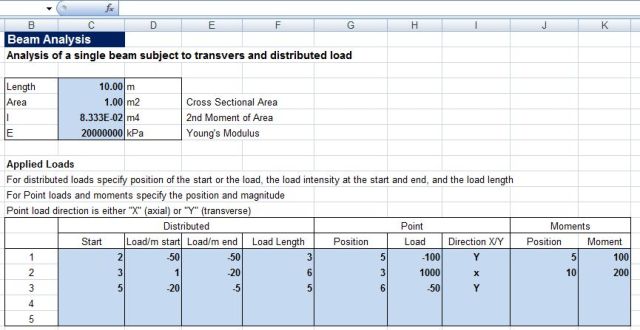
The required input is shown in the screen shot below:

  • Beam length
  • Beam cross sectional area
  • Beam second moment of area
  • Beam Young’s Modulus
  • Applied loads: distributed transverse loads, point transverse or longitudinal loads, and point moments
  • Restrained end freedoms, three of vertical or horizontal deflection or rotation at either end
Beam properties and applied loads

Beam properties and applied loads

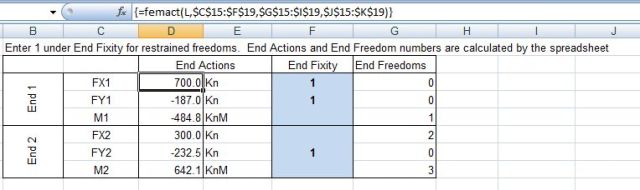
The nodal actions required for the analysis are the “fixed end” moments and reactions due to the applied loading, that is the end moments and reactions forces that would be generated by the applied loads if the ends of the beam were fully fixed against rotation and translation.  These are calculated by the UDF “FEMACT()”, which has as inputs the beam length, and the thre tables: distributed loads, point loads, and moments.  This UDF will be described in greater detail in a later post.  The output of the UDF is shown in the screen shot below:

beam2

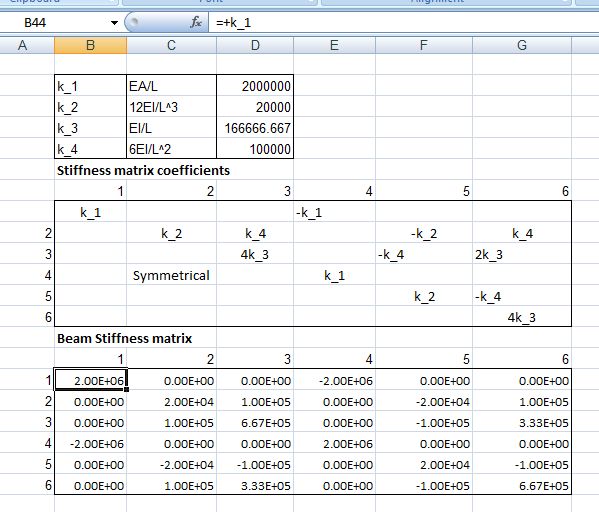
The formation of the beam stiffness matrix, and the matrix coefficients for the example beam are shown in the screen shot below.  The beam stiffness matrix coefficients are derived from the standard beam slope deflection equations, combined with the application of Hooke’s law for axial loads.  Further details of the derivation are given in many structural analysis textbooks.

beam3

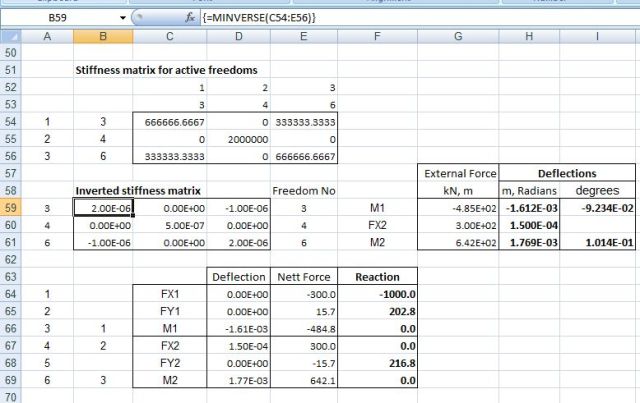
For the purposes of finding the magnitude of the unrestrained freedoms the beam stiffness matrix is reduced to 3×3 by extracting only the rows and columns related to the unrestrained freedoms, as shown in the screen shot below.  This matrix is then inverted, using the Excel Minverse function, then multiplied by the applied loads at the unrestrained nodes, using the Mmult function.  The result is a column of 3 cells giving the translations or rotations at the unrestrained nodes.  The final stage is to multiply the full original stiffness matrix by the full deflection column matrix to derive the nett force at each node.  The reactions at each node are then found by deducting the applied loads (i.e. the “fixed end” actions”).  It can be seen from the example output that the reactions at the unrestrained nodes are zero, and the reactions at the fixed nodes are equal and opposite to the applied loads, as would be expected.

Inverted stiffness matrix and analysis results

Inverted stiffness matrix and analysis results

Posted in Excel, Finite Element Analysis, Frame Analysis, Newton, UDFs, Uncategorized | Tagged , , , | 14 Comments

Apple Numbers 09

A review of the new Apple spreadsheet, with an emphasis on engineering applications, from the “Engineering for the Real World” blog.

I don’t think I’ll be changing any time soon, but for Mac users familiar with Apple Script it looks like it would be well worth a look.

Posted in Computing - general | Leave a comment