Section Properties UDF and UDF charting

The technique for calculating section properties from coordinates is conveniently coded into a UDF:

Function Area(xy_range As Variant) As Double
Dim XYcells As Variant
Dim N As Long, NumX As Long
Dim XD As Double, YSum As Double
XYcells = GetArray(xy_range)
NumX = UBound(XYcells, 1) - LBound(XYcells, 1) + 1
If NumX < 3 Then
 XYcells = Transpose1(XYcells)
NumX = UBound(XYcells, 1) - LBound(XYcells, 1) + 1
 End If
'Iterate index from 1 to 1 less than number of members
  For N = 1 To NumX - 1
  XD = XYcells((N + 1), 1) - XYcells(N, 1)
  YSum = XYcells(N, 2) + XYcells((N + 1), 2)
  Area = Area + XD * YSum / 2
  Next N
End Function

This function, and another (SecProp()) calculating first and second moments of area, and centroid positions, about the X and Y axis may be downloaded from here:
http://www.interactiveds.com.au/software/SecProps-array.zip
Both functions allow the coordinates to be listed in a vertical or horizontal range, or as an array (surrounded by {}) entered directly in the Function.

SecProp() returns a 14×1 array, which should either be entered as an array formula, or an optional output index may be entered to return a specific section property.

Also included is a UDF (XYChart()) to plot shapes defined by coordinates directly in the cell where the function is entered. To enlarge the chart either increase the cell width or height, or select a range of cells and enter as an array formula.

Note that XYChart makes use of undocumented features, and cannot be guranteed to work in future versions. Also note that it clears the undo stack, so undo will not work if it is entered anywhere in the workbook.

 XYChart is adapted from code by Rob van Gelder, posted at: http://www.dailydoseofexcel.com/archives/2006/02/05/in-cell-charting/

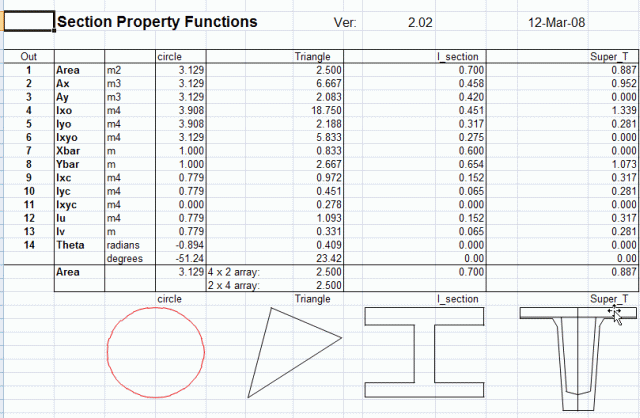
Output from Area(), SecProp() and XYChart() are illustrated below:
SecProp

Posted in Arrays, Charts, Excel, UDFs | Tagged | 6 Comments

Section Properties from Coordinates

The area of irregular closed polygons defined by coordinates may be conveniently calculated by summing the areas of adjacent trapeziums, as shown below.   The area of each trapezium is calculated from the X axis.  Note that with the apex coordinates defined in a clockwise direction the area between the bottom of the polygon and the x-axis is first added in (red trapeziums), then deducted (green trapeziums), leaving the correct area for the polygon, shaded blue. Other section properties, such as first and second moment of area, may be found in the same way, taking care to ensure that the formula gives a positive value for a positive XD, and negative for negative XD, for line segments above the X axis, and vice versa for segments below the X axis.
Area1

Arae1a

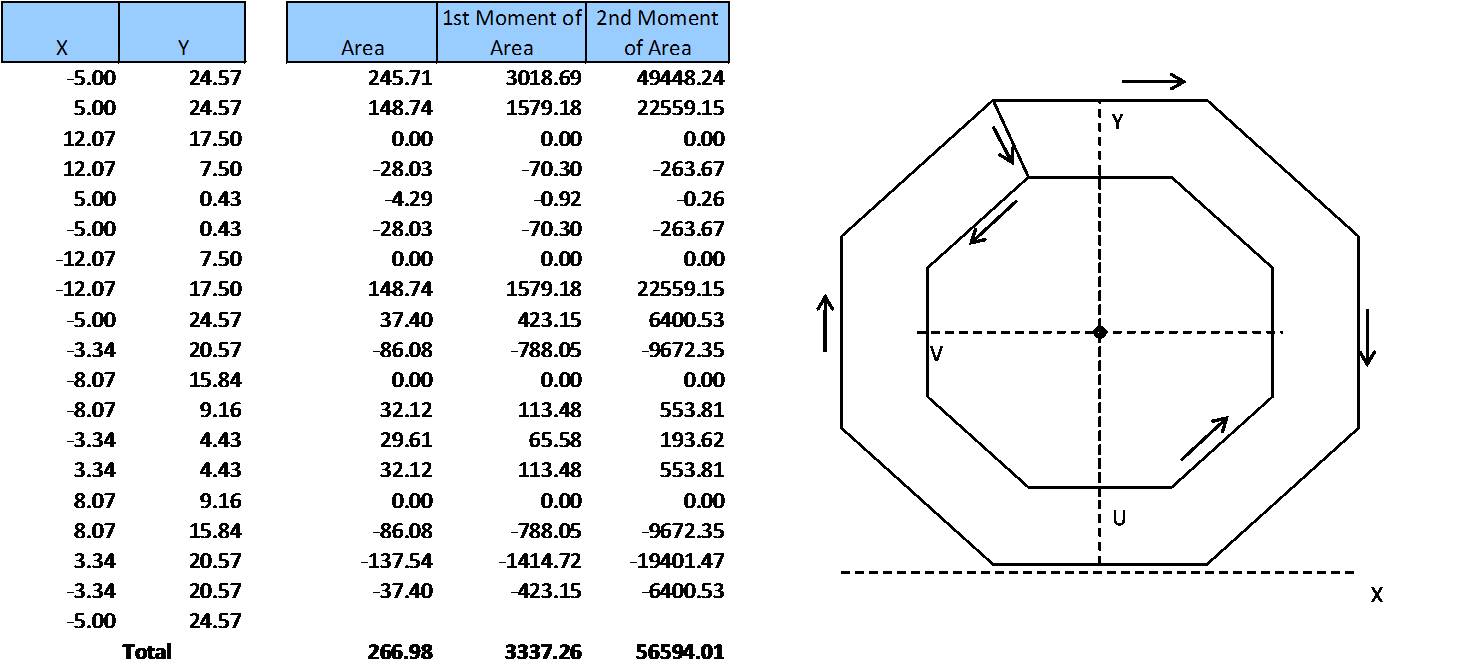
Voided shapes may be defined by connecting any external apex to one apex of the internal void, then listing the void apex coordinates in an anti-clockwise direction, then finally returning to the external apex.  This procedure is shown for a regular hollow octagon below, but may also be used for any irregular shape, with any number of voids.

Area2b

Posted in Maths, Newton | Tagged , , , , | 2 Comments

Array resources

The getarray function from the first post in this series, plus functions to transpose, count the number of dimensions, and return other information about arrays, ranges or values:
http://www.interactiveds.com.au/software/getarray.zip

Chip Pearson’s Functions for VBA Arrays (also have a look at his index page, there is a huge amount of information and downloads on arrays)http://http://www.cpearson.com/Excel/VBAArrays.htm

Alan Beban’s array functions
http://http://home.pacbell.net/beban/

Colo’s Junk Room VBA tips, starting off with arrays
puremis.net/excel/tips.shtml

Microsoft Developer Center on understanding arrays
msdn2.microsoft.com/en-us/library/aa164778(office.10).aspx

Posted in Uncategorized | 3 Comments

Ranges and Arrays – 2

Yesterday we looked at how to get data from a worksheet range into a VBA array.  Today’s post looks at the opposite operation; writing an array to a worksheet range. 

With a UDF it couldn’t be simpler:

Function MyFunction() as Variant
Dim MyArray() as double
...
MyFunction = MyArray
End Function
 

This function will return whatever was in MyArray.  To access all this data there are several options:

The easy way is to enter the function in the worksheet as an array function; i.e. enter the function as normal (array element (1,1) will display), then select the range where you want to display the array (with the function in the top-left cell); press the F2 key to enter edit mode; then press Ctrl-Shift-Enter to enter the array as an array function.  The contents of the array will be displayed, with NA in any cells outside the limits of the array.

To display one element, or a limited range, of the array, use the Index() worksheet function; e.g. =Index(MyFunction(),2 ,3) will display the array element for row 2, column 3; i.e. =Index() works on arrays in exactly the same way as it works on worksheet ranges.

Finally you can code optional output index parameters in your UDF, so selected elements of the array can be displayed without using =Index():


Function MyFunction(Parameter1, Parameter2, Optional Out1 as long, Optional Out2 as long) as Variant
Dim MyArray() as double
...
If Out1 = 0 Then
MyFunction = MyArray
Else
MyFunction = MyArray(Out1, Out2)
End If
End Function

With an array in a VBA subroutine it is a similar procedure.  The code below will adjust the size of an existing named range to the size of the array, then write the array values to the range:

ReDim myarray(1 To NumArrayRows, 1 To NumArrayColumns)

' Fill array

With Range("MyNamedRange")
.ClearContents
.Resize(NumArrayRows, NumArrayColumns).Name = "MyNamedRange"
End With
Range("MyNamedRange").Value2 = myarray

Anyone who has used a loop to write an array to a worksheet range, cell by cell, will appreciate the dramatic increase in speed using this method.

Posted in Arrays, Excel, UDFs | 1 Comment

Ranges and Arrays

Transferring data from a worksheet into a VBA routine, or the other way round, is one of the most frequent tasks carried out in VBA programming.  Fortunately there is a simple way to do it:
In a subroutine:

  • Name the data range in the spreadsheet
  • Declare a variant variable in the VBA code
  • Variable = Rangename.value

Dim DataArray as Variant
DataArray = Range("RangeName").value
 

Note that there is no need to specify the size of the array, it is automatically set to the size of the specified range.

 With functions it is even easier:

Function FuncName(MyData as Variant) as Variant
MyData = MyData.value
...

There are a couple of traps to watch out for though:

  • If a function may be used as a UDF or called from another VBA routine, you need to check if the data being passed is a worksheet range or if it is already an array.
  • If the function parameter is a single cell range it will not be converted into an array.
  • If the parameter is a single row range it will be converted to a 2D array with a single row.  A 1D array therefore needs to be converted into the same form for consistency.
  • Similarly, a single cell range, if converted into an array, will be converted into a 1D, base zero array.  For consistency it needs to be converted into a 2D, base 1 array, with 1 row and 1 column.

The code below carries out all these tasks:

Public Function GetArray(Arrayname As Variant) As Variant
  Dim TempA() As Variant, LBound1 As Long
  Dim UBound1 As Long, UBound2 As Long
  Dim i As Long, j As Long
' If Arrayname is not an array, convert it into one.
' IsArray is true for multi-cell ranges, but not for a single cell range
  If Not IsArray(Arrayname) Then
  Arrayname = Array(Arrayname)
  End If
' If Arrayname is a range, convert it into an array containing the range cell values
  If TypeName(Arrayname) = "Range" Then
  GetArray = Arrayname.Value
'Otherwise simply allocate the array to GetArray
  Else
  GetArray = Arrayname
  End If

' Check for a 1D array, or a base 0 array
  On Error Resume Next
  UBound2 = UBound(GetArray, 2)
' Convert to base 1
  If UBound2 = 0 Then
  LBound1 = LBound(GetArray)
  UBound1 = UBound(GetArray)
  ReDim TempA(1 To 1, 1 To UBound1 - LBound1 + 1)
  j = 1
  For i = LBound1 To UBound1
  TempA(1, j) = Arrayname(i)
  j = j + 1
  Next i

GetArray = TempA
  End If

End Function

Posted in Arrays, Excel, UDFs | Tagged , , , | 4 Comments