
… or other irregular cyclic data.
Another Eng-Tips question asked how to approximate ice area over a freeze-thaw cycle using a function based on a sine or cosine curve. The screen-shot below shows three alternatives:

Using built in Excel functions requires a separate function for the freeze and thaw part of the cycle:
=(IF(DOY<DOY_FS,-1,IF(DOY>DOY_FE,1,SIN((DOY-F_Mid)/F_Days*PI())))+1)/2*A_max
=(IF(DOY<DOY_MS,1,IF(DOY>DOY_ME,-1,COS((DOY-DOY_MS)/M_Days*PI())))+1)/2*A_max
I have incorporated these in a short user defined function (UDF), which returns a column array of the full data range. (See Using Array Functions and UDFs if you are not familiar with array functions).
Function ScaleSin(DatRange As Variant, Outx As Variant)
Dim Inc0x As Double, Inc0y As Double, Inc1x As Double, Inc1y As Double
Dim Dec0x As Double, Dec0y As Double, Dec1x As Double, Dec1y As Double
Dim NumX As Long, i As Long, ResA() As Double, OutXA() As Double, DX As Double, DY As Double
Dim Pi As Double
Pi = Atn(1) * 4

DatRange = DatRange.Value2
Inc0x = DatRange(1, 1)
Inc0y = DatRange(1, 2)
Inc1x = DatRange(2, 1)
Inc1y = DatRange(2, 2)
Dec0x = DatRange(3, 1)
Dec0y = DatRange(3, 2)
Dec1x = DatRange(4, 1)
Dec1y = DatRange(4, 2)

Outx = Outx.Value2

NumX = UBound(Outx)
ReDim ResA(1 To NumX, 1 To 1)
ReDim OutXA(1 To NumX, 1 To 1)

i = 1
Do While i <= NumX
    Do While Outx(i, 1) < Inc0x
        ResA(i, 1) = Inc0y
        i = i + 1
    Loop

    DX = Inc1x - Inc0x
    DY = Inc1y - Inc0y
    Do While Outx(i, 1) < Inc1x
        OutXA(i, 1) = (Outx(i, 1) - Inc0x) / DX * Pi - Pi / 2
        ResA(i, 1) = Inc0y + DY * (Sin(OutXA(i, 1)) + 1) / 2
        i = i + 1
    Loop

    DX = Dec0x - Inc1x
    DY = Dec0y - Inc1y
    Do While Outx(i, 1) < Dec0x
        ResA(i, 1) = Inc1y + DY * (Outx(i, 1) - Inc1x) / DX
        i = i + 1
    Loop

    DX = Dec1x - Dec0x
    DY = Dec0y - Dec1y
    Do While Outx(i, 1) < Dec1x
        OutXA(i, 1) = (Outx(i, 1) - Dec0x) / DX * Pi + Pi / 2
        ResA(i, 1) = Dec1y + DY * (Sin(OutXA(i, 1)) + 1) / 2
        i = i + 1
    Loop

    Do While i <= NumX
        ResA(i, 1) = Dec1y
        i = i + 1
    Loop
    i = i + 1
Loop

ScaleSin = ResA
End Function
An alternative approach suggested at the Eng-Tips discussion is to use a Sigmoid function of the form:
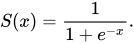
I have written another UDF to return such a function:
Function Sigmoid(xA As Variant, Optional a As Double = 1, Optional b As Double = 1, Optional c As Double = 1, _
            Optional d As Double = 1, Optional f As Double = -5, Optional t As Double = 0)
Dim Z As Double, NumX As Long, x As Double, i As Long, ResA() As Double

    xA = xA.Value2
    If IsArray(xA) Then
        NumX = UBound(xA)
    Else
        NumX = 1
    End If
    ReDim ResA(1 To NumX, 1 To 1)

    For i = 1 To NumX
        If NumX = 1 Then
            x = d * (xA - f)
        Else
            x = d * (xA(i, 1) - f)
        End If

        If x >= 0 Then
            ResA(i, 1) = a / (b + c * Exp(-x)) + t
        Else
            Z = Exp(x)
            ResA(i, 1) = a * Z / (b + c * Z) + t
        End If
    Next i
    Sigmoid = ResA
End Function
The sigmoid function also returns an array, but must be entered separately for the freeze and thaw part of the cycle.
Examples of the use of both functions applied to freeze-thaw data are given in the download file: Freeze-sin.xlsb
As usual, the download file includes full open-source code.


 Newton Excel Bach, not (just) an Excel Blog
Pingback: #Excel Super Links #79 – shared by David Hager | Excel For You