Coincidentally, following the previous post, New Scientist’s regular brain teaser featured the iccanobiF Sequence, which is just like the Fibonacci Sequence, except that after adding the two previous numbers the digits of the results are reversed. Obviously the sequences are the same for single digit values, but following 5 and 8 the Fibonacci result is 13, and iccanobiF is 31.
The Python functools module has been around since 2006, so it’s not exactly new, but it is something I don’t currently use, but with potential to be useful.
This link: Functools module in Python provides details and examples of all the functions available, but this post will focus on the lru_cache function, which caches recent function results to speed up repeated calls with the same arguments. The example from the link calls a function to find the factorial of any input integer, and I had a look at that application here in 2022 (Python functools – cache and lru_cache), but an earlier post from the same site presents a similar function to calculate the Fibonacci Sequence: Python Functools – lru_cache(), which I have adapted to call from Excel with pyxll.
the Fibonacci sequence is a sequence in which each element is the sum of the two elements that precede it. The sequence begins: 0, 1, 1, 2, 3, 5, 8, 13, 21, 34, 55, 89, 144, …
The code below uses a simple recursive function to return the Fibonacci Number from any position in the sequence. It is followed by an alternative using a loop in place of the recursive function calls, then an alternative recursive function, modified to greatly reduce the number of calculation steps:
@xl_func()
@xl_arg('n', 'int')
def fibonacci(n):
    if n < 2:
        return n
    return fibonacci(n - 1) + fibonacci(n - 2)

@xl_func()
@xl_arg('n', 'int')
def fibonacci2(n):
    f1 = 1
    f2 = 1
    for i in range(2, n):
        f3 = f2+f1
        f1 = f2
        f2 = f3
    return f3

@xl_func()
@xl_arg('n', 'int')
def fibonacci9(n, a= 1, b=2):
    if n <= 2:
        return a
    else:
        return fibonacci9(n - 1, b, a+b)
Each of these functions has been modified with three alternative decorators:
Functools lru_cache: @lru_cache(maxsize=128)
Numba just-in-time compiler in “no python” mode: @njit
Numba with “parallel” enabled: @njit(parallel = True)
Results and execution times for the 12 alternative functions are shown below for input values (N) of 10 and 40:
All the options give the same results, but with widely different timing. For N = 10:
With the recursive function use of lru_cache slows down the results by about half. Both jit options are faster, with the parallel option doubling the speed compared with jit alone.
The loop function is about twice as fast as the plain recursive function, 5 times faster with lru_cache, and 3 to 4 times faster with jit.
The second recursive function is about twice as fast as the loop with no cache, similar with the cache, and very much slower than both of the other functions with either jit option.
For N = 40:
The recursive function with no cache is very slow, with the time being roughly proportional to the output Fibonacci number, rather than the input value.
The recursive function with lru_cache is about 240,000 faster, but the loop function with no cache is about 50% faster than that, and the recursive2 function is nearly 5 times faster again.
Use of lru_cache with the loop and recursive2 functions gives further significant speed increases, with recursive2 with lru_cache being over 3.5 million times faster than recursive without cache.
The jit functions with recursive are both only about 20 times faster than the function with no cache. With recursive2 they are both very much slower than the same function with no cache.
The loop function with jit on the other hand were 2.5 to 3.5 million times faster than recursive with no cache, and loop with jit+parallel was about equal fastest overall with recursive2 with lru_cache.
For the input shown above the numerical results are all identical, but for N = 93 or greater the result is greater than the maximum 64 bit integer, and the functions using either jit option return an incorrect result. Note that the values returned by all the other options are only accurate to machine accuracy, so they will also be wrong past the 15th significant figure.:
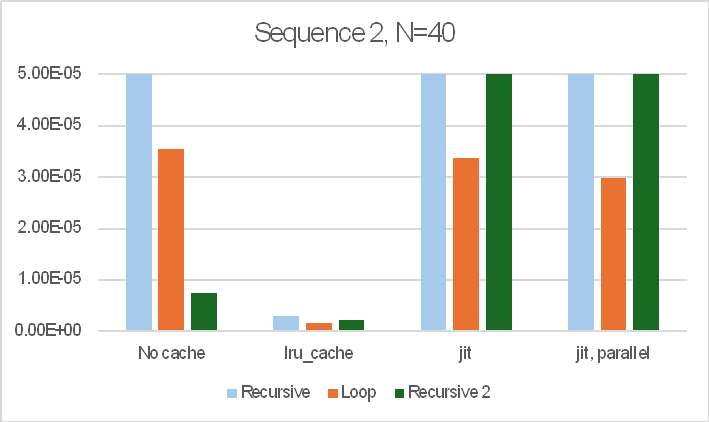
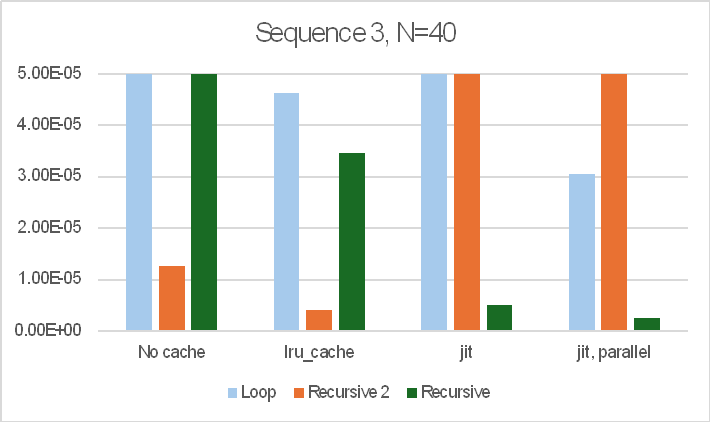
The sequence of operations also made a large difference to the results. The bar charts below show the results for three different sequences of the 12 functions:
Note that the bar charts are all cut off at 50 microseconds (5.0E-5 sec.) so that the relative performance of the faster options is visible. The recursive function with no cache took over 12 seconds in all cases.
In summary:
The recursive function with no cache was always very slow.
The best performer from the other options was highly variable, depending on the number of iterations required and the order the functions were called in, but the lru_cache function always gave good results and was often the fastest option.
The jit options were highly variable, sometimes being very fast, but in others being much slower than lru_cache, or the loop or recursive2 functions with no cache.
For real applications it would be worth looking at all the options in practice.
Continuing posts on new Python features, this one looks at the new walrus operator, which was introduced in Python 3.8. For a detailed description see Python Walrus Operator in Python 3.8.
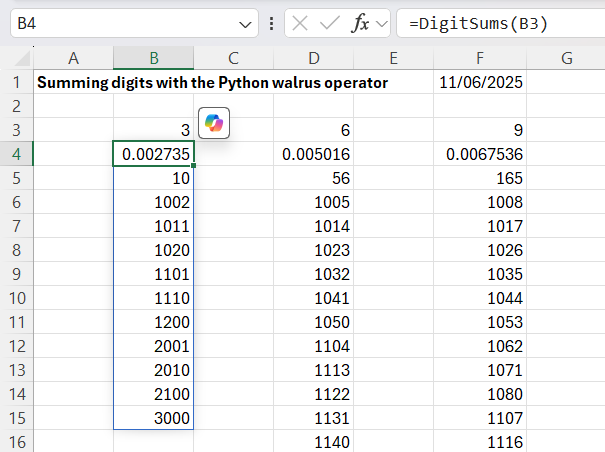
In addition to linking to an Excel UDF, my code allows the sum value to be set to any integer, and also returns the number of values generated and the execution time:
# Quora link - https://qr.ae/pAVa31
@xl_func()
@xl_arg('n', 'int')
def DigitSums(n):
    stime = time.perf_counter()
    sum_n_nums = []
    minval = 1000 + n -1
    maxval = n * 1000 +1
    for num in range(minval, maxval):
        # use the "walrus operator" to both assign a value to
        # digit_sum and compare the value we assigned
        if (digit_sum := sum(int(digit) for digit in str(num))) == n:
            sum_n_nums.append(num)
    sum_n_nums.insert(0, len(sum_n_nums))
    sum_n_nums.insert(0, time.perf_counter() - stime)
    return sum_n_nums
As noted in the code, the walrus operator, :=, calculates the sum of the digits in each number, assigns that value to the digit_sum variable, then compares the value to the required sum, n. If the values are equal the number is appended to the list of results.
The code and an example have been added to the Pandigitals file at: Pandigitals.zip
The py_SciPy download contains full open-source Python code and example spreadsheets for a wide range of Scipy functions, as well as the Numpy functions covered in this post. For more details, see the series of posts starting at: Scipy functions with Excel and pyxll. Also see Python and pyxll for details of the pyxll add-in, required to link my Python code to Excel.
The code below calls functions from the Python random or secret modules:
Function results are shown in the screenshot below, together with three Numpy functions and the Excel built-in Randbetween and Randarray functions:
py_RandBetween and Excel Randbetween operate in the same way, returning a single integer, between the specified inclusive limits.
py_RandRange and py_RandIntA operate in a similar way, returning integers between the lower limit and below the upper limit. py_RandRange also has a step input (default = 1), and returns only integers with the specified step interval above the minimum value. py_RandIntA is a Numpy function, and returns an array with the specified number of rows and (optionally) columns.
py_RandArray and py_RandUniform are Numpy functions and also return arrays with multiple rows and 1 or more columns. py_RandArray returns a normal distribution with zero mean and 1.0 variance. py_RandUniformA operates in a similar way to the Excel Randarray function, returning an array of floats of the specified size with uniform distribution over the specified range.
py_RandBelow returns an integer between zero and 1 less than the upper limit. It is part of the Python random.secrets module and provides greater security in the generation of random integers.
All the Python and Numpy functions provide direct access to the on-line Python help by clicking the “help on this function” link in the function dialogue:
The help is also available as text within Excel for the Numpy functions, using the py_Numpy spreadsheet:
The code below generates arrays of numerical “palindromes”, i.e. integers with the same value when read from right to left:
@xl_func()
@xl_arg('start', 'int')
@xl_arg('stop', 'int')
def PalindromeNum(start, stop):
    stime = time.perf_counter()
    palindromes = []
    for num in range(start, stop):
        if str(num) == str(num)[::-1]:
            palindromes.append(num)
    palindromes.insert(0, len(palindromes))
    palindromes.insert(0, time.perf_counter() - stime)
    return palindromes

@xl_func()
def PalindromeNum8():
    stime = time.perf_counter()
    palindromes = []
    for one in range(1, 10):
        for two in range(0, 10):
            for three in range(0, 10):
                for four in range(0, 10):
                    palindromes.append(int(f'{one}{two}{three}{four}{four}{three}{two}{one}'))
    palindromes.insert(0, len(palindromes))
    palindromes.insert(0, time.perf_counter() - stime)
    return palindromes
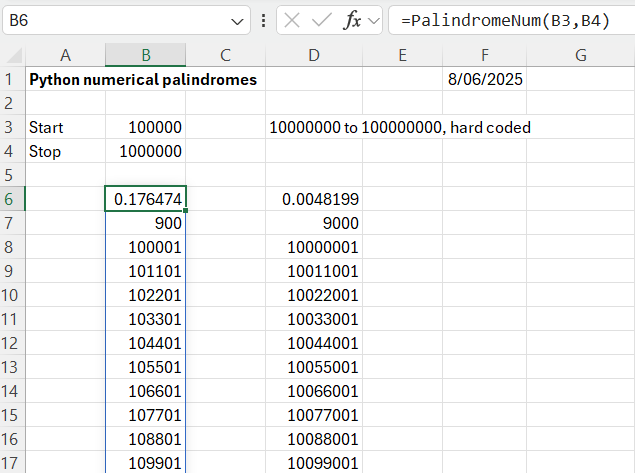
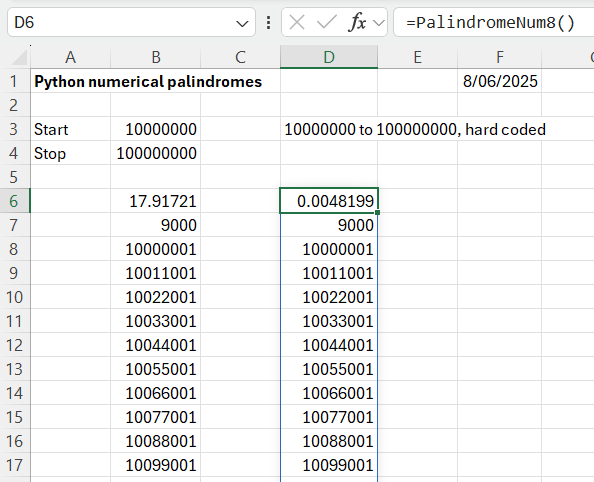
The functions return an array of all the palindromes between the specified limits (for the PalindromeNum function, or between 10,000,000 and 100,000,000 for PalindromeNum8. The functions also return the execution time and the number of palindromes found.
The PalindromeNum function works by generating all the integers in the specified range, then checking if they are palindromes, by comparing a string of each value with the reversed string. This works reasonably quickly for up to 1 million values, but rapidly slows down for bigger ranges:
The PalindromeNum8 function works by generating all the possible integers of half the required size, then appending the reversed value as a string, and converting the result back to an integer. For the example shown this is about 3500 times faster than the original code! The problem with the faster code is that it needs a variable number of nested loops, depending on the magnitude of the integers, so the code would need reworking to allow ranges of different magnitude. Since the purpose of the exercise is to display Python techniques for manipulating lists and strings, I will leave that as an exercise for the reader!