Daily Download 5: Frame Analysis

Leading on from yesterday’s continuous beam functions, today’s download covers four frame analysis spreadsheets, with increasing levels of complexity.  For those interested in the workings of the program I recommend working through each spreadsheet, but for practical applications the final two versions (Frame4.xlsb and 3DFrame.xlsb) provides the best functionality.

The spreadsheets may be downloaded from:

http://interactiveds.com.au/software/Frame1.zip
http://interactiveds.com.au/software/Frame2.zip
http://interactiveds.com.au/software/Frame3.zip
http://interactiveds.com.au/software/Frame4.zip
http://interactiveds.com.au/software/3DFrame.zip

For instructions on linking to the compiled solver routines (provided with Frame4 and 3DFrame) see:
If you are using 64 bit Windows first see:
https://newtonexcelbach.wordpress.com/2013/03/28/installing-dlls-on-64-bit-windows/
For 32 bit Windows go straight to:
https://newtonexcelbach.wordpress.com/2012/11/13/using-regasm-exe/

The last blog posts on Frame4.xlsb are: Extending Frame4 with on sheet formulas, and Using Frame4 for truss analysis.
The latest on 3DFrame.xlsb are: 3DFrame – 3D Frame analysis for Excel and 3DFrame v1.01

Beam results from Beam4.xls

Deflected shape plot

Bending moment results for selected beams
Posted in Beam Bending, Excel, Finite Element Analysis, Newton, UDFs, VBA | Tagged , , , | 12 Comments

Daily Download 4: Continuous Beam Analysis

Today’s download files contain several alternative functions for analysing continuous beams. The most flexible is the ConBeamU spreadsheet, which in addition to the continuous beam function also contains functions for single span beams and cantilevers, and for fixed end moments and restrained end moments.  Each function comes in both “unit aware” versions, and versions for use with any consistent units.

The functions use Macaulay’s Method, and allow beams with varying cross-section, and any number of supports, which may be rigid simple supports, or spring supports with rotational restraint.  Loads may be trapezoidal distributed loads or point transverse loads or moments.  The most recent blog post on this spreadsheet was: Continuous Beam Spreadsheet – with Units, and the spreadsheet may be downloaded from:

http://www.interactiveds.com.au/software/ConBeamU.zip

An alternative approach uses cubic splines to model the beam deflection when subject to a series of point loads and moments.  The most recent post on this approach was: SplineBeam update and the spreadsheet may be downloaded from:

http://interactiveds.com.au/software/SplineBeam2_2.zip

Finally a series of beam analysis spreadsheets were presented as an introduction to frame analysis, the most recent being: Frame Analysis with Excel – 3, Continuous beam or frame the associated download file is available at:

http://interactiveds.com.au/software/Beam3.zip

but note that this has been developed into a frame analysis program, which will be presented here in the next few days.

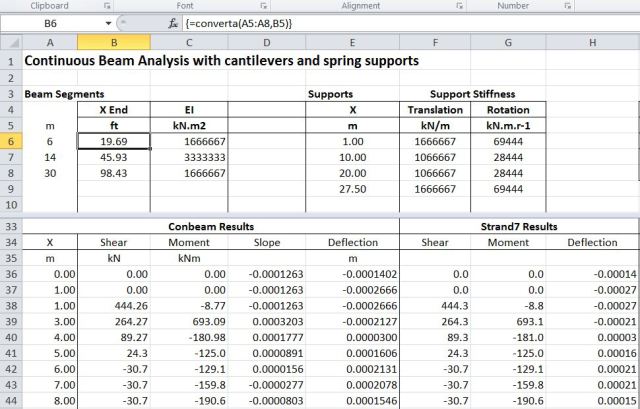
Typical screenshots are shown below:

ConBeamU function

SplineBeam results

Beam 3 – Continuous beam results

Posted in Beam Bending, Excel, Frame Analysis, Newton, UDFs, VBA | Tagged , , , , , | 15 Comments

Daily Download 3: ULS design of reinforced concrete sections

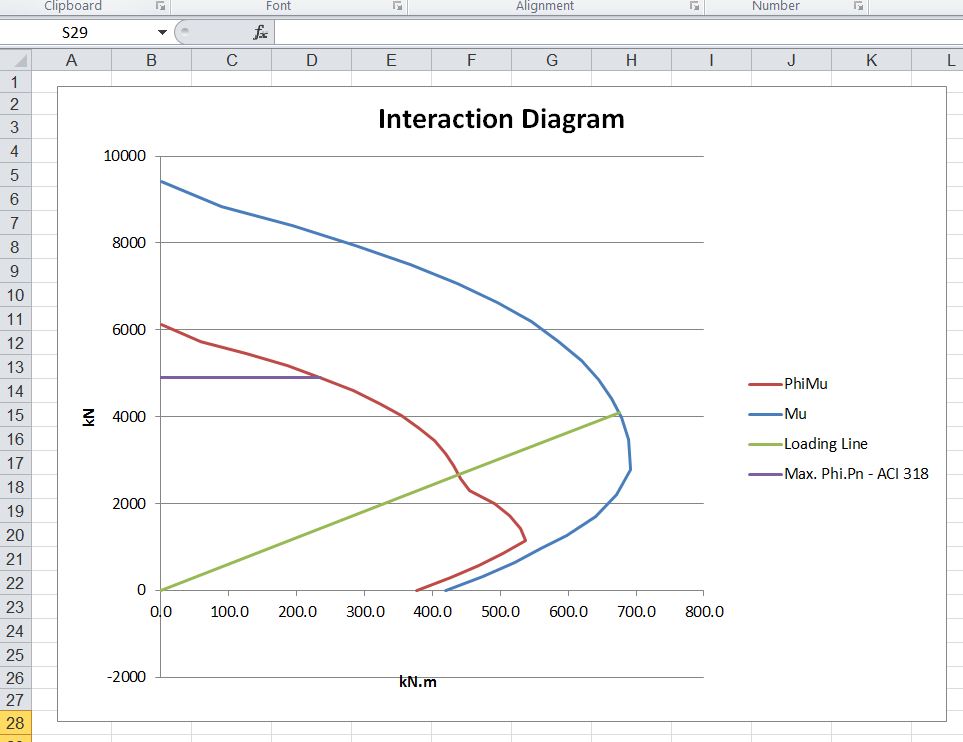
Today’s downloads provide a spreadsheet providing Ultimate Limit State (ULS) analysis of reinforced or prestressed concrete sections, and an iterative method for finding the depth of the Neutral Axis in a circular reinforced concrete section.

The ULS analysis spreadsheet is described at: ULS Analysis of Concrete Beams; now with added units it may be downloaded from:

http://interactiveds.com.au/software/ULS%20Design%20Functions.zip

Input and output are similar to the SLS function in Beam Design Functions, presented yesterday, with the added feature that the function is unit aware, and will accept input and output in a variety of accepted units:

UMom Function Input

The spreadsheet to find the neutral axis depth is described at: Calling a function as a variable – another example.  It may be downloaded from:

http://interactiveds.com.au/software/DepthNA.zip

The function uses Brent’s Method to solve an equation by iteration, and is included the Circe function (part of RC Design Functions spreadsheet) presented yesterday:

Finding the depth of neutral axis using Brent’s Method

Posted in Beam Bending, Concrete, Excel, Newton, UDFs, VBA | Tagged , , , , , , | 23 Comments

Daily Download 2: SLS design of reinforced concrete sections …

… and prestressed concrete sections.

Today’s download installment covers spreadsheets for design of reinforced and prestressed concrete beams and columns at the Serviceability Limit State (SLS).  The spreadsheets cover design of rectangular and circular sections, sections made up of any number of trapezoidal layers, and composite beams constructed in two stages.  The spreadsheets for rectangular and circular sections also cover design at the Ultimate Limit State (ULS).  Spreadsheets for ULS design of non-rectangular sections will be listed tomorrow.

The RC Design Functions spreadsheet provides functions for rectangular and circular sections  It is described at:

Reinforced Concrete Moment-Curvature – 1 and
Tension Stiffening and
ULS design of reinforced concrete, AS, ACI and European codes

Download from: http://www.interactiveds.com.au/software/RC%20design%20functions6.zip

More details of using the included functions are given at:
Using RC Design Functions – 1, including examples: http://interactiveds.com.au/software/EStress%20Examples.xlsx

For non-rectangular sections use Beam Design Functions, described at:

Using Beam Design Functions

Download from: http://www.interactiveds.com.au/software/Beam%20Design%20Functions.zip

Functions for design of composite sections are provided in two files, one using the Excel Goal-Seek function, and the other using a (much faster) VBA based solver:

Composite Beam Spreadsheet – 2 and
Composite Beam Spreadsheet 3

Download from: http://www.interactiveds.com.au/software/Composite%20Design%20Functions-GS.zip and
http://www.interactiveds.com.au/software/Composite%20Design%20Functions.zip

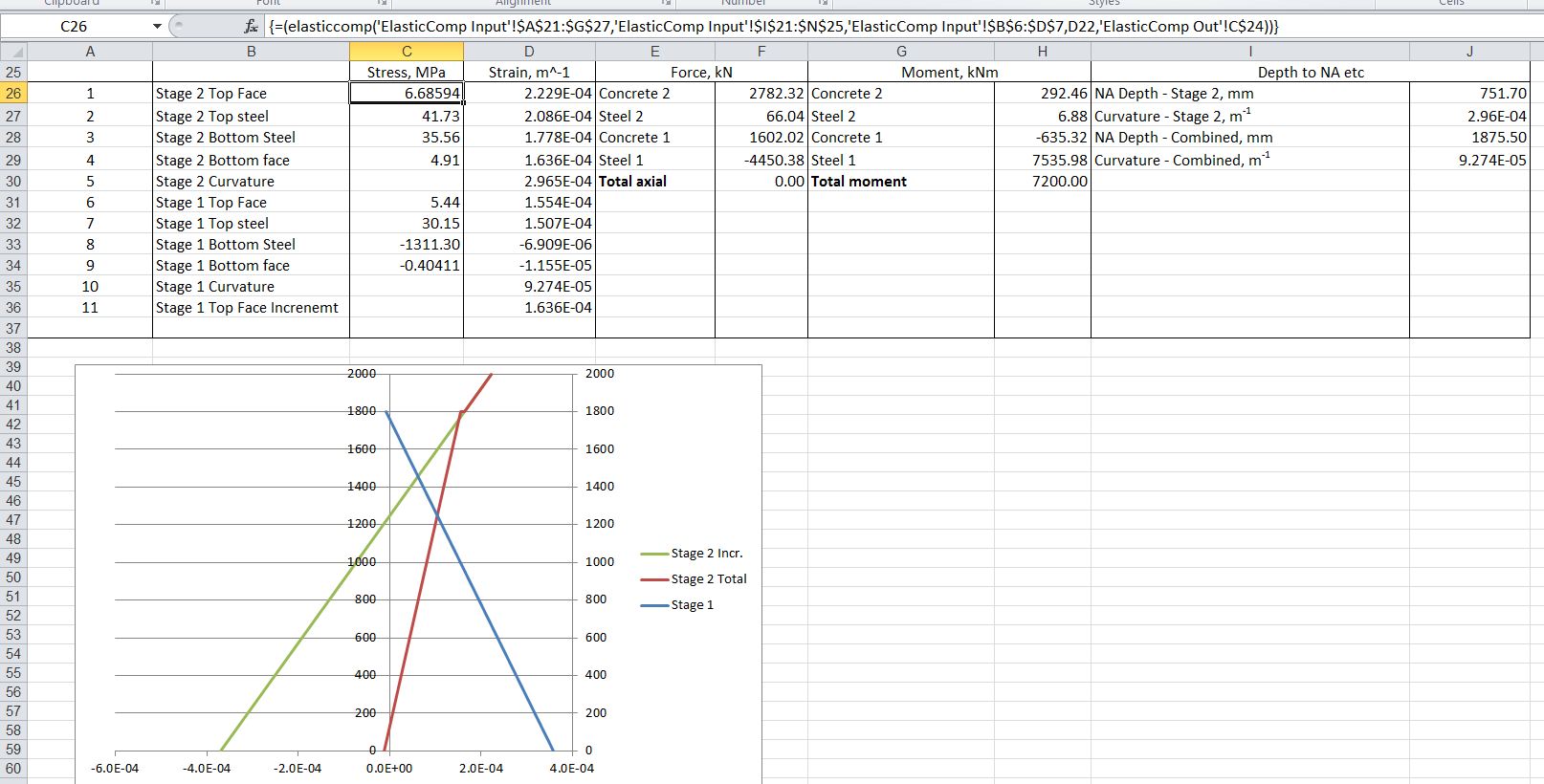
Example input and output from the spreadsheets is shown below, but download for a good look at all the functions available:

RC Design Functions; list of functions 1

RC Design Functions; list of functions 2

Beam Design functions – for use with non-rectangular sections

Composite Design Functions – Input

Composite Design Functions – output

Posted in Beam Bending, Concrete, Excel, Newton, UDFs | Tagged , , , , , , , , , , | 15 Comments

Daily Download 1: Buckling of columns, rings and arches

One of the disadvantages of the blog format is that valuable resources tend to get lost somewhere in the archives.  To help make them a bit more visible, for the next month or so I plan to post links to the spreadsheets available for download here (127 in all), together with a short description and a link to the most recent blog post for more details.

To start, here are two spreadsheets performing buckling analysis:

Buckling of columns with varying cross section

Download from: http://interactiveds.com.au/software/Frame4Buckle.zip

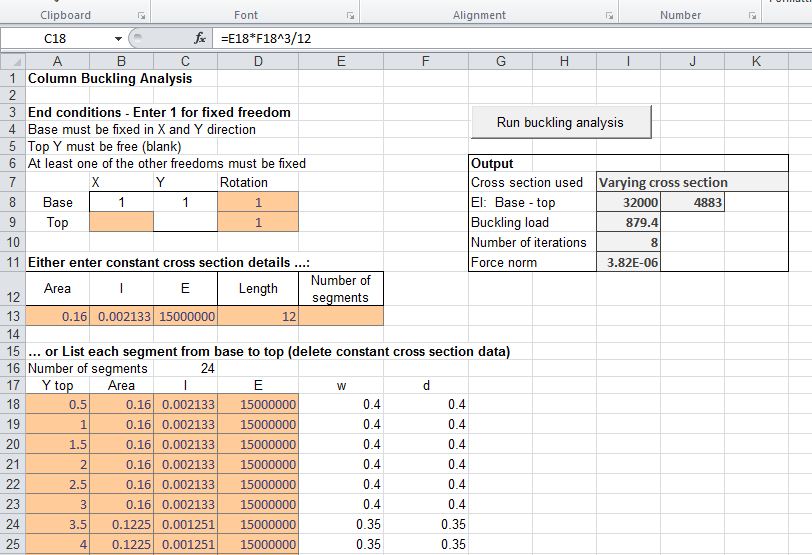
This spreadsheet is based on the Frame4 spreadsheet, modified to carry out a buckling analysis of any straight member subject to axial load, including stepped or tapered cross sections. The buckling load is found using the method of Vianello, described in a paper from the University of Ljubljana. This is an iterative method using successive approximations of the deflected shape.

Typical input and results are shown in the screen shot below:

Frame4Buckle Input and Output, click image for full size view

The buckling shape may be plotted to a chosen scaled deflection:

Buckled shape

Buckling of rings and arches

Download from: http://interactiveds.com.au/software/Frame4buckle-ring.zip

The buckling spreadsheet described above has been modified to allow the input of a quarter circular arch (which with appropriate end conditions is equivalent to symmetrical effects in a full ring), or for a smaller portion of an arc. The spreadsheet also allows different options for the change in direction of the applied load after deformation of the ring, and the ring may be either specified with a constant cross section or a series of stepped sections.

Buckling of rings and arches

Posted in Beam Bending, Excel, Newton, UDFs, VBA | Tagged , , , , , , | Leave a comment