Seems like fun; more details here: Concrete Column Blind Prediction Contest

Concrete Column Prediction Test

Seems like fun; more details here: Concrete Column Blind Prediction Contest
Concrete Column Prediction Test
by John Martyn with Danny Thomson on bass, a live performance in Dublin from 1987
Click to follow the link to You Tube (put your headphones on first) …
I have updated the ALGLIB Spline and Matrix Function spreadsheet to include 2D interpolation of tabular data, including both linear and cubic spline interpolation. The spreadsheet including the new functions with full open source code may be downloaded from AL-Spline-Matrix03.zip for Excel 2003 and earlier and AL-Spline-Matrix07.zip for the Excel 2007 and 2010 version.
Typical input and output is shown in the screenshots below:

CSpline2DA - click for full size view

LinSpline2DA and interpolation data

CSpline2DA and LinSpline2DA Output
Depiction is a low cost GIS program. I received an e-mail today that they are hosting a webinar on using Depiction with Excel from 10-11 AM PDT on Wed 18th August. Click here for details.
Looks interesting, but it’s 3:00-4:00 AM Sydney time, and I’m not quite that interested.
I have recently imported all the ALGLIB statistics functions into VBA, and written interface functions where required, so that all the functions may now be used as User Defined Functions (UDFs) on the spreadsheet. A spreadsheet including full open source code and descriptions and examples of each function may be downloaded from AL-Stats.zip. The available functions are shown on the screenshots below:

ALGLIB Statistics Functions - 1 (click for full size view)
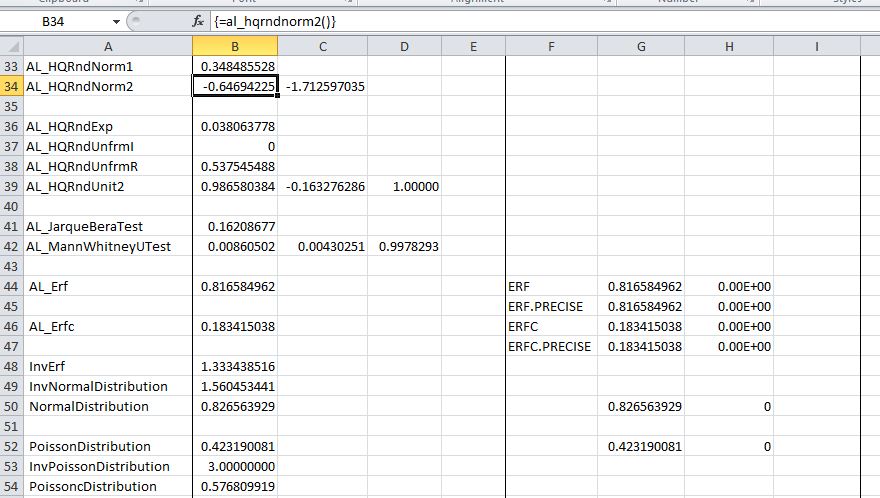
ALGLIB Statistics Functions - 2

ALGLIB Statistics Functions - 3
The screen shots show output from the ALGLIB functions together with the equivalent Excel results, where available. Note that many of the Excel functions are only available in Excel 2010, and will not work in earlier versions. Also note that in some cases Excel returns statistics for an estimate of the population value, whereas the ALGLIB functions always return the statistic for the sample. See for example this Wikipedia article on the Kurtosis function.
The ALGLIB functions with names not preceded by AL_ call the ALGLIB code directly. For the remainder it has been necessary to write an interface function for various reasons:
Code for a typical interface function is shown below:
Public Function AL_DistMoments(XA As Variant) As Variant
  Dim XA0() As Double, N As Long, Ncols As Long, Rtn As Long, DMRes(1 To 4) As Double

  Dim Mean As Double, Variance As Double, Skewness As Double, Kurtosis As Double
Rtn = VarAtoDouble1D_0(XA, XA0, N, Ncols)
Call CalculateMoments(XA0, N, Mean, Variance, Skewness, Kurtosis)
  DMRes(1) = Mean

  DMRes(2) = Variance

  DMRes(3) = Skewness

  DMRes(4) = Kurtosis
   AL_DistMoments = DMRes
End Function
The VarAtoDouble1D_0 routine converts a VBA Variant array into a 1D, base 0, Double array and returns the number of rows and columns of the array:
Function VarAtoDouble1D_0(XL_A As Variant, ByRef Cpp_A() As Double, ByRef Nrows As Long, ByRef Ncols As Long) As Long
    Dim i As Long, j As Long, LB As Long
    On Error GoTo iErr
    If TypeName(XL_A) = "Range" Then XL_A = XL_A.Value2

    LB = LBound(XL_A)

    Nrows = UBound(XL_A)

    Ncols = UBound(XL_A, 2)
    ' Copy 2D base 1 variant array to 1D base 0 double array
    ReDim Cpp_A(0 To Nrows * Ncols - 1)

    For i = 1 To Nrows

        For j = 1 To Ncols
            Cpp_A((i - 1) * Ncols + j - 1) = XL_A(i, j)

        Next j
    Next i
    VarAtoDouble1D_0 = 0
    Exit Function
iErr:
    VarAtoDouble1D_0 = 1
End Function
The download spreadsheet includes all the necessary code, but for the benefit of those wanting to use the code direct from the ALGLIB site, or to use the versions in different languages, all the necessary code modules are listed below:


 Newton Excel Bach, not (just) an Excel Blog