Adding Function Categories and Descriptions

User defined functions (UDF’s) are by default added to the “User Defined” category in the function list, and when a UDF is selected the words “no help available” appear, rather than a description of the function and it’s parameters.  A rather complex way of getting the full functionality of the built-in function descriptions is given at:  Registering a User Defined Function with Excel.  In this post I will describe a much simpler method to achieve the same end, but with the restriction that the total number of characters in the description must be less than 256.

The simple method uses a four column table in the workbook containing the functions as shown below:
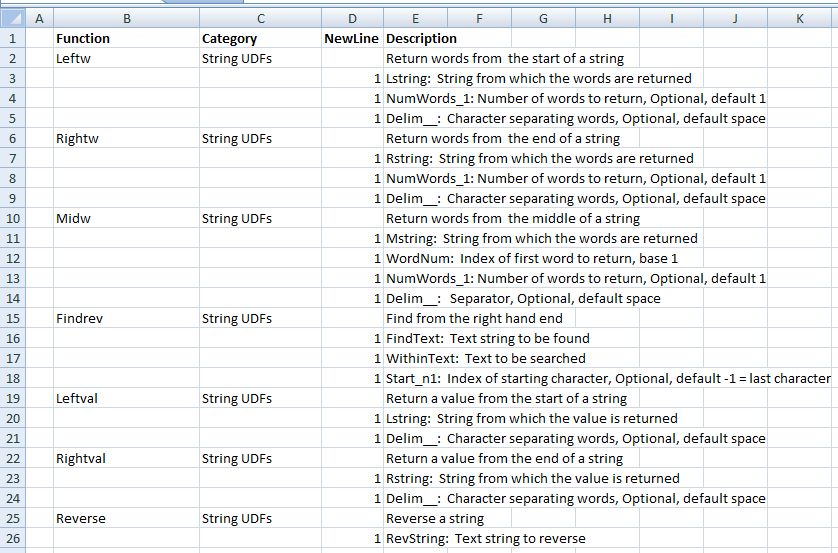
Click for full-size view

Click for full-size view

The columns are:

  1. The function name
  2. The category name
  3. A 1 on any continuation lines
  4. The function description, with descriptions of each parameter on a separate line

Assign the range name “functionlist” to the list, excluding the column headings.

The macro listed below will create the category names and add the function descriptions to the function list:

Sub FuncDescriptions()
Dim FunctionA As Variant, NumRows As Long, NL As Long
Dim FuncName As String
Dim Descript As String
Dim Cat As Variant
Dim i As Long, j As Long
FunctionA = Range("functionlist").Value
NumRows = UBound(FunctionA)
On Error Resume Next
With Application
i = 1
Do While i <= NumRows
If NL = 0 Then
FuncName = FunctionA(i, 1)
Cat = FunctionA(i, 2)
Descript = FunctionA(i, 4)
Else
Descript = Descript & vbCrLf & FunctionA(i, 4)
End If
If i < NumRows Then NL = FunctionA(i + 1, 3)
If NL = 0 Or i = NumRows Then
.MacroOptions Macro:=FuncName, Description:=Descript, Category:=Cat
End If
i = i + 1
Loop
End With
End Sub

To run the macro automatically add:

Private Sub Workbook_Open()
FuncDescriptions
End Sub

under “ThisWorkbook”

Example code has been added to the String Functions worksheet here: StringFunctions.zip

Posted in Excel, UDFs, VBA | Tagged , , , | 3 Comments

Bert Jansch – Acoustic Routes

Just appeared on YouTube; the first part of a documentary about the music, life and times of Bert Jansch, made in 1992, including a rare appearance from Anne Briggs and commentary from a very youthful looking Billy Connolly.

Great Stuff!

Posted in Bach | 1 Comment

Is light a wave or a particle?

This clever ambigram from Douglas Hofstadfter provides the answer:

Is light a wave or particle?

Is light a wave or particle?

Posted in Newton | 4 Comments

Some string functions

It was pointed out in a comment to this post at Daily Dose of Excel that VBA has a StrReverse function that will (logically enough) reverse a string.  That’s not awfully useful to me (except maybe for Project Euler), but it did set me thinking that I spend a fair amount of time writing lengthy formulas in Excel to extract bits of strings, which could be done with much less typing with a few simple User Defined Functions.

So here they are; download from String Functions.zip; full open source code is in the download file.

(Now updated as suggested by Dick K in the comments with a MidW() function, and an optional delimiter parameter)

Functions are:

leftw(); Return the first word(s) from a string

rightw(); Return the last word(s) from a string

Midw(); Return words(s) from the middle of a string

FINDrev(); Find from the right hand end

Leftval(); Extract a value from the left end of a string

Rightval(); Extract a value from the right end of a string

Reverse(); Reverse a string

Screenshot with more details:

Click for full size view

Click to view full size

Posted in Excel, UDFs, VBA | Tagged , , , | 5 Comments

Frame Analysis with Excel – 7; Shear deflections and support displacements

Continuing from: Frame Analysis with Excel – 6; Beam end releases and actions

Download Frame4.zip – the download file includes complete open source code.

Two more refinements have been added to the frame analysis spreadsheet:

  • The stiffness matrix has been revised to take account of shear deflections for members where the shear area and shear modulus are provided.
  • It is now possible to apply displacements and/or rotations to supports.  Fixed freedoms are specified with “F”, or enter the support deflection in the appropriate units, or rotation in radians.

In addition a plotting routine has been added to plot the frame, with or without scaled deflections.

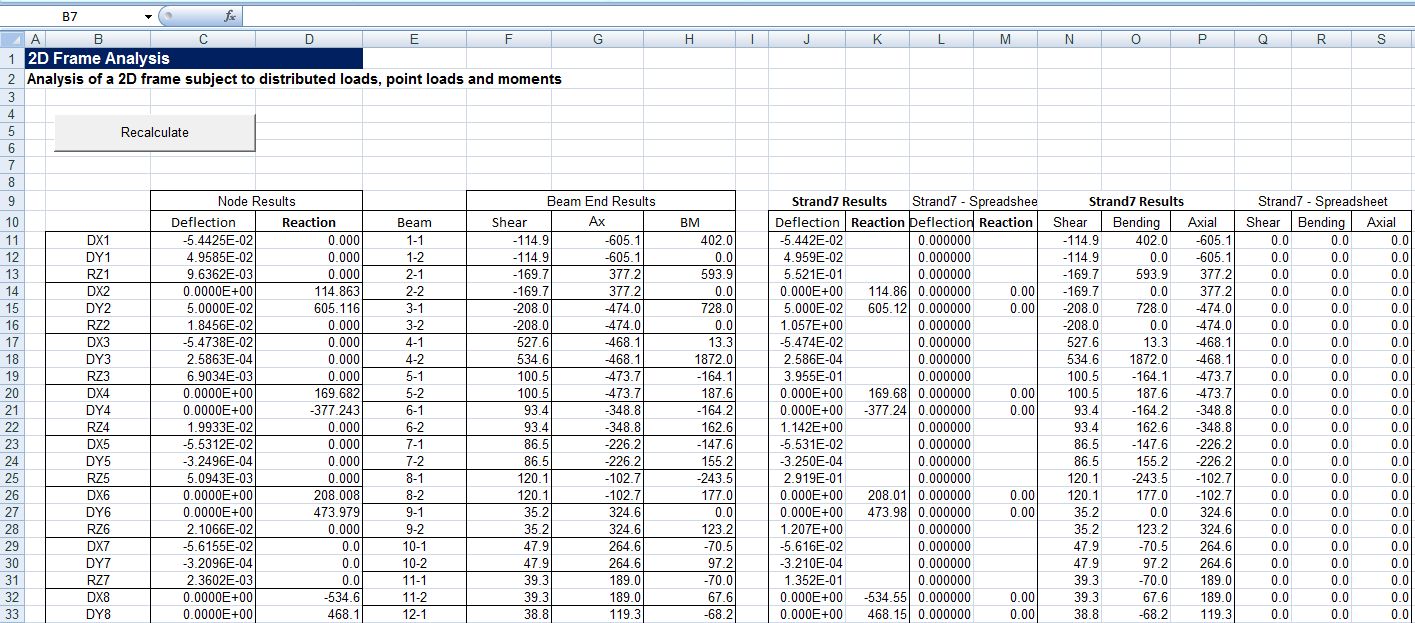
Shown below are results for an example frames, with results from the same frames analysed in Strand7, and plots of the deflected shape (scaled by a factor of 20) from the spreadsheet and Strand7:

Frame4 output compared with Strand7; click to view full size.

Frame4 output compared with Strand7; click to view full size.

Spreadsheet plot of deformed shape x 20

Spreadsheet plot of deformed shape x 20

Strand7 deformed shape

Strand7 deformed shape

Truss input and output added 30 Jan 10:

Member end releases are specified by entering a 1 in the column for the freedom to be released.  A truss can be modelled by releasing the rotational freedom at both ends of each truss member (M1 and M2).  Input and results for a simple truss are shown below.  Note that all the members have zero moment at both ends, and the rotations (in radians) at each end of each beam are reported.  The end release table headings in the spreadsheets in Frame4.zip have been modified to clarify the reqired input.

Posted in Excel, Finite Element Analysis, Frame Analysis, Newton, VBA | Tagged , , , | 31 Comments