Importing text files with VBA

Importing data from other programs into an Excel spreadsheet, in the form of text files, is a frequent requirement in engineering and scientific applications.  Often the data will have been formatted to suit printed output and will require processing before importing into the spreadheet.  In addition to rather cumbersome procedures, the built-in Excel facilities for importing text files have several drawbacks; for instance where lines start with a ‘, “, or ^ character, these are treated as text alignment characters and are truncated.  Also if numeric text is split into columns results can be unpredictable .

The link below provides routines to select files for import, and import the text to a specified range, optionaly inserting an initial ‘ to avoid truncation of any text alignment characters in the first column of the text.

Future posts will cover splitting the text into columns, and searching for rows containing data, discarding headers and footers etc.
Importing text file with VBA – 2

To use the routines “GetFileName” and “ReadTextSub” in a new file it is necessary to create the following named ranges:

TfileName
destrange
Inserta

and a range with the name specified in destrange.
The function ReadText is called by the subroutine ReadTextSub, but may also be used as a user defined function. In this case it should either be entered as an array function (press ctrl-shift-enter), or inside an INDEX() function. Examples are given in the file below.

Text-in.zip Right click to download

Screen shot:
Text-in screen shot

Posted in Excel, UDFs, Uncategorized | Tagged , , , , | 12 Comments

Elegant Proofs – 1

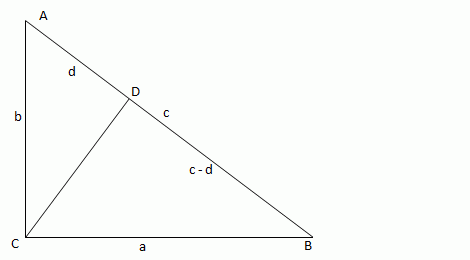
Roger Penrose in his book “The Road to Reality” gives a remarkably simple proof of Pythagoras’ Theorem:

Pythagoras proof

Drawing a perpendicular to the hypotenuse from the right angle (line CD) will divide any right angled triangle into two similar triangles, both of which are similar to the original triangle. Since the area of similar shapes are proportional to the square of the ratio of the length of their sides, and the sum of the areas of the two smaller triangles is clearly equal to the area of the enclosing triangle, the area of the square on the long hypotenuse is equal to the sum of the squares on the other two sides (i.e. the hypotenuse of the the two smaller triangles).

The beauty of this proof is not only its simplicity, but also that it makes clear why the Pythagoras formula will only work with a right angled triangle; since only a right angled triangle can be divided into two triangles similar to the original.

This result may also be simply shown algebraically:
From similarity:
b/d = c/b
b^2 = cd
and
a/(c-d) =c/a
a^2 = c^2-cd
c^2 = a^2 + cd
hence substituting b^2 for cd:
c^2 = a^2 + b^2

A different approach to this method is given at: Terence Tao

And for those looking for some variety 87 different proofs can be found at: Cut the knot

Posted in Maths, Newton | Tagged , , , | Leave a comment

Playing with numbers

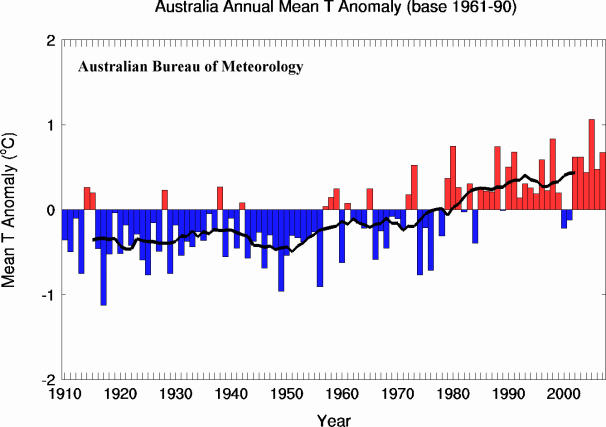
A reader of Melbourne’s Herald-Sun newspaper has posted some data from the Australian Bureau of Meteorology, purporting to show a total lack of climate change, in spite of steadily increasing CO2 concentrations:

Where’s the heat

 Non-bolting temperatures?

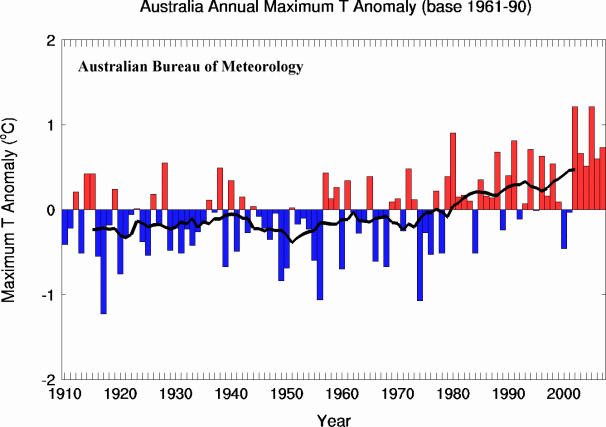
Funily enough, when you take a slightly longer view frrom the very same site, and smooth out the monthly variations, you get a totally different picture:

 mintemp

meantemp

maxtemp

The black line in the lower graphs is the 11 year moving average.


Posted in Climate, Newton | Tagged , , | 2 Comments

Reinforced Concrete Section Analysis – 2

Previous Post

Pseudo-code for elastic analysis of a layered reinforced concrete section under eccentric axial load and pre-stress load:

 Read data
‘For each reinforcement layer: Find area, first moment of area about top ,and depth of centroid.
Find total reinforcement section properties over all layers
For each reinforcement layer: adjust section properties for compression from the top surface to the layer.
‘For each concrete layer:

Find area, first and second moments of area about base of layer ,and height of centroid above base.
Find the number of reinforcement layers in the compression zone.
Find composite transformed properties about the base of each layer.

Find the centroid depth for the complete composite section in compression, and the reinforcement in tension.
Find the total prestress force and moment about the concrete centroid.
Find total axial force and bending moment, and nett axial force eccentricity from the concrete centroid and top face.
Check compression face.
If the compression face is bottom face, reverse layers and recalculate section properties.
Find the concrete layer containing the Neutral Axis.
If the Neutral Axis is above the top face (section entirely in tension) or below the bottom face (section entirely in compression) then:

Find top and bottom face stresses and position of NA using stress = P/A + M/Z

Else

Find parameters for Neutral Axis equation
Solve Neutral Axis equation
Adjust for reinforcement layers in the bottom concrete layer, below the Neutral Axis.
Find composite transformed section properties about the Neutral Axis
Find top and bottom face stresses.

Find stresses and strains at each reinforcement layer and top and bottom face.
Find concrete, reinforcement and total axial forces.
Find concrete, reinforcement and total moments.
Check equilibrium.
Finish

Posted in Beam Bending, Excel | Tagged , , | 1 Comment

Excel 2007 performance – feedback please

According to this post at MSDN:

http://msdn.microsoft.com/en-us/library/aa730921.aspx#office2007excelperf_ExcelPerformanceImprovements

Excel 2007 should be giving significant performance improvements on multi-core processors.

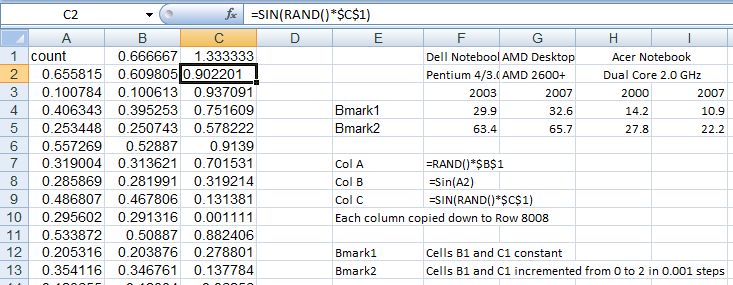
Some simple benchmarks on an Acer laptop with 2.0 GHz dual-core processor and 2 GB RAM show some improvement (over Excel 2000), albeit quite modest:
Benchmark Results
 Click on image to see full size.

In all cases with the dual core processor it was shown to be working at close to 100% under 2007, and about 50% with 2000.  Possibly with a less linear calculation process 2007 would show a bigger advantage.

Looking at situations where VBA is interacting with a workbook, either reading or writing data, or using .worksheetfunction, things are quite different however.  I have found Excel 2007 to be substantially slower than 2000; of the order of 3 times slower or more.  These results comparing the use of .worksheet function with a UDF evaluated entirely inside VBA illustrate this difference.:

Worksheetfunction vs UDF

In this case Excel 2007 took about 25% longer using the UDF (dual core processors are not supported in VBA), but more than 3 times longer using .worksheetfunction.

Overall, in real applications I have found 2007 to be generally about the same speed as 2000, but in some cases using VBA dramatically slower, sometimes needing a re-write of the code to make the application usable.

On the plus side I have found that 2007 saves substantially quicker, especially in binary format, and when there is a lot of VBA code used.

I would be interested to hear the comments of others.

The comment button is just down there on the right 🙂

Posted in Excel, UDFs | Tagged | 7 Comments