Scipy has 3 functions for multiple numerical integration in the scipy.integrate module:
- dblquad: Compute a double integral.
- tplquad: Compute a triple integral’
- nquad: Integration over multiple variables.
I have written six functions to call these functions from Excel, via Pyxll:
Each of the Python functions can be called to evaluate the integrals of either a function entered as a string on the spreadsheet (py_DblQuadS, py_TplQuadS, or py_NQuadS), or a Python function (py_DblQuadF, py_TplQuadF, or py_NQuadF).

The integration limits are passed as either two or three two-column ranges for the dblquad and tplquad functions, or an n-row, two-column range for nquad functions. Note that the order of the limits is different for nquad to the dblquad and tplquad functions:

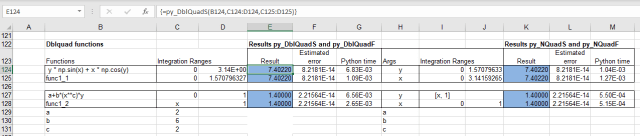
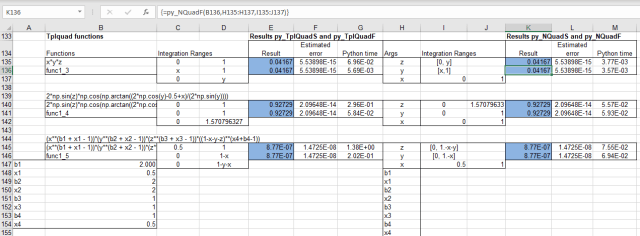
The two screen shots below show output from dblquad and tplquad on the left, and nquad on the right, with an example of the “S” and “F” function in each case, Click on the images for full-size view:
Other significant differences between the functions are:
- For the dblquad and tplquad functions, the variables must be x, y, and z, which are passed in the order z, y, x. For the nquad functions the variable names are an input argument, and they are passed in the order listed.
- Where one or both limits for the nquad functions is a formula the limits are entered in one cell in the format: [lower limit or function, upper limit or function]. See examples in the screenshots.
A Pyxll based Excel-Scipy application including these functions, and many others, will be published in the near future.




 Newton Excel Bach, not (just) an Excel Blog