This song has actually appeared here before, but it was a bit buried, so here it is again; Robin Williamson with a quite good interpretation of Like a Rolling Stone:

This song has actually appeared here before, but it was a bit buried, so here it is again; Robin Williamson with a quite good interpretation of Like a Rolling Stone:
A recent thread at Eng-Tips was looking for a solution to the problem described below:
 The solutions to this problem described below can be downloaded from:
The ItSolve.xlsb spreadsheet contains a user defined function (UDF) to solve iterative problems using Brent’s method, so the first approach was to modify this to return an array of results, with the input variables defined by a column and row of data, solving a function entered as text on the spreadsheet:

This works, but it is quite slow, taking about 10 seconds to return results for a 21 x 21 array. I then modified the UDF to work as a subroutine, solving a short VBA function, rather than the text string on the spreadsheet:
Function TempFunc(Coefficients As Variant, T As Double)
Dim G_1 As Double, G_2 As Double, G_3 As Double, G_4 As Double, G_5 As Double, epsilon As Double, alpha As Double

G_1 = Coefficients(1, 1)
G_2 = Coefficients(2, 1)
G_3 = Coefficients(3, 1)
G_4 = Coefficients(4, 1)
G_5 = Coefficients(5, 1)
epsilon = Coefficients(6, 1)
alpha = Coefficients(7, 1)

    TempFunc = G_1 * epsilon * T ^ 4 + G_2 * (T - 320) ^ 1.25 - G_3 * alpha - G_4 - G_5

End Function
Input and results are shown below:

A 3D contour plot can now be generated quickly using Excel’s “surface chart” option:

This reduced the computation time for the 21×21 matrix down to about 0.25 seconds.
The xlwings/Python spreadsheet xlwScipy3.xlsb also has a function using Brent’s method (linking to the Scipy brentq function). I have modified this to return results as a 2D array, with input of a single column and row of data:

Input for the Eng-Tips problem is shown below:

The xl_BrentA function will work on either a function entered as text on the spreadsheet, or link to a Python function. The screen-shot below shows results calling the Python function “TempFunc” (included in the download files).

Exactly the same results are generated using the text function on the spreadsheet:

Both options complete the calculation of the 21×21 array in about 5 milliseconds, about 50 times faster than the solution using a VBA function, or 2000 times faster than solving the string function entered on the spreadsheet!
What the Australian Government says:
PM claims Australia will meet Paris target ‘in a canter’ despite emissions climbing.
Morrison says rate of increase not as high as previous years and renewables investment will ensure Australia meets commitment
pm-claims-australia-will-meet-paris-target-in-a-canter-despite-emissions-climbing
What the government numbers say:

What the government numbers say when you look a little closer:
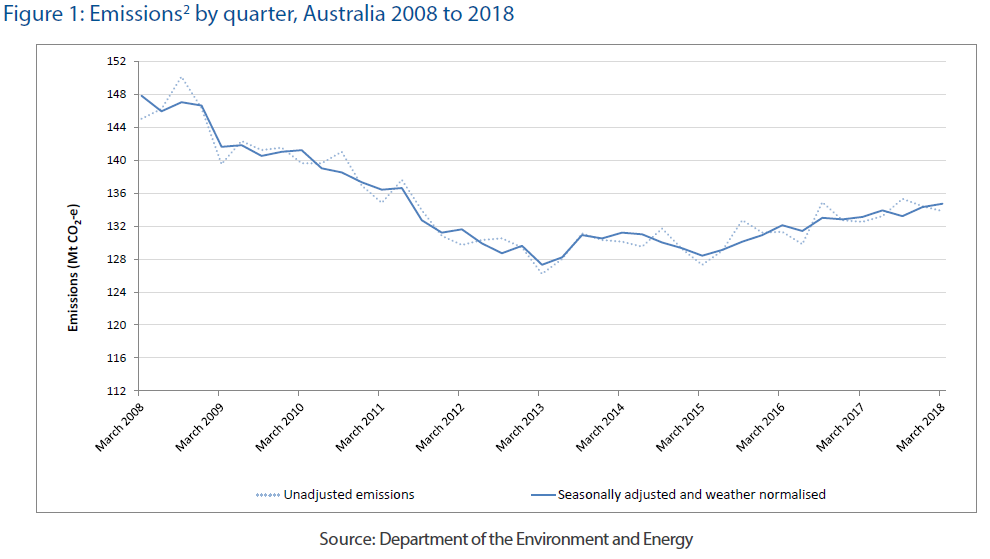
quarterly-update-australias-national-greenhouse-gas-inventory-march-2018
Dates and times in Excel are stored as a date number, which is the number of days since 1 January 1900, with the value after the decimal point representing the time of day.
To calculate the number of hours between two dates we can simply subtract the two values and multiply by 24. This returns a decimal value though. If we want the time in hours and minutes (or hours minutes and seconds), things get a bit more complicated:

The screen-shot shows various alternatives for displaying the number of hours between the date/time in cell B3 and the start of the date in B2.
The first row shows the result of multiplying the date difference by 24. This shows the correct result if formatted as a decimal, but if is formatted as time it shows the wrong value.
Microsoft recommends use of the Text function, with the format string “h:mm”. Note that the format string overrides the cell format, so the returned text displays the same regardless of the cell number format. This will work correctly for time differences up to 24 hours, but the display resets to zero after each 24hours, so the 36 hour time difference above displays as 12 hours. This can be changed to display days, hours and minutes with the format string “d:h:mm”.
Another approach is to leave the time difference as a date number and format to display as hours. The default time format has the same problem as the “h:mm” format string, so 36 hours displays as 12, but it is possible to display the correct number of hours:

Update 1 Oct 18: As noted by Doug Glancy in the comments, the [h]:mm:ss format is available from the format dialog. In my version (Office 365) it is at the end of the time formats, near the bottom of the custom format list.
A revised version of the Australian Concrete Structures code, AS 3600, was recently published, with many significant changes, including:
The new provisions will require changes to all my concrete design spreadsheets, starting with RC Design Functions, which has now been updated for all the changes listed above (but only the simplified shear design method at present). In addition the creep and shrinkage functions have been updated to allow calculation to the FIB Model Code, 2010.
The revised spreadsheet can be downloaded from:
More details of specific changes will be given in future posts, but as always if you have any questions on theory or application, please ask in a comment.


 Newton Excel Bach, not (just) an Excel Blog