In a recent Eng-Tips thread someone wanted a VBA routine to combine a value with different + and – tolerance values, formatted as superscript and subscript. Eng-Tips (and Tek-Tips) regular, Skip Vought, came up with a macro to do the job, which I have modified to allow it to work on any selected range:
Download VBAFormat.xlsb
Sub AddTolerance()
'SkipVought 2017 3.14
'Ammended to use selected range as input: Doug Jenkins 2017 3.15

'Output to the column to the right of the input range, or to the last column of selected range if NumCols > 4
    Dim sVal As String, sMax As String, sMin As String
    Dim p1 As Long, p2 As Long, NumRows As Long, NumCols As Long, i As Long
    Dim RowVals As Range

    With Selection
        NumRows = .Rows.Count
        NumCols = .Columns.Count
        If NumCols < 4 Then NumCols = 4
        For i = 1 To NumRows
            Set RowVals = .Cells.Offset(i - 1, 0).Resize(1, NumCols)

            sVal = RowVals(1, 1).Value           'The value

            sMax = "+" & RowVals(1, 2).Value     'The max tolerance

            sMin = RowVals(1, 3).Value           'The min tolerance

            With RowVals(1, NumCols)
                .Value = sVal & sMax & sMin

                p1 = InStr(.Value, "+")
                p2 = InStr(.Value, "-")

                With .Characters(Start:=p1, Length:=p2 - p1).Font
                    .Superscript = True
                    .Subscript = False
                End With

                With .Characters(Start:=p2, Length:=Len(.Value) - p2 + 1).Font
                    .Superscript = False
                    .Subscript = True
                End With
            End With
        Next i
    End With
End Sub
Results are shown in the screenshot below:
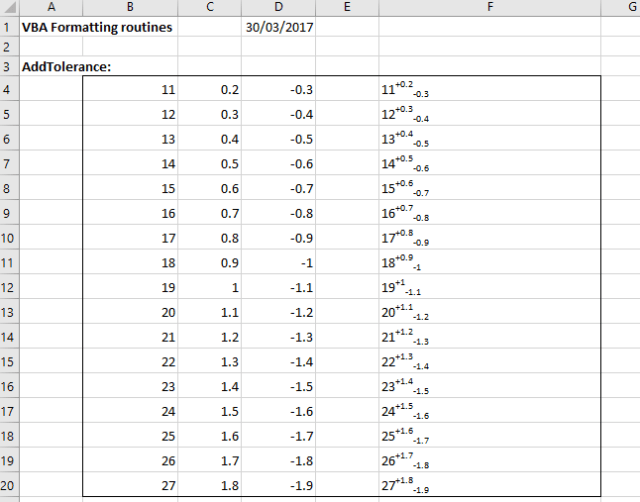 The data consists of three adjacent columns: values and upper and lower tolerances. To run the macro either select just the input data range, or extend the range to the right, then press Alt-F8 and select AddTolerance. The output results will either be written to the column to the right of the input data, or if a wider range was selected, in the last column of the selected range, as shown above.
As another example, I have written a macro to convert text strings with exponents in “^x” format to superscript format, as shown below:

Sub FormatExp()
' Convert ^x to superscript format
'Output to the column to the right of the input range, or to the last column of selected range if NumCols > 2
    Dim sVal As String, sMax As String, sMin As String
    Dim p1 As Long, p2 As Long, NumRows As Long, NumCols As Long, i As Long, NewString As String
    Dim RowVals As Range, j As Long, k As Long, k2 As Long, m As Long, Sup As Boolean, str As String, NumE As Long, EPosA() As Long, StrLen As Long

    With Selection
        NumRows = .Rows.Count
        NumCols = .Columns.Count
        If NumCols = 1 Then NumCols = 2

        For i = 1 To NumRows
            Set RowVals = .Cells.Offset(i - 1, 0).Resize(1, NumCols)

            sVal = RowVals(1, 1).Value           'The value
            StrLen = Len(sVal)
            ' Count number of ^ characters
            NumE = 0
            For j = 1 To StrLen
                If Mid(sVal, j, 1) = "^" Then NumE = NumE + 1
            Next j
            If NumE = 0 Then
                RowVals(1, NumCols).Value = sVal
            Else
            ' find positions of ^ characters and length of exponent value
                ReDim EPosA(1 To NumE, 1 To 2)
                m = 0
                For j = 1 To StrLen
                    If Mid(sVal, j, 1) = "^" Then
                        m = m + 1
                        EPosA(m, 1) = j
                        k = InStr(j, sVal, " ") - 1
                        k2 = InStr(j, sVal, ")") - 1
                        If k2 > 0 Then
                            If k < 1 Or k2 < k Then k = k2
                        End If
                        If k < 1 Then k = Len(sVal)
                        EPosA(m, 2) = k - j
                    End If
                Next j
            ' Remove ^ characters
                NewString = ""
                For j = 1 To NumE
                    If j = 1 Then m = 1 Else m = EPosA(j - 1, 1) + 1
                    NewString = NewString & Mid(sVal, m, EPosA(j, 1) - m)
                Next j
                NewString = NewString & Right(sVal, EPosA(NumE, 2))
            ' Convert exponents to superscript format
                With RowVals(1, NumCols)
                    .Value = NewString
                    For j = 1 To NumE
                        m = EPosA(j, 1) + 1 - j
                        .Characters(Start:=m, Length:=EPosA(j, 2)).Font.Superscript = True
                    Next j
           End With

            End If
        Next i

      End With
    End Sub


 Newton Excel Bach, not (just) an Excel Blog