The meaning of = in Python

In VBA, if you have an array named a and a variant named b, then the statement “b = a” creates a new array b with the same size and values as a.  If the values of either a or b are subsequently changed, the values of the other remain unchanged.

In Python it doesn’t work that way.  All variables are objects and “b=a” indicates that the object named a is now also named b.  The result is that b not only has the same values as a, it is the same in every other respect.  If the values of either a or b are changed, the values of the other are also changed.  This behaviour can cause problems for the unwary, and also sometimes it is necessary to create a new object with the same values as the original, but not otherwise connected.  Python provides ways of doing this, but the detailed workings are not always obvious, behaviour varies depending on the type of the object, and different ways of achieving the same end can have huge differences in performance.  This post therefore looks at the various options for making independent copies of different objects, focussing on Python lists and Numpy arrays.

Suppose we create a list with name ‘a’:
>>>  a = [1,2,3]
We can then give that list another name, ‘b’:
>>>  b = a
We can check that the two names indeed refer to the same object:
>>> b is a
True
Then any operation we perform on a also affects b, and vice versa:
>>> a[2] = 4
>>> b.append(5)
>>> a
[1,2,4,5]
>>> b
[1,2,4,5]

However, if we assign a new list to one, the other remains unchanged:
>>> a = [4,5,6]
>>> a
[4,5,6]
>>> b
[1,2,4,5]
>>> b is a
False

Methods that can be used to create a new copy of a list include:

  •  Create a new list of the same size, then loop through list ‘a’ and assign the value of each element to list ‘b’.
  • Use the copy or deepcopy functions (see below for differences between the two)
  •  Create a Numpy array with the values in the list, then convert that array back to a list
  •  For a list of lists, create a new list of the same size and shape, then loop through list ‘a’ and copy the value of each sub-list to list ‘b’.

To use the copy or deepcopy functions we must first import the copy module, then:
>>> a = [1,2,3]
>>> b = copy.copy(a)
>>> b
[1,2,3]
>>> b is a
False

Copy may also be used on a list of lists, but comes with a catch:
>>> a = [[1,2,3],[4,5,6]]
>>> b = copy.copy(a)
>>> b is a
False
>>> b[0] is a[0]
True

So copy creates a new object for the top level list, but each sub-list refers to the same object as in ‘a’.  We could loop through b and create a new copy of each sub-list, or use the deepcopy function:
>>> b = copy.deepcopy(a)
>>> b[0] is a[0]
False

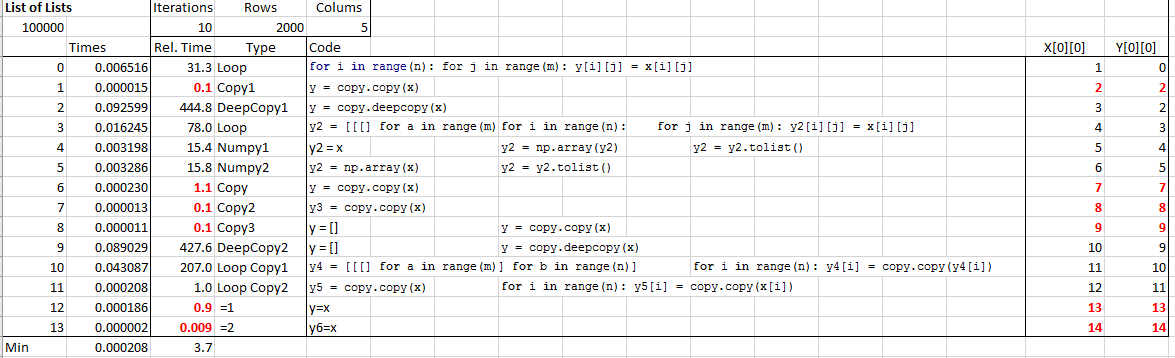
To check how these alternatives work in practice I have set up an Excel function to perform the copy operations on a large array, and return times, data types, and values from both arrays when a value in one is changed.

The screenshot below shows results for 13 different methods of copying a list  of lists (click on the image for full-size view).  Note that for the results  shown in red the process has created an alias, rather than a new copy.
pycopy1-1

Of the results that do create a new copy of all elements of the original list, method 11 is by far the quickest, using copy to create a new array, then using copy again on each sub-list.  The deepcopy function is convenient, but is very much slower.

For Numpy arrays the operation a=b works the same as for lists; b refers to the same array as a.  On the other hand the copy and deepcopy functions both create a full new array.  There is also a Numpy copy function and a copyto function, and several other ways to copy to a new array, as shown below:

pycopy1-2

There was much less variation in the times of the different options (other than looping through the array, and assigning item by item), but the simple operation:
y = np.array(x)
was consistently the fastest.

Posted in Arrays, Excel, Link to Python, NumPy and SciPy, UDFs, VBA | Tagged , , , , , , , , , | 4 Comments

ConBeamU 4.13

The continuous beam analysis spreadsheet, ConBeamU, is now up to version 4.13 with some minor bug-fixes, and the addition of a non-linear option for the BeamAct functions.

See ConBeamU for more details of the functions available in the spreadsheet.

Download the latest version from ConBeamU.zip.

The BeamAct2D and BeamAct3D user defined functions (UDFs) return beam actions and deflections for any beam subject to specified loads and end deflections.  The beam may have any number of segments with different section properties, and may be specified in either global or local coordinate systems.  The new non-linear option allows non-linear geometric effects to be taken into account.

Most of the function input is unchanged from previous versions:

conbeamu6-1

The optional non-linear arguments specify if a non-linear analysis is required, the target relative error in maximum deflection, and the maximum number of iterations.  The support stiffness (translational and rotational) may also be supplied.  The default is fixed at both ends for both translation and rotation:

conbeamu6-2

The output is before, with output at any number of specified locations:

conbeamu6-3

Results are shown below for a 3D analysis of a 10 m long beam under combined axial and transverse load.  The blue and green lines are the results ignoring geometric non-linear effects, and the grey and red are the output from both the spreadsheet and a non-linear analysis in Strand7, with the beam divided into 16 segments:

conbeamu6-4

Due to differing approximations in the two programs there are small differences in the shear results:

conbeamu6-5

Bending moments are in good agreement.

conbeamu6-7

The 2D function gives similar results:

conbeamu6-8Note that these functions are still under development.  All results must be independently verified using other software.

Posted in Beam Bending, Excel, Frame Analysis, Newton, UDFs, VBA | Tagged , , , , , , | 7 Comments

February Links

Two new links with valuable free resources:

.net and office automation follies : including many advanced VBA resources.  Thanks to Alfred Vachris for the link.

AET VBE Tools : Tools for the Visual Basic editor from Andrew Engwirda (via Daily Dose of Excel).

Posted in Excel, Link to dll, VBA | Tagged , , , | Leave a comment

ACO, Pekka Kuusisto, Sam Amidon, Pentangle and Wedding Dress

Murder and Redemption, the current ACO concert series, led by guest musical director Pekka Kuusisto and folk musician Sam Amidon, combines American and British folk songs with the works of Janáček and John Adams.

Here Pekka Kuusisto talks of performing the traditional song Wedding Dress:

and Sam Amidon performs it (from a previous concert, without ACO):

and finally a much earlier recording, from Pentangle in 1972, recorded for French TV:

Posted in Bach | Tagged , , , , , | Leave a comment

Christy Moore sings Beeswing

Back in 2011 I posted a link to Richard Thompson’s song Beeswing, sung by The Little Unsaid.   That post still brings a trickle of visitors to his site, which led me to this version by Christy Moore:

and Christy Moore’s version of the lyrics:

Beeswing

Richard Thompson
I was 18 when I came to town they called it the summer of love
Burning babies burning flags the hawks against the doves
I took a job at the steaming way down on Caltrim St,
Fell in love with a laundry girl that was workin next to me.

Brown hair zig zagged across her face and a look of half surprise,
Like a fox caught in the headlights there was animal in her eyes,
She said to me can’t you see I’m not the factory kind,
If you don’t take me out of here I’ll surely lose my mind

Chorus:
She was a rare thing fine as a bee’s wing
So fine a breath of wind might blow her away
She was a lost child, she was runnin’ wild (she said)
So long as theres no price on love I’ll stay
You wouldn’t want me any other way.

We busked around the market towns fruit pickin down in kent
We could tinker pots and pans or knives wherever we went.
We were campin down the Gower one time, the work was mighty good.
She wouldn’t wait for the harvest, I thought we should.

I said to her we’ll settle down, get a few acres dug,
A fire burning in the hearth and babbies on the rug.
She said Oh man you foolish man that surely sounds like hell,
You might be lord of half the world,You’ll not own me as well

Chorus

We were drinking more in those days our tempers reached a pitch
Like a fool I let her run away when she took the rambling itch.
Last I heard she was living rough back on the Derby beat
A bottle of White Horse in her pocket, a Wolfhound at her feet

They say that she got married once to a man called Romany Brown
Even a gypsy caravan was too much like settlin’ down
They say her rose has faded, rough weather and hard booze,
Maybe thats the price you pay for the chains that you refuse

She was a rare thing, fine as a bee’s wing
I miss her more than ever words can say
If I could just taste all of her wildness now
If I could hold her in my arms today…..
I wouldn’t want her any other way

Followed by this comment (which I thought was a pretty good answer to the incessant YouTube arguments about whose version of any song is the best):

It is never easy writing these words out. First there is the problem of the lyric as written. Invariably I need to turn these songs into my own dialect, into the english as I sing it. Sometimes I am unable to resist slipping back into the writers idiom when seduced by the beauty of the sound of a particular word. Then there is the bloody grammar and punctuation which can get in the way of writng a song as she should be sung (as distinct from the way Fr. Clandillon would have me write it!)

This song is, for me, a modern classic in the old style. Up there with Musgrave and Baker, Raggle and Yellow Bittern, it will survive the ages that are left and will shine brightly when us lads are long forgotton.

Its a beauty to sing, it is usually good but every now and then a version emerges that stills my night and leaves me totally satisfied at the last chord not caring about audience or next song or The Gig or anything, just to bathe in the luxury of a beautiful song shared and sung to a receptive kipful of listeners.

Posted in Bach | Tagged , , | Leave a comment