I have just signed up for the Excel Summit South.
Anyone wanting a 20% discount has until Thursday 31st December.


I have just signed up for the Excel Summit South.
Anyone wanting a 20% discount has until Thursday 31st December.
My post from last week, on using the Aggregate function to find the maximum and minimum of a range ignoring errors, was linked in the Contextures Blog’s weekly roundup, which also linked to the Contextures page of Sum Function examples. This includes sub-totals, grand-totals, Offsets, Sumifs, Sumproducts, and much more. It’s a comprehensive list, including clear examples and videos, and well worth a visit.
Another excellent UK musician I had never heard of, and judging by the number of YouTube hits, neither have you:
Someone comments that John Martyn comes to mind, so maybe this duo is not so surprising:
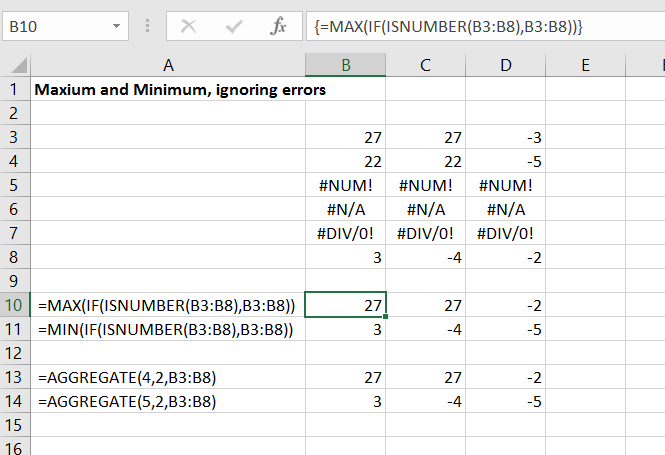
Recently I needed to find the maximum and minimum of a range of values including some #N/A values. Searching found a variety of solutions, of which the simplest (that works in all versions) seems to be:
The function must be entered as an array function, i.e. type the function, then press Ctrl-Shift-Enter, rather than just Enter. The screenshot below shows a simple example:
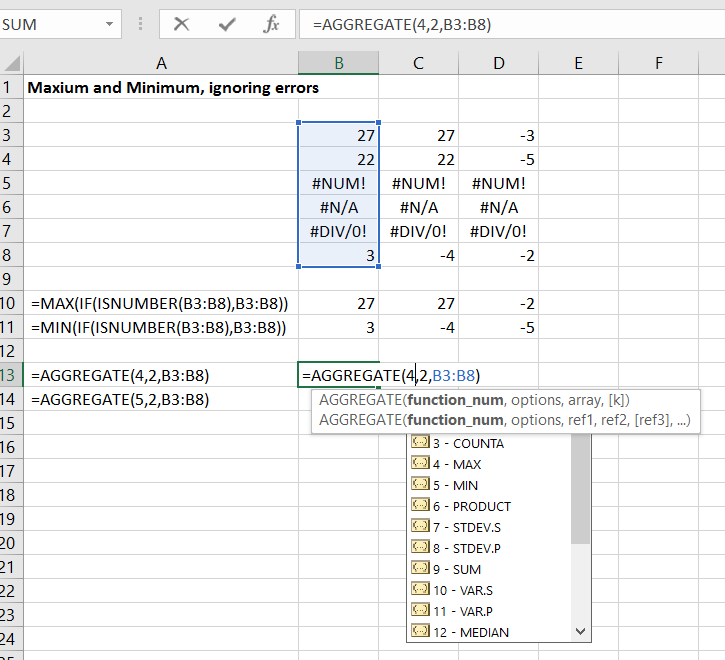
The search also found the Aggregate function, which is new in Excel 2010, and provides a number of options for ignoring sub-totals as well as errors. The Aggregate function will return a number of different statistical functions, as well as Max and Min. These are documented with a tool=tip as the function is entered, as shown in the screen-shot below:


 Newton Excel Bach, not (just) an Excel Blog