Text files generated on Unix systems have a different convention to denote the ends of lines to that used on Dos/Windows systems (see Newline for more details). This was causing problems with the Text-in2 spreadsheet, with small files being imported with all text on one line, and large files causing overflow errors. I have now added an option to convert Unix line endings to the Windows format, allowing these files to be imported successfully. The new spreadsheet (including full open-source code) can be downloaded from:
Code for this routine is quite brief:
Sub ConvertUnix(FName As String, SName As String, FileSaved As Boolean)
    Dim WholeLine As String

    If SName = "" Then SName = FName
    Close #1
    Open FName For Input Access Read As #1

    Line Input #1, WholeLine
    If EOF(1) Then
        WholeLine = Replace(WholeLine, vbLf, vbCrLf)
        Close #1
        Open SName For Output Access Write As #1
        Print #1, WholeLine
        Close #1
        FileSaved = True
    Else
        FileSaved = False
    End If
End Sub
The routine reads the first line of the input file. If this line includes the End of File (EOF) marker, this indicates that the file was in Unix format, and the VBA Replace function is used to replace all occurrences of the Line Feed character (vbLf) with Carriage Return/ Line Feed (vbCrLf). The file is then saved back to disk, either over-writing the original file, or optionally writing to a new file.
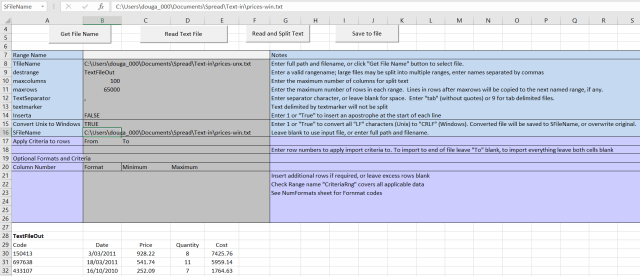
Use of the new option is shown in the screen-shot below:
Click for full size view
Note that “Convert Unix to Windows” has been set to True (Cell B15), and a different file name has been entered for the converted file (Cell B16).
Other features of the spreadsheet are illustrated in the following screen-shots.
Criteria for import of text may be specified for a range of lines, or for the whole file. In the screen-shot below only lines with values greater than 990 in column 3 are imported, starting from line 2 (so that the headings in line 1 are imported):

The ReadText Function returns text from the named file, with the added option to read specific line numbers, as illustrated below:

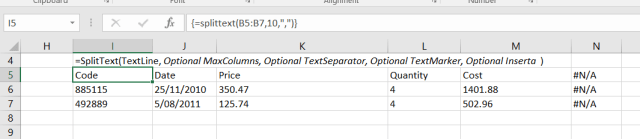
The SplitText function splits text into columns (at the specified separator):
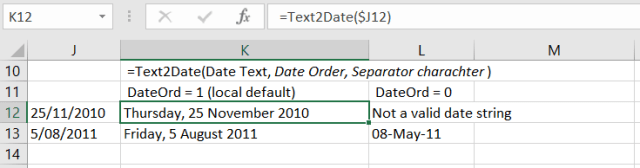
The Text2Date function converts a date in text format into an Excel date value. In the case of ambiguous dates, interpretation may be based on the local order (default), or mm/dd/yy (Date Order = 0):
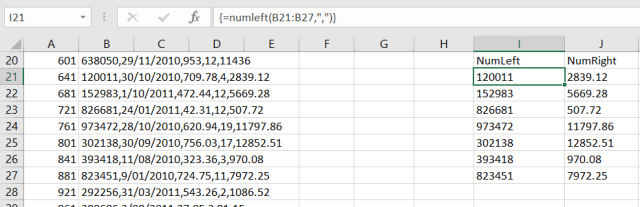
The NumLeft and NumRight functions extract the first number from either the left or right hand end of a text string:
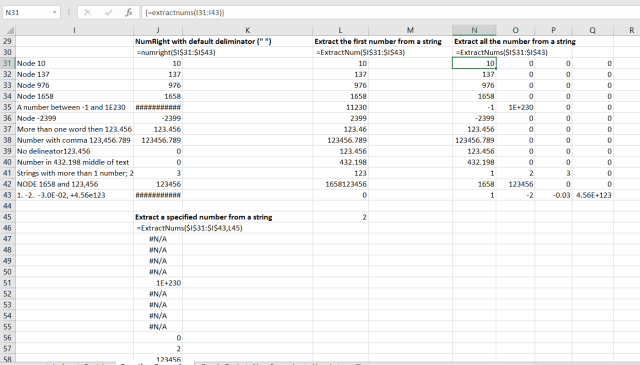
The ExtractNum and ExtractNums functions extract one or more numbers from anywhere in a text string, or range of strings:
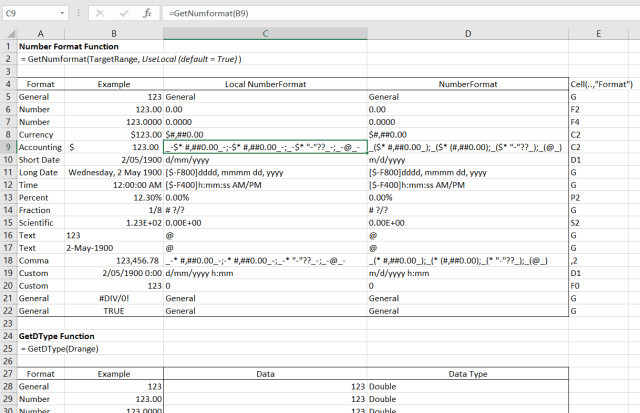
The GetNumFormat and GetDType functions return the number format string and the data type of the contents of a cell or a range:
For more details see:
Importing text files with VBA – 2
Importing text files with VBA – 3
Importing tab delimited files and clearing large ranges
Combining text files
Importing selected rows from a text file
Extracting numbers from text strings
Extracting numbers with regular expressions
Dealing with dates 3: opening and saving csv files without data corruption



 Newton Excel Bach, not (just) an Excel Blog