This post will look at options for transferring arrays between Excel and Python using Pyxll, including data types, and problems associated with transferring mixed data types. In the following post I will look at the relative performance of the various options when used with a large range, which shows some big differences.
The sample data ranges used are shown below:

Range_1 includes numbers (in different display formats), text (including numbers in text format), blank cells, and a variety of error constants. Cell D5 contains a text string showing the value of pi to 17 significant figures. Range_2 includes just numbers and blank cells, and Range_3 just numbers with no blanks. Range_4 and Range_5 are a single row and column for use with the Pyxll numpy_row and numpy_column data types.
The first 6 examples illustrate the use of Python User Defined Functions (UDFs) in Excel, using the Pyxll @xl_func decorator. Typical code is shown below:
@xl_func("var InRange,  int Out: var")
def py_GetTypes1(InRange, Out):
    numrows = len(InRange)
    numcols = len(InRange[0])

    if Out == 1:
        # Create Numpy text array and read data types for each cell in InRange
        outa = np.zeros((numrows, numcols), dtype='|S20')
        for i in range(0, numrows):
            for j in range(0, numcols):
                outa[i,j] = type(InRange[i][j])
        return outa
    elif Out == 2:
        # Return size of InRange
        outa = np.zeros((1,2))
        outa[0,0] = numrows
        outa[0,1] = numcols
        return outa
    elif Out == 3:
        # Sum rows in InRange
        rowsum = sumrows1(InRange)
        return rowsum
    elif Out == 4:
        # Sum rows using Numba jit compiler
        fastsum = autojit(sumrows1)
        rowsum = fastsum(InRange)
        return rowsum
    else:
        # Return InRange
        return InRange
The @xl_func decorator specifies the data type for the input function arguments, and the return values, which may be a single cell value or a range or array in both cases.
The most versatile of the data types is “var”, which is similar to a VBA variant object:
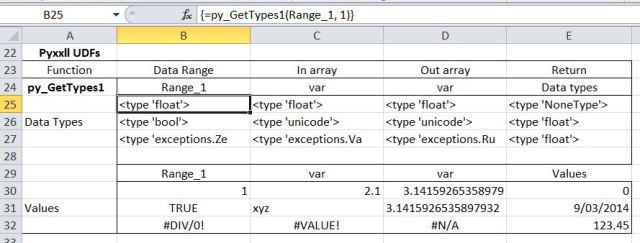
Using Range_1 we see that all cells with numeric values are passed as ‘float’, including date and currency values. Blank cells are passed as ‘NoneType’, Boolean as ‘bool’, and text as ‘unicode’ (in Excel 2007 and later). The error constants are passed as various types of ‘exception’. The text string version of pi is returned as text, including all 17 significant figures. This string will be recognised as a numerical value by Excel, but the additional significant figures will be lost. Pi()-D31 will return exactly zero for instance.
Note that the blank cell is returned as a value of zero.
Use of var[] for input produces exactly the same results as var:
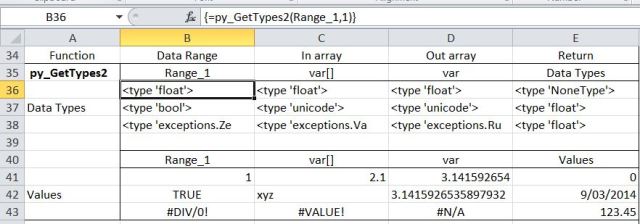
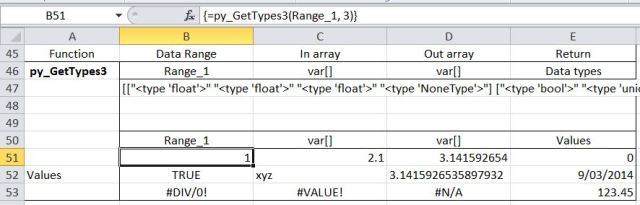
However, if the numpy array of data types is returned as var[], this is returned as a single text string:
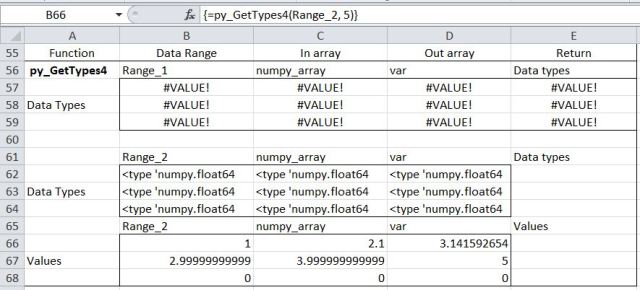
When Range_1 is passed as numpy_array, this produces an error, because all the values are expected to be numeric or blank. With Range_2 all the values (including the blank cells) are passed as ‘numpy.float64’. Note that the blank cells are returned as a value of zero:
Using the numpy_row and numpy_column data types values (which must be numbers or blank) are passed as ‘numpy.float64’, creating a 1D numpy array. If this array is returned to Excel using the var data type the result is an error because a var is expected to be either a single value or a 2D array (or list of lists). The 1D array produced by numpy_row or numpy_column may be returned as either a row or column, allowing data to be transposed (see last example below):
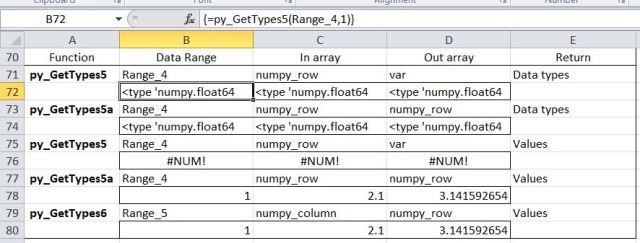
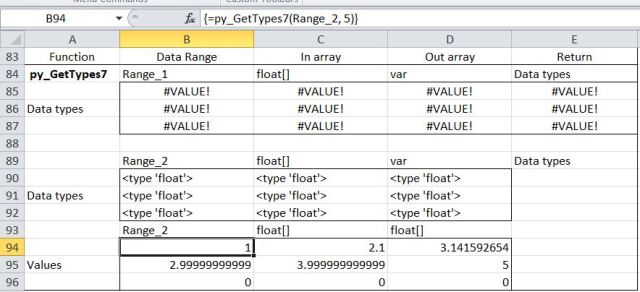
If the data is all numeric or blank, it may be passed as an array of floats using float[]. Note that, as with the numpy_array type, attempting to pass non-numeric data results in an error. Both numbers and blank cells are passed as ‘float’, and blanks are returned as a value of zero:
The remaining examples illustrate the use of the xl.Range object inside Python to read data from the spreadsheet using COM. This must be initiated using the following code:
from pyxll import xl_menu, get_active_object

def xl_app():
    """returns a Dispatch object for the current Excel instance"""
    # get the Excel application object from PyXLL and wrap it
    xl_window = get_active_object()
    xl_app = win32com.client.Dispatch(xl_window).Application

    # it's helpful to make sure the gen_py wrapper has been created
    # as otherwise things like constants and event handlers won't work.
    win32com.client.gencache.EnsureDispatch(xl_app)

    return xl_app

xl = xl_app()
Functions may then be written entirely within Python to read and write from/to range addresses, or named ranges, or as in these examples, I have written short VBA routines to pass range names to the Python code. A typical example is:
Sub py_GetTypeSub1()
Dim RtnA As Variant, Func As String, InRange As String, OutRange As String, Out As Long, TRange As String

' Read range names and Out index value from the spreadsheet
Func = Range("Func").Value
InRange = Range("In_Range").Value
OutRange = Range("Out_Range").Value
Out = Range("Out").Value
TRange = Range("trange").Value

' The python function 'Func' will read data from InRange, and write to OutRange
RtnA = Application.Run(Func, InRange, OutRange, Out)

' If Out = 4 the Python function will return execution time data, which is written to TRange
If Out = 4 Then Range(TRange).Value2 = RtnA
End Sub
The data in a named Excel range ‘InRangetxt’ may be read into a Python list of lists with the code:
@xl_func("string InRangetxt, string OutRange, int Out: var")
def py_GetTypes8(InRangetxt, OutRange, Out):
    InRange = xl.Range(InRangetxt).Value
Note that in this case the VBA function passes just a string with the range name.
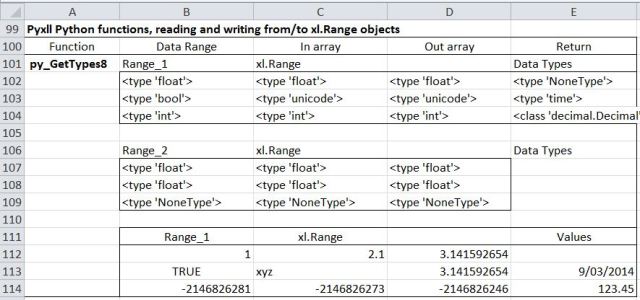
The results are similar to using the Pyxll ‘var’ object, except that:
- Error constants are read as type ‘int’ and written to the spreadsheet as negative integers
- Blanks are read as ‘NoneType” but are written back as blanks, rather than zero
- All strings are read as ‘unicode’, but strings looking like numbers are written back as numbers, truncated to 15 significant figures
- Numbers formatted as date or currency are read as ‘time’ and ‘decimal.Decimal’ respectively.
Range data may be read into a numpy array using:
@xl_func("string InRangetxt, string OutRange, int Out: var")<
def py_GetTypes9(InRangetxt, OutRange, Out):
    InRange = np.array(xl.Range(InRangetxt).Value)
In this case the array data types are automatically coerced into the appropriate data type, with the same results as reading to a Python list of lists:
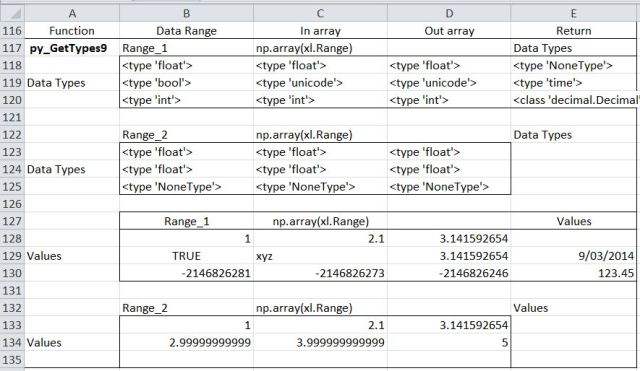
The data type for the Numpy array may be specified using:
@xl_func("string InRangetxt, string OutRange, int Out: var")
def py_GetTypes10(InRangetxt, OutRange, Out):
    InRange = np.array(xl.Range(InRangetxt).Value, dtype=np.float64)
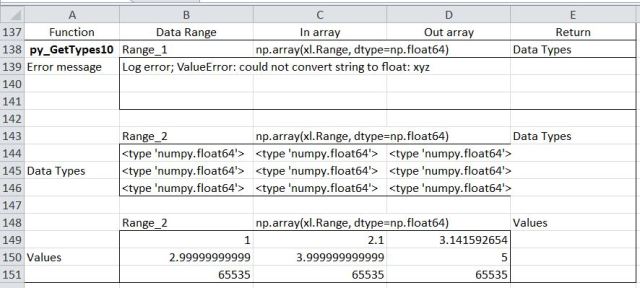
In this case Range_1 will generate an error because it contains non-numeric data.
Range_2 is read as ‘numpy.float64’ for all cells, including the blanks, but the blank cells are written back as integers, 65535:
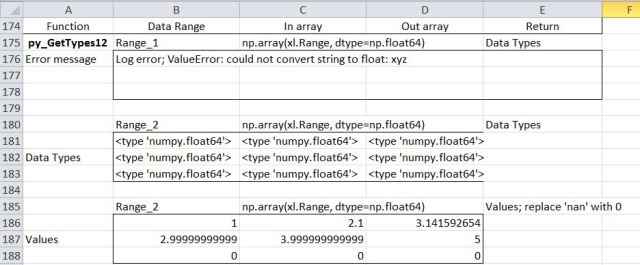
Data that may contain blanks can be checked using the numpy ‘isnan’ property:
        for i in range(0, numrows):
            for j in range(0, numcols):
                if np.isnan(InRange[i,j]):
                    InRange[i,j] = 0
The data may be read into a numpy string array using:
@xl_func("string InRangetxt, string OutRange, int Out: var")
def py_GetTypes11(InRangetxt, OutRange, Out):
    InRange = np.array(xl.Range(InRangetxt).Value, dtype='|S24')
In this case the data from Range_1 is read as a string in all cases. Note that:
- The value of pi is read into a string, but is written back as a value truncated to 12 significant figures
- The 17 significant figure text string is read as a string, but written back as a value truncated to 15 significant figures
- The blank cell and error constants are read as strings, but written back as ‘None’ and ‘-2146826281’ respectively
In the case of Range_2 all the values are read as ‘float’ or ‘NoneType’, and written back as values truncated to 12 significant figures or ‘None’


