More from Renbourn and Friends

For all its faults, Youtube does have some extraordinary material, such as this Danish documentary on the music scene in London’s Soho in 1967.

It starts with a very atypical 30’s style duet from Martin Carthy and Dave Swarbrick, followed by commentary in Danish up to about 3:35, then:

  •  Live performances from not Davy Graham, but Marc Sullivan, but certainly showing Davy Graham influence, and Wizz Jones (possibly)
  • Some shots of Carnaby Street, backed by Beatles
  • Back to the folk club for John Renbourn
  • A street interview (in English)
  • Bert Jansch and John Renbourn jamming in their shared flat, while an unknown friend sits in the background, doing a crossword!
  • An interview with a painfully shy Bert Jansch
  • Finishing up with some (much more typical) jigs and reels from Carthy and Swarbrick

Martin Carthy and Dave Swarbrick still play together, the clip below being from a UK folk festival in 2009  (10 years after Swarbrick’s premature obituary in the UK Daily Telegraph!):

Posted in Bach | Tagged , , , , , | 2 Comments

John Renbourn

John Renbourn has had the occasional mention here for his work with Bert Jansch and The Pentangle, but to my mind he is really at his best when playing solo, so here is a collection of Youtube clips which exemplify his unique style:

And a more recent live performance:

John Renbourn site (biography, gig guide and more)

Posted in Bach | Tagged | Leave a comment

Using Index() as an array function

As promised, this post looks at using the Excel built in Index() function to operate on arrays; it also provides a VBA user defined function (UDF), VBIndex, which simplifies working with arrays within VBA, and also provides improved functionality when called from the spreadsheet.   A spreadsheet with full open-source code and the examples given below can be downloaded from:  VBIndex.

The Excel Index function returns the value of a single cell when provided with a row number and a column number.  If either the row or the column numbers are omitted then the function will return the full column or row respectively.  The screenshot below shows Index used to return the 4th row and the 3rd column of the sample data (see Useful Gayaan for more examples):

Using Index() to return an array

Using Index() to return an array

Note that the function must be entered as an array function to return all the data; see Using Array Formulas for details.

As well as a single value or omitted (or 0), the Index function will accept an array to define both the rows or columns to be returned.  The array may be a spreadsheet range (either a single row or column), or a list of values surrounded by {}.
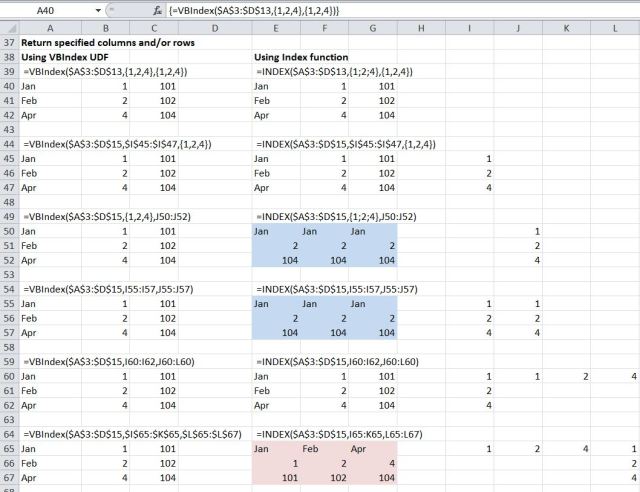
Returning specified rows or columns with Index() and VBIndex()

Returning specified rows or columns with Index() and VBIndex()

The screenshot above shows the use of the UDF VBIndex() and the built-in Index() function. Note that when using the Index() function the list of rows must be entered as a column array (either a single column range, or values separated by a semi-colon), and the list of columns must be entered as a row array (either a single row range, or values separated by a comma). If this is not done correctly the returned array will not be the required values, as shown shaded in blue and pink.
To simplify the input, and also to simplify the use of the function from within VBA routines, I have written the UDF VBIndex, which will accept either a row or column array (or range) to specify both rows or columns. Examples are shown returning the 1st, 2nd, and 4th rows and columns with a variety of different forms of input.

Posted in Arrays, Excel, UDFs, VBA | Tagged , , , , , | 3 Comments

Two new blogs

Two new Excel/computer related blogs that I have found recently are:

Useful Gyaan (Sharing Stuff to Make life @ work easier)

and

MS EXCEL UNPLUGGED (which looks like a good resource on using pivot tables)

In the near future I will be having a closer look at:
VBA Trick of the Week :: Slicing an Array Without Loop – Application.Index
from Useful Gyaan.

Posted in Arrays, Excel, VBA | Tagged , , , | Leave a comment

Writing an array function from VBA

I have covered the topic of writing VBA arrays to a spreadsheet range quite frequently here.  As a reminder, the procedure is:

ReDim myarray(1 To NumArrayRows, 1 To NumArrayColumns)
' Fill array
With Range("MyNamedRange")
.ClearContents
.Resize(NumArrayRows, NumArrayColumns).Name = "MyNamedRange"
End With
Range("MyNamedRange").Value2 = myarray

But what if you want to write an array function to the spreadsheet from VBA?  The procedure for that is also quite simple, as shown in the example below:
Range("LCRes").ClearContents
Range("LCRes").Resize(NumRows, 4).Name = "LCRes"
Range("LCRes").FormulaArray = "=getlcres(LC_1Res,LC_2Res,stofile,PlotLC,Env_LF)"

This example writes a User Defined Function (UDF) called “GetLCres” to the named range “LCRes”, having first cleared the range, then resized it to Numrows rows x 4 columns.

The arguments of GetLCRes are all named spreadsheet ranges, but could be numerical values or cell addresses (although using cell addresses in VBA code is usually not a good idea).  The example uses a UDF, but the same technique will work with built-in functions, or any valid spreadsheet array formula.

Posted in Arrays, Excel, UDFs, VBA | Tagged , , , | 1 Comment