Using RC Design Functions – 3

In the previous post in this series I looked at the results available from the EStress function in the RC Design Functions spreadsheet.  Three associated functions are:

  • EstressCap
  • PLCurve
  • TStiff

EStressCap finds the maximum bending moment for a specified axial load, either using the stress limits specified in AS 3600 or AS 5100, or an input stress limit.

EStressCap Output

EStressCap Output

The function input is similar to the EStress function:

EstressCap(input range, axial load, output column index, output row index, Allowstress, MSign, prestress, code, depth)
Function arguments in italics are optional

If the optional AllowStress argument is omitted the stress limit specified in AS 3600 is used if Code = 1 or is omitted, or the lower stress specified in AS 5100 for dead load only if Code = 2.  If AllowStress   > 0 then this value is used as the stress limit, and the Code value is ignored.

The other two functions are alternative methods of evaluating the tension stiffening effect. PLCurve uses a fictitious pre-compression strain applied to the reinforcement to model the effect of concrete shrinkage and creep strains, and the Eurocode 2 provisions for tension stiffening.  TStiff uses a concrete tensile stress block to model the effect of tension stiffening; see Tension Stiffening for more details.

RCdesign5c-2

PLCurve and TStiff output

PLCurve either requires creep and shrinkage data (to AS 3600 or Eurocode 2) to be input, or the fictitious prestress may be input directly.

TStiff requires details of the tensile stress block, or default values may be used.  See Tension Stiffening for details.

Additional input for PLCurve and TStiff

Posted in Beam Bending, Concrete, Excel, Newton, UDFs, VBA | Tagged , , , , , , , , | 1 Comment

Bridge Design, Beyond the Basics …

… is the name of a series of full-day seminars that I will be presenting around Australia (together with two other bridge engineers), for the Concrete Institute of Australia, starting in Sydney next Wednesday, 12th June.

Click below for details:

Amongst the additional benefits to attendees are a 30% discount on the purchase price of the Strand7 API, and a free full working copy of my Strand7 API tools spreadsheet, allowing direct 2-way communication between Excel and Strand7 (normally only available to active clients). See the link above for full details.

Posted in Arch structures, Concrete, Newton | Tagged , , , , | Leave a comment

Recently discovered (and rediscovered) links

Math ∩ Programming

– A place for elegant solutions (another Alfred Vachris link)

About the Author

My name is Jeremy Kun. I’m currently a mathematics PhD student at the University of Illinois in Chicago, and I did my undergraduate at Cal Poly San Luis Obispo in mathematics and computer science. I have a thorough background in computer science, but my most exciting experiences there always stemmed from elegant (and uncoincidentally mathematical) solutions to programming problems. This blog is a presentation of the interesting solutions I come across, and an exploration of the deeper mathematical ideas therein. Most often this means exploring the mathematical structure of a problem to lubricate the cogs of algorithm design. In seldom cases, this involves using programs to reason about mathematical theory.

Two new engineering sites:

DesignToEurocodes.com:  Forums, software and articles related to the use of Eurocodes, including concrete, steel, masonry, timber and seismic design.

Simple Supports – Started Feb 2013, articles on the science, maths, and practice of structural engineering.

Brian Potter works as a structural engineer, making sure buildings don’t fall down. He writes here about engineering, sometimes in the third person.

The BBC series on Climbing Great Buildings led me to:

  • Maths in the City and
  • The dome of St Paul’s Cathedral, London which led to:
  • The Arch Never Sleeps
  • It has been said that arches never sleep, that they are almost living in the way they adapt to change.  Using case studies of Ely Cathedral in England and Chartres in France, the tracks on this album examine the way in which the design of arches developed in the early middle ages, and use mathematical models to explore some of  the problems faced and overcome by the stone masons. This material makes up part of the course MST209, Mathematical methods and models.

And finally two blogs on The Universe and Everything that I linked to in 2011, then promptly forgot about:

Cosmic Horizons

My personal take on what’s going on within our Event Horizon. Mostly astronomical, often cosmological, usually quite grumpy.

In the Dark

A blog about the Universe, and all that surrounds it

Posted in Arch structures, Dome Structures, Newton | Tagged , , , , , , | Leave a comment

Using Goal Seek on a multi-column range

Following a comment requesting help using my Goal Seek spreadsheet I have modified the macro to allow it to operate on a multi-column range.  The spreadsheet can be downloaded from GSeek.zip, including the solution to the problem described below.

The problem is to find the values of H such that Z = 1/(sqrt(H^2 + (A-x)^2 + (A-y)^2) for values of x and y between -10 and 10.

The stages to solve the problem are:

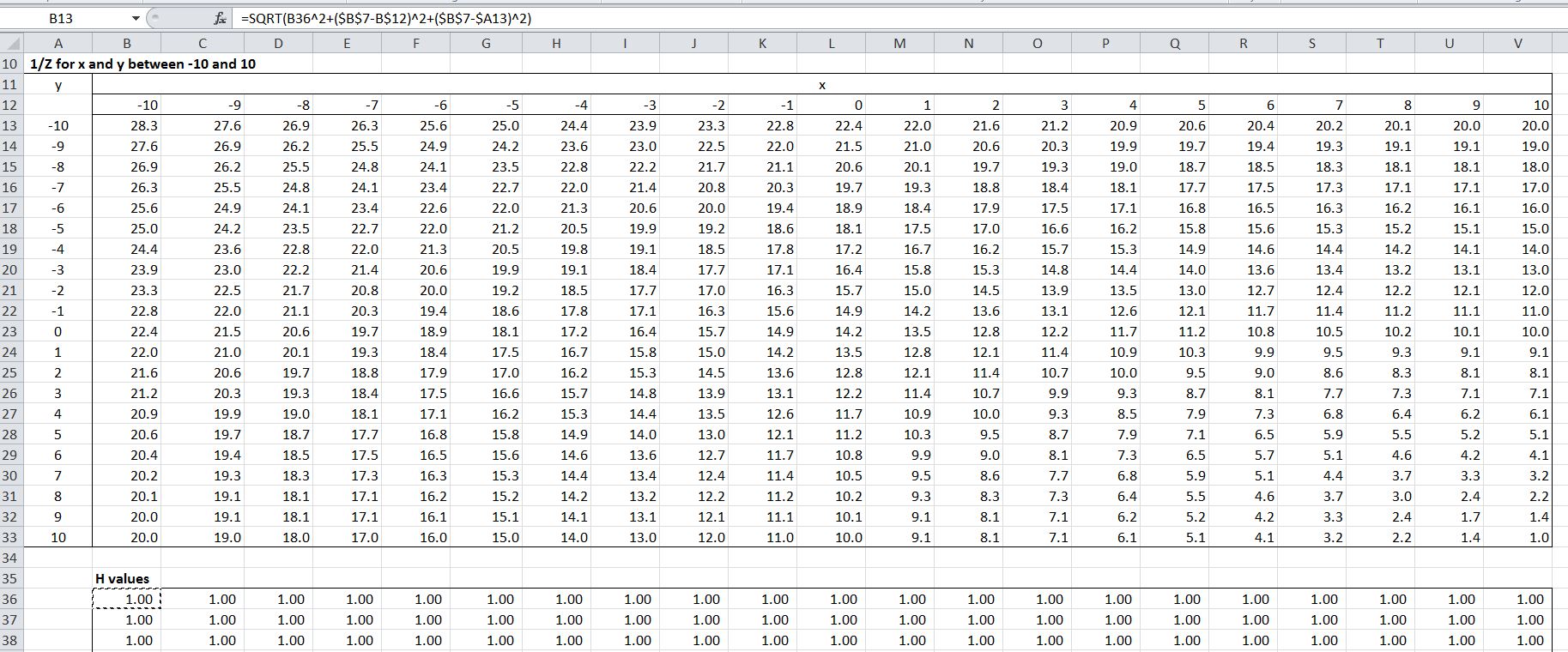
Set up a 21 x 21 table with copies of the formula reading x values from the row above the table, y values from the column to the left, and H values from a 21 x 21 range below:

Click for full-size view

Click for full-size view

The formula is entered in cell B13 as =SQRT(B36^2+($B$7-B$12)^2+($B$7-$A13)^2)
note the use of $ signs to specify x values in row 12 (B$12) and y values in column A ($A13).  The formula is then copied to the range B13:V33.  The Z values will be written to the range B36:V56, and this range must be filled with a starting value for Goal Seek.

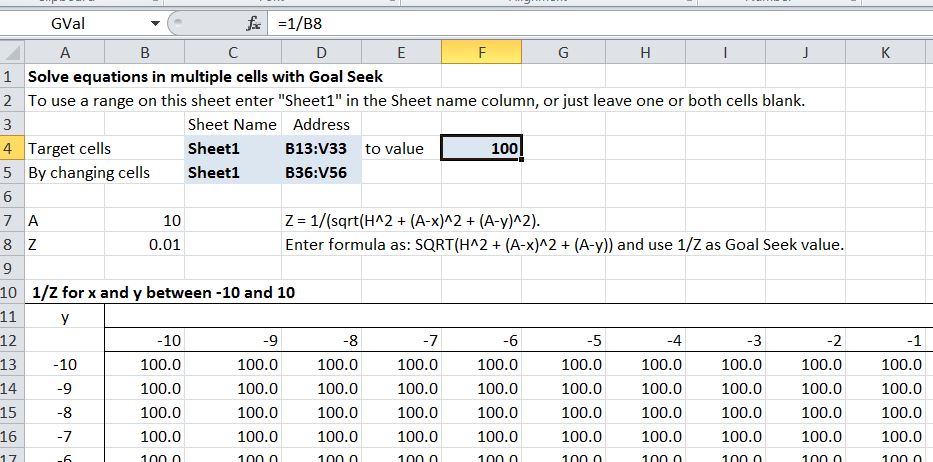
The ranges for the target cells and “by changing” cells, and the target value are then entered in the grey shaded cells.  Note that I have entered the target as 1/Z, and modified the formula accordingly.  This gives better precision in the results, because the target is a larger number (and also makes the formulas a little simpler).

Gseek3-2b

After entering the data and ranges press Alt-F8 and run the GSeekA macro.  The range B13:V33 should show the target value (100.0) and the range B36:V66 will contain the Z values found by Goal Seek:

Click for full size view

Click for full size view

Posted in Excel, VBA | Tagged , , , | Leave a comment

Using RC Design Functions – 2

In the previous post we looked at a summary of the functions in the RC Design Functions spreadsheet, and ways of using the EStress function (download file with examples).  In this post we will look in more detail at the output from EStress.

Since the last post there have been some minor changes to the EStress output, and the calculation of cracking moment including shrinkage effects has been updated to the latest version of the code, so to follow the notes below it is best to download the latest version of RC Design Functions.

The output is controlled by the arguments out1 and out2:

EStress function arguments

EStress function arguments

The “Insert Function” dialog can be displayed by clicking on the icon to the left of the Edit Bar, and selecting the function from the “User Defined” category, or enter “=Estress(” then click the Insert Function icon. Out1 selects the output column, and Out2 the output row.

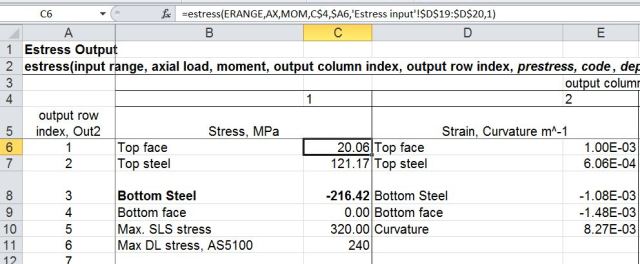
Out1 = 1 returns stress values (in MPa) and Out1 = 2 returns strain and curvature (in m^-1) results:
RCdesign5b-1

The stress and strain results are given at (controlled by the value of Out2):

  1. Concrete top face
  2. Top steel centroid
  3. Bottom steel centroid
  4. Bottom face

Note that if the concrete is in tension (negative strain) the stress displays as zero, because the analysis ignores tensile stress in the concrete.

If the Code argument is omitted, or is equal to 1 or 2, row 5 of the stress output returns the maximum allowable stress under SLS loading according to the Australian design codes, (AS 3600 and AS 5100).  If the Code value is 2, row 6 returns the maximum allowable stress under SLS dead load only, according to AS 5100 (the bridge design code).

The strains and curvature returned in column 2 are calculated assuming zero tension stress in the concrete.

Out1 = 3 or 4 returns force and moment results:

RCdesign5b-2

The total force and moment should be equal to the input applied load values.  The force and moment in the concrete are calculated from the total section area above the neutral axis times the average concrete stress (compression face stress / 2), less the concrete force and moment over the area of the reinforcement in the compression zone (if any).

Out1 = 5 or 6 returns the depth to the neutral axis and cracking stresses and moments; and an echo of the input values respectively:

RCdesign5b-3

The concrete design flexural tensile strength (rows 4 and 7) is based on the code provisions if f’ct is specified as -1 in the input, or the input value for any other value.

The AS 3600 cracking moment including shrinkage is based on Cl. 8.5.3.1 of the code and the input shrinkage strain:

AS 3600 Cl 8.5.3.1 (part)

AS 3600 Cl 8.5.3.1 (part)

The other code cracking moments do not allow for shrinkage.

The values in output Column 6 should be equal to the corresponding input values.  Any difference indicates that the input ranges have not been specified correctly.

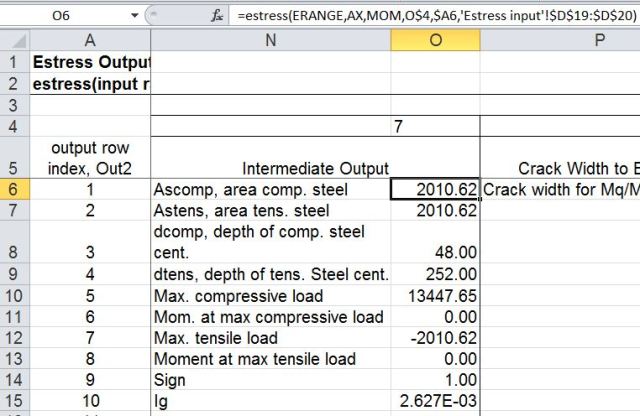
Out1 = 7 returns miscellaneous intermediate results:
RCdesign5b-4

1, 2:  Area of tension and compression steel.
3,4:  Depth of the centroid of the tension and compression steel, measured from the compression face.
5,6: Maximum compressive load and associated bending moment.
7,8: Maximum tensile load and associated bending moment.
9:    Sign of the applied moment (tension on the bottom face positive)
10:  Ig, the second moment of area of the gross  section, including reinforcement using transformed area properties.

The maximum compressive an tensile loads are based on the specified concrete compressive strength and steel tensile strength respectively.  Note that no reduction factors are applied, and the calculated stresses and strains in output columns 1 and 2 assume elastic behaviour under all loads.

Out1 = 8 returns crack width and effective stiffness results:
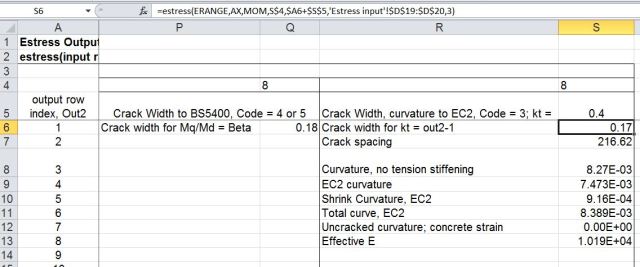
RCdesign5b-5

If the input Code value = 4 or 5 then Out1 = 8 returns just the crack width to the British code BS 5400.  The Mq/Md  ratio (Live Load/ Dead Load) is set to the input Beta value.

For a Code value of 3 (Eurocode 2) Out1 = 8 returns:

Out2
<2:   Crack width for kt = Out2-1 (kt = 0.4 for long term load, 0.6 for short term)
2:      Crack spacing
3:      Curvature with no tension stiffening
4:       Curvature to Eurocode 2, with no shrinkage
5:        Shrinkage curvature to Eurocode 2
6:        Total curvature to Eurocode 2
7:        Uncracked curvature; = 0.0 for cracked section
8:       Effective E, based on total curvature to Eurocode 2 and Ig

Posted in Concrete, Excel, Newton, UDFs, VBA | Tagged , , , , , | 1 Comment