Continuous Beam Analysis by Macaulay’s Method

The Macaulay spreadsheet now includes a ConBeam() function, analysing continuous beams with any number of segments of different stiffness, subject to any combination of distributed or point loads and moments.  The spreadsheet also includes an example, together with output of the same beam from Strand7, which is in exact agreement.  The revised spreadsheet (including open source code) may be downloaded from Macaulay.zip.

The algorithm used by the ConBeam function is:

  • Find the deflections at the internal supports under the specified loading, treating the beam as simply supported at the end supports only.
  • Find the deflection at the support positions due to a unit upward load applied at each support.
  • Use this data to find the reaction force at each internal support.
  • Find the shear forces, moments, curvatures, slopes and deflections at each output point under the specified applied load plus the reaction forces at the internal supports

The code for generation of the reaction loads is shown below:

If NumSupports > 2 Then

        ' Find deflections at support positions for unit load at each internal support
        W = 1
SSSupports(1, 1) = SupportA(1)
SSSupports(2, 1) = SupportA(NumSupports)

SupportLoadA(1, 2) = W

For i = 2 To NumSupports - 1
SupportLoadA(1, 1) = SupportA(i)

SuppRes = SSSpan(Segments, DLoads, SupportLoadA, ISupportA, 0, 1)

For j = 1 To NumSupports - 2
SupportF(i - 1, j) = SuppRes(j, 4)
            Next j
Next i
If NumSupports > 3 Then
InvSupportF = WorksheetFunction.MInverse(SupportF)
        Else
InvSupportF = 1 / SupportF(1, 1)
        End If
        ' Find deflection at internal supports for simply supported span between end supports

SuppRes = SSSpan(Segments, DLoads, PLoads, ISupportA, NumDloads, NumPloads)

For i = 1 To NumSupports - 2
SuppDef(i, 1) = -SuppRes(i, 4)
Next i

' Find reactions at internal supports and add to PLoads2 array

If NumSupports > 3 Then
IntReact = WorksheetFunction.MMult(InvSupportF, SuppDef)
        Else
IntReact = InvSupportF * SuppDef(1, 1)
        End If
ReDim PLoads2(1 To NumPloads + NumSupports - 2, 1 To 3)
For i = 1 To NumPloads
PLoads2(i, 1) = PLoads(i, 1)
PLoads2(i, 2) = PLoads(i, 2)
PLoads2(i, 3) = PLoads(i, 3)
Next i
        k = 0
If NumSupports > 3 Then
For j = i To i + NumSupports - 3
k = k + 1
PLoads2(j, 2) = IntReact(k, 1)
PLoads2(j, 1) = SupportA(k + 1)
            Next j
        Else
PLoads2(i, 2) = IntReact
PLoads2(i, 1) = SupportA(2)
        End If
NumPloads = NumPloads + NumSupports - 2
    Else    ' single span
SSSupports(1, 1) = 0  'Segments(1, 2)
SSSupports(2, 1) = Spans(1, 2)
PLoads2 = PLoads
    End If

The input and output from the example in the spreadsheet are shown below:

Conbeam Input

ConBeam output, compared with Strand7, click for full size view

Show Force

Bending Moment

Deflections

Posted in Beam Bending, Excel, Frame Analysis, Newton, UDFs, VBA | Tagged , , , , | 8 Comments

Beam Fixed End Actions by Macaulay’s Method

Following the previous post examples have been added to the Macaulay Spreadsheet illustrating the use of the method to find fixed end moments and reactions for a beam fixed at one or both ends, and subject to any number of combinations of trapezoidal distributed loads and point loads and moments.  The beam may be of uniform cross-section, or divided into any number of segments with different properties.  The download spreadsheet contains full open source code.

The basis of the method is:

  • Find the slope of the ends for the applied loads assuming simple supports, using SSSpan.
  • Find the end slopes due to a unit moment applied at the end.
  • Solve the resulting simultaneous equations to find the end moments that will give the calculated end slopes under your loads, with a simply supported span.  The fixed end moments are the equal and opposite reactions to these moments.

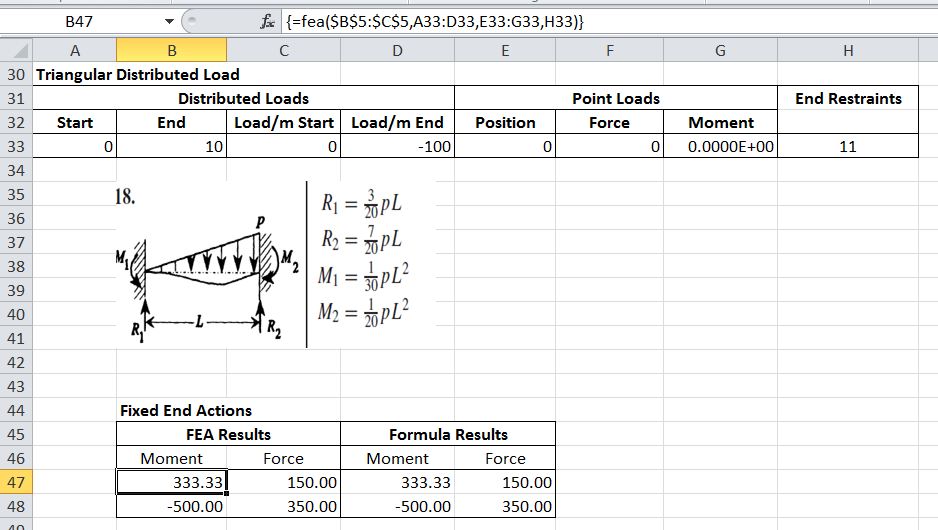
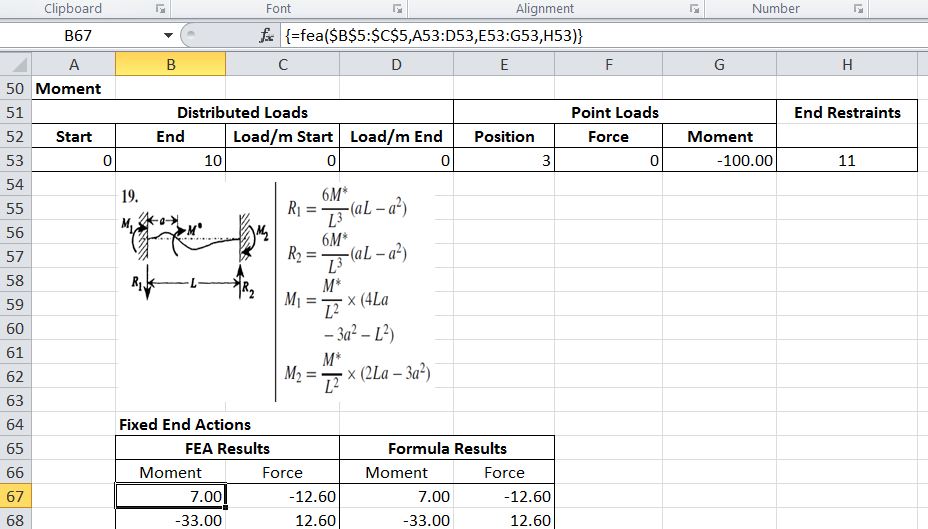
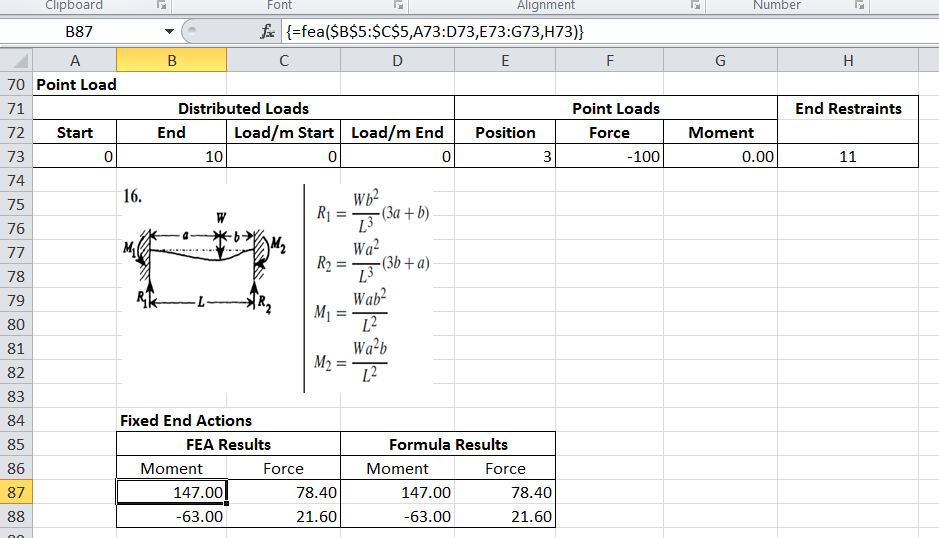
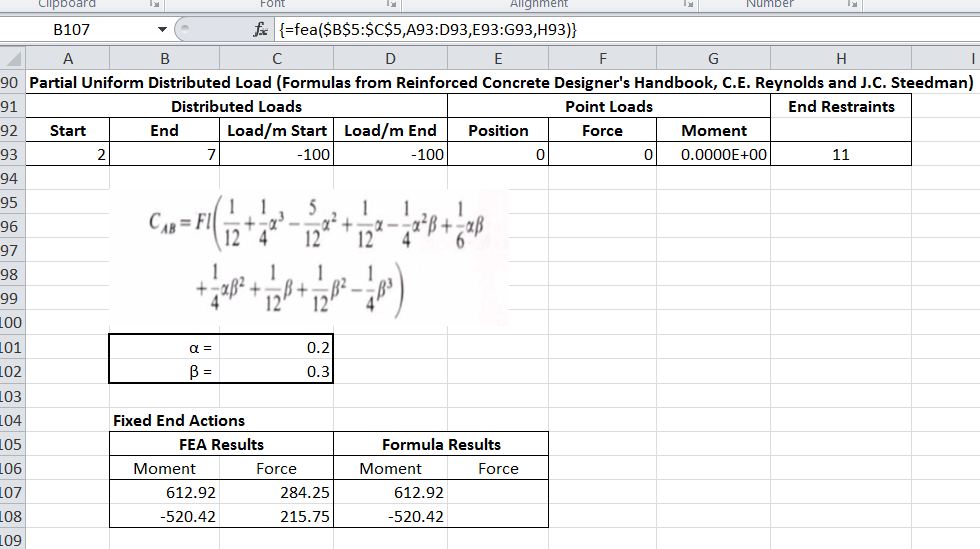
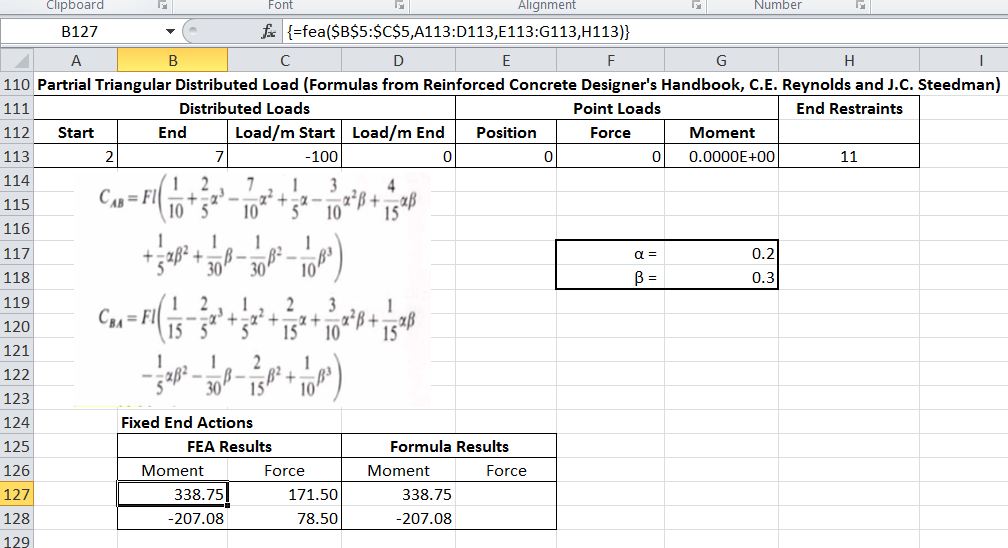
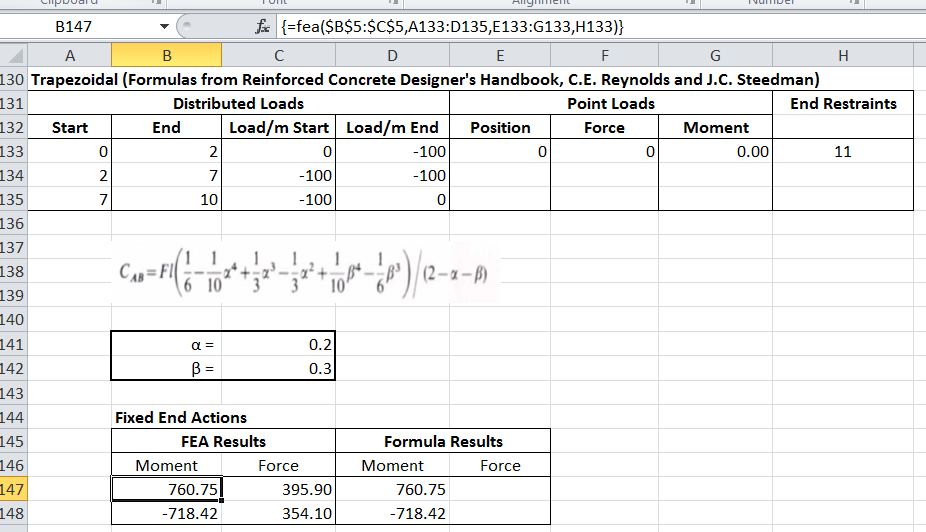
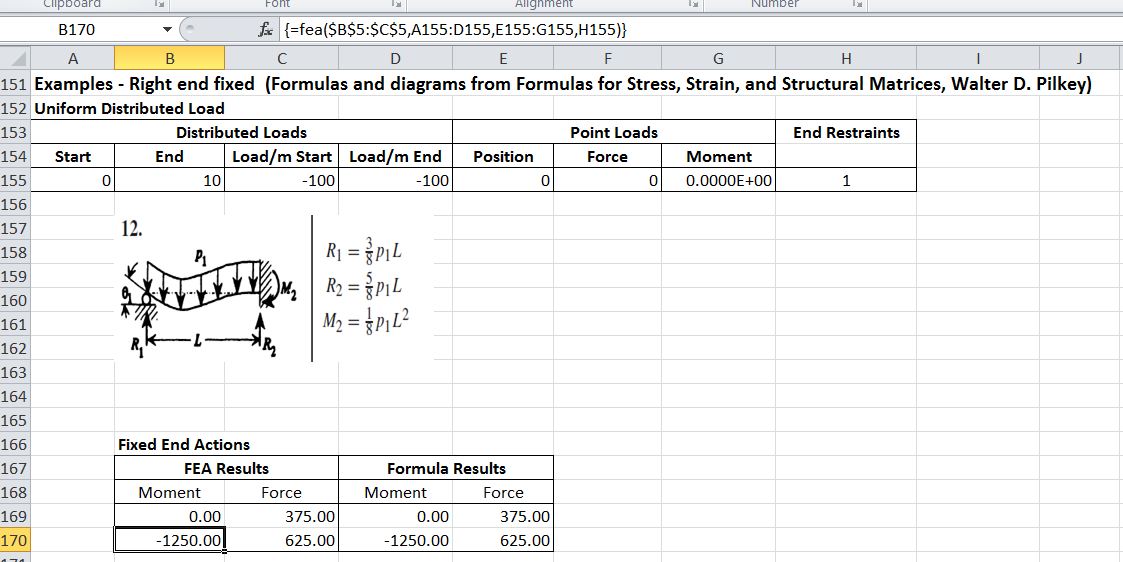
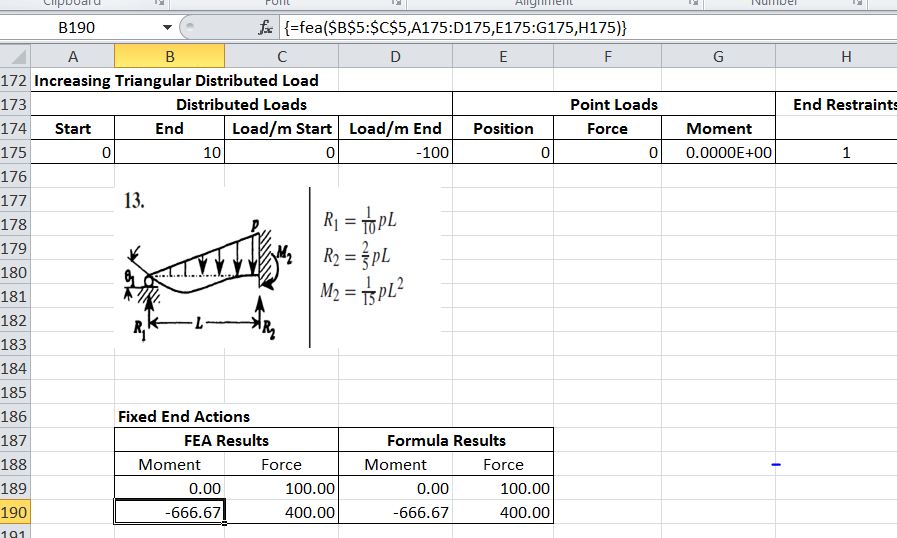
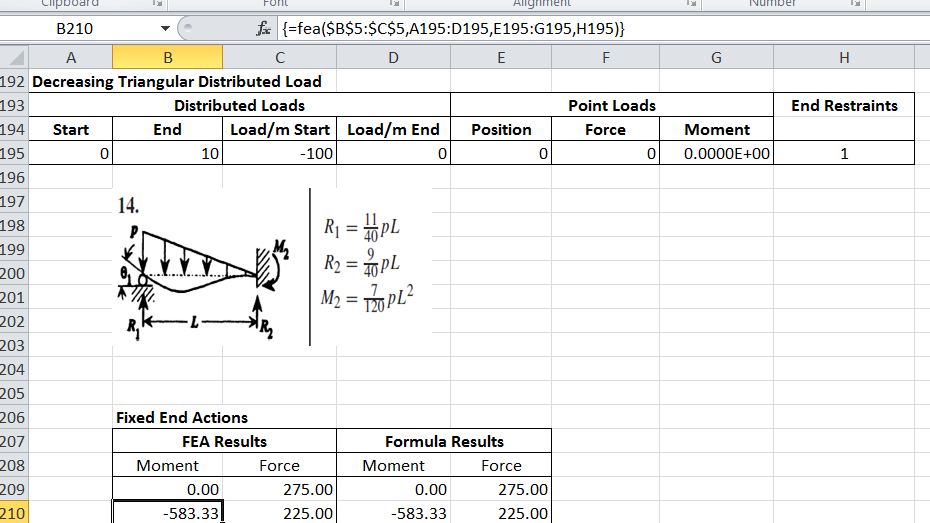
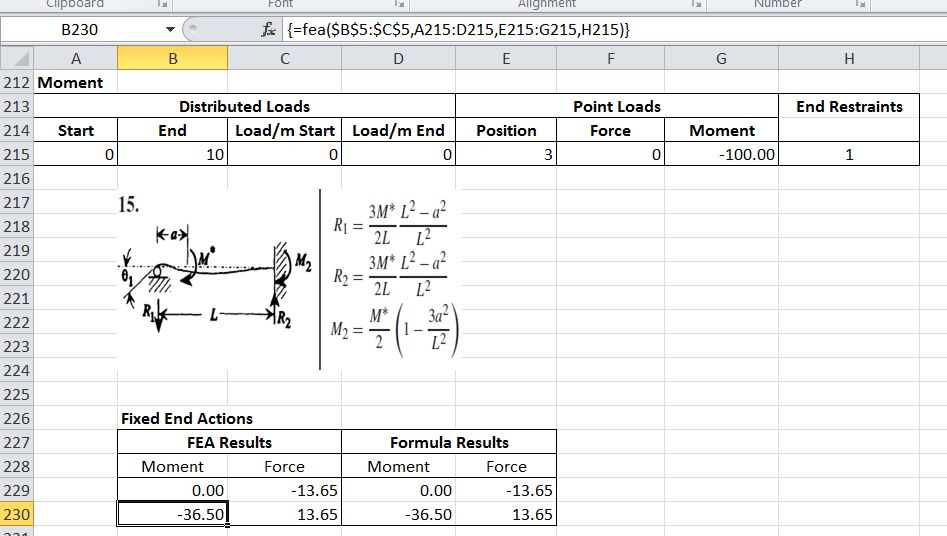
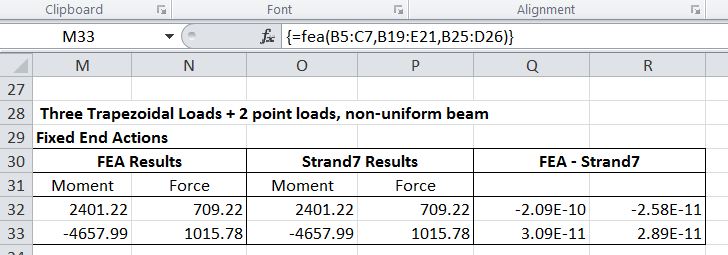
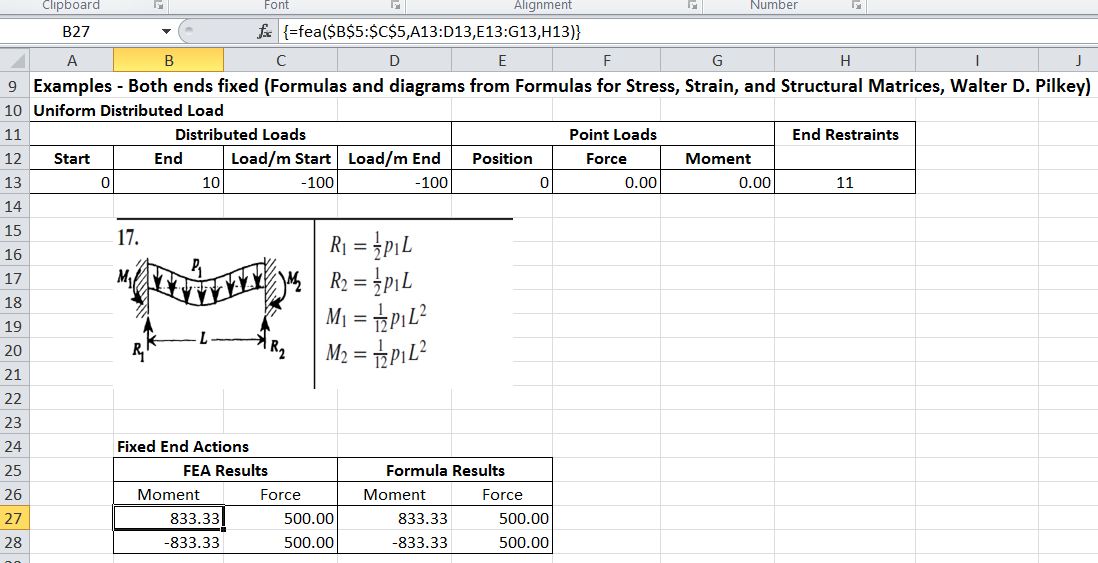
This procedure is incorporated in the User Defined Function (UDF) FEA().  The screenshots below show a description of the UDF input and output, and some examples taken from Formulas for Stress, Strain, and Structural Matrices, Walter D. Pilkey and The Reinforced Concrete Designer’s Handbook, C.E. Reynolds and J.C. Steedman.  Finally a more complex example has been compared with the results of a Strand7 analysis.  In all cases the UDF results and the formula or analysis values are in exact agreement.

FEA Input and Output

Uniform Distributed Load

Triangular Distributed Load

Moment

Point Load

Partial Uniform Distributed Load

Partial Triangular Distributed Load

Trapezoidal

Uniform Distributed Load

Increasing Triangular Distributed Load

Decreasing Triangular Distributed Load

Moment

Complex Loading

Posted in Beam Bending, Excel, Frame Analysis, Newton, UDFs, VBA | Tagged , , , , | 2 Comments

Beam actions and deflections by Macaulay’s Method

Macaulay’s Method is a convenient method of applying beam slope-deflection equations to find the shear forces, bending moments, slopes and deflections of a structural beam subject to complex load conditions, including partial varying distributed loads and point loads and moments.  It is described in Wikipedia, and in more detail, with numerous examples by Colin Caprani.  I have developed a spreadsheet using this method to analyse simply supported beams, continuous beams, and to find fixed end moments.  The spreadsheet, including full open source code, may be downloaded from Macaulay.zip.

This post describes the background, and the User Defined Functions (UDFs) for analysis of simply supported beams.  Later posts will look at the extension of the method to fixed end actions, continuous beams, spring supports, shear deflections etc.

The essence of the method is to use “Macualay bracket” notation to integrate applied loads from the point at which they first become active up to the end of the beam.  If a load is terminated before the end of the beam then an equal and opposite load must be applied from that point to correctly model the applied loading.  Quoting Wikipedia:

This procedure is carried out by the UDF SSSpan():

  • Transfer beam and load data from the spreadsheet
  • Take moments about the left hand support to find the end support reactions
  • Set up an array of integration limits
  • Solve for shear forces, bending moments, curvatures, slopes and deflections, assuming zero rotation at the left hand end; adjusting for variations in the section stiffness if required.
  • Rotate for zero deflection at the right hand end..
  • Output results.

Function input and output are shown in the screenshots below:

SSSPan Input

SSSPan Output

Example Input

Load Distribution

Output compared with Strand7 analysis of the same data (click for full size view)

Output Shear Forces

Output Bending Moments and Deflections

Full open source code is included in the download spreadsheet. The extracts below show how Macaulay’s Method is performed in the VBA code. The output results are generated in a 5 column array called SSRes, the columns being:

  1. X: distance of the section from the left hand end
  2. Shear force = integral of distributed applied loads + point loads + reaction at the left hand support
  3. Moment = integral of the shear force + applied moments
  4. Slope = integral of curvature = integral of Moment/EI (EI = section flexural stiffness)
  5. Deflection = integral of slope

Note that columns 4 and 5 are initially determined with a unit EI value, then corrected for the specified EI.  This procedure is required to handle beams with varying flexural stiffness along their length.

Evaluate for distributed loads

    For i = 1 To NumSegments
        If i > 1 Then X0 = Segments(i - 1, 1) Else X0 = 0
        X = Segments(i, 1)
        DX = X - X0

    ' Distributed loads
        For j = 1 To NumDloads

            X1 = DLoads(j, 1)
            X2 = DLoads(j, 2)
            Q = DLoads(j, 3)
            QNeg = -DLoads(j, 4)
            If X2 <> X1 Then Qdash = (DLoads(j, 4) - DLoads(j, 3)) / (X2 - X1) Else Qdash = 0
            DX1 = X - X1
            If DX1 < 0 Then DX1 = 0
            DX2 = X - X2
            If DX2 < 0 Then DX2 = 0

            SSRes(i + 1, 2) = SSRes(i + 1, 2) + Q * DX1 + Qdash * DX1 ^ 2 / 2 + QNeg * DX2 - Qdash * DX2 ^ 2 / 2
            SSRes(i + 1, 3) = SSRes(i + 1, 3) + Q * DX1 ^ 2 / 2 + Qdash * DX1 ^ 3 / 6 + QNeg * DX2 ^ 2 / 2 - Qdash * DX2 ^ 3 / 6
            SSRes(i + 1, 4) = SSRes(i + 1, 4) + (Q * DX1 ^ 3 / 6 + Qdash * DX1 ^ 4 / 24 + QNeg * DX2 ^ 3 / 6 - Qdash * DX2 ^ 4 / 24)
            SSRes(i + 1, 5) = SSRes(i + 1, 5) + (Q * DX1 ^ 4 / 24 + Qdash * DX1 ^ 5 / 120 + QNeg * DX2 ^ 4 / 24 - Qdash * DX2 ^ 5 / 120)

        Next j

Then point loads and moments

        ' Point loads
        For j = 1 To NumPloads
            X1 = PLoads(j, 1)
            DX1 = X - X1
            W = PLoads(j, 2)
            If DX1 < 0 Then DX1 = 0
            If DX1 > 0 Then
                SSRes(i + 1, 2) = SSRes(i + 1, 2) + W
                SSRes(i + 1, 3) = SSRes(i + 1, 3) + W * DX1
                SSRes(i + 1, 4) = SSRes(i + 1, 4) + (W * DX1 ^ 2 / 2)
                SSRes(i + 1, 5) = SSRes(i + 1, 5) + (W * DX1 ^ 3 / 6)
            End If
        Next j

        ' Moments
        If PloadCols > 2 Then
            For j = 1 To NumPloads
                X1 = PLoads(j, 1)
                DX1 = X - X1
                W = -PLoads(j, 3)
                If DX1 < 0 Then DX1 = 0
                If DX1 > 0 Then
                    SSRes(i + 1, 3) = SSRes(i + 1, 3) + W
                    SSRes(i + 1, 4) = SSRes(i + 1, 4) + W * DX1
                    SSRes(i + 1, 5) = SSRes(i + 1, 5) + (W * DX1 ^ 2 / 2)
                End If
            Next j

        End If
    Next i

Add end actions

   For i = 1 To NumSegments
        X = Segments(i, 1)
        If i = 1 Then DX = X Else DX = X - Segments(i - 1, 1)
        SSRes(i + 1, 1) = X
        SSRes(i + 1, 2) = SSRes(i + 1, 2) + SSRes(1, 2)
        SSRes(i + 1, 3) = SSRes(i + 1, 3) + SSRes(1, 3) + SSRes(1, 2) * X
        SSRes(i + 1, 4) = SSRes(i + 1, 4) + SSRes(1, 4) + (SSRes(1, 3) * X + SSRes(1, 2) * X ^ 2 / 2)
        SSRes(i + 1, 5) = SSRes(i + 1, 5) + SSRes(1, 4) * X + SSRes(1, 5) + (SSRes(1, 3) * X ^ 2 / 2 + SSRes(1, 2) * X ^ 3 / 6)
    Next i

Finally adjust slope and deflection for EI of each segment

    ' Adjust slope and deflection for EI
    For i = 1 To NumSegments
        EI = Segments(i, 2)
        X = Segments(i, 1)
        If i = 1 Then DX = X Else DX = X - Segments(i - 1, 1)
        If i = 1 Then StartSlope = SSRes(i, 4) Else StartSlope = EndSlope
        If i = 1 Then StartDef = SSRes(i, 5) Else StartDef = EndDef

        EndSlope = StartSlope + (SSRes(i + 1, 4) - SSRes(i, 4)) / EI
        EndDef = StartDef + StartSlope * DX + (SSRes(i + 1, 5) - SSRes(i, 5) - (SSRes(i, 4) * DX)) / EI
        SSRes(i, 4) = StartSlope
        SSRes(i, 5) = StartDef
    Next i
    SSRes(i, 4) = EndSlope
    SSRes(i, 5) = EndDef

The array SSRes at this stage has correct values for shear and bending moment, but the slopes and deflections are based on zero slope at the left hand end. This is corrected by finding the slope required to make the deflection at the right hand end equal to zero, then adding this slope and the associated deflection to the output values.

Posted in Beam Bending, Excel, Frame Analysis, Newton, Numerical integration, UDFs, VBA | Tagged , , , , | 15 Comments

IP2 Update, ByRef and ByVal

A recent comment pointed out that the IPPlaneLine function (intersection of a 3D line with a plane) in the IP2 spreadsheet was giving incorrect results.  This has now been fixed, and the corrected spreadsheet can be downloaded from IP2.zip.

The problem turned out to be in another function called PlaneCoeff which modified an array that had been passed by reference (ByRef), and this modified array was then used in IPPlaneLine, whereas the unmodified array was required.  The solution was to pass the array by value (ByVal), so that the modifications performed in PlaneCoeff were not passed back to the calling routine.

See  for more details about the effects of passing ByRef or ByVal.

Posted in Arrays, Coordinate Geometry, Excel, Newton, UDFs, VBA | Tagged , , , , , | 1 Comment

Tanh-Sinh Quadrature V2.1

Graeme Dennes has released another update to his Tanh-Sinh Quadrature spreadsheet, which can be downloaded from:  Tanh-Sinh Quadrature (including, as usual, full open source code).  Here is Graeme’s description of the changes:

In Version 2.0, the nodes and weights array data for the Tanh-Sinh, DE and DE_OSC programs are calculated every time for every integration calculation.  Also as noted above, for each program, the nodes and weights are fixed, being independent of the function being integrated and the integration limits. Therefore, the nodes and weights need only be generated once, stored in an array, and made available for use by the three programs as required.

This has been done in Version 2.1, where the nodes and weights for the three programs are automatically pre-generated via calls to the array generation code in the three program modules. The (one-time) calls to the array generators are located in the Workbook_Open() Sub in the ThisWorkbook object, which is activated on opening of the workbook by Excel.

This improves the efficiency of the three programs.

The new version is in Excel 2007 format only.  The previous version including a copy in 2003 format can be downloaded from: Tanh-Sinh 2.0

Previous post on Tahn-Sinh Quadrature.

Posted in Excel, Newton, Numerical integration, UDFs, VBA | Tagged , , , , | 2 Comments