Linest, NPV, IRR and solving polynomials

In a comment on Using LINEST for non-linear curve fitting Lori Miller posted a formula that found the coefficients fitting a cubic polynomial curve to a set of data, then solved the resulting equation to find the X value for a given Y value:

=IRR(LINEST(Yrange,Xrange^{1,2,3})-{0,0,0,1}*YValue)*1+1

which recently raised a question of how it works.

The Linest part is straightforward, as explained in the body of the post, it returns the coefficients of the cubic curve of best fit through the points specified in XRange and YRange:    y = ax3 + bx2 + cx +d

These values are returned as an array, and subtraction of the array {0,0,0,1}*YValue subtracts Y from the d value, resulting in ax3 + bx2 + cx +d – y = 0

The IRR part requires some background, including definition of Net Present Value (NPV) and Internal Rate of Return (IRR).

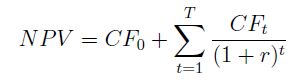
If a series of cash flows are made at regular intervals, the present value of those cash flows may be found by applying a discount to those occurring in the future:

where: CF0, CF1, … CFt are the cash flows, and r is the discount rate over each time step.

The Internal Rate of Return (IRR) is then defined as the discount rate that will result in the cash flows having  a NPV equal to zero:

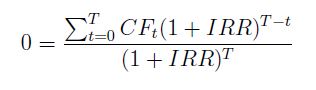
Which may be written as:

Multiplying both sides by the denominator:

Which may be written as:

where a0 to an are the coefficients of the polynomial equation, and x = 1+IRR.

It follows that the function IRR({a, b, c, d – y}) + 1 is the desired solution to the equation:

ax3 + bx2 + cx +d – y = 0

As stated in the original comment, this approach is easily adapted to higher powers, although the use of cubic splines will often give more stable results.

Finally for those wanting to solve high order polynomials also consider the use of the Jenkins-Traub method, which has been incorporated in a user defined function, which is described in: Evaluating higher order polynomials, which will work in situations where the IRR method will not return a result (such as roots with negative value), often provides better precision, and will return complex roots.

Note: the derivation of the polynomial solution from the definition of IRR was taken from:

NPV and IRR by Dan Saunders

Posted in Excel, Maths, Newton, UDFs, VBA | Tagged , , , , , , | 3 Comments

Linestgap with data in rows

In response to a comment I have modified the LinestGap function to work on data arranged in rows.  This function works the same as the Excel built in LinEst function, but ignores any data that has a blank cell in the x or y values.  It is described in more detail at: Using LinEst() on data with gaps, and the revised spreadsheet (including full open source code) may be downloaded from: Linest-poly.xls

The screenshot below shows the revised function used to fit a quadratic curve to data arranged in rows:

The function in the edit box shows the X data specified in the form of an array function:

  • =LINESTgap(B30:L30,B28:L28^{1;2})

This must be typed as shown, then entered into the spreadsheet by pressing Ctrl-shift-enter, when it will display as {=LINESTgap(B30:L30,B28:L28^{1;2})}.

It is important to note that when the data is arranged in rows the exponents for the x values must be entered as a column array, with a semi-colon separator: {1;2}.  When the data is arranged in columns then this is entered with a comma: {1,2}.

Alternatively the x and x^2 values may be generated explicitly on the spreadsheet, as seen in rows 28 and 29, and then the function is entered as:

  • =LINESTgap(B30:L30,B28:L29)

In this case the function will return the first result when entered as a normal function (with the Enter key), but to return all three results it must still be entered with Ctrl-shift-enter (see Using Array Formulas for more details).

The function works with data in rows by simply using the Worksheetfunction.Transpose function on both the X and Y data if the specified Y range has more columns than rows.

Posted in Excel, UDFs, VBA | Tagged , , , , , , | 11 Comments

Continuous Beam Analysis by Macaulay’s Method

The Macaulay spreadsheet now includes a ConBeam() function, analysing continuous beams with any number of segments of different stiffness, subject to any combination of distributed or point loads and moments.  The spreadsheet also includes an example, together with output of the same beam from Strand7, which is in exact agreement.  The revised spreadsheet (including open source code) may be downloaded from Macaulay.zip.

The algorithm used by the ConBeam function is:

  • Find the deflections at the internal supports under the specified loading, treating the beam as simply supported at the end supports only.
  • Find the deflection at the support positions due to a unit upward load applied at each support.
  • Use this data to find the reaction force at each internal support.
  • Find the shear forces, moments, curvatures, slopes and deflections at each output point under the specified applied load plus the reaction forces at the internal supports

The code for generation of the reaction loads is shown below:

If NumSupports > 2 Then

        ' Find deflections at support positions for unit load at each internal support
        W = 1
SSSupports(1, 1) = SupportA(1)
SSSupports(2, 1) = SupportA(NumSupports)

SupportLoadA(1, 2) = W

For i = 2 To NumSupports - 1
SupportLoadA(1, 1) = SupportA(i)

SuppRes = SSSpan(Segments, DLoads, SupportLoadA, ISupportA, 0, 1)

For j = 1 To NumSupports - 2
SupportF(i - 1, j) = SuppRes(j, 4)
            Next j
Next i
If NumSupports > 3 Then
InvSupportF = WorksheetFunction.MInverse(SupportF)
        Else
InvSupportF = 1 / SupportF(1, 1)
        End If
        ' Find deflection at internal supports for simply supported span between end supports

SuppRes = SSSpan(Segments, DLoads, PLoads, ISupportA, NumDloads, NumPloads)

For i = 1 To NumSupports - 2
SuppDef(i, 1) = -SuppRes(i, 4)
Next i

' Find reactions at internal supports and add to PLoads2 array

If NumSupports > 3 Then
IntReact = WorksheetFunction.MMult(InvSupportF, SuppDef)
        Else
IntReact = InvSupportF * SuppDef(1, 1)
        End If
ReDim PLoads2(1 To NumPloads + NumSupports - 2, 1 To 3)
For i = 1 To NumPloads
PLoads2(i, 1) = PLoads(i, 1)
PLoads2(i, 2) = PLoads(i, 2)
PLoads2(i, 3) = PLoads(i, 3)
Next i
        k = 0
If NumSupports > 3 Then
For j = i To i + NumSupports - 3
k = k + 1
PLoads2(j, 2) = IntReact(k, 1)
PLoads2(j, 1) = SupportA(k + 1)
            Next j
        Else
PLoads2(i, 2) = IntReact
PLoads2(i, 1) = SupportA(2)
        End If
NumPloads = NumPloads + NumSupports - 2
    Else    ' single span
SSSupports(1, 1) = 0  'Segments(1, 2)
SSSupports(2, 1) = Spans(1, 2)
PLoads2 = PLoads
    End If

The input and output from the example in the spreadsheet are shown below:

Conbeam Input

ConBeam output, compared with Strand7, click for full size view

Show Force

Bending Moment

Deflections

Posted in Beam Bending, Excel, Frame Analysis, Newton, UDFs, VBA | Tagged , , , , | 8 Comments

Beam Fixed End Actions by Macaulay’s Method

Following the previous post examples have been added to the Macaulay Spreadsheet illustrating the use of the method to find fixed end moments and reactions for a beam fixed at one or both ends, and subject to any number of combinations of trapezoidal distributed loads and point loads and moments.  The beam may be of uniform cross-section, or divided into any number of segments with different properties.  The download spreadsheet contains full open source code.

The basis of the method is:

  • Find the slope of the ends for the applied loads assuming simple supports, using SSSpan.
  • Find the end slopes due to a unit moment applied at the end.
  • Solve the resulting simultaneous equations to find the end moments that will give the calculated end slopes under your loads, with a simply supported span.  The fixed end moments are the equal and opposite reactions to these moments.

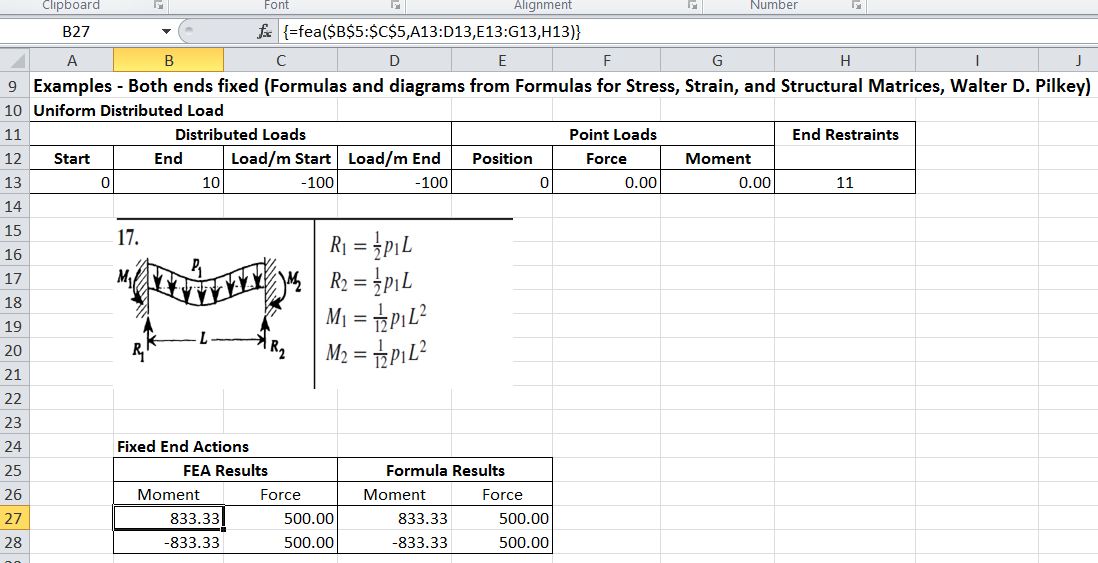
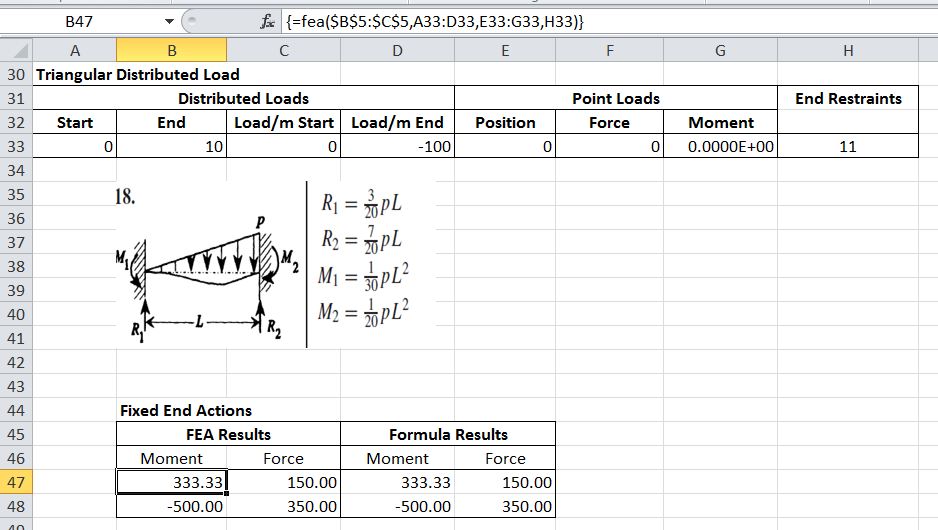
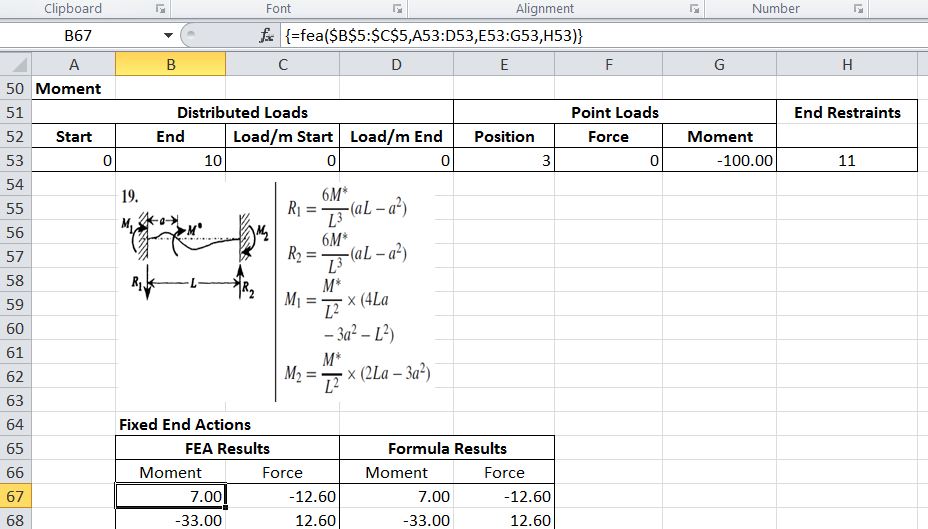
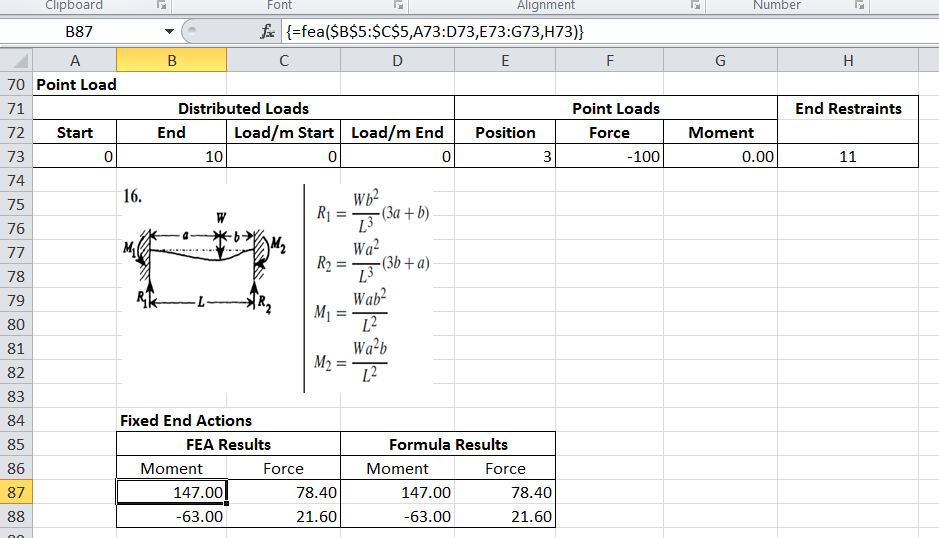
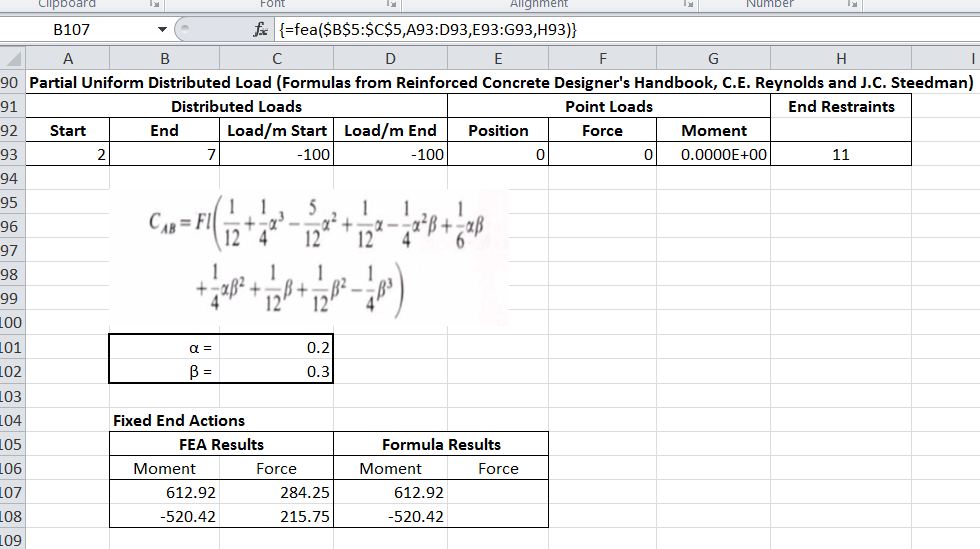
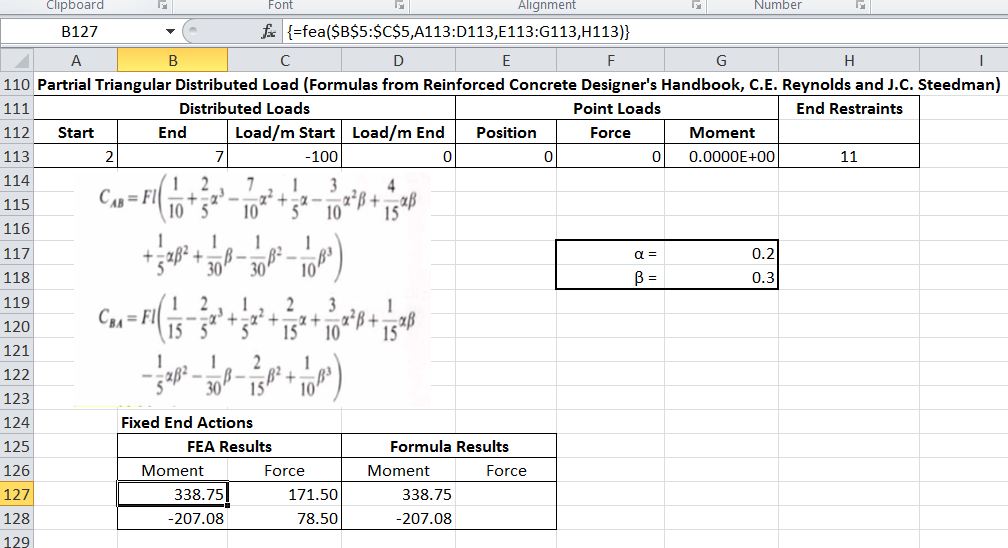
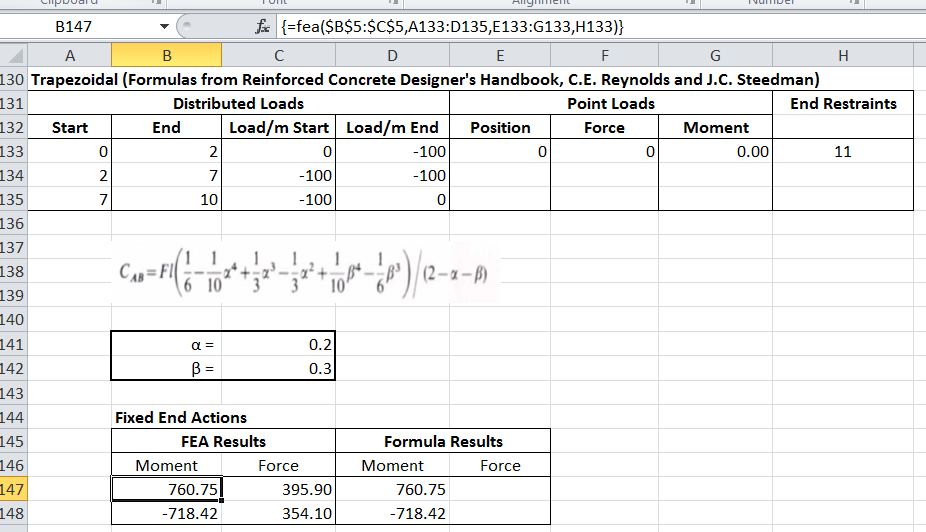
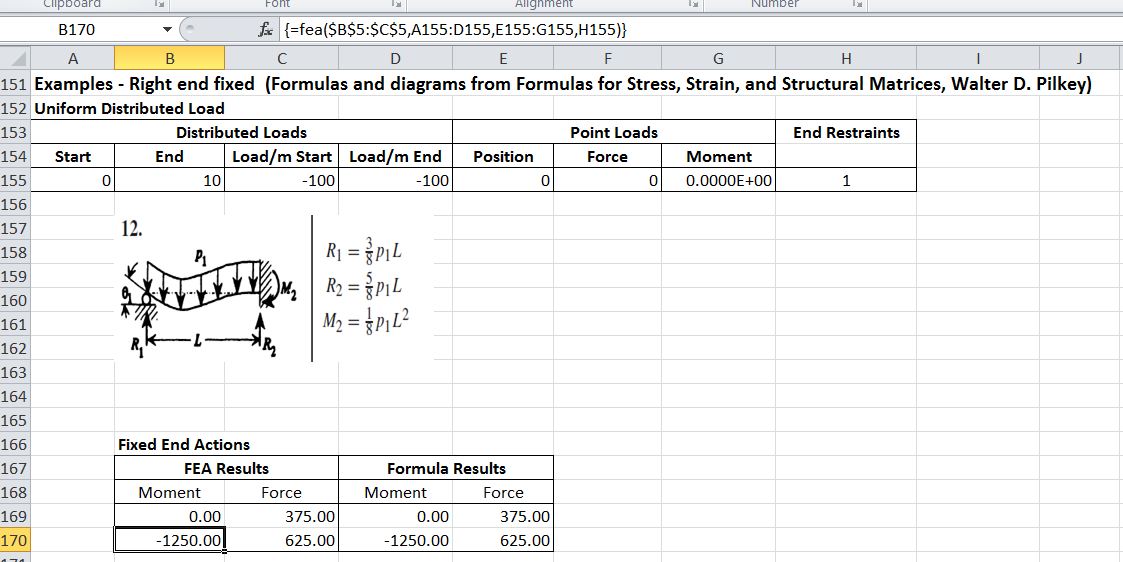
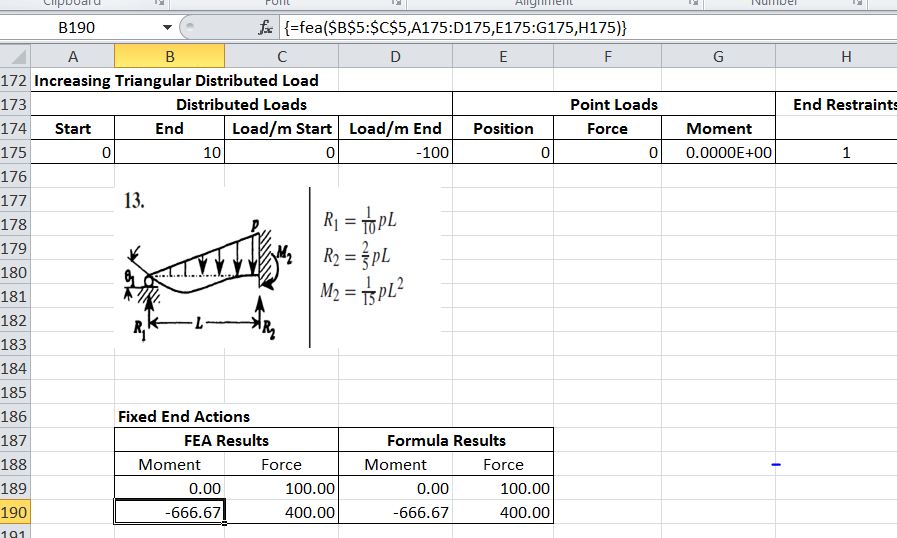
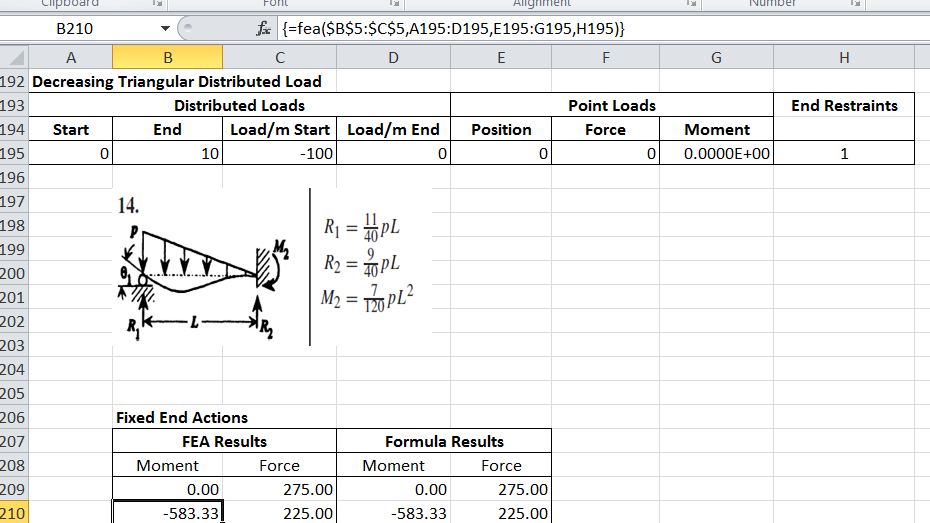
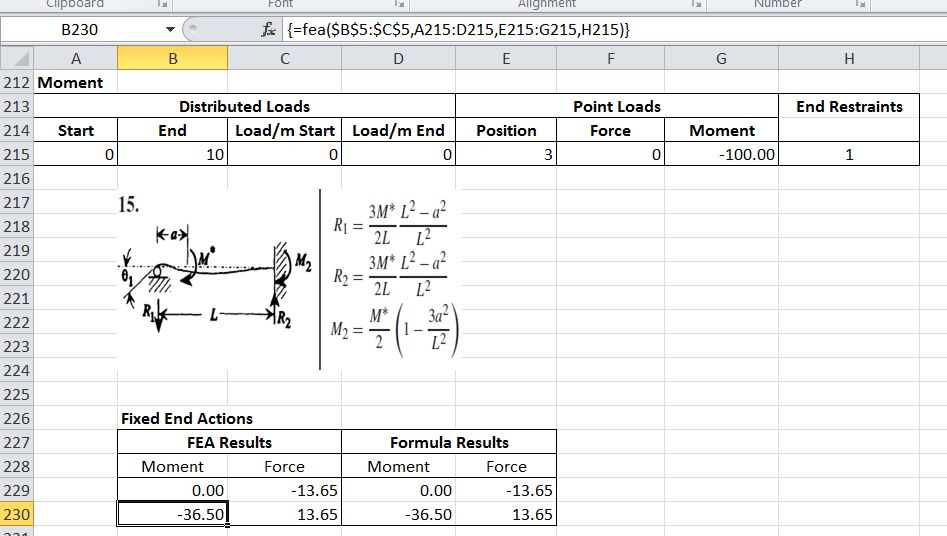
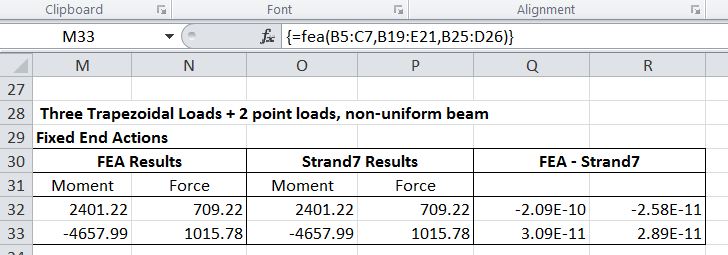
This procedure is incorporated in the User Defined Function (UDF) FEA().  The screenshots below show a description of the UDF input and output, and some examples taken from Formulas for Stress, Strain, and Structural Matrices, Walter D. Pilkey and The Reinforced Concrete Designer’s Handbook, C.E. Reynolds and J.C. Steedman.  Finally a more complex example has been compared with the results of a Strand7 analysis.  In all cases the UDF results and the formula or analysis values are in exact agreement.

FEA Input and Output

Uniform Distributed Load

Triangular Distributed Load

Moment

Point Load

Partial Uniform Distributed Load

Partial Triangular Distributed Load

Trapezoidal

Uniform Distributed Load

Increasing Triangular Distributed Load

Decreasing Triangular Distributed Load

Moment

Complex Loading

Posted in Beam Bending, Excel, Frame Analysis, Newton, UDFs, VBA | Tagged , , , , | 2 Comments

Beam actions and deflections by Macaulay’s Method

Macaulay’s Method is a convenient method of applying beam slope-deflection equations to find the shear forces, bending moments, slopes and deflections of a structural beam subject to complex load conditions, including partial varying distributed loads and point loads and moments.  It is described in Wikipedia, and in more detail, with numerous examples by Colin Caprani.  I have developed a spreadsheet using this method to analyse simply supported beams, continuous beams, and to find fixed end moments.  The spreadsheet, including full open source code, may be downloaded from Macaulay.zip.

This post describes the background, and the User Defined Functions (UDFs) for analysis of simply supported beams.  Later posts will look at the extension of the method to fixed end actions, continuous beams, spring supports, shear deflections etc.

The essence of the method is to use “Macualay bracket” notation to integrate applied loads from the point at which they first become active up to the end of the beam.  If a load is terminated before the end of the beam then an equal and opposite load must be applied from that point to correctly model the applied loading.  Quoting Wikipedia:

This procedure is carried out by the UDF SSSpan():

  • Transfer beam and load data from the spreadsheet
  • Take moments about the left hand support to find the end support reactions
  • Set up an array of integration limits
  • Solve for shear forces, bending moments, curvatures, slopes and deflections, assuming zero rotation at the left hand end; adjusting for variations in the section stiffness if required.
  • Rotate for zero deflection at the right hand end..
  • Output results.

Function input and output are shown in the screenshots below:

SSSPan Input

SSSPan Output

Example Input
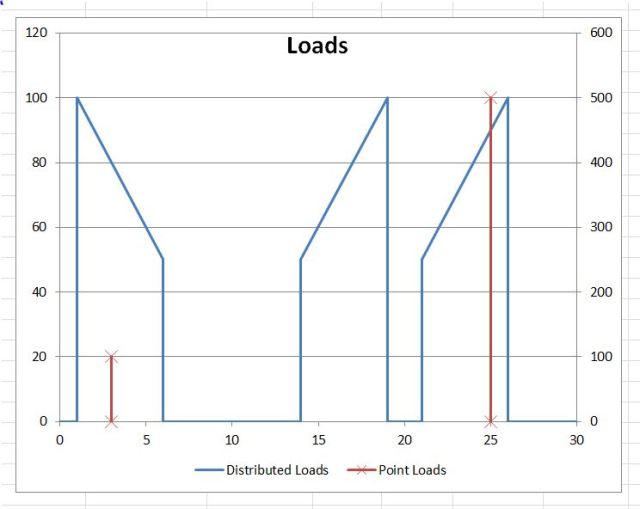
Load Distribution
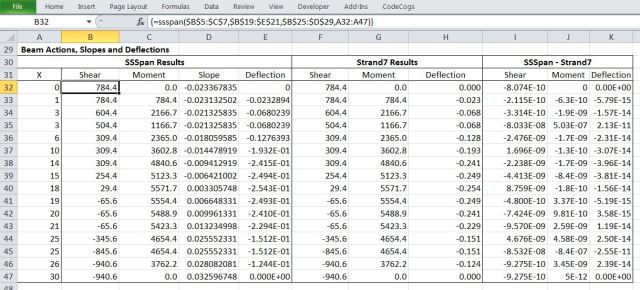
Output compared with Strand7 analysis of the same data (click for full size view)

Output Shear Forces

Output Bending Moments and Deflections

Full open source code is included in the download spreadsheet. The extracts below show how Macaulay’s Method is performed in the VBA code. The output results are generated in a 5 column array called SSRes, the columns being:

  1. X: distance of the section from the left hand end
  2. Shear force = integral of distributed applied loads + point loads + reaction at the left hand support
  3. Moment = integral of the shear force + applied moments
  4. Slope = integral of curvature = integral of Moment/EI (EI = section flexural stiffness)
  5. Deflection = integral of slope

Note that columns 4 and 5 are initially determined with a unit EI value, then corrected for the specified EI.  This procedure is required to handle beams with varying flexural stiffness along their length.

Evaluate for distributed loads

    For i = 1 To NumSegments
        If i > 1 Then X0 = Segments(i - 1, 1) Else X0 = 0
        X = Segments(i, 1)
        DX = X - X0

    ' Distributed loads
        For j = 1 To NumDloads

            X1 = DLoads(j, 1)
            X2 = DLoads(j, 2)
            Q = DLoads(j, 3)
            QNeg = -DLoads(j, 4)
            If X2 <> X1 Then Qdash = (DLoads(j, 4) - DLoads(j, 3)) / (X2 - X1) Else Qdash = 0
            DX1 = X - X1
            If DX1 < 0 Then DX1 = 0
            DX2 = X - X2
            If DX2 < 0 Then DX2 = 0

            SSRes(i + 1, 2) = SSRes(i + 1, 2) + Q * DX1 + Qdash * DX1 ^ 2 / 2 + QNeg * DX2 - Qdash * DX2 ^ 2 / 2
            SSRes(i + 1, 3) = SSRes(i + 1, 3) + Q * DX1 ^ 2 / 2 + Qdash * DX1 ^ 3 / 6 + QNeg * DX2 ^ 2 / 2 - Qdash * DX2 ^ 3 / 6
            SSRes(i + 1, 4) = SSRes(i + 1, 4) + (Q * DX1 ^ 3 / 6 + Qdash * DX1 ^ 4 / 24 + QNeg * DX2 ^ 3 / 6 - Qdash * DX2 ^ 4 / 24)
            SSRes(i + 1, 5) = SSRes(i + 1, 5) + (Q * DX1 ^ 4 / 24 + Qdash * DX1 ^ 5 / 120 + QNeg * DX2 ^ 4 / 24 - Qdash * DX2 ^ 5 / 120)

        Next j

Then point loads and moments

        ' Point loads
        For j = 1 To NumPloads
            X1 = PLoads(j, 1)
            DX1 = X - X1
            W = PLoads(j, 2)
            If DX1 < 0 Then DX1 = 0
            If DX1 > 0 Then
                SSRes(i + 1, 2) = SSRes(i + 1, 2) + W
                SSRes(i + 1, 3) = SSRes(i + 1, 3) + W * DX1
                SSRes(i + 1, 4) = SSRes(i + 1, 4) + (W * DX1 ^ 2 / 2)
                SSRes(i + 1, 5) = SSRes(i + 1, 5) + (W * DX1 ^ 3 / 6)
            End If
        Next j

        ' Moments
        If PloadCols > 2 Then
            For j = 1 To NumPloads
                X1 = PLoads(j, 1)
                DX1 = X - X1
                W = -PLoads(j, 3)
                If DX1 < 0 Then DX1 = 0
                If DX1 > 0 Then
                    SSRes(i + 1, 3) = SSRes(i + 1, 3) + W
                    SSRes(i + 1, 4) = SSRes(i + 1, 4) + W * DX1
                    SSRes(i + 1, 5) = SSRes(i + 1, 5) + (W * DX1 ^ 2 / 2)
                End If
            Next j

        End If
    Next i

Add end actions

   For i = 1 To NumSegments
        X = Segments(i, 1)
        If i = 1 Then DX = X Else DX = X - Segments(i - 1, 1)
        SSRes(i + 1, 1) = X
        SSRes(i + 1, 2) = SSRes(i + 1, 2) + SSRes(1, 2)
        SSRes(i + 1, 3) = SSRes(i + 1, 3) + SSRes(1, 3) + SSRes(1, 2) * X
        SSRes(i + 1, 4) = SSRes(i + 1, 4) + SSRes(1, 4) + (SSRes(1, 3) * X + SSRes(1, 2) * X ^ 2 / 2)
        SSRes(i + 1, 5) = SSRes(i + 1, 5) + SSRes(1, 4) * X + SSRes(1, 5) + (SSRes(1, 3) * X ^ 2 / 2 + SSRes(1, 2) * X ^ 3 / 6)
    Next i

Finally adjust slope and deflection for EI of each segment

    ' Adjust slope and deflection for EI
    For i = 1 To NumSegments
        EI = Segments(i, 2)
        X = Segments(i, 1)
        If i = 1 Then DX = X Else DX = X - Segments(i - 1, 1)
        If i = 1 Then StartSlope = SSRes(i, 4) Else StartSlope = EndSlope
        If i = 1 Then StartDef = SSRes(i, 5) Else StartDef = EndDef

        EndSlope = StartSlope + (SSRes(i + 1, 4) - SSRes(i, 4)) / EI
        EndDef = StartDef + StartSlope * DX + (SSRes(i + 1, 5) - SSRes(i, 5) - (SSRes(i, 4) * DX)) / EI
        SSRes(i, 4) = StartSlope
        SSRes(i, 5) = StartDef
    Next i
    SSRes(i, 4) = EndSlope
    SSRes(i, 5) = EndDef

The array SSRes at this stage has correct values for shear and bending moment, but the slopes and deflections are based on zero slope at the left hand end. This is corrected by finding the slope required to make the deflection at the right hand end equal to zero, then adding this slope and the associated deflection to the output values.

Posted in Beam Bending, Excel, Frame Analysis, Newton, Numerical integration, UDFs, VBA | Tagged , , , , | 15 Comments