Following a discussion at the Eng-Tips Forum, I have written an Excel User Defined Function (UDF) to find the intersection point of two 3D line segments. The UDF has been added to the IP2 spreadsheet, which is available for free download (including full open source code) from IP2.ZIP.
The method of calculation of the intersection point is:
- Check if either End of Line2 is coincident with either end of Line1.
- Check if either end of Line2 lies on Line1.
- Check for quick 2D solution, if both lines lie on a plane parallel to the XY, XZ or YZ planes.
- Check that lines lie in the same plane, i.e distance of End2 of Line2 from the plane formed by Line1 and End1 of Line2 is zero.
- Find 2D IP of lines projected on to XY, XZ, and YZ planes.
- Check that the IP is within the length of each line segment.
- Extract the IP X,Y, and Z coordinates and assign to the function return value.
The screen shots below show for two 3D line segments:
The intersection point found using the new UDF (IP3D):
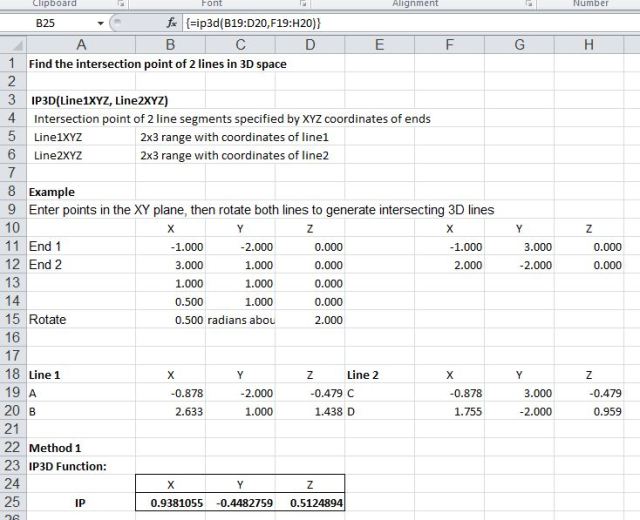
IP3D example
On spreadsheet calculation for the same two lines, using the UDF IP() (Example 2), and using only built in Excel Functions (Example 3)
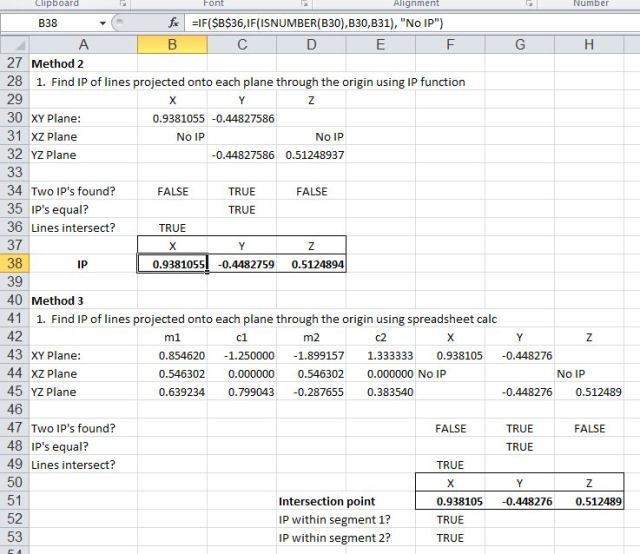
On spreadsheet calculation of IP
and graphs of the two lines projected on to the three axis planes:

Projected intersecting lines




 Newton Excel Bach, not (just) an Excel Blog