Tension Stiffening

Tension Stiffening in reinforced concrete is the increase in stiffness of a cracked member due to the development of tensile stresses in the concrete between the cracks.  The main application of tension stiffening theory in design applications is in the estimation of the bending deflection of transversely loaded beams and slabs, where this effect has a significant effect, especially at bending moments just above the cracking moment.

The main categories of analysis methods for tension stiffening are:

  1. Empirical adjustment methods, based on evaluation of an intermediate stiffness between the fully cracked and uncracked values, dependent on the ratio of the service moment to the cracking moment.
  2. “Smeared crack” methods where an effective tensile stress-strain relationship is developed, based on the average strain in the concrete, with the displacements at cracks distributed over the length between the cracks.  The stress-strain relationship may be fully empirical, or based on rigorous analysis, or a combination of the two.
  3. Rigorous methods modelling the formation of cracks,  the actual tensile stress-strain behaviour of the concrete before and after cracking, bond stresses and bond slip at the concrete-reinforcement interface, and, where applicable, the non-linear behaviour of the reinforcement and the concrete in compression.

A recent issue of the Institution of Civil Engineers “Structures and Buildings” journal (1, 2) contains two papers examining tension stiffening effects in flexural members based on rigorous analysis, which has then been used to derive a new smeared crack model.  Predicted beam deflection results using the new model have been compared with experimental results, results from rigorous analysis, and results using empirical methods contained in design codes, and found to be in good agreement.

I have updated the RC Design Functions spreadsheet to include two versions of the new model.  The spreadsheet, including full open source code, can be downloaded from RC Design Functions6.zip.

The concrete tension stress-strain model recommended by the paper is Figure (b) below.  This is based on the combination of the relationships before and after cracking shown in Figure (a).  The two models have been combined for simplicity on the grounds that the higher concrete tensile stresses allowed in the “pre-cracking” model will always occur near the section neutral axis, and hence will have little effect on bending moments.  This is true for sections with small or zero axial load, but where compressive axial loads are larger the effects of the rising tensile stress zone become significant.  Also since different analysis procedures are required for the cracked and uncracked sections there is little additional complexity in using a different stress strain curve for the cracked section.
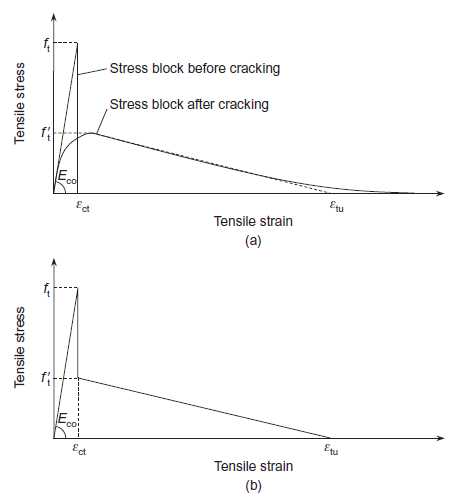
Concrete Tension Stress/Strain Curves

The procedure used in the analysis was as follows:

  1. Check maximum tensile stress assuming an uncracked section.
  2. If this stress exceeds the cracking stress, or if the section is flagged as previously cracked, find the depth of the neutral axis and maximum concrete compressive strain ignoring concrete tensile stresses using a closed form solution.
  3. Using the results from step 2 find the axial force and bending moment due to the concrete tensile stresses.
  4. Algebraically subtract the force and moment due to concrete tensile stresses from the applied loads, and recalculate the depth of the neutral axis and concrete compressive strain ignoring concrete tensile stresses.
  5. Recalculate the axial force and bending moment due to the concrete tensile stresses.
  6. Find the difference between the applied axial force and bending moment and the sum of the revised applied loads and the reaction forces due to concrete tensile stresses.
  7. Repeat steps 4 to 6 until the load difference found at step 6 is less than a specified tolerance.
  8. The section curvature may now be calculated from the depth of the neutral axis and concrete compression strain found in the last iteration.

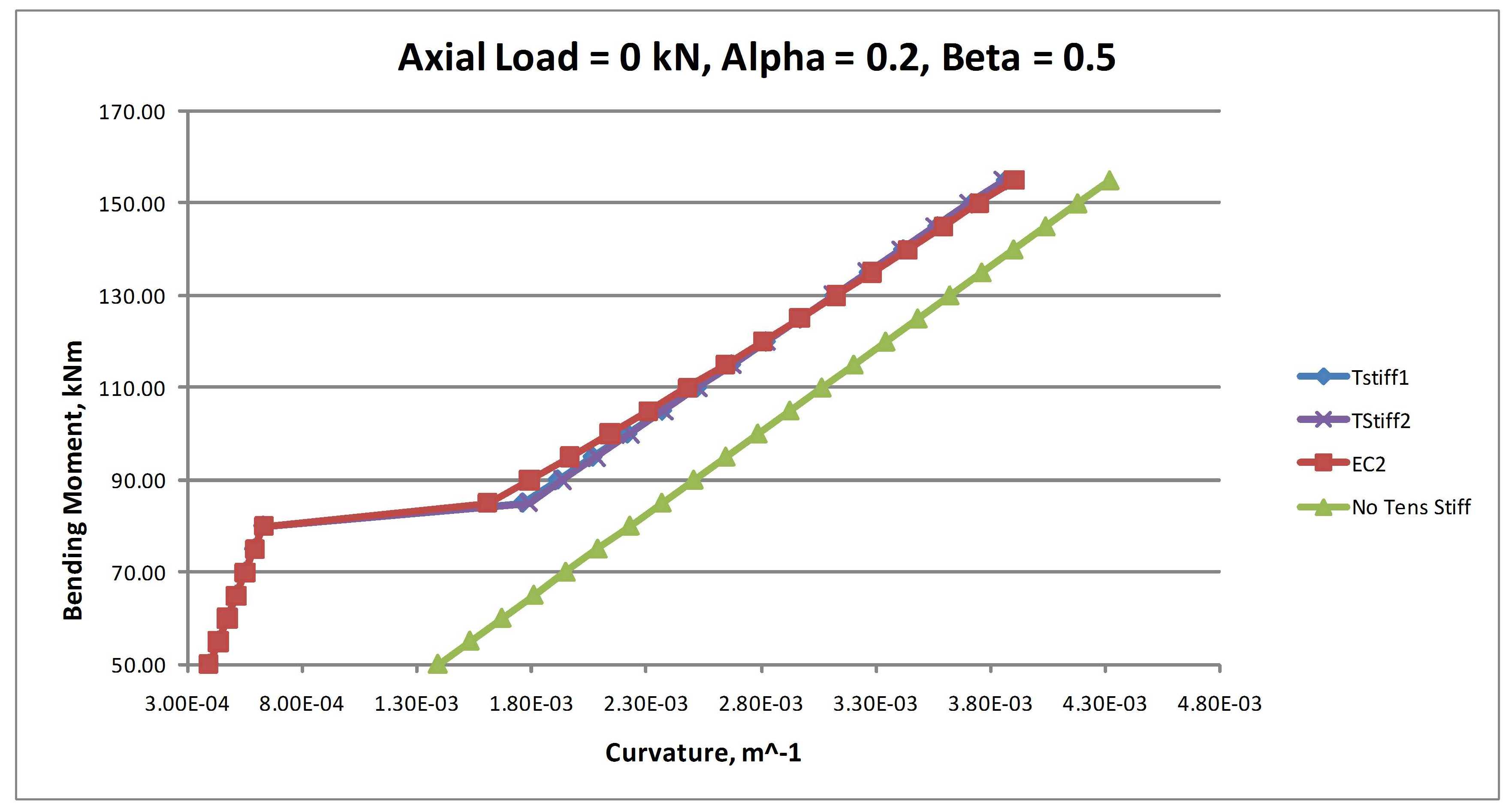
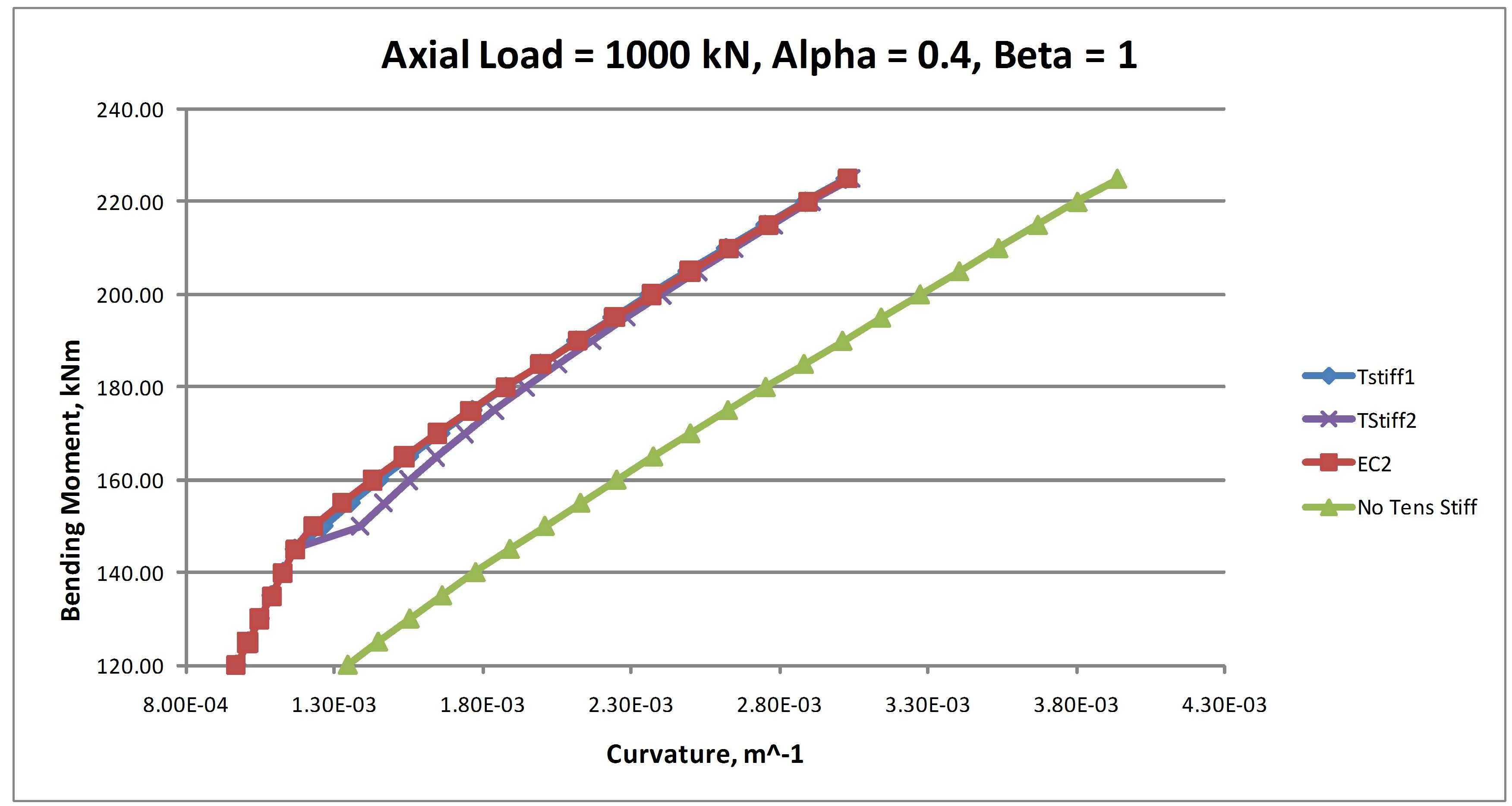
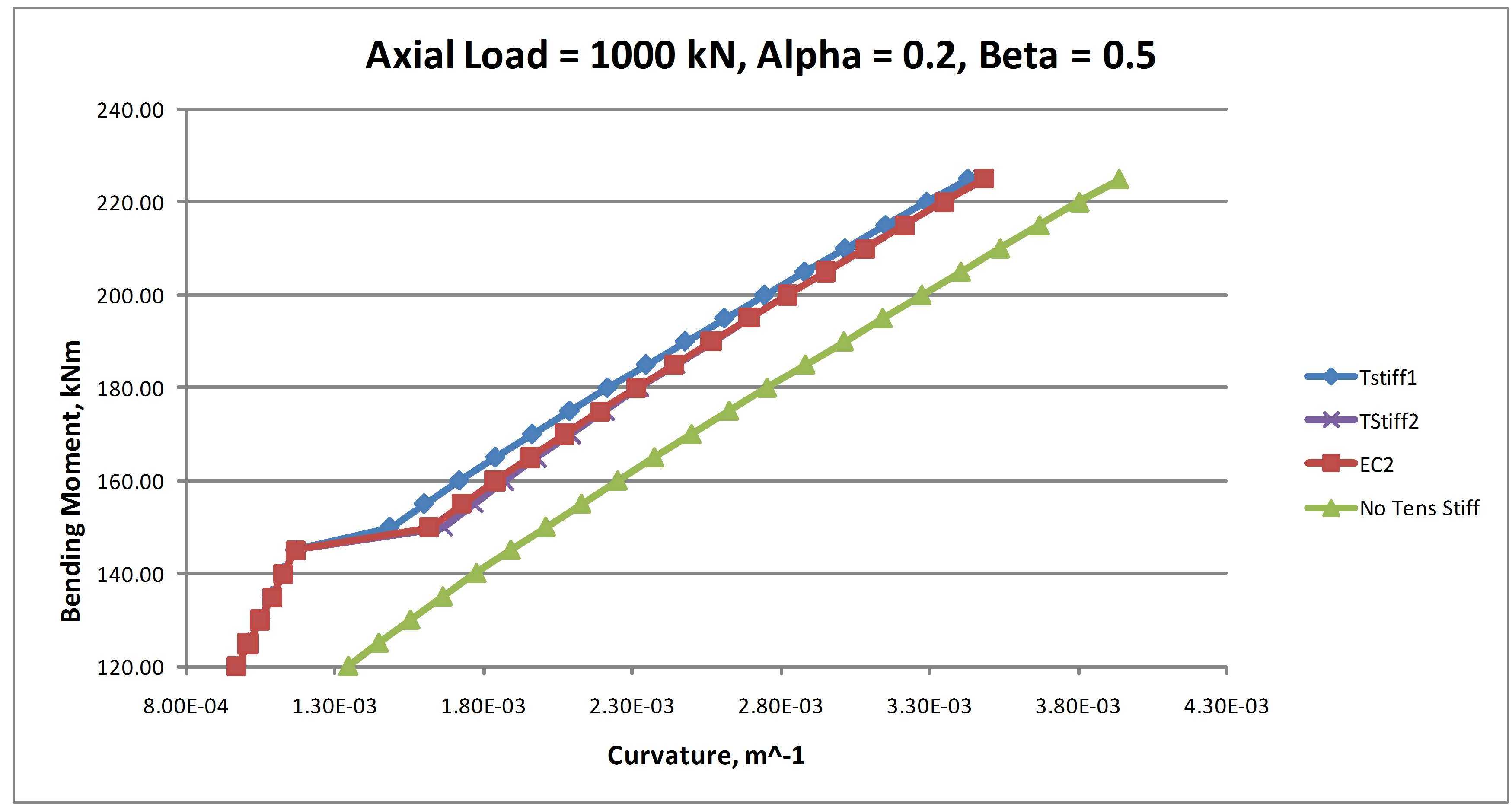
Results of this analysis are shown in the charts below for a 350 mm deep slab with a tensile reinforcement ratio of approximately 0.9%.  The analyses used the two alternative tensile stress blocks, and two alternative maximum tensile stress values.  The results are compared with the empirical method given in Eurocode 2 and with no tension stiffening.  On the charts:

  • TStiff1 indicates the results using the stepped bi-linear tension block shown in Figure (b).
  • TStiff2 indicates the results using the parabolic linear tension block shown in Figure (a).
  • Alpha is the tension stress factor for maximum tensile stress after cracking. In Figures (a) and (b) f’t = alpha.ft
  • Beta is the Eurocode 2 factor for loss of tension stiffening.  Beta = 1 for short term loading and 0.5 for long term loading.
  • For the purposes of comparison the analyses have used the relationship Alpha = 0.4Beta

Left click any image for a full size view:
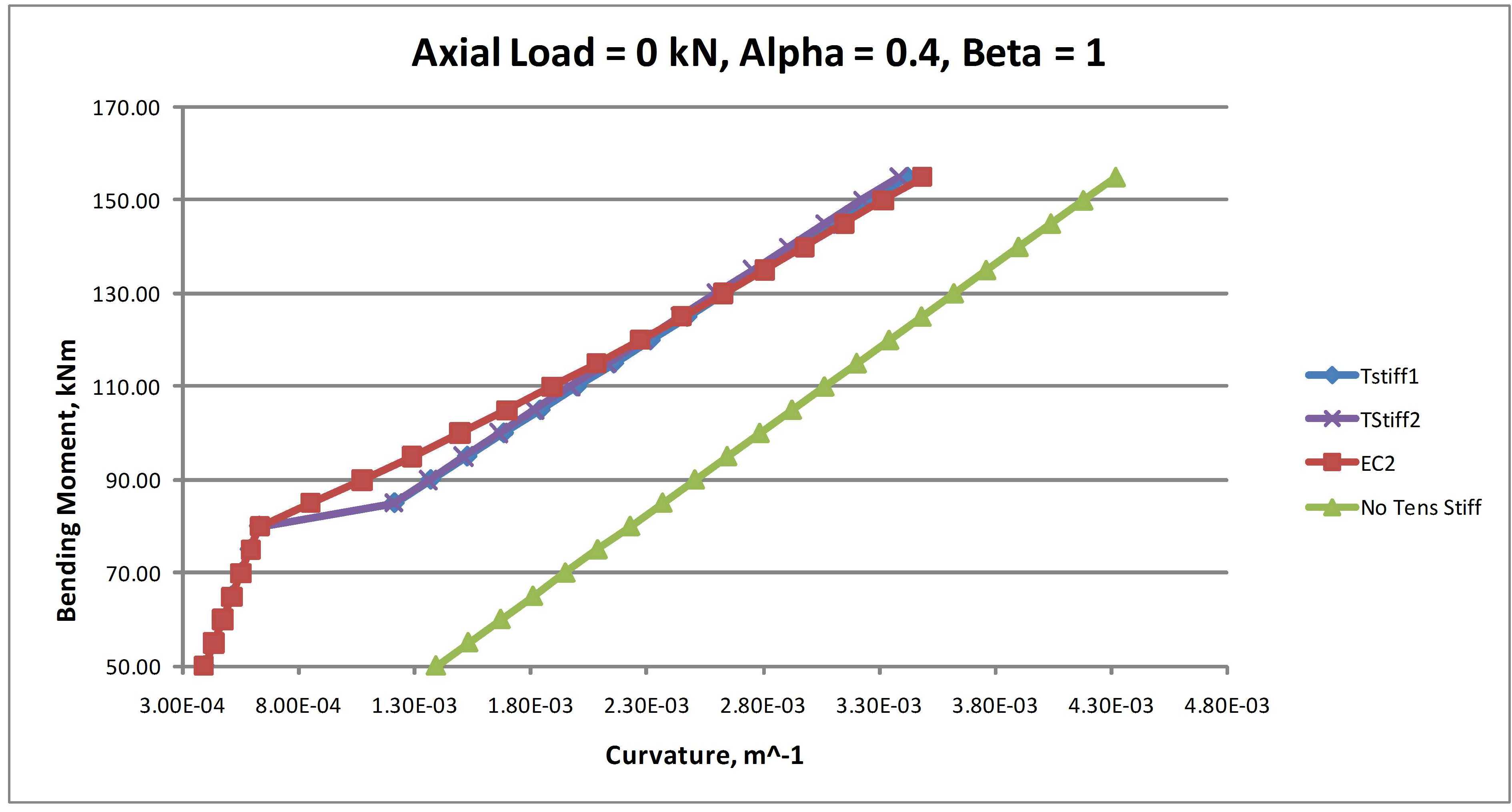

The results of these analyses indicate that:

  • The results allowing for concrete tension are in reasonably good agreement with the Eurocode 2 results in all cases, but give slightly greater curvature at bending moments just above the cracking moment for sections with zero axial load.
  • With zero axial load the two different stress-strain curves gave virtually identical results
  • With 1000 kN axial load the parabolic-linear stress-strain curve (TStiff2) gave significantly greater curvature than the stepped bi-linear curve (TStiff1) at bending moments just above the cracking moment.
  • For short term loading the TStiff1 results were in better agreement with the Eurocode 2 results.
  • For long term loading the TStiff2 results were in better agreement with the Eurocode 2 results.

In summary, any of the three analysis methods compared here are likely to provide satisfactory results.  For practical design applications the Eurocode 2 method will be satisfactory, but for research purposes or for comparison with experimental results the tensile stress block method is better correlated with the actual bending mechanisms, and provides better and more rational means of adjustment for such factors as change in concrete tensile strength, creep and shrinkage strains, or changes in steel/concrete bond characteristics.  If the tensile stress block method is employed the use of the parabolic-linear stress block is closer to the underlying analytical results, and requires little if any increase in complexity of the analysis process, and is therefore recommended.

References:

  1. P.L. Ng et al., “Tension Stiffening in concrete beams. Part1 FE Analysis”, Structures and Buildings, Institution of Civil Engineers, Vol 163 Issue SB1, Feb 2010, pp 19-28.
  2. J.Y.K. Lam et al., “Tension Stiffening in concrete beams. Part 2 member Analysis”, Structures and Buildings, Institution of Civil Engineers, Vol 163 Issue SB1, Feb 2010, pp 29-39.
Posted in Beam Bending, Concrete, Excel, Newton, UDFs, VBA | Tagged , , , , , | 3 Comments

The speed of loops

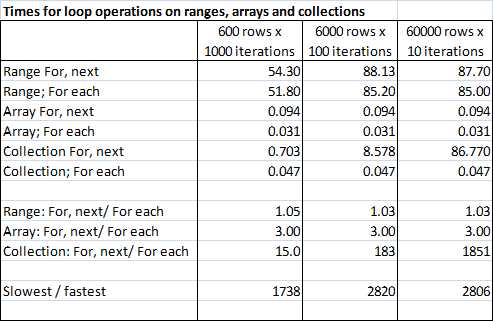
Commenting on the Good Practice post, John Tolle pointed out that with a collection it was very much quicker to loop using a For each loop than iterating by index, using a for, next loop.  I did some simple tests on this, also looking at ranges and arrays, and found he was absolutely right.  The test consisted of looping through a collection, range or array with 600, 6000 or 60,000 items, 1000, 100, or 10 times, adding 1 to the value at each step, so there were 600,000 operations in all cases.  The results are summarised in the screen shot below:

Looping through ranges, arrays and collections

 The lessons from this exercise were:

  • Arrays were always faster than the equivalent operations with a collection, and very much faster than a range
  • Using a “For Each” loop on an array was 3 times faster than a “For, Next” loop.
  • Using a “For Each” loop on a collection was almost as fast as a “For Each” loop with an array.
  • Times for a “For, Next” loop with a collection were proportional to the square of the size of the collection.  For the largest collection (60,000 items) this form of loop was nearly 2000 times slower than the “For Each” loop.
  • Where possible use “For Each” loops, in preference to a “For, Next” loop.
  • If a “For, Next” loop is necessary, use an array in preference to a collection.
  • Avoid iterating through a range in any application where speed is important.

For those interested in the code, the spreadsheet can be downloaded from CheckLoopSpeed.xls

The macro checkloop is currently set up for 10 iterations of 60,000 cells. If you want to change the parameters you need to change the NumReps value and the UserRng extent (at two locations) in the code. Note that for the loops using a range I have used 1/10 the number of iterations, and multiplied the time by 10, so the NumReps value should be 1/10 the actual number you want.

On re-running I also found that the range times were about twice as fast as previously, but still very much slower than the array times, or the collection times with a for each loop.

Posted in Arrays, Excel, VBA | Tagged , , , , , | 8 Comments

A post about everything …

… according to xkcd

From the top down:

Click for full size view

… and deeper down:


Posted in Newton | Tagged , , , | 3 Comments

Stringing more than two words together

It has always seemed strange to me that the Excel function Concatenate(), which has such a long name, provides no additional functionality over using the & operator.

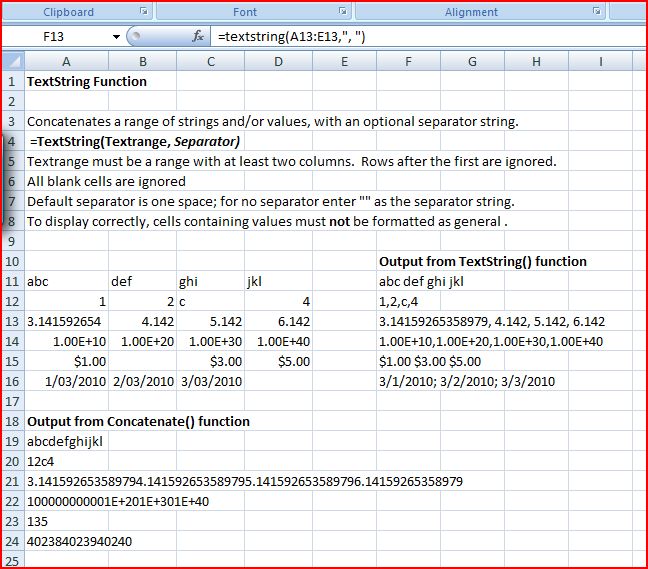
The TextString function is a simple User Defined Function (UDF) which provides the following additional features:

  1. The cells to be concatenated are defined as a single row range, rather than separate cells.
  2. An optional separator character may be specified.
  3. Numbers, including dates, times and currency are concatenated as displayed

A spreadsheet including full open source code and examples may be downloaded from: TextString.xls

Typical output (and results of the Concatenate function) are shown in the screen shot below:

TextString Output, click for full size view

Posted in Excel, UDFs, VBA | Tagged , , , | 5 Comments

Transferring data within VBA

The use of inappropriate techniques for passing data between sub-routines and modules is probably one of the most frequent causes of error in VBA programs, but many text books provide little guidance on this subject, and what there is, is often too general to be of much use. This post will focus on the basics, and a following post will look at some details affecting passing of arrays and ranges. The best source of more detailed information I know of is: Chip Pearson on Scope and ByVal and ByRef.

By default, when a variable or constant is declared within a VBA subroutine or function it is only available within that routine. The main ways of make the information available to other routines are:

  • Declare the variable with a wider “scope”
  • Copy the information to a worksheet, or to another file available to other VBA routines and possibly external routines
  • Pass the variable to a called subroutine or function at the time of calling

Declaring Module or Project wide scope

For a constant, since the value will not be changed during the execution of a routine, it generally makes sense to give it the widest scope possible. That is declare it as Public at the top of a module. In this way the constant will be available to every module in the project. For instance:

Public Const Pi As Double = 3.14159265358979

For large projects it is a good idea to put all constants in their own module.

For variables it is also possible to declare them at the top of a module so that they will be available anywhere within the module (if declared as Private) or anywhere within the project (if declared as Public). This is quick and easy, but in general it is not a good idea. The problems are:

  • Any change to a variable will be affect every procedure where the variable is used, and this may not be what was intended.
  • A variable of the same name may be declared within any procedure without any warning being generated. Changes to this variable will only will only be seen within the procedure where it is declared, but it may be assumed (especially at a later date) that the variable with global scope is applicable in every routine.

Transferring variable contents to a worksheet or file

The simplest way to accomplish this is to declare the variable as a range:


Dim RangeVariable as Range
Set RangeVariable = Range("Rangename")

Any changes made to the RangeVariable object will now change the worksheet range (since that is what the RangeVariable refers to), and this changed data will be available from any other routine or module within the project (or indeed from another project). The problem with this approach is that the transfer of data between VBA and the spreadsheet is very slow, and if the data in the range object changes frequently this can result in a significant loss of performance.

Passing Variables between routines

This is of course the main method of transferring data within VBA. Examples are:

  1. ReturnVal = FunctionName(Var1, Var2, Var3)
  2. SubName Var1, Var2, Var3
  3. Call SubName(Var1, Var2, Var3)
  4. SubName(Var1), (Var2), (Var3)
  5. Call SubName((Var1), (Var2), (Var3))

These are used to call:

Function FunctionName(Var1 as Double, ByRef Var2 as Double, ByVal Var3 as Double) as Double
Sub SubName(Var1 as Double, ByRef Var2 as Double, ByVal Var3 as Double)

Variables may be passed either “by reference” (ByRef) or “by value” (ByVal). Passing by reference passes the memory address of the variable, so that if the value of the variable is changed by the called subroutine, that change is seen by the calling routine, which continues to use the same memory address as the location of this variable. In contrast a variable passed by value may be changed by the called routine without affecting the value of the variable in the calling routine.

Examples can be found in ByRefByVal1.xls.

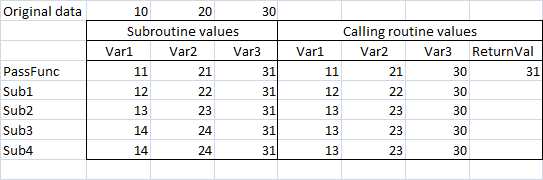
The response of the different varieties of passing variables is illustrated in the screenshot below:

Output from data passed ByRef and ByVal

The routine used to produce this output performed the following tasks:

  1. Read the values in cells B3 to D3 and assign to the variables Var1 to Var3
  2. Pass the variables Var1 to Var3 to PassFunc and add 1 to each value
  3. Copy the resulting values to cells B4 to D4
  4. From the calling routine, copy the value of Var1 to Var3 to cells E4 to G4
  5. Copy the function return value to cell H4
  6. Repeat steps 2 to 4, but passing the variables to subroutines using the syntax styles of examples 2 to 5 above

The results of this excercise illustrate the following points:

  • Passing by reference is the default; the results for Var1 (method of passing not specified) and Var2 (passed by reference) are therefore always the same.
  • Var3 is passed by value, so the increment in its value by the called subroutine is not passed back to the calling routine.
  • Function return values (in this case Var3) do reflect the increment in value.
  • When the variables passed to a subroutine are enclosed in brackets these variables are passed by value, even if by reference is specified in the called routine.
  • Thus in Sub3 and Sub4 the increment in Var1 and Var2 is not passed back to the calling routine, even though these variables were passed by reference. This behaviour is particularly confusing if a single variable is passed to a subroutine with the variable enclosed in brackets, since this will be passed by reference by default if the Call statement is used, but always by value if the subroutine is called without the call statement.

When ByRef and when Byval?

In some circumstances the logic of the programme dictates the method of passing variables, so if any changes to the variable are required to be passed back to the calling routine (and it is not a function return value) then it must be passed by reference, and if the variables in the calling routine should not be affected by changes in the called routine, then they must be passed by value. But what is the best practice when the passed variable is not changed in the called routine, or is not used again in the calling routine? There are arguments for different procedures, but my preference is:

  • If the program logic is not affected by the method of passing, then leave it as unspecified (and hence by reference is adopted as the default).
  • If the program logic demands that the value must be passed by reference, then specify by reference. This then acts as a flag that the method should not be changed unless the program logic changes.
  • If the program logic demands that the value must be passed by value, then there is no option, by value must be specified.

In my opinion this procedure optimises performance (by passing by reference whenever possible), aids readability, but also flags those procedures where the correct method of passing is vital to correct performance.

Posted in Excel, VBA | Tagged , , , , | 7 Comments