Evaluating Polynomial Functions

A polynomial function is a function of the form:
a + b*x + c*x^2 + d*x^3 …

and the derivative (the slope of the line at point x) of this function is given by:
b + 2c*x + 3d*x^2 …

The User Defined Function (UDF) =EvalPoly1() will evaluate any polynomial and its derivatives, and may be downloaded from: EvalPoly.zip

The UDF input is:
=evalpoly1(x,Coefficient range, No of derivatives)

Where x is the value the function is to be evaluated for, and Coefficient range is a single row range containing the function coefficients, in increasing powers of x.  If “no of derivatives” is zero the UDF returns a single value; otherwise it returns a single row array containing the specified data.  To view the array, select the number of cells required, with the UDF in the left hand cell, then press F2 followed by ctrl-shift-enter.

The download file now also includes a 2D array version of the function, which is much faster for large data sets:

=EvalPoly1A(xa, Coefficient range, No of derivatives)

Where xa is a single column range of x values.

Typical output for a quartic polynomial is shown in the screen-shot below:

Output of EvalPoly1 Function (click to view full size)

Output of EvalPoly1 Function (click to view full size)

Posted in Excel, Maths, UDFs, VBA | Tagged , , , , | 5 Comments

Using the DMax Function …

… and an alternative.

In this discussion at Eng-Tips I recommended the use of the DMAX() function to extract maximum values from data grouped with different text labels.  In the process I needed to adjust the selection criterion to generate the correct results.  DMAX requires a criteria range of at least two rows and one or more columns.  In the simplest case the criterion consists of a column header with the criterion underneath; for instance:

=DMAX(datarange, 2, criteria)

Where criteria is a two row range containing:

First Name
Fred

Will return the maximum value from Column 2 from any row with the text “Fred” in the column headed “First Name”.

Unfortunatly this will not always work as expected, and in the example in the Eng-Tips discussion a criterion of M1 was also returning values from rows with labels M11, M12 etc.

The correct way to specify the criterion is to enter:

=”=M1″

which will appear as:

=M1

An alternative is to replace the DMAX function with an array function that will do the same job:

=MAX(IF(EXACT($C$7:$C$12928,U7),$E$7:$E$12928,-1000000))

In this case the labels are in Column C, the criteria are in Column U, and the data from which the maximum values are required are in column E.  The final negative number must be less than the most negative value in the datarange.

This formula must be entered as an array function (by pressing ctrl-shift-enter).  The screenshot below shows an example.

Array Formula as an alternative to DMax(), click to see full size

Array Formula as an alternative to DMax(), click to see full size

 
The array formula has the advantages:
  1. The criteria occupy only one cell, so may be placed in a list, next to the formula output
  2. The criteria consist only of the text, without an equals sign

Eng-Tips members may download an example spreadsheet from the link.

Posted in Arrays, Excel | Tagged , , , | 4 Comments

Randomising a list

A list can be sorted into random order by inserting a list of random numbers in an adjacent column and sorting both columns on the random number column.

A similar procedure can be carried out through a VBA subroutine, avoiding the need to insert a column of random numbers on the spreadsheet.  A spreadsheet incorporating this routine can be downloaded from: randomise list.zip

Features of this procedure are:

  • The range to be sorted is selected through a dialog box, with the default range being either the pre-selected range, or if there is no selection, the previously used range (if any).
  • The random number array is sorted using the combsort routine.
  • The range to be sorted can be a single column, or multiple columns.

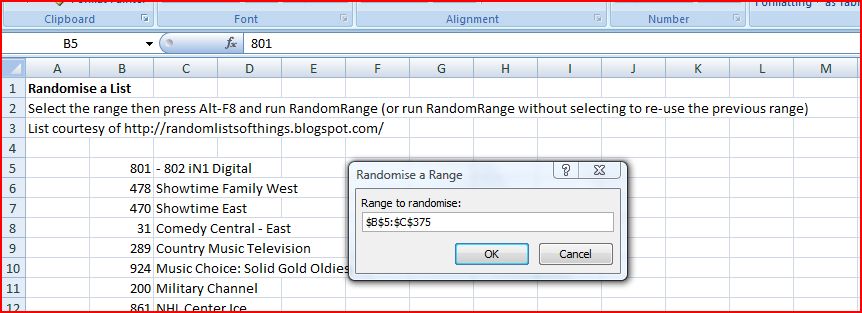
The range selection dialog is shown in the screen-shot below:

Randomise a List

Randomise a List

Posted in Excel, VBA | Tagged , , | 2 Comments

Listing sheet names

Answering my own question from the previous post, here is a short UDF that will return a list of worksheet names, starting with any chosen sheet:

Posted in Excel, UDFs, VBA | Tagged , , , | 3 Comments

Extracting data from a 3D range

I recently needed to extract data from a series of tables on separate worksheets, into a form suitable for plotting on an XY graph.  In Lotus 123 this would be a piece of cake, since the Lotus @INDEX function has an optional third parameter allowing the sheet number to be selected.  Unsurprisingly, I could find nothing on the subject in the Excel help files, but surprisingly I couldn’t find anything on the Internet either.  I ended up using the INDIRECT() function, as shown in the screen shot below (click image to see full size):

Retrieve data from a 3D range using INDIRECT()

Retrieve data from a 3D range using INDIRECT()

I have entered sheet names in column B and the cell address in row 3, then the formula to retrieve the data to go in cell D5 is:
=INDIRECT(“‘”&$B5&”‘!”&D$3)
Note the $ signs that keep the address referring to the correct column and row when it is copied, and the apostrophe between the double quotes at the start and before the exclamation mark.  Also note that the sheet names in column B are now just the name as it appears on the tab, without the !.

Does anyone have an alternative method?
Is there a neat way to fill the sheet name column automatically?

Edited 27 August 09 following comments from Harlan Grove, who also provided some alternative ways of tackling it (see comments below)

Posted in Arrays, Excel | Tagged , , , | 3 Comments