Continuous beam with varying stiffness

Previous Splinebeam post

One of my aims in developing the splinebeam function is to carry out non-linear analysis of reinforced concrete beams, allowing for the greatly reduced flexural stiffness of reinforced concrete sections after cracking of the concrete.  To that end, I have added the facility to specify the section stiffness span by span.  Later versions will allow for the stiffness of individual segments to be specified, or for a non-linear moment-curvature relationship to be used. Dowload SplineBeam2_1.zip

The standard cubic spline formulation is based on the curvature and slope of the spline being continuous at nodes.  Since a step in the section stiffness will result in a step in the curvature, the curvature has been replaced by the bending moment, and the governing equation becomes:

SplineBeam2_1-1

SplineBeam2_1-2

The coefficients of the cubic splnie function must also be changed:

if: y = a + b(x – x(n)) + c(x – x(n))^2 + d(x – x(n))^3

where x lies between x(n) and x(n+1)

then:

SplineBeam2_1-3

Typical output for a 3 span beam is shown below:

SplineBeam2_1-4

Typical output; Click to view full size

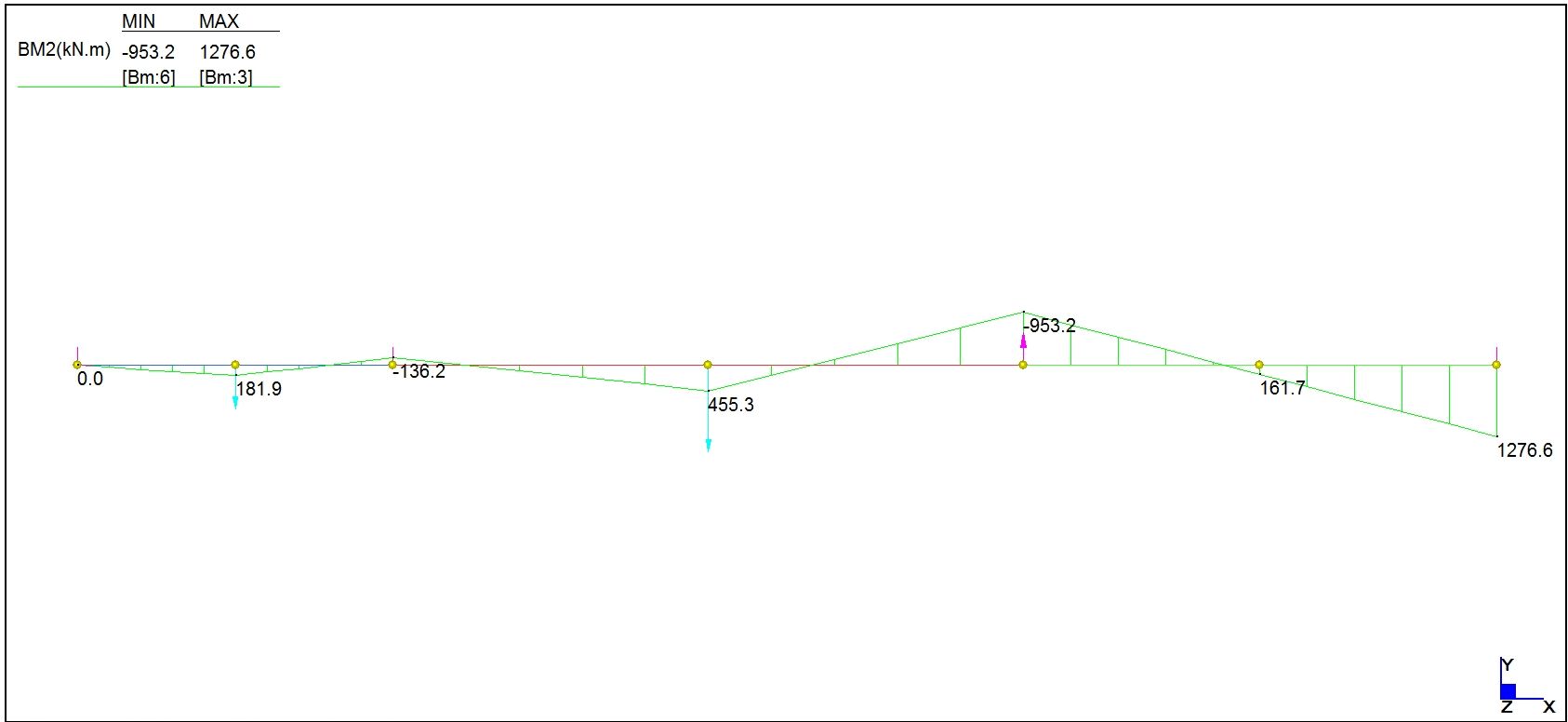
A Strand7 analysis with the same input gives identical results:
SplineBeam2_1-5

Strand7 Output, Click to view full size

Posted in Arrays, Beam Bending, Excel, Finite Element Analysis, Maths, Newton, UDFs, VBA | Tagged , , , , , , , | 3 Comments

Finding Circle Centres in 3D

In 2 new functions for IP.xls I described two Excel User Defined Functions (UDFs) to find the radius and centre of a circle defined by 3D coordinates for either 3 points on the circumference, or for two tangent points and the intersection of the tangents.  The algorithm used had the merit of being intuitively obvious, but was unnecessarily long and complex.  I have now re-written the UDFs with a much more efficient algorithm, and added two more functions.  Download IP2.zip

The new functions are:

  • ArcCenTP requires a point on the circle, one point on the tangent line through that point, and one other point on the circle
  • ArcCenRP requires one point on the circle, one point on a radial line through that point, and one other point on the circle

The general method used in all the functions is:

  • From the coordinates of the three input points, ABC, find the angle BAC and the length of the line AC
  • Find the radius of the circle, R
  • Find the direction of a line parallel to a line between a known point and the circle centre
  • Project a line from this known point towards the circle centre

The four different cases are shown below:

ArcCen Functions, click to view full size

ArcCen Functions, click to view full size

Referring to the four cases shown above, the procedure is:

From input coordinates find:
  Direction cosines of AB
  Direction cosines of AC
  Cos BAC (from Cosine Rule)
  Sin BAC (Case 1 and 3)
Calculate R:
  Case 1: AE / Sin BAC
  Case 2: AD / Cos BAC
  Case 3: AD / Sin BAC
  Case 4: AD / Cos BAC
Find direction cosines of line parallel to line from a known point to centre:
  Case 1: DC
  Case 2: BD
  Case 3: DC
  Case 4: AB
Project from known point to circle centre:
  Case 1: Point E, mid point of AB
  Case 2: Point D, mid point of AC
  Case 3: Point A
  Case 4: Point A

All four functions return a four column array containing the XYZ coordinates of the circle centre and the radius of the circle.  To enter an array function:

  • Enter the function as usual
  • Select the cell containing the function and the three adjacent cells to the right
  • Press F2 to enter “edit mode”
  • Press Ctrl-Shift Enter

As, before the function ArcCenT2IP also returns a second line with the coordinates of the adjusted tangent point, if any.

Further notes are given in the download file, and as usual it includes full open source VBA code.

Posted in Coordinate Geometry, Excel, Maths, Newton, UDFs, VBA | Tagged , , , , , , , , | 5 Comments

Continuous beam with specified end conditions …

… and/or support displacements.

The previous post in this series derived cubic splines with specified end conditions; either a specified curvature or a specified end slope.

I have adapted the splinebeam function to allow input of specified end conditions (either a fixed slope or a bending moment), and also to allow input of deflections at the supports.  The spreadsheet file may be downloaded from Splinebeam2.  As usual it includes full open source VBA code for the included functions.  The screen shots below show output for four example cases of a 3 span beam, together with Strand7 output for the same loading, showing near exact agreement.  Click on an image to view full size.

Example 1; Splinebeam

Example 1; Splinebeam


Example 1; Strand7 Results

Example 1; Strand7 Results


Example 2; Splinebeam

Example 2; Splinebeam


Example 2; Strand7 Results

Example 2; Strand7 Results


Example 3; Splinebeam

Example 3; Splinebeam


Example 3; Strand7 Results

Example 3; Strand7 Results


Example 4; Splinebeam

Example 4; Splinebeam


Example 4; Strand7 results

Example 4; Strand7 results

Posted in Arrays, Beam Bending, Excel, Finite Element Analysis, Frame Analysis, Maths, Newton, UDFs, VBA | Tagged , , , , , , , | 1 Comment

Climate change and political opportunism

Senator Steve Fielding is the leader of a small political party in Australia and a member of the the Federal Senate (the Australian upper house).  For some reason he sends me occasional e-mails, which usually go straight in the bin, but on this occaision he was dealing with the subject of action on climate change, an issue that he (as one of the small group of Senate members outside the two major parties) has a disproportionate influence on.  The relevant part of his e-mail was:

CLIMATE CHANGE – Are you sure carbon dioxide (CO2) is the problem?
Check it out for yourself – see what I presented to Minister Wong and Australia’s Chief Scientist after I returned from a self-funded trip to Washington, and see their response. Read more
here…

and here is my response:

Dear Senator Fielding

 I’m not sure why you keep sending me e-mails, but since you ask, no I’m not absolutely certain that human sourced CO2 emissions (and other greenhouse gasses) are the primary source of climate change, but what we can say is:

  1.  On the balance of probabilities the scientific evidence suggests that the costs of likely climate change will far exceed the cost of reducing emissions.
  2. The probability of climate change having disastrous consequences for countries with large heavily populated low lying regions is unacceptably high.
  3. There is a small, but certainly not negligible possibility of still more extreme consequences, such as that climate change will have a catastrophic effect on world agricultural output, leading to mass starvation.

In summary I believe that seeking to slow down or stop action on reduction of emissions of greenhouse gasses because the science is not “certain” is grossly irresponsible, and smacks of political opportunism.

On the subject of political opportunism, using a “cherry picked” graph of temperatures against emissions to support your arguments is ignorant at best, and most likely outright dishonest.

I hope that answers your question.

Posted in Climate, Newton | Tagged , | 3 Comments

From the Ridiculous to the Sublime

Our previous musical interlude featured a positively Pythonic Wizz Jones battling the Newquay Urban District Council, but now for something completely different.

On Sunday the cellists Emma-Jane Murphy and Daniel Yeadon treated us to performances of Bach’s 1st and 5th Suites for Solo Cello, at the Utzon Room of the Sydney Opera House.  I can’t find any on-line Bach performances by either of the two performers, but this rendition of the Prelude to Bach’s Cello Suite No 1 by Yo-Yo Ma (accompanied by Salvador Dali paintings) makes a very acceptable alternative.

Posted in Bach | Tagged , , | 2 Comments