Answering my own question from the previous post, here is a short UDF that will return a list of worksheet names, starting with any chosen sheet:

Answering my own question from the previous post, here is a short UDF that will return a list of worksheet names, starting with any chosen sheet:
I recently needed to extract data from a series of tables on separate worksheets, into a form suitable for plotting on an XY graph. In Lotus 123 this would be a piece of cake, since the Lotus @INDEX function has an optional third parameter allowing the sheet number to be selected. Unsurprisingly, I could find nothing on the subject in the Excel help files, but surprisingly I couldn’t find anything on the Internet either. I ended up using the INDIRECT() function, as shown in the screen shot below (click image to see full size):

Retrieve data from a 3D range using INDIRECT()
I have entered sheet names in column B and the cell address in row 3, then the formula to retrieve the data to go in cell D5 is:
=INDIRECT(“‘”&$B5&”‘!”&D$3)
Note the $ signs that keep the address referring to the correct column and row when it is copied, and the apostrophe between the double quotes at the start and before the exclamation mark. Also note that the sheet names in column B are now just the name as it appears on the tab, without the !.
Does anyone have an alternative method?
Is there a neat way to fill the sheet name column automatically?
Edited 27 August 09 following comments from Harlan Grove, who also provided some alternative ways of tackling it (see comments below)
One of my aims in developing the splinebeam function is to carry out non-linear analysis of reinforced concrete beams, allowing for the greatly reduced flexural stiffness of reinforced concrete sections after cracking of the concrete. To that end, I have added the facility to specify the section stiffness span by span. Later versions will allow for the stiffness of individual segments to be specified, or for a non-linear moment-curvature relationship to be used. Dowload SplineBeam2_1.zip
The standard cubic spline formulation is based on the curvature and slope of the spline being continuous at nodes. Since a step in the section stiffness will result in a step in the curvature, the curvature has been replaced by the bending moment, and the governing equation becomes:


The coefficients of the cubic splnie function must also be changed:
if: y = a + b(x – x(n)) + c(x – x(n))^2 + d(x – x(n))^3
where x lies between x(n) and x(n+1)
then:

Typical output for a 3 span beam is shown below:

Typical output; Click to view full size
A Strand7 analysis with the same input gives identical results:
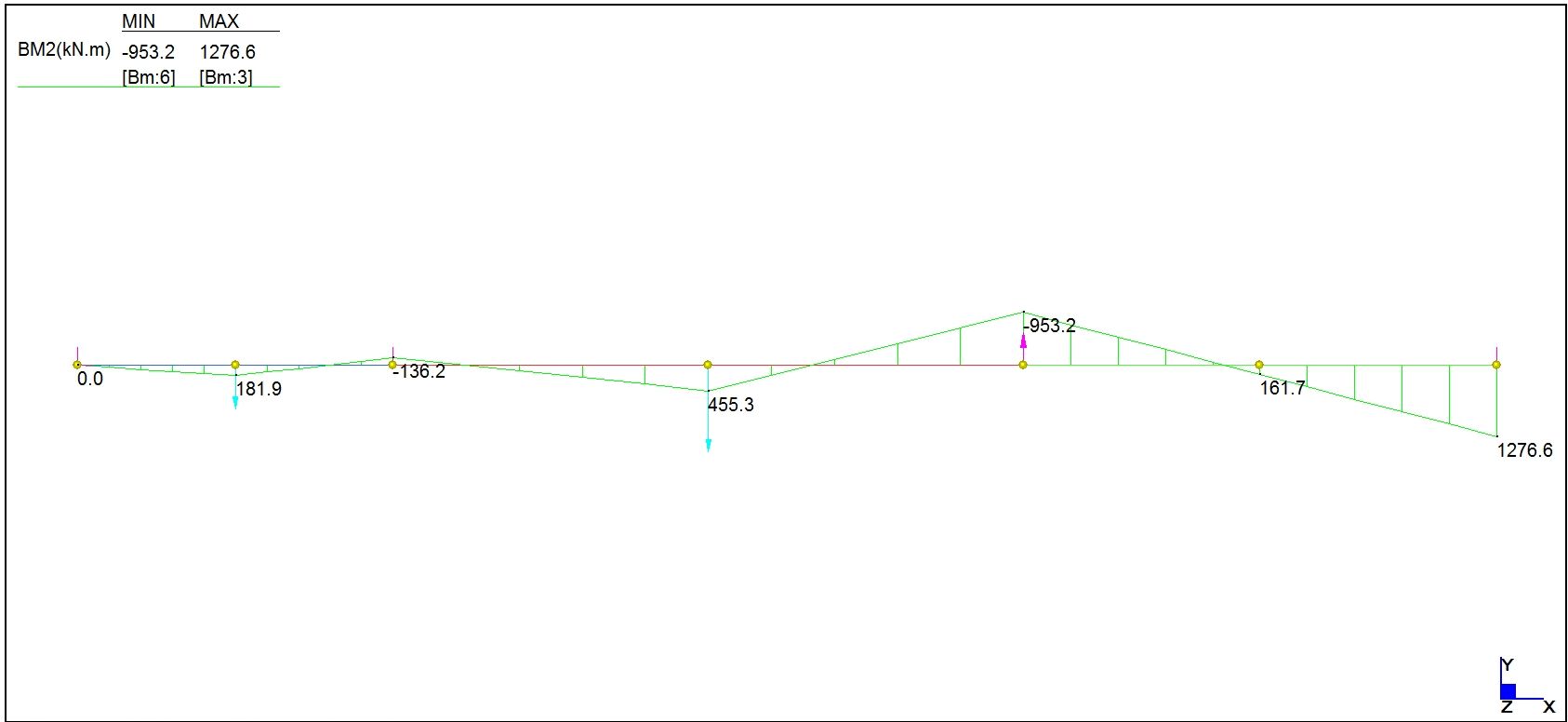
Strand7 Output, Click to view full size
In 2 new functions for IP.xls I described two Excel User Defined Functions (UDFs) to find the radius and centre of a circle defined by 3D coordinates for either 3 points on the circumference, or for two tangent points and the intersection of the tangents. The algorithm used had the merit of being intuitively obvious, but was unnecessarily long and complex. I have now re-written the UDFs with a much more efficient algorithm, and added two more functions. Download IP2.zip
The new functions are:
The general method used in all the functions is:
The four different cases are shown below:

ArcCen Functions, click to view full size
Referring to the four cases shown above, the procedure is:
From input coordinates find:
Direction cosines of AB
Direction cosines of AC
Cos BAC (from Cosine Rule)
Sin BAC (Case 1 and 3)
Calculate R:
Case 1: AE / Sin BAC
Case 2: AD / Cos BAC
Case 3: AD / Sin BAC
Case 4: AD / Cos BAC
Find direction cosines of line parallel to line from a known point to centre:
Case 1: DC
Case 2: BD
Case 3: DC
Case 4: AB
Project from known point to circle centre:
Case 1: Point E, mid point of AB
Case 2: Point D, mid point of AC
Case 3: Point A
Case 4: Point A
All four functions return a four column array containing the XYZ coordinates of the circle centre and the radius of the circle. To enter an array function:
As, before the function ArcCenT2IP also returns a second line with the coordinates of the adjusted tangent point, if any.
Further notes are given in the download file, and as usual it includes full open source VBA code.
… and/or support displacements.
The previous post in this series derived cubic splines with specified end conditions; either a specified curvature or a specified end slope.
I have adapted the splinebeam function to allow input of specified end conditions (either a fixed slope or a bending moment), and also to allow input of deflections at the supports. The spreadsheet file may be downloaded from Splinebeam2. As usual it includes full open source VBA code for the included functions. The screen shots below show output for four example cases of a 3 span beam, together with Strand7 output for the same loading, showing near exact agreement. Click on an image to view full size.

Example 1; Splinebeam

Example 1; Strand7 Results

Example 2; Splinebeam

Example 2; Strand7 Results

Example 3; Splinebeam

Example 3; Strand7 Results

Example 4; Splinebeam

Example 4; Strand7 results


 Newton Excel Bach, not (just) an Excel Blog