Just appeared on YouTube; the first part of a documentary about the music, life and times of Bert Jansch, made in 1992, including a rare appearance from Anne Briggs and commentary from a very youthful looking Billy Connolly.
Great Stuff!

Just appeared on YouTube; the first part of a documentary about the music, life and times of Bert Jansch, made in 1992, including a rare appearance from Anne Briggs and commentary from a very youthful looking Billy Connolly.
Great Stuff!
This clever ambigram from Douglas Hofstadfter provides the answer:

Is light a wave or particle?
It was pointed out in a comment to this post at Daily Dose of Excel that VBA has a StrReverse function that will (logically enough) reverse a string. That’s not awfully useful to me (except maybe for Project Euler), but it did set me thinking that I spend a fair amount of time writing lengthy formulas in Excel to extract bits of strings, which could be done with much less typing with a few simple User Defined Functions.
So here they are; download from String Functions.zip; full open source code is in the download file.
(Now updated as suggested by Dick K in the comments with a MidW() function, and an optional delimiter parameter)
Functions are:
leftw(); Return the first word(s) from a string
rightw(); Return the last word(s) from a string
Midw(); Return words(s) from the middle of a string
FINDrev(); Find from the right hand end
Leftval(); Extract a value from the left end of a string
Rightval(); Extract a value from the right end of a string
Reverse(); Reverse a string
Screenshot with more details:

Click to view full size
Continuing from: Frame Analysis with Excel – 6; Beam end releases and actions
Download Frame4.zip – the download file includes complete open source code.
Two more refinements have been added to the frame analysis spreadsheet:
In addition a plotting routine has been added to plot the frame, with or without scaled deflections.
Shown below are results for an example frames, with results from the same frames analysed in Strand7, and plots of the deflected shape (scaled by a factor of 20) from the spreadsheet and Strand7:
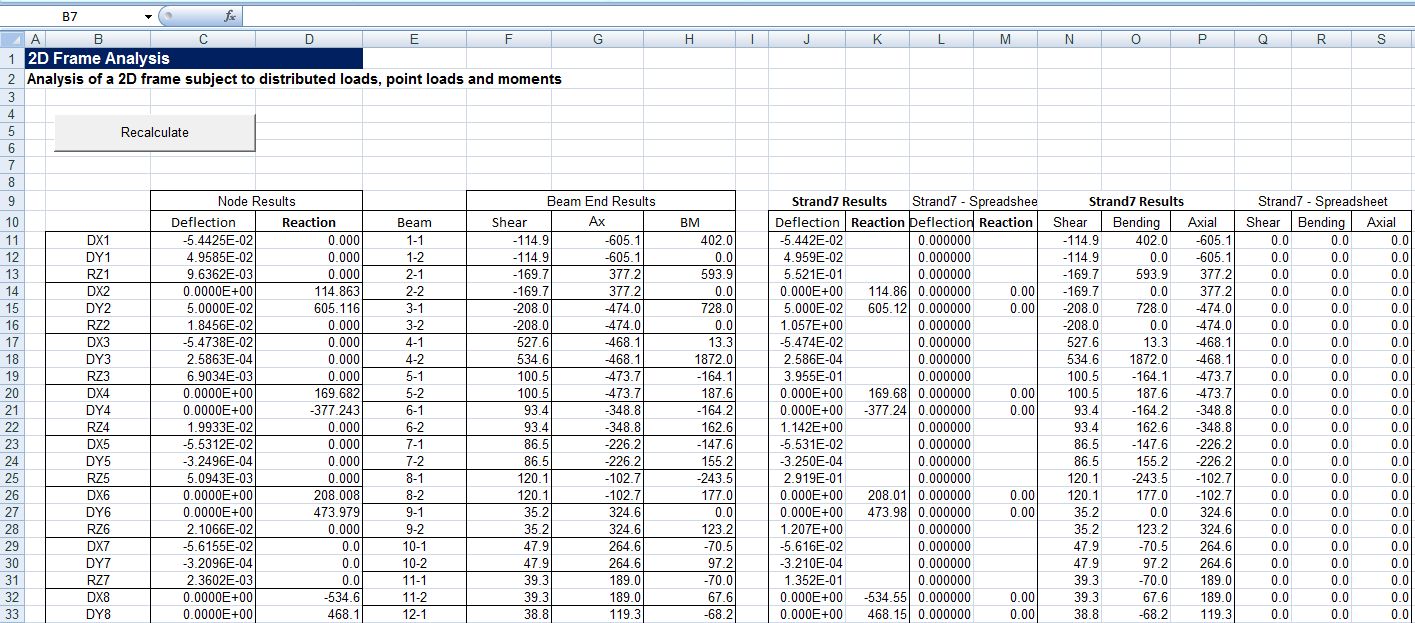
Frame4 output compared with Strand7; click to view full size.

Spreadsheet plot of deformed shape x 20

Strand7 deformed shape
Truss input and output added 30 Jan 10:
Member end releases are specified by entering a 1 in the column for the freedom to be released. A truss can be modelled by releasing the rotational freedom at both ends of each truss member (M1 and M2). Input and results for a simple truss are shown below. Note that all the members have zero moment at both ends, and the rotations (in radians) at each end of each beam are reported. The end release table headings in the spreadsheets in Frame4.zip have been modified to clarify the reqired input.


… to 100 decimal places.
Why would anyone want to do that?
To solve Project Euler Problem 80:
“It is well known that if the square root of a natural number is not an integer, then it is irrational. The decimal expansion of such square roots is infinite without any repeating pattern at all.
The square root of two is 1.41421356237309504880…, and the digital sum of the first one hundred decimal digits is 475.
For the first one hundred natural numbers, find the total of the digital sums of the first one hundred decimal digits for all the irrational square roots.”
Michael at Daily Dose of Excel tracked down a method of finding square roots that requires only addition and subtraction of integers:
Square Roots by Subtraction, by Frazer Jarvis
“Initial step
Let a = 5n (this multiplication by 5 is the only time when an operation other
than addition and subtraction is involved!), and put b = 5.
Repeated steps
(R1) If a is greater than or equal to b, replace a with a − b, and add 10 to b.
(R2) If a is less than b, add two zeroes to the end of a, and add a zero to b just before
the final digit (which will always be ‘5’).
Conclusion
Then the digits of b approach more and more closely the digits of the square
root of n.”
Implementing this very simple algorithm in VBA was complicated by the lack of a very long integer, so instead I set up two arrays a little bigger than the number of required digits, to store a and b, with one digit in each array element. The algorithm above was then iterated until all the required decimal places had been filled, then the array was converted to a string for display in the spreadsheet (or for the Project Euler problem the sum of the digits was found with a simple loop).
A spreadsheet with the VBA code for the SqRtI() function may be downloaded from here
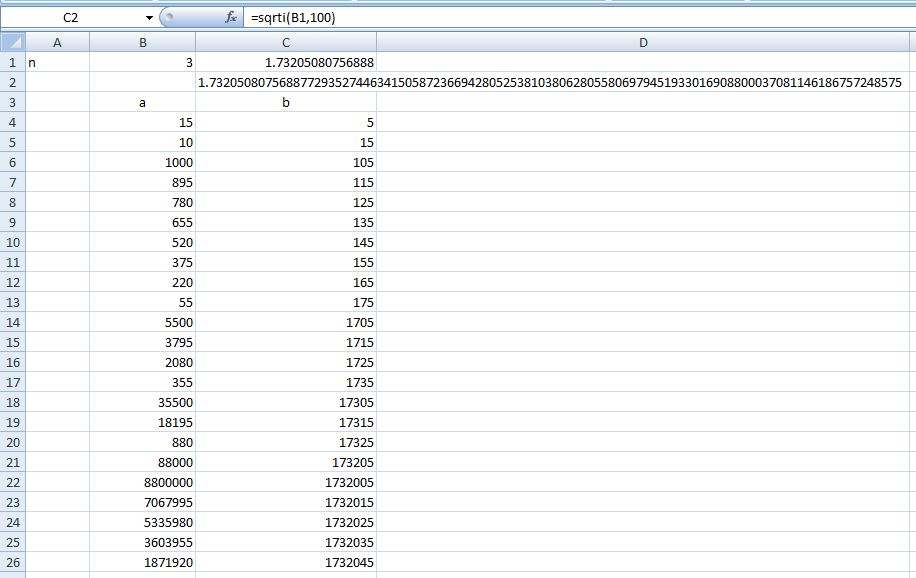
The screen shot below shows the function returning the first 100 digits of the square root of 3, together with a spreadsheet implementation of the algorithm (which is limited to the 15 digit precision available in Excel).
100 digits of root 3


