Drawing in Excel 9 – Perspective Projection

Previous post

 Download PlotXYZ-xlsb.zip (XL 2007)

Download PlotXYZ-xls.zip (XL 2003 and earlier)

The drawing program presented in the previous post in this series has been modified to plot perspective projections of line drawings defined by 3D coordinates of line end points, and a list of connected points.  The coordinates of the viewpoint and the centre point of the plot are entered together with a scale factor.  The program then allows the spreadsheet ranges defining the drawing to be selected, or previously selected ranges may be re-used.

The procedure used in perspective projection is most easily visualised by imagining a sheet of glass placed between the veiwer and the scene to be drawn.  The glass is placed at unit distance from the eye (say 1 metre), and is perpendicular to the line of sight between the eye and the point that will be the centre of the drawing.  If the eye was maintained in a fixed position, and the outline of the scene was drawn on the glass, the resulting 2D image would be the same as will be calculated and plotted in the spreadsheet.

In more detail, the procedure carried out in the spreadsheet is as follows:

  1. Find the mid-point of the X, Y and Z coordinates of the scene to be plotted.
  2. The viewpoint is specified relative to the mid-point of the scene.  Use the calculated mid-point values to find the true coordinates of the viewpoint.
  3. Move the Origin to the viewpoint by subtracting the X, Y and Z coordinates of the viewpoint from every point in the coordinate list.
  4. Assuming that the X and Z axes are horizontal and the Y axis is vertical it is necessary to rotate the axes so that the Z axis extends from the viewpoint through the midpoint of the model:
  5. Rotate the X and Z axes about the Y (vertical) axis, so that the X coordinate of the mid-point is zero.
  6. Rotate the Y and Z axes about the X (horizontal transverse) axis, so that the Y coordinate of the mid-Point is zero.
  7. The projected coordinates of the 2D perspective image (X’ and Y’)are then given by: X’ = X/Z, Y’ = Y/Z
  8. The projected X’ and Y’ coordinates are then scaled and trimmed using the techniques described in the previous post.

More detail of the process is given here:  Imperial College 3D Graphics

Screen shots of images produeced by this program are shown below, and the data used is included in the download files.

A couple of words of warning about this spreadsheet:

  • The suspension bridge drawing includes over 3000 data points, and when plotting in Excel 2000 seems to cause a lockup half-way through the process.  For this reason I have included a greatly simplified model with the xls file for Excel 2003 and earlier.
  • The complex bridge drawing is successfully plotted in Excel 2007, but it is painfully slow.  It takes over 30 seconds to draw on my machine, although details (which contain fewer lines) plot much more quickly.

The slow drawing is related to the drawing process, not the projection calculations, which are reasonably fast.  Excel 2000 and 2007 (surprisingly) seemed to be equally slow, and as far as I know the solution lies in the hands of Microsoft, but if anyone does know a way to speed up the plotting of complex images I would be glad to hear it.

Cube - Top Left view
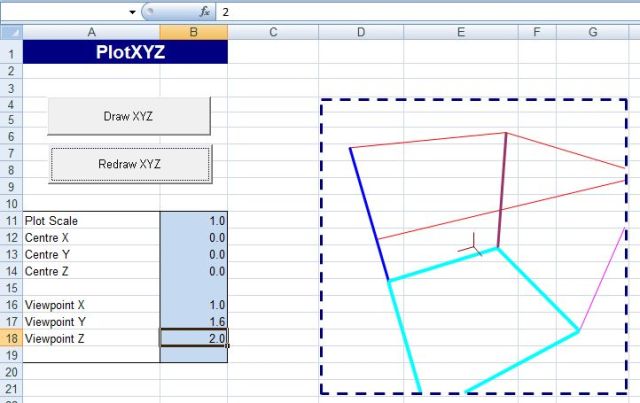
Cube - Top Left view


Cube - same angle, reduced viewing distance
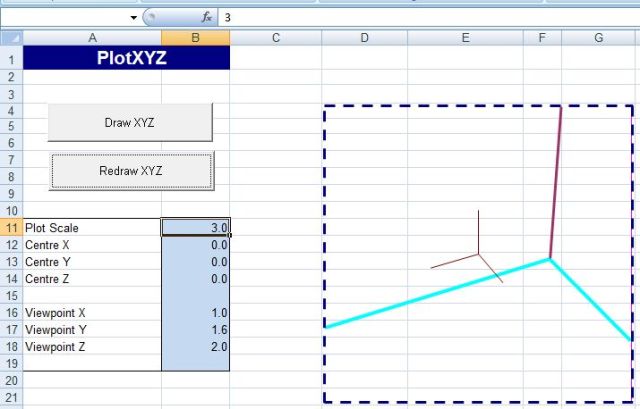
Cube - same angle, reduced viewing distance


Cube - zoom in

Cube - zoom in


Suspension Bridge - overall view
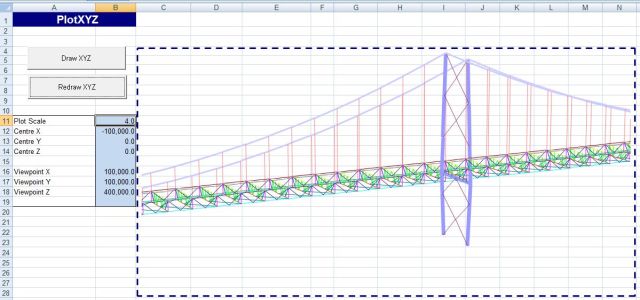
Suspension Bridge - overall view


Bridge detail x 4
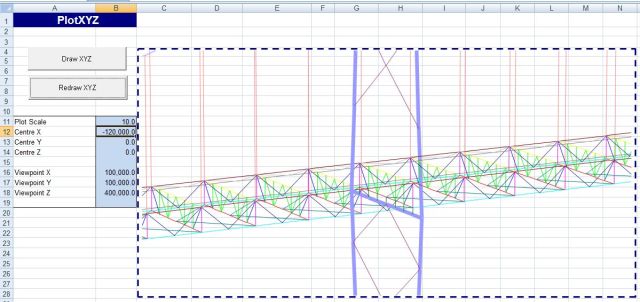
Bridge detail x 4


Bridge detail x 10

Bridge detail x 10

Bridge Detail x 50

Bridge Detail x 50

Posted in Drawing, Excel, VBA | 3 Comments

A Tribute to Davy Graham

The English musician Davy Graham died from Lung Cancer on 15th December 2008, an event that received no attention from the mainstream media, at least here in Australia, but he was probably the single greatest influence on the British musicians who followed him.  Quoting Wikipedia: “Although he never achieved great commercial success (and indeed perhaps did not seek it),  Graham’s music received positive critical feedback, and has proved to be influential. Credited for sparking the 1960s folk revival in England, he has inspired artists and fellow players such as Bert Jansch, John Renbourn and Paul Simon. Jimmy Page and Robert Plant of Led Zeppelin have cited Graham as an influence to their music. Folk Rock bands such as Fairport Convention and Pentangle also show large Graham influence.”

The You Tube clip provides a glimpse of his life and music.

The Official Davy Graham Web Site.

Posted in Bach, Uncategorized | Tagged , | 1 Comment

I’ve got a feeling – ancient and modern

More from Danny Thompson, here with The Pentangle in a BBC broadcast from 1972, and from their re-union tour in 2008 (plus a few pounds, but sounding as good as ever).

The pieces from the early concert are “In Time” and “I’ve Got a Feeling” (studio versions of both of which can be heard on the Sweet Child album), followed by another version of I’ve Got a Feeling from the recent concert:

Posted in Bach | Tagged , , | 1 Comment

Excel 2007 performance – Microsoft looking for feedback

The latest post on the Microsoft Excel Blog is asking for comment on slow performance of Excel 2007, specifically related to VBA:

Microsoft Excel Blog

I encourage everyone to respond!

Posted in Excel, VBA | Tagged , , , | 1 Comment

Drawing in Excel 8 – scaling and trimming

Previous Post – Drawing in Excel 7

Download PlotXY-xls.zip (XL 2003 and earlier)

Download PlotXY-xlsb.zip (XL 2007)

The previous post presented VBA routines to plot drawings in Excel from a series of coordinates, a list of connected points, and a table of formatting information. The drawings were scaled to fit the selected plot area.

This post covers a modification of these routines that allows the scale and centre of the plot to be changed, with lines and polylines being trimmed where necessary to fit inside the plot area.  This is not as straightforward as it might seem because trimming polylines will often change the number of line segments; for instance in the plot of a triangle shown below increasing the scale factor to 1.6 increases the number of sides of the plot shape from 3 to 7.

Triangle with scale factor = 1

Triangle with scale factor = 1


Trimmed triangle with scale factor = 1.6

Trimmed triangle with scale factor = 1.6

The trimming of lines and polylines is carried out by the function IPBox(Line1, Box), where Line1 is a list of XY coordinates and Box is a 2 x 2 array listing the bottom left and top right coordinates of the plot area, to the same scale as the shape to be trimmed.

The procedure is as follows:

  1. For each node find the sector containing the node.
  2. For each line find any intersection points with the limits of the plot box
  3. Step through the nodes until the first inside the plot box
  4. For this and each subsequent line segment:
  5. If both ends are inside the plot box then save the start coordinates
  6. If the line crosses the plot box limits then save the intersection point coordinates
  7. For line ends outside the plot box, project to the nearest line, or nearest corner
  8. For the last line segment close the shape with the first node or intersection point
  9. Delete duplicate points  from the list of saved coordinates
  10. Plot the resulting shape.

Examples of the output from this routine are shown below.

Super-T Bridge Beam Cross Section

Super-T Bridge Beam Cross Section


Scaled and Trimmed Super-T

Scaled and Trimmed Super-T


Part of a large finitge element mesh

Part of a large finitge element mesh


Finite element mesh at 20 x magnification

Finite element mesh at 20 x magnification

Posted in Drawing, Excel, VBA | Tagged , , , , | 3 Comments