The Dome of the Pantheon

I have recently made my first Wikipedia edit.

The article on the Pantheon in Rome made the following claim:

“The exact composition of the Roman concrete used in the dome remains a mystery. An unreinforced dome in these proportions made of modern concrete would hardly stand the load of its own weight, since concrete has very low tensile strength, yet the Pantheon has stood for centuries. It is known from Roman sources that their concrete is made up of a pasty Calcium hydroxide|hydrate of lime, with pozzolanic ash (Latin ”pulvis puteolanum”) and lightweight pumice from a nearby volcano, and fist-sized pieces of rock. In this, it is very similar to modern concrete. The high tensile strength appears to come from the way the concrete was applied in very small amounts and then was tamped down after every application to remove excess water and trapped air bubbles. This appears to have increased its strength enormously.”

Some quick research on the Internet found no evidence for the Roman concrete having particularly high strength, and this article: The Pantheon by David Moore quoted research showing that the maximum flexural tensile stresses were very low.

My edit was as follows:

It is known from Roman sources that their concrete is made up of a pasty hydrate of lime, with pozzolanic ash (Latin pulvis puteolanum) and lightweight pumice from a nearby volcano, and fist-sized pieces of rock. In this, it is very similar to modern concrete.[3] No tensile test results are available on the concrete used in the Pantheon; however Cowan discussed tests on ancient concrete from Roman ruins in Libya which gave a compressive strength of 2.8 ksi (20 MPa). An empirical relationship gives a tensile strength of 213 psi (1.5 MPa) for this specimen.[4] Finite element analysis of the structure by Mark and Hutchison[5] found a maximum tensile stress of only 18.5 psi (0.13 MPa) at the point where the dome joins the raised outer wall.[6] The stresses in the dome were found to be substantially reduced by the use of successively less dense concrete in higher layers of the dome. Mark and Hutchison estimated that if normal weight concrete had been used throughout the stresses in the arch would have been some 80% higher.

4. H. W. Cowan, The Master Builders. John Wiley and Son, New York, 1977, p. 56
5. R. Mark and P. Hutchinson, “On the Structure of the Pantheon”, Art Bulletin. March 1986
6. Moore, David, “The Pantheon”, http://www.romanconcrete.com/docs/chapt01/chapt01.htm, 1999

Posted in Concrete, Newton | Tagged , , , | 7 Comments

Worksheetfunction vs UDF – 2

Previous Post

In a recent post at microsoft.public.excel.programming Charles Williams (Decision Models) found that a VBA User Defined Funcion (UDF) searching through a defined range for a specified number was very much slower than simply using .worksheetfunction.match as below:

Function VBAMatch2(arg As Double, XRange As Variant) As Long
    VBAMatch2 = Application.WorksheetFunction.Match(arg, XRange, 1)
End Function

I found this strange, since in the past I had found the exact opposite, and repeating the comparison I again found that searching through the data within VBA was some 400 times faster than calling worksheetfunction.match.

It turns out that there is a logical explanation for these different results, which is that I was calling the functions from a VBA subroutine, whereas Charles was using them as UDFs on the spreadsheet.  The result was that the transfer of data between the spreadsheet and VBA (the bit that takes all the time) occurred once for my VBA search routine, but 10,000 times when I used .worksheetfunction.match, calling the function from the VBA sub.  On the other hand when the functions were called from the spreadsheet the opposite situation occurred.  To quote Charles:

Your timing routine has as its first executable statement:
datarange=Range(“a1:A10000”)
This converts the range to a variant array of values before doing any
timing, and then passes datarange to the UDFs as a variant array rather than
a range.

So for your timing run of VBAMatch there is no data transfer between Excel
and VBA or VBA and Excel at all, but for VBAMATCH2 the whole array gets
passed from VBA to Excel 10000 times.
Since the vast majority of the execution time is taken by the data transfer
that explains the differences.

Conclusion:
If you want to develop a MATCH routine to process a sorted VBA array then a
VBA binary search routine (or your equivalent) will be fast because the data
is already in VBA, but if you want to develop a UDF MATCH routine to use as
a worksheet UDF function its better to use Worksheetfunction.MATCH because
then the data never has to be passed from Excel to VBA. “

Posted in Excel, UDFs | Tagged , , | Leave a comment

Importing text files with VBA

Importing data from other programs into an Excel spreadsheet, in the form of text files, is a frequent requirement in engineering and scientific applications.  Often the data will have been formatted to suit printed output and will require processing before importing into the spreadheet.  In addition to rather cumbersome procedures, the built-in Excel facilities for importing text files have several drawbacks; for instance where lines start with a ‘, “, or ^ character, these are treated as text alignment characters and are truncated.  Also if numeric text is split into columns results can be unpredictable .

The link below provides routines to select files for import, and import the text to a specified range, optionaly inserting an initial ‘ to avoid truncation of any text alignment characters in the first column of the text.

Future posts will cover splitting the text into columns, and searching for rows containing data, discarding headers and footers etc.
Importing text file with VBA – 2

To use the routines “GetFileName” and “ReadTextSub” in a new file it is necessary to create the following named ranges:

TfileName
destrange
Inserta

and a range with the name specified in destrange.
The function ReadText is called by the subroutine ReadTextSub, but may also be used as a user defined function. In this case it should either be entered as an array function (press ctrl-shift-enter), or inside an INDEX() function. Examples are given in the file below.

Text-in.zip Right click to download

Screen shot:
Text-in screen shot

Posted in Excel, UDFs, Uncategorized | Tagged , , , , | 12 Comments

Elegant Proofs – 1

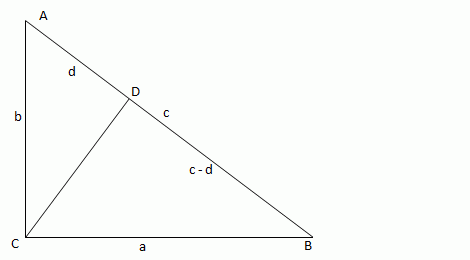
Roger Penrose in his book “The Road to Reality” gives a remarkably simple proof of Pythagoras’ Theorem:

Pythagoras proof

Drawing a perpendicular to the hypotenuse from the right angle (line CD) will divide any right angled triangle into two similar triangles, both of which are similar to the original triangle. Since the area of similar shapes are proportional to the square of the ratio of the length of their sides, and the sum of the areas of the two smaller triangles is clearly equal to the area of the enclosing triangle, the area of the square on the long hypotenuse is equal to the sum of the squares on the other two sides (i.e. the hypotenuse of the the two smaller triangles).

The beauty of this proof is not only its simplicity, but also that it makes clear why the Pythagoras formula will only work with a right angled triangle; since only a right angled triangle can be divided into two triangles similar to the original.

This result may also be simply shown algebraically:
From similarity:
b/d = c/b
b^2 = cd
and
a/(c-d) =c/a
a^2 = c^2-cd
c^2 = a^2 + cd
hence substituting b^2 for cd:
c^2 = a^2 + b^2

A different approach to this method is given at: Terence Tao

And for those looking for some variety 87 different proofs can be found at: Cut the knot

Posted in Maths, Newton | Tagged , , , | Leave a comment

Playing with numbers

A reader of Melbourne’s Herald-Sun newspaper has posted some data from the Australian Bureau of Meteorology, purporting to show a total lack of climate change, in spite of steadily increasing CO2 concentrations:

Where’s the heat

 Non-bolting temperatures?

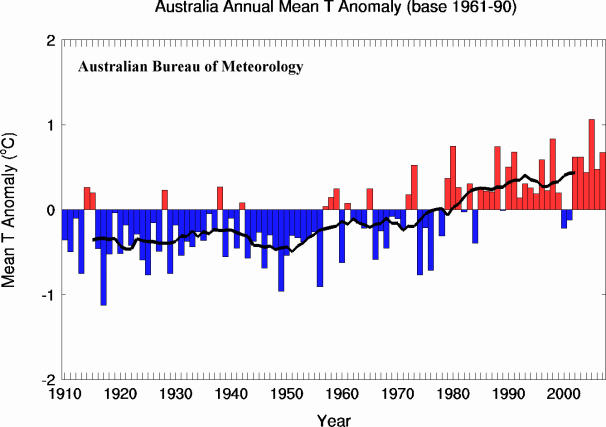
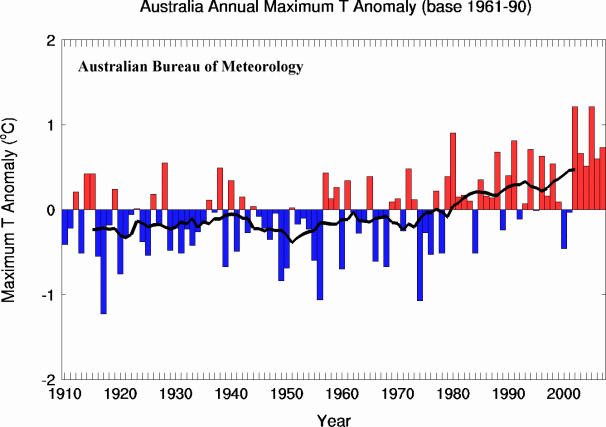
Funily enough, when you take a slightly longer view frrom the very same site, and smooth out the monthly variations, you get a totally different picture:

 mintemp

meantemp

maxtemp

The black line in the lower graphs is the 11 year moving average.


Posted in Climate, Newton | Tagged , , | 2 Comments