Reinforced Concrete Section Analysis – 2

Previous Post

Pseudo-code for elastic analysis of a layered reinforced concrete section under eccentric axial load and pre-stress load:

 Read data
‘For each reinforcement layer: Find area, first moment of area about top ,and depth of centroid.
Find total reinforcement section properties over all layers
For each reinforcement layer: adjust section properties for compression from the top surface to the layer.
‘For each concrete layer:

Find area, first and second moments of area about base of layer ,and height of centroid above base.
Find the number of reinforcement layers in the compression zone.
Find composite transformed properties about the base of each layer.

Find the centroid depth for the complete composite section in compression, and the reinforcement in tension.
Find the total prestress force and moment about the concrete centroid.
Find total axial force and bending moment, and nett axial force eccentricity from the concrete centroid and top face.
Check compression face.
If the compression face is bottom face, reverse layers and recalculate section properties.
Find the concrete layer containing the Neutral Axis.
If the Neutral Axis is above the top face (section entirely in tension) or below the bottom face (section entirely in compression) then:

Find top and bottom face stresses and position of NA using stress = P/A + M/Z

Else

Find parameters for Neutral Axis equation
Solve Neutral Axis equation
Adjust for reinforcement layers in the bottom concrete layer, below the Neutral Axis.
Find composite transformed section properties about the Neutral Axis
Find top and bottom face stresses.

Find stresses and strains at each reinforcement layer and top and bottom face.
Find concrete, reinforcement and total axial forces.
Find concrete, reinforcement and total moments.
Check equilibrium.
Finish
Posted in Beam Bending, Excel | Tagged , , | 1 Comment

Excel 2007 performance – feedback please

According to this post at MSDN:

http://msdn.microsoft.com/en-us/library/aa730921.aspx#office2007excelperf_ExcelPerformanceImprovements

Excel 2007 should be giving significant performance improvements on multi-core processors.

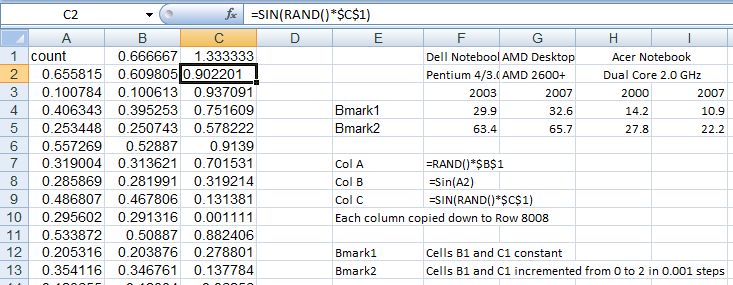
Some simple benchmarks on an Acer laptop with 2.0 GHz dual-core processor and 2 GB RAM show some improvement (over Excel 2000), albeit quite modest:
Benchmark Results
 Click on image to see full size.

In all cases with the dual core processor it was shown to be working at close to 100% under 2007, and about 50% with 2000.  Possibly with a less linear calculation process 2007 would show a bigger advantage.

Looking at situations where VBA is interacting with a workbook, either reading or writing data, or using .worksheetfunction, things are quite different however.  I have found Excel 2007 to be substantially slower than 2000; of the order of 3 times slower or more.  These results comparing the use of .worksheet function with a UDF evaluated entirely inside VBA illustrate this difference.:

Worksheetfunction vs UDF

In this case Excel 2007 took about 25% longer using the UDF (dual core processors are not supported in VBA), but more than 3 times longer using .worksheetfunction.

Overall, in real applications I have found 2007 to be generally about the same speed as 2000, but in some cases using VBA dramatically slower, sometimes needing a re-write of the code to make the application usable.

On the plus side I have found that 2007 saves substantially quicker, especially in binary format, and when there is a lot of VBA code used.

I would be interested to hear the comments of others.

The comment button is just down there on the right 🙂

Posted in Excel, UDFs | Tagged | 7 Comments

Making light of gravity

The man who fell sideways

A matter of some gravity

Posted in Newton | Tagged , | Leave a comment

Evaluate Function

It would often be convenient to evaluate a function entered as text; for instance if we have the function for the deflection of a cantilever under point loading at the end:

F*L^3/(3*E*I)

then it would be convenient to be able to allocate different values to F, L, E and I, and calculate the value of the function, without having to re-enter it.

Unfortunately Excel provides no such function.  Fortunately it is quite easy to write one in VBA.

Function Eval(form As String, RepA As Variant, ParamA As Variant)
Dim Eform As String, i As Long

GetArray RepA
GetArray ParamA
Eform = form
For i = 1 To UBound(RepA, 1) - LBound(RepA, 1) + 1
Eform = Replace(Eform, RepA(i, 1), ParamA(i, 1))
Next i
Eval = Evaluate(Eform)
End Function

Usage of this function is illustrated in this screen shot:

The UDF parameters are:
The cell containing the function to be evaluated
A range containing the function parameters
A range containing the values to be substituted into each corresponding parameter

Note that the GetArray function can be found here: GetArray Function

A working version of this function can also be found in the section properties spreadsheet here: Section Properties Spreadsheet

The idea for this function was borrowed from: Lamda Function

Posted in Excel, Maths, UDFs | Tagged , , | 9 Comments

The history of the theory of beam bending – Part 2

Before moving on from Galileo, Mariotte and Parent, let’s examine a peculiarity arising from the testing of their formulas.

Jacques Heyman in “The Science of Structural Engineering” states:

“… then the new calculation of bending strength [by Parent] gave a coefficient or 1/6 instead of the 1/2 of Galileo or 1/3 of Mariotte. For the first time, a logical and correct mathematical description had been given of the way a beam might fracture, but in fact none of the three values of coefficient accorded with tests – 1/2 might be better for stone and 1/3 for wood, while the mathematically correct value of 1/6 seemed to be useless as a predictor of fracture.”

This statement seems to be based on the work of Coulomb, who in 1773 (60 years after Parent’s work) reinvented the theory that had already been discovered by others. Coulomb found that stone and wood behaved in different ways, and presented two theories, based on a common approach, that satisfied the requirements of mechanics. He concluded that Galileo’s coefficient of 1/2 seemed best for stone, but he could not verify his (and Parent’s) coefficient of 1/6 for timber. By the turn of the century the standard text of the Ecole Polytechnique still stuck to Galileo’s formula for stone, and Mariotte’s coefficient of 1/3 for wood (Heyman).

This is curious, because although timber might approximate a plastic material, and thus Mariotte’s coefficient of 1/3 would give a good approximation of the bending strength, stone is a brittle material that will fail in tension while the stress distribution is close to triangular, and thus the coefficient of 1/6 should be appropriate, rather than 1/2.

Unfortunately Heyman gives no details of Coulomb’s experimental work, but the only way I can explain this anomaly is to assume that either Coulomb calculated the tensile strength of stone by back-calculation from bending tests, using Galileo’s formula, or that he carried out tensile tests that gave results much lower than the correct value, perhaps due to stress concentrations in the testing apparatus.

Either way, the end result was that by the early 19th century, over 300 years after Leonardo Da Vinci published the basis of the correct theory of bending, engineering texts still recommended a formula for the bending strength of stone that was incorrect by a factor of 3.

Reference:
The Science of Structural Engineering – Jacques Heyman

Posted in Beam Bending, Newton | Tagged , , , , , , , | 3 Comments