Two recordings of live concerts recently found on You Tube:
Sandy Denny singing Blackwaterside (BBC In Concert – Paris Theatre 16/3/72) :
The Pentangle, three songs recorded in Australia in August 1972:

Two recordings of live concerts recently found on You Tube:
Sandy Denny singing Blackwaterside (BBC In Concert – Paris Theatre 16/3/72) :
The Pentangle, three songs recorded in Australia in August 1972:
I recently upgraded to Python 3.10, and because of some problems with my previous installation I decided to do a complete new installation using pip, which required installation of all the libraries needed for my various programs.
For my linear algebra functions based on the Scipy library I have also installed PyPardiso which provides substantially better performance than the Scipy functions for solving large sparse systems. As reported here I previously found I had to search for a non-standard conda library for the installation, but this time the latest documentation recommended installation with pip: pypardiso 0.4.1

Since PyPardiso calls the Intel MKL library, I installed this first, so my installation procedure was:
Code for using the PyPardiso spsparse function (or optionally the equivalent Scipy.sparse function) can be found at: Installing PyPardiso.
Checking the performance of the equivalent functions, the pyPardiso spsolve function was found to be much faster than the Scipy equivalent, as previously reported at: Making Finite Element Analysis go faster – Update and PyPardiso.
The Scipy sparse.spsolve function was found to have reverted to the slower times reported at: Making Finite Element Analysis go faster … The change in performance is (probably) related to installation of the scikit-umfpack library, which I had not installed at the time of the tests, but even after umfpack is properly installed, the pyPardiso function is much faster than any option with the Scipy function.
Recently I had problems with an Excel Add-in that was still trying to run, and generating error messages, even after being removed from the add-in list and uninstalled.
After much searching and trying suggested methods that didn’t work, I finally found a method that did work at:
https://stackoverflow.com/questions/1946551/excel-add-in-doesnt-get-the-hint/1946607#1946607
Here are the steps:
answered Feb 21, 2021 at 3:33
The original question was raised in 2009!
Australia now has a new government. Here’s what Billy Bragg thinks about it:

Recently I found that for unknown reasons the Excel Solver add-in was not working. Opening the add-ins list from the Devloper tab showed that it had become deactivated (also accessible from File-Options-Add-ins):

Clicking the Solver check box returned a message that the Solver file cold not be accessed. Several similar problems were reported on Stackoverflow and elsewhere, but none of the suggested solutions worked for me, and a lengthy session with Microsoft support, ending up with reinstalling Office, also had no effect.
I finally discovered that when the Excel add-ins are accessed through File-Options-Addins the dialog box has a list of “inactive add-ins”, then a list of “Disabled Application Add-ins”, which listed the Solver add-in. I was able to remove Solver from the list (leaving it empty), after which it could be enabled in the usual way.
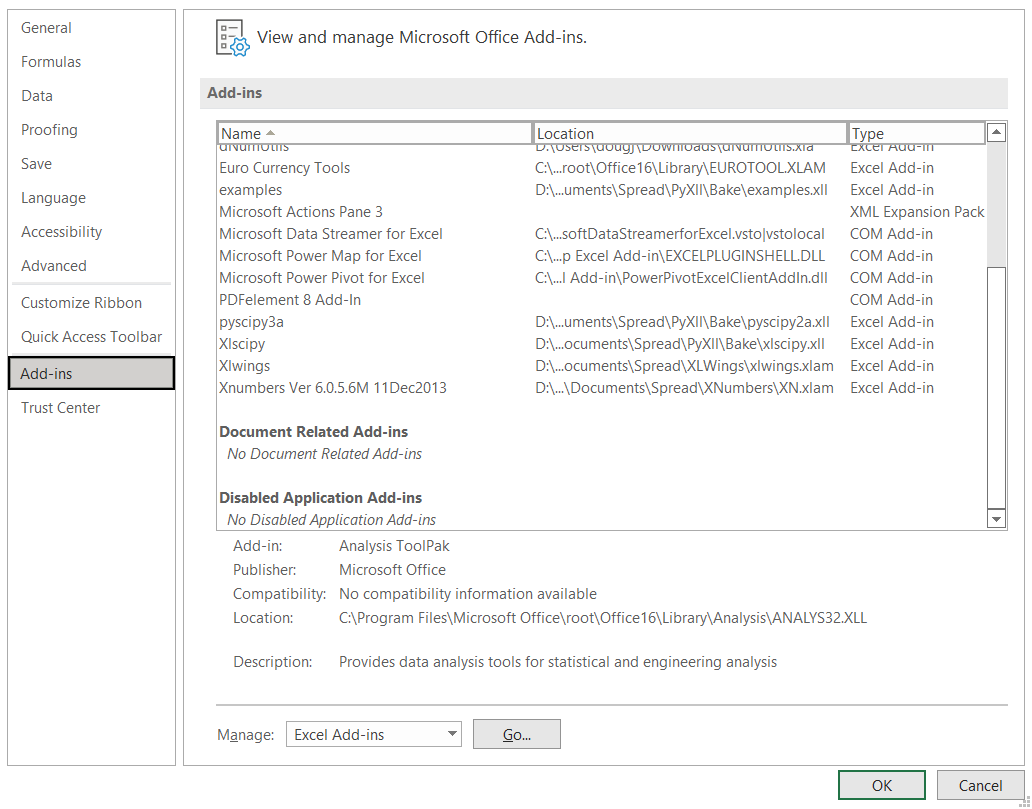
I don’t recall when or how Solver became disabled, but for anyone with a similar problem, checking the disabled add-ins list may provide a simple fix.


 Newton Excel Bach, not (just) an Excel Blog