The Concrete Institute of Australia – Golden Jubilee

The Concrete Institute of Australia will celebrate 50 years in 2020. The Institute was originally formed when members of the Australia Prestressed Concrete Group proposed a change in 1968 where it was resolved to adopt the name Concrete Institute of Australia. This occurred in May 1969 and the first meeting of Council was then held in July 1969 which was chaired by Mr William (Bill) Brown who was elected as the first National President. Following this the Institute was officially registered as a company limited by guarantee with approved Memorandum and Articles of Association on 17th April 1970.

Posted in Concrete, Newton | Tagged , | Leave a comment

The String Family

According to their web site, The String family are:

A family of classically trained string players who launched their musical career by hitting the road full time from 2016 through 2018, bringing music to people around Australia. Featuring 2 cellos, 2 violins, voice and percussion they incorporated their unique story of life on the road as Australian musical gypsies with toe tapping celtic, folk, world and classical crossover music. On their musical journey they received numerous awards for performance and songwriting including: New Australian Celtic Talent of the Year, Australian Celtic Song of the Year, Australian National Busking Champions.

Recent conditions have put a stop to their travelling, but not their music making:


Posted in Bach | Tagged , | Leave a comment

Getting near matches from a list with Python

To return a list of near matches from a long list of strings would be quite difficult in VBA (unless I’m missing something), but in Python it is very simple.  Here is the code for this operation, using pyxll to read a list from Excel, and return the near matches as the result of a User Defined Function (UDF):

from difflib import get_close_matches

@xl_func
@xl_arg('patterns', 'str[]')
@xl_arg('n', 'int')
def closeMatches(patterns, word, n =3, cutoff = 0.6): 
     return get_close_matches(word, patterns, n, cutoff)

The function required arguments are:

  • patterns: A single column list of text strings
  • word: A single word to find close matches for in the list.

By default the function returns a maximum of 3 results.

The example below looks for matches to “py_GetBeamSection” in the list of 1800+ function names in column R, returning 3 matches:

The first optional argument, ‘n’, specifies the maximum number of strings to return, set to 30 below:

This list can be reduced with the second optional argument, ‘cutoff’, which has a default value of 0.6.  Increasing this to 0.75 reduces the number of matches to 11 in this case:

Note that for the particular application of finding function names the Excel function wizard also does a pretty good job.  Entering ‘=py_GetBeamSe’ returns a list of the 7 closest available functions (all UDFs written in python in this case):
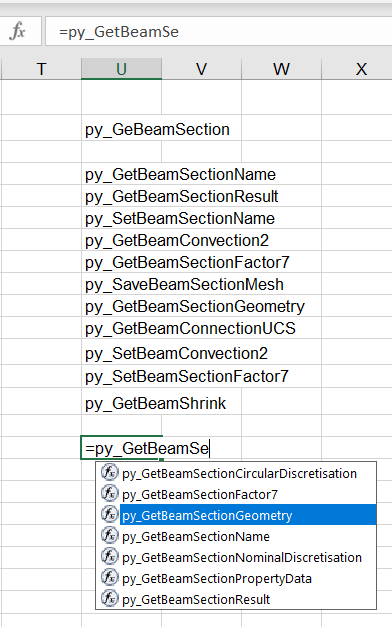
Select the function you want from the list and press tab, and the function will be entered on the edit line.  Then click the ‘Insert Function” icon (top left in the screen-shot below), and the function is listed together with a list of arguments, and where available, the function and argument descriptions included in the code:

Posted in Excel, Link to Python, PyXLL, UDFs | Tagged , , , , , | Leave a comment

Dancing Pendulums Revisited

I have previously posted on Dynamically Defined Dancing Pendulums, using the Strand7 FEA program to generate the motion of a series of pendulums of varying length.  I have now updated that video using the latest Beta version of the program (Rel 3):

For those who don’t have access to the Strand7 package, just enjoy the video, for those who do, read on.

I have now uploaded the Strand7 files used to create the videos for download:

DancingPendulums.zip

The zip file includes versions for the current release (2.6), and the Beta version of Release 3, which is available for preview by supported users.

To generate the animation, open the ST7 file and run a non-linear transient dynamic analysis, which you can then use to create an animation from any chosen viewpoint and play-back rate.  The analysis has 18,000 time steps, which with default view settings takes 3 hours or more to complete.  To speed things up, switch off the log file and convergence graph displays, so there is minimal screen updating with each step.  This reduces the computation time down to about 10 minutes.  See the previous post for more details on the set up of the model and analysis parameters.

The animation can be saved in Strand7 format, or converted to an avi file.  For upload to WordPress I used Snagit to capture the video on-screen, then saved as an mp4 file, which can now be uploaded to run directly from WordPress.

Posted in Animation, Finite Element Analysis, Frame Analysis, Newton, Strand7 | Tagged , , , , , | Leave a comment

Stepping through Python code called from Excel

Setting up your editor to allow Python code debugging for functions called from Excel can be tricky, depending on the details of your editor and linking software, but using the Visual Studio Code Editor and Pyxll, this works for me:

  1. Open the Python code in the Visual Studio Code editor.
  2. Make sure the Python code Extension is installed (check under File-Preferences-Extensions).
  3. Open the folder containing the code file.  Either use File-Open Folder …, or click on the Explorer icon (top icon on the left hand icon bar).
  4. Go to the Excel File that will be calling the Python functions, and link to the editor from the Add-ins – Pyxll – Attach to VS Code menu:
  5. Return to Visual Studio Code and click the Run icon in the left hand tool bar …
  6. … then click the green arrow between Run and Python Attach.  The blue bar at the bottom of the screen should turn orange:
  7. Finally click in the left hand margin on a line where you like to insert a break point …
  8. … and return to Excel and call the routine to be de-bugged.

The code will stop at the selected break point.  You can then step through the code using the Run menu, use the function key short-cuts, or right click for debug options.

Posted in Computing - general, Excel, Link to Python, PyXLL, UDFs | Tagged , , , , | 4 Comments