Following the previous post, the py_RC Design spreadsheet has been updated with improved versions of the py_UMomp and py_UMomBiax functions. The revised version can be downloaded from:
The py_UMomp function is based on the Umom function, with the following changes:
The Eurocode 2 parabolic stress block is applied over the full range of axial loads and includes the required restrictions on maximum strain for neutral axis positions outside the concrete section. It may also be applied for calculations otherwise following the AS 3600 or AS 5100.5 codes.
The reinforcement may now be distributed over any number of layers.
The current version allows only for rectangular sections, but future versions will also have the option to specify any number of trapezoidal concrete layers.
py_UMomp input:
The results from the new function have been compared with the py_UmomBiax function (with the neutral axis angle set to zero) and also the VBA version of the UMom function.
With rectangular stress blocks used for all versions there is excellent agreement over most of the range, other than for high axial loads where the VBA version uses a different procedure for linear interpolation when the NA position is outside the concrete section:
Comparing results using the parabolic-linear stress block with the rectangular stress block, but applying Australian code stress limits in both cases, there are significant differences for axial loads above the balance load, especially for AS 3600:
The differences are increased when the maximum strain is increased to the Eurocode 2 limit of 0.0035:
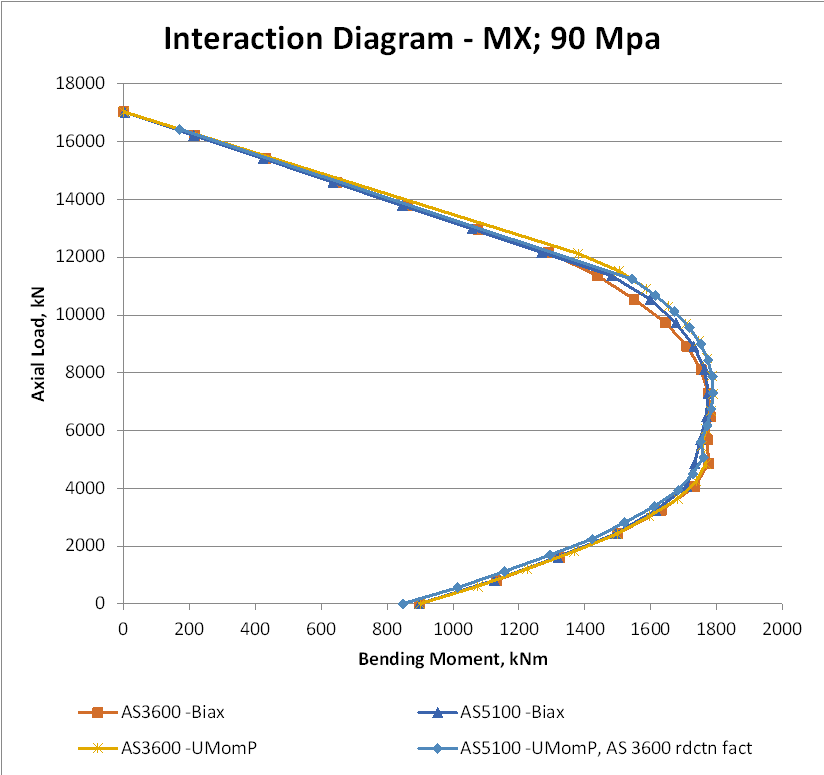
The difference between the AS 3600 and AS 5100.5 results is largely due to the difference in the default reduction factors. In the graph below the results for both codes have the AS 3600 values: 0.85 for zero axial load, reducing to 0.65 for sections where the concrete compression controls the design capacity.
With 30 MPa concrete, results up to the balance load are now very close, with the AS 3600 results with a parabolic-linear stress block being higher than AS 5100.5 because of differences in the application of the transition of the reduction factors from 0.85 to 0.65. Above the balance load the two codes give identical results with the parabolic-linear stress block, but AS 3600 is significantly more conservative with the rectangular stress block.
With 50 MPa concrete the differences are similar but the differences between two stress blocks are increased, and the difference between AS 3600 and AS 5100.5 with the rectangular stress block is also increased.
Finally with 90 MPa concrete all four results are very close over the full range.
The py_RC Design spreadsheet provides Python versions of the reinforced concrete design functions in the RC Design Functions spreadsheet. The current version can be downloaded from:
For details of the pyxll app required to connect the Python code to Excel see Python and pyxll.
The focus of this post will be the new py_UmomBiax function that provides similar functionality to the equivalent VBA function, see Biaxial bending update 2.
The function allows for irregular cross-sections, defined by coordinates, with any number of reinforcement layers:
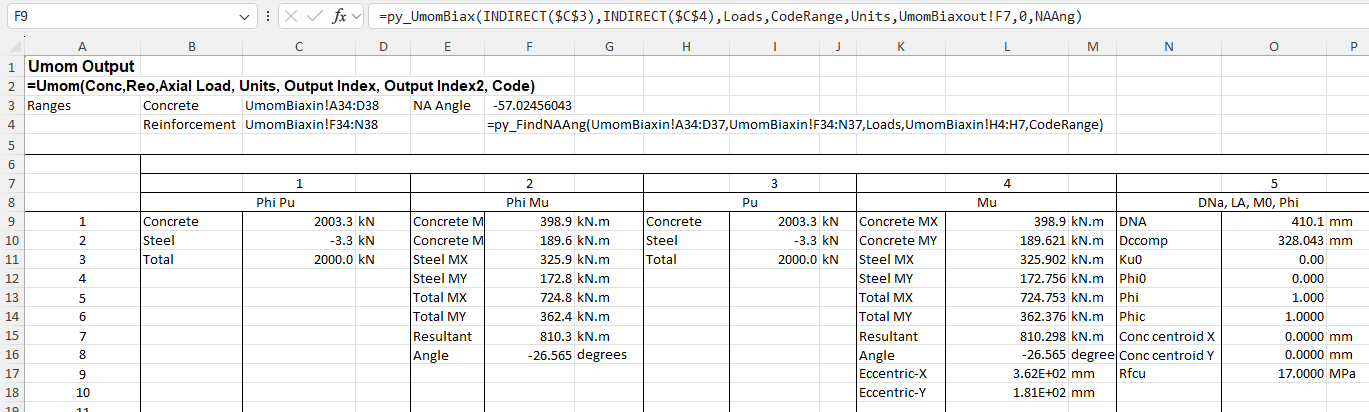
The neutral axis can be adjusted by the spreadsheet so that the angle of the reaction bending moment is equal to the direction of the input loads. The output format is similar to the VBA version:
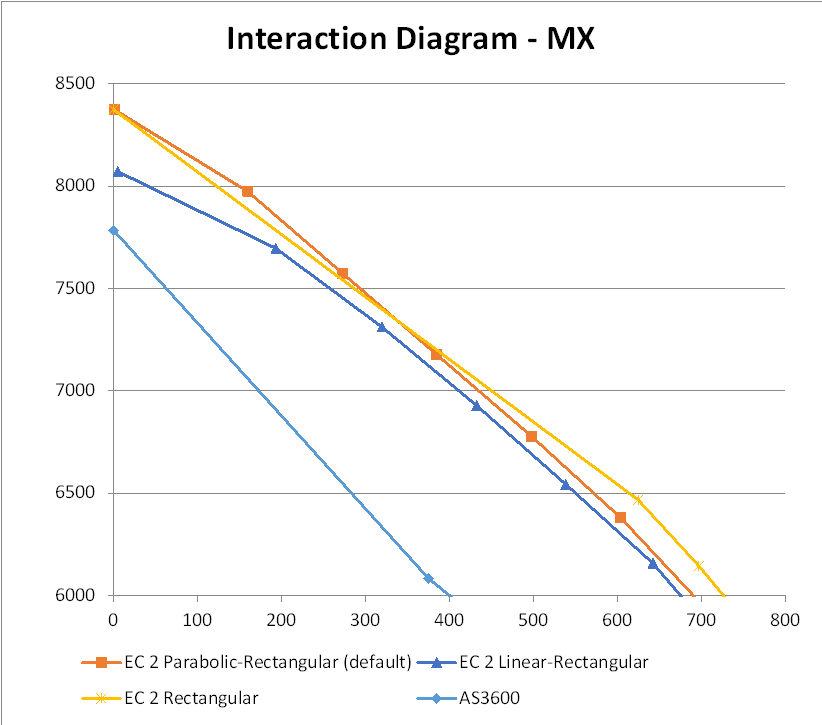
The py_UmomBiaxA function allows the generation of interaction diagrams. The first example plots bending moments about the X axis against axial load for 4 different code options:
Eurocode 2 with parabolic-rectangular stress block.
Eurocode 2 with linear-rectangular stress block.
Eurocode 2 with rectangular stress block.
AS 3600 with rectangular stress block.
For rectangular stress block calculations the moment capacity is calculated for all axial loads where the neutral axis is inside the section, then linear interpolation is used for results with higher axial load. For parabolic-rectangular and linear-rectangular stress blocks the strain-based calculation is used for all axial loads, using the Eurocode 2 procedure where the maximum compressive strain is reduced as axial loads increase:
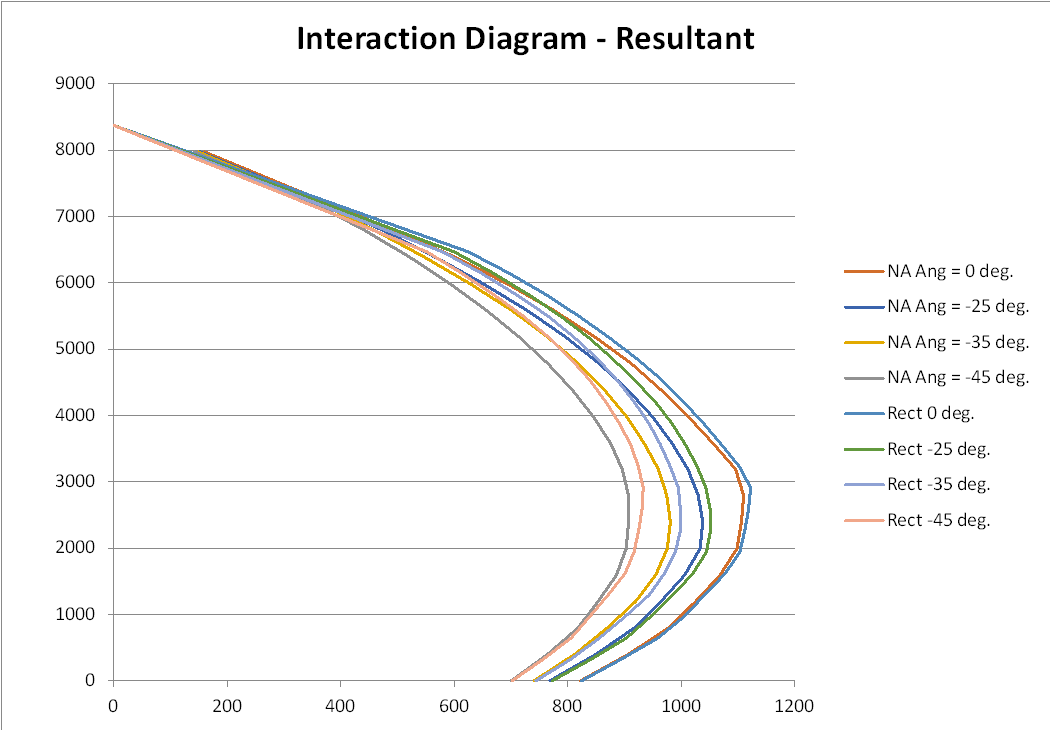
The next example shows moment capacity about the Y axis for different angles of the neutral axis. For each angle results are shown with a parabolic-rectangular and rectangular stress blocks:
Similar results are plotted below for the resultant bending moment capacity, using the same stress blocks:
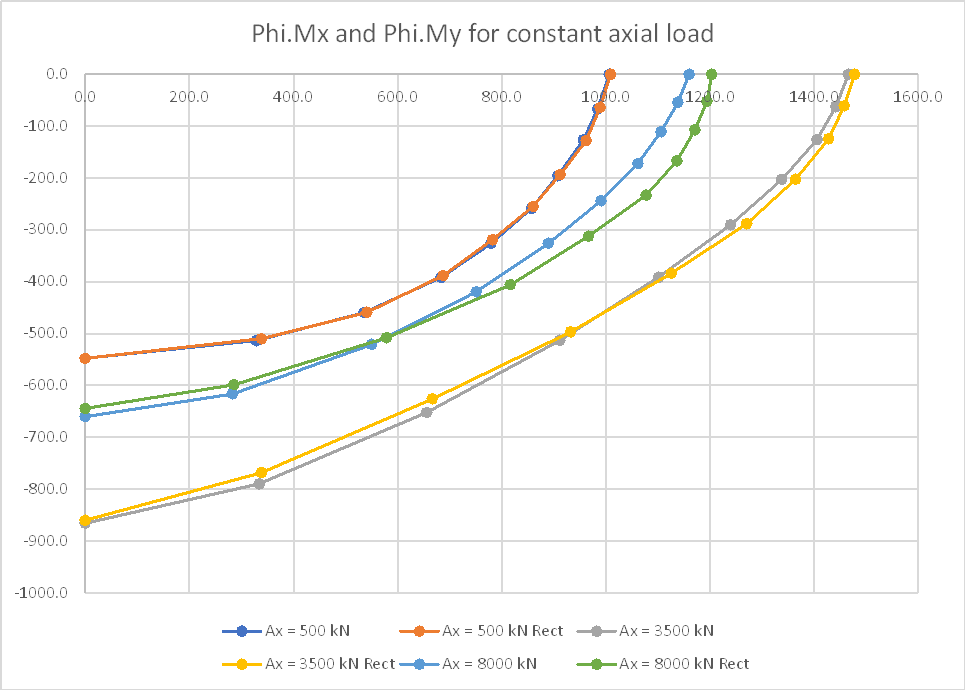
Finally results are plotted for constant axial load with the neutral axis angle between 0 and 90 degrees:
So if there was some guy who had been around since the early seventies singing traditional scottish songs in a modern style, I’d know all about him, right?
The New Scientist brain twister from last weeks edition has several problems involving pandigital sums, which are additions that use each of the digits from 0 to 9 exactly once, and with no number within the sum that starts with a zero.
The problems can be solved without the use of computers, but it is also interesting to write code to generate brute force solutions, which is what is covered in this post. For anyone who wants to have a go at solving the problems themselves, the screenshot at the bottom of this post contains some solutions, so don’t scroll down.
The problems are:
Find a pandigital sum of the form ABCD + EF = 2034
There are 96 pandigital sums of the form ABC + DEF = GHIJ. How many of these have GHIJ = 1089
Find the pandigital sum where ABC + DEF = GHIJ.and A<B<C<D<E<F.
My Python code and a sample spreadsheet with VBA code can be downloaded from:
Function Pandigital()
Dim a, b, c, d, e, f, g, h, i, j, ResA(1 To 1, 1 To 5), STime
STime = Timer()
 For a = 1 To 9
    For b = a + 1 To 9
        For c = b + 1 To 9
            For d = c + 1 To 9
                For e = d + 1 To 9
                    For f = e + 1 To 9
                        For g = 1 To 9
                            For h = 0 To 9
                                For i = 0 To 9
                                    For j = 0 To 9
                                        If (a + b + c + d + e + f + g + h + i + j = 45) Then
                                            If (100 * a + 10 * b + c + 100 * d + 10 * e + f = 1000 * g + 100 * h + 10 * i + j) Then
                                                ResA(1, 1) = 100 * a + 10 * b + c
                                                ResA(1, 2) = 100 * d + 10 * e + f
                                                ResA(1, 3) = ResA(1, 1) + ResA(1, 2)
                                                ResA(1, 4) = 1000 * g + 100 * h + 10 * i + j
                                                ResA(1, 5) = Timer() - STime
                                                Pandigital = ResA
                                                Exit Function
                                            End If
                                        End If
                                    Next j
                                Next i
                            Next h
                        Next g
                    Next f
                Next e
            Next d
        Next c
    Next b
Next a
End Function
This works, and returns the answer in well under a second, but I wanted to avoid so many indented ifs, and also to optimise the code to reduce the number of trials where the values did not meet the stated criteria.
My first effort using Python (linked to Excel with pyxll) was:
@xl_func()
@xl_return('numpy_array')
def py_Pandigital0():
    stime = time.perf_counter()
    intlist = [0, 1,2,3,4,5,6,7,8,9]
    abc = np.array([1,2,3])
    def_ = np.array([4,5,6])
    facta = np.array([100,10,1])
    for k in range(0, 3):
        if abc[0] < 4: abc[0] += 1
        abc[1] = abc[0]
        for l in range(0, 3):
            if abc[1] < 5: abc[1] += 1
            abc[2] =abc[1]
            for m in range(0, 3):
                if abc[2] < 6: abc[2] += 1
                abcsum = np.dot(abc, facta)
                for n in range(0, 3):
                    if def_[0] < 7: def_[0] += 1
                    def_[1] = def_[0]
                    for o in range(0, 3):
                        if def_[1] < 8: def_[1] += 1
                        def_[2] = def_[1]
                        for o in range(0, 3):
                            if def_[2] < 9: def_[2] += 1
                            defsum = np.dot(def_, facta)
                            sum1 = abcsum + defsum
                            sumlist = intlist.copy()
                            for p in range(0, 3):
                                if abc[p] in sumlist:
                                    sumlist.remove(abc[p])
                                else:
                                    break
                                if def_[p] in sumlist:
                                    sumlist.remove(def_[p])
                                else:
                                    break

                            for q in range(1, 4):
                                for r in range(0, 4):
                                    for s in range(0, 4):
                                        for t in range(0, 4):
                                            sum2 = sumlist[q]*1000 + sumlist[r]*100 +sumlist[s]*10 + sumlist[t]
                                            if sum1 == sum2:
                                                etime = time.perf_counter() - stime
                                                return np.array([abcsum, defsum, sum1, sum2, etime])
    return np.array(sumlist)
The differences from the VBA code are:
The values for the first two numbers are restricted to the possible ranges.
The values are generated from the selected digits by multiplying two numpy arrays, using np.dot.
The numbers available for the sum value are generated by removing the 6 digits of ABC and DEF from a list of digits from 0 to 9, using the list.remove method.
The Python code reduced the execution time from 66 milliseconds down to 4 milliseconds.
The Python code was further refined by using the itertools permutations and combinations methods to generate lists of trial groups of digits:
@xl_func()
@xl_arg('in_list', 'numpy_array', ndim=1)
@xl_arg('n', 'int')
@xl_return('numpy_array')
def Perms(in_list, n):
    PermA = []
    for perm in permutations(in_list,n):
        PermA.append(list(perm))
    return np.array(PermA)

@xl_func()
@xl_arg('in_list', 'numpy_array', ndim=1)
@xl_arg('n', 'int')
@xl_return('numpy_array')
def Combs(in_list, n):
    CombA = []
    for comb in combinations(in_list,n):
        # if list(comb) == sorted(comb):
        CombA.append(list(comb))
    return np.array(CombA)
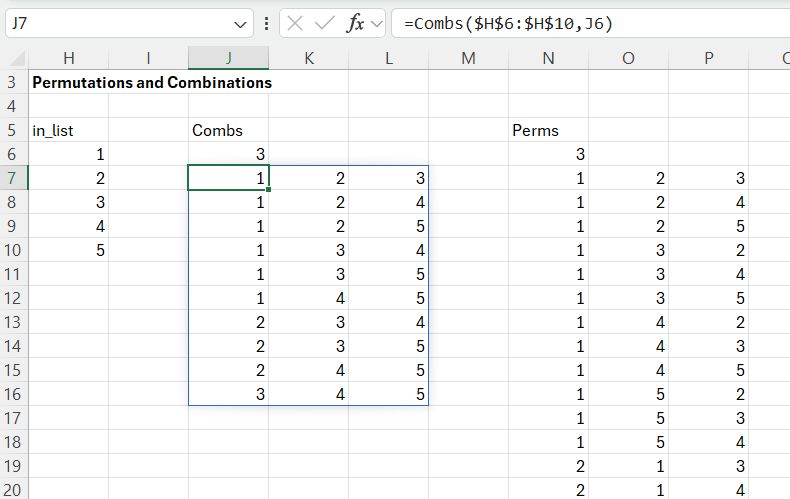
These two functions can also be called from Excel, and return all the combinations or permutations of the specified list from the given input list:
The Combs function returns all the groups of 3 numbers selected from the input list of 5 numbers, listed in the same sequence as in the input array;10 combinations are returned in this case. Note that the code has a commented out line, checking that the returned values are in increasing order. This was suggested by the Bing AI code generator, but was not necessary because the input list was in ascending order.
The Perms function returns the same 10 groups of numbers, but with each sorted in the 6 possible different orders, returning 60 permutations in all. In my code the Combs function is used to generate the first two numbers, but Perms is used for the final sum because this may be in any order, other than not starting with zero.
@xl_func()
@xl_arg('m', 'int')
@xl_arg('n', 'int')
@xl_return('numpy_array')
def py_Pandigital1(m, n):
    stime = time.perf_counter()
    intlist = np.array([0,1,2,3,4,5,6,7,8,9])
    intlist1 = intlist[2:10-n]
    intlist2 = intlist[m+2:]
    abcA = Combs(intlist1, m)
    defA = Combs(intlist2, n)
    rows = abcA.shape[0]
    rows2 = defA.shape[0]
    o = 10 - (m+n)
    facta1 = []
    facta2 = []
    facta3 = []
    for i in range(m-1,-1,-1):
        facta1.append(10**i)
    facta1 = np.array(facta1)
    for i in range(n-1,-1,-1):
        facta2.append(10**i)
    facta2 = np.array(facta2)
    for i in range(o-1,-1,-1):
        facta3.append(10**i)
    facta3 = np.array(facta3)
    for a in range(0, rows):
        abc = abcA[a,:]
        abcsum = np.dot(abc, facta1)
        for b in range(0, rows2):
            def_ = defA[b,:]
            if def_[0] > abc[-1]:
                defsum = np.dot(def_, facta2)
                sum1 = abcsum + defsum
                sumlist = intlist.copy().tolist()
                for c in range(0, m):
                    if abc[c] in sumlist:
                        sumlist.remove(abc[c])
                    else:
                        break
                for c in range(0, n):
                    if def_[c] in sumlist:
                        sumlist.remove(def_[c])
                    else:
                        break

                SumA = Perms(sumlist, 4)
                rows3 = SumA.shape[0]
                for d in range(0, rows3):
                    SumA2 = SumA[d, :]
                    if SumA2[0] == 1:  # > 0:
                        sum2 = np.dot(SumA2, facta3)
                        if sum1 == sum2:
                            etime = time.perf_counter() - stime
                            return np.array([abcsum, defsum, sum1, sum2, etime])
    etime = time.perf_counter() - stime
    return np.array(etime)
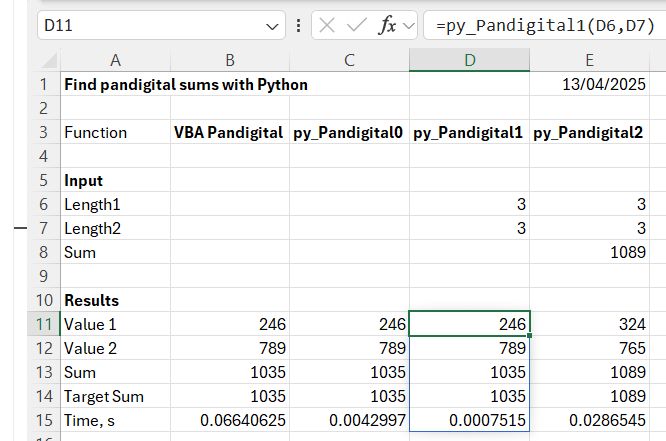
In addition to the use of the combinations and permutations method, this code has also been modified to allow the length of the output numbers to be changed, for instance to check if there was a solution of the form ABCD + EF (there wasn’t). The execution time for this code comes down to 0.8 milliseconds.
For the first two problems the generated values do not need to be in increasing order, but the resulting sum is specified in the input:
@xl_func()
@xl_arg('m', 'int')
@xl_arg('n', 'int')
@xl_arg('sum2', 'int')
@xl_return('numpy_array')
def py_Pandigital2(m, n, sum2):
    stime = time.perf_counter()
    intlist = [0,1,2,3,4,5,6,7,8,9]
    sum2A = np.array([int(d) for d in str(sum2)])
    s = sum2A.shape[0]
    for i in range(0, s):
        intlist.remove(sum2A[i])

    abcA = Perms(intlist, m)
    defA = Perms(intlist, n)
    rows = abcA.shape[0]
    rows2 = defA.shape[0]
    facta1 = []
    facta2 = []
    facta3 = []
    for i in range(m-1,-1,-1):
        facta1.append(10**i)
    facta1 = np.array(facta1)
    for i in range(n-1,-1,-1):
        facta2.append(10**i)
    facta2 = np.array(facta2)
    for i in range(s-1,-1,-1):
        facta3.append(10**i)
    facta3 = np.array(facta3)
    for a in range(0, rows):
        abc = abcA[a,:]
        for b in range(0, rows2):
            def_ = defA[b,:]
            if np.intersect1d(abc, def_).size == 0:
                if np.intersect1d(abc, sum2A).size + np.intersect1d(def_, sum2A).size == 0:
                    abcsum = np.dot(abc, facta1)
                    defsum = np.dot(def_, facta2)
                    sum1 = abcsum + defsum
                    if sum1 == sum2:
                        etime = time.perf_counter() - stime
                        return np.array([abcsum, defsum, sum1, sum2, etime])
    etime = time.perf_counter() - stime
    return np.array(etime)
Changes in this code are:
The trial values are generated with the permutations method, because their digits do not need to be in increasing order.
The sum value is input, but this has to be checked against the two generated values to check that no digits are repeated. This is done with the numpy intersect1d function, which counts how many values two arrays have in common.
The input sum value was split into an array of digits, which were then removed from the list of digits available for the first two numbers.
The reduced time for creating and checking the sum value was more than offset by the options for the first two numbers coming from a permutations list rather than combinations, and the execution time increased to 28 milliseconds.
Output results (spoiler alert: includes answers to the problems)
Last Saturday I saw cellist Abel Selaocoe perform with the Australian Chamber Orchestra, performing a mixture of classical works and his own unique compositions. He captured the audience and at the end of the performance received an ovation the like of which I have never seen before.
South African cellist Abel Selaocoe is one of the most captivating performers on the world stage today. With an irresistible energy, he has taken the world by storm since bursting onto the scene in 2021 with his BBC Proms debut. Whether with symphony orchestras, in iconic club venues or at major mainstream festivals, Abel combines virtuosic cello and vocal performance with improvisation and sweeps audiences along in captivating shows which blaze with creation, sending audiences home on a high.
Abel grew up in Sebokeng, where he first began learning cello with his brother at the African Cultural Organisation of South Africa (ACOSA) in Soweto. Abel’s affinity for the cello became quickly apparent and he continued his studies on scholarship at St John’s College before moving to the UK where he found a musical home at the Royal Northern College of Music in Manchester. In Manchester, he met the musicians who are now his most regular collaborators, and this has led to the formation of his bands, Chesaba and the Bantu Ensemble.








 Newton Excel Bach, not (just) an Excel Blog