The VBA Decimal data type

This is what the Microsoft on-line help says about using the Decimal data type in VBA

“”

At least that is what the Microsoft search listed for me, and Google listed nothing from Microsoft related to VBA on the first page.

The VBA help takes you to the Visual Basic page on the same data type, which says.

Holds signed 128-bit (16-byte) values representing 96-bit (12-byte) integer numbers scaled by a variable power of 10. The scaling factor specifies the number of digits to the right of the decimal point; it ranges from 0 through 28. With a scale of 0 (no decimal places), the largest possible value is +/-79,228,162,514,264,337,593,543,950,335 (+/-7.9228162514264337593543950335E+28). With 28 decimal places, the largest value is +/-7.9228162514264337593543950335, and the smallest nonzero value is +/-0.0000000000000000000000000001 (+/-1E-28).

This would be OK if VB and VBA were essentially the same in their use of this data type, but they are not.  For instance:

  1. The VB help says that Decimals are declared with: Dim bigDec1 As Decimal, but this is not accepted in VBA.
  2. In VB appending the identifier type character @ to any identifier forces it to Decimal, but in VBA this forces the identifier to the Currency data type (which has only 4 decimal places).
  3. In VB appending the literal type character D to a literal forces it to the Decimal data type, but in VBA this generates an “Overflow” error message.

So can the Decimal data type actually be used in VBA?  Yes, it can (and it is reasonably straightforward), but there are a number of aspects that need to be handled carefully, and use in engineering and scientific calculations is greatly restricted.

To use a Decimal in VBA, declare it as a variant, then use the CDec() function to convert an input value into a decimal.  If data is being read from a spreadsheet cell it may be entered as a number if it has 15 or less significant figures, or as a text string if 16 or more figures are required.  The code below will add the two values a and b, and return the result as a string, or optionally as a Decimal. Returning a Decimal value to the spreadsheet will result in it being converted to a double, but if it is being used in another VBA routine keeping it as a Decimal will be more efficient.

Function DecAdd(a As Variant, b As Variant, Optional RtnString As Boolean = True) As Variant
    Dim Res As Variant
    Res = CDec(a) + CDec(b)
    If RtnString Then
        DecAdd = Str(Res)
    Else
        DecAdd = Res
    End If
End Function

This function will allow values (entered as text strings) with up to 28 significant figures to be added on the spreadsheet, and the Decimal.xlsb spreadsheet has similar short functions to subtract, multiply, divide, and find the maximum and minimum of two values.

There is also a function to find the square root of any input value (based on code taken from VBAExpress), but this brings us to the main drawback of this data type.  If any of the VBA maths functions are used on a Decimal, the result will be returned as a Double, unless you write your own function, using only the basic arithmetic operators (plus a small number of other simple functions, such as Abs()).

Fortunately there is an easier way of carrying out high precision calculations.  The XNumbers package will do arbitrary precision calculations, and is now available for Excel 2007 and later.  See XNumbers for more details and free download.

Posted in Excel, Maths, Newton, UDFs, VBA | Tagged , , , | 4 Comments

Footsteps of The Incredible String Band

I just thought I would ask Google who there is playing music these days developing the tradition of the Incredible String Band, and after wading through long lists of 40 year old albums I eventually found:

Trembling Bells

Sweet Death Polka

Waltz of the New Moon:

And something rockier, live this year:

Posted in Bach | Tagged , | Leave a comment

Solving non-linear equations with two or more unknowns – 5

This will be the last of the series on solving non-linear equations (for now).  Up until now all the examples have had two unknown values, and two target values.  This can be extended by making three changes to the code:

  • Set up an nxn matrix of the function slopes with respect to each of the unknown values (the function Jacobian)
  • Calculate the first estimate of the target values, using an estimated value for each of the unknowns.
  • Form and solve a series of simultaneous equations to find a better estimate of the unknowns.

In Excel VBA the solution to the equations can be found using the Worksheetfunction.MInverse and MMult functions, as shown in the code below:

LoopNum = LoopNum + 1
        ' Evaluate function at guessed values and small increments.
                                            
        For i = 1 To NumVar
            Var2A(i, 1) = Var1A(i, 1) * VarFact
            VarDiffA(i, 1) = Var1A(i, 1) * (VarFact - 1)
        Next i
        Res1 = Application.Run(Func, Var1A, X)
        For j = 1 To NumVar
            ResDiff(j, 1) = Target(j, 1) - Res1(j, 1)
        Next j
        Temp = Var1A(1, 1)
        Var1A(1, 1) = Var2A(1, 1)
        For i = 1 To NumVar
            Res2 = Application.Run(Func, Var1A, X)
            
            For j = 1 To NumVar
                SlopeA(j, i) = (Res2(j, 1) - Res1(j, 1)) / VarDiffA(i, 1)
            Next j
            Var1A(i, 1) = Temp
            If i < NumVar Then
                Temp = Var1A(i + 1, 1)
                Var1A(i + 1, 1) = Var2A(i + 1, 1)
            End If
        Next i
        
        ' Solve SlopeA
        InvA = WorksheetFunction.MInverse(SlopeA)
        ResA = WorksheetFunction.MMult(InvA, ResDiff)
        
        ErrSum = 0
        For i = 1 To NumVar
            ErrA(i, 1) = (Target(i, 1) - Res1(i, 1))
            ErrSum = ErrSum + Abs(ErrA(i, 1))
            Var1A(i, 1) = Var1A(i, 1) + ResA(i, 1)
        Next i

The User Defined Function (UDF) MSolve has been modified as shown above, and the earlier version renamed MSolve2.  A spreadsheet including examples of both functions, and full open source code, can be downloaded from:

Eval2.zip

Input and output from both functions is shown in the screenshot below:

Solve2var-15

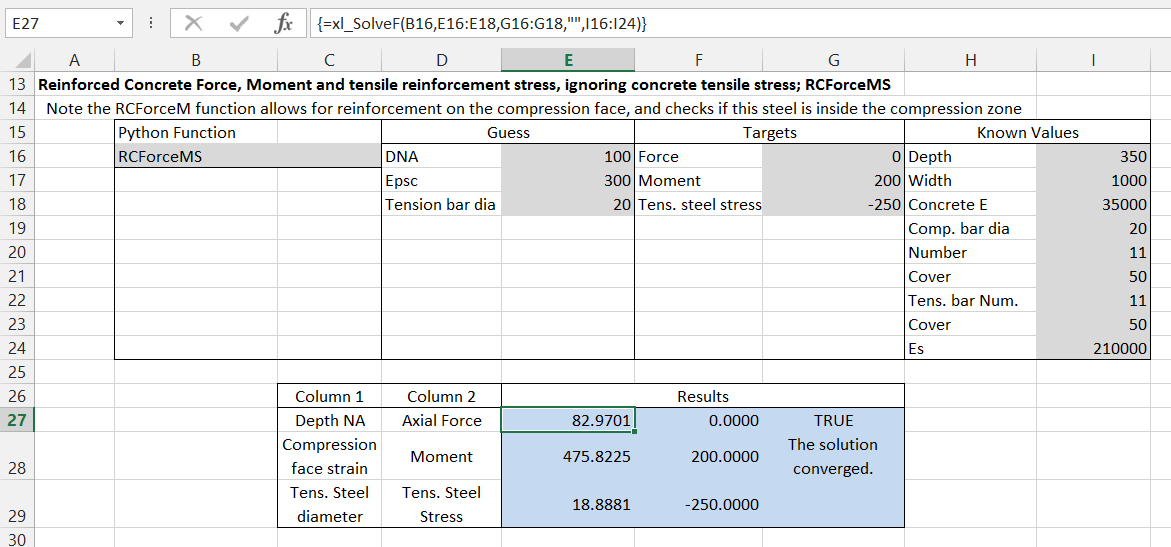
MSolve2 works as before, in the example returning the depth of neutral axis and compression face strain in a reinforced concrete section, for any given axial load and bending moment.

The MSolve example adds one more unknown (the diameter of the tension reinforcement), and another target, the tension reinforcement stress.

The Python Scipy package also contains a number of routines for solving problems of this type.  In order to access these from Excel we need:

  • A python routine for the function to be solved.
  • An interface allowing this routine and the Scipy functions to be accessed from Excel.

I have updated the Eval-PyIntegration spreadsheet to perform this task, and this can be downloaded from:

Eval-PyInt.zip

The spreadsheet uses ExcelPython for communication with Python, and the download file includes all necessary files (other than Excel, Python and Scipy).

The example below shows the xl_SolveF function used to find the depth of neutral axis, compression face strain, and tension bar diameter required for a specified axial force, bending moment and tension steel stress.  In this example the Python function being solved (RCForceMS) is the simplified version, ignoring concrete in tension.

Solve2var-16

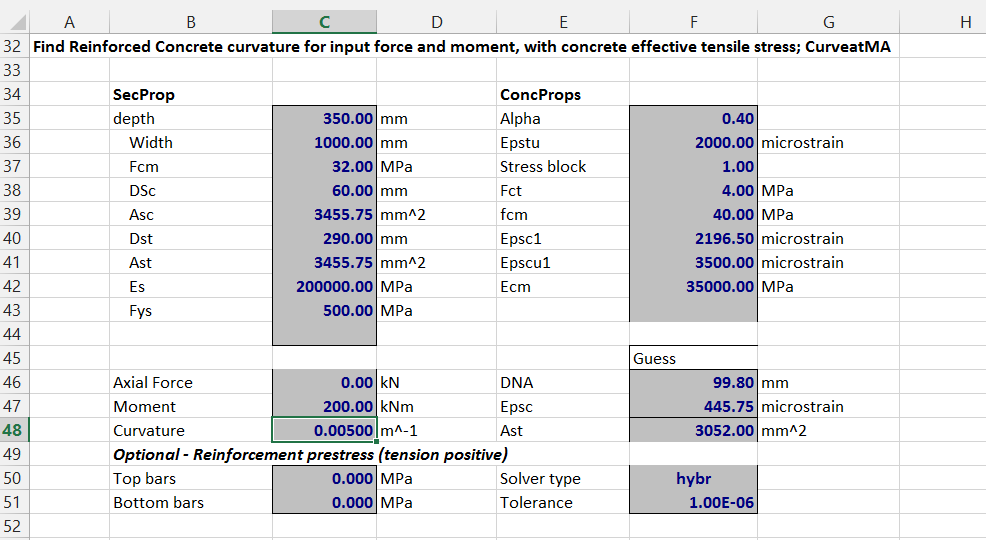
The download also includes Python versions of the functions CurveatMA and CurveatMAS, with input as shown below.  The functions make use of the SciPy optimize.root function, which has many optional arguments, detailed in the SciPy manual.  In the spreadsheet the only options included are for the solver type, and tolerance for termination.

Solve2var-17

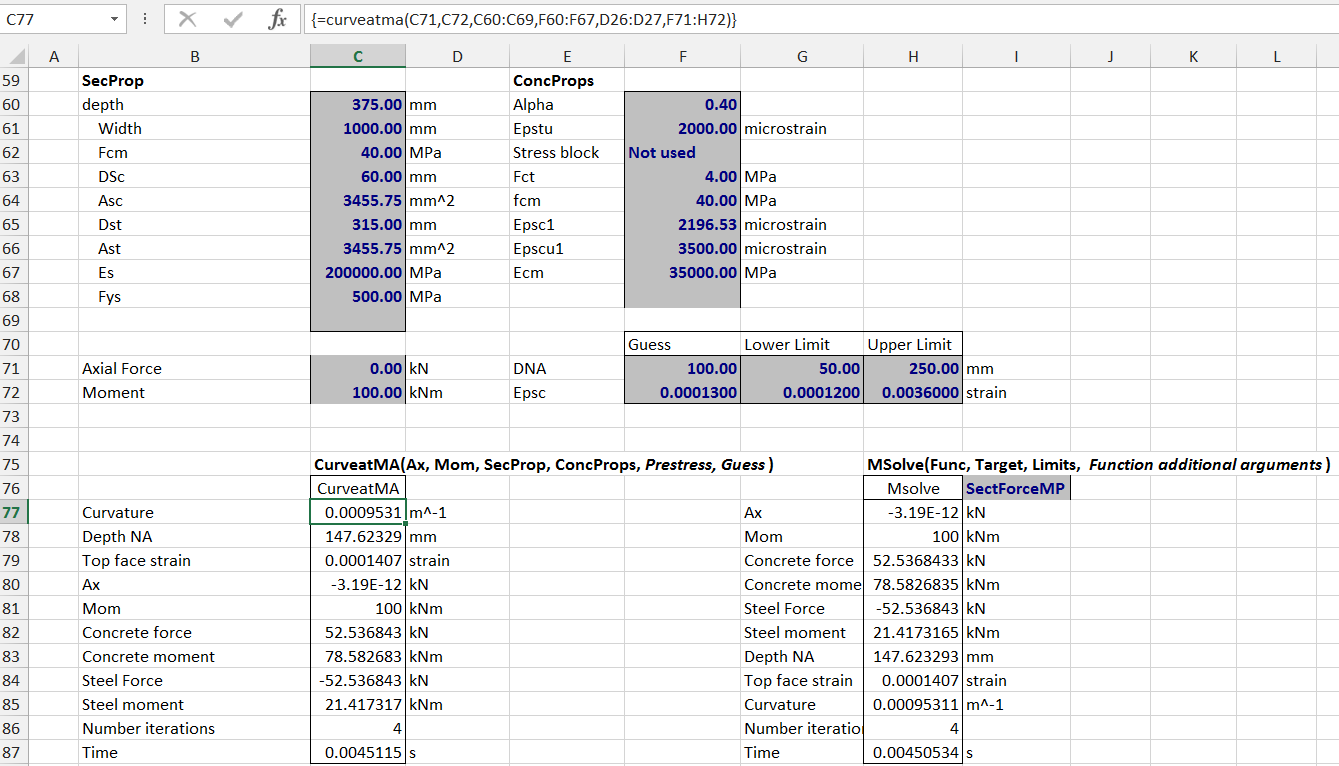
The screenshot below shows the results of CurveatMA for an axial load of zero and bending moment of zero.  The returned values of depth of neutral axis (DNA) and compression face strain (Epsc) have been checked using the function SectForceMV, which finds that the axial force and bending moment are as expected.

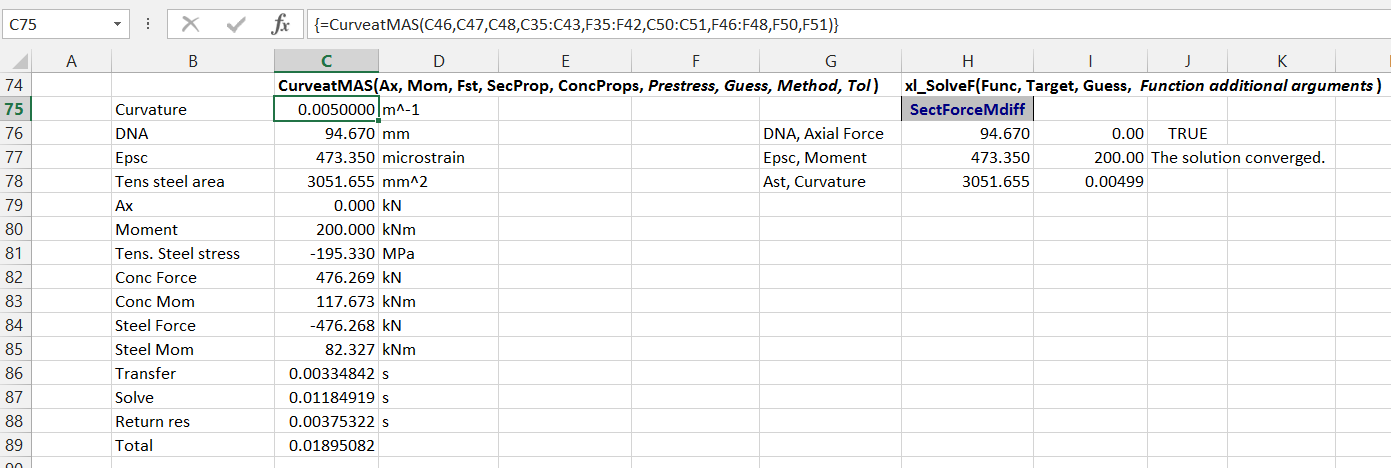
The xl_SolveF function can also be called directly, using a function that returns the difference of the function values from the target values, in this case SectForceMDiff.

Solve2var-18

Finally, CurveatMAS adjusts the neutral axis depth, compression face strain, and tension steel area such that the axial force, bending moment and section curvature match the target values.  Once again, xl_SolveF may be used with SectForceMdiff to return the same 3 values.

Note that the steel force and tensile strain found by these functions are average values, including tension stiffening effects.  The results are intended for use in deflection calculations, and should not be used in strength or stress limit calculations.

Solve2var-19a


Posted in Beam Bending, Concrete, Excel, Link to Python, Maths, Newton, NumPy and SciPy, UDFs, VBA | Tagged , , , , , , , , , , , , | 3 Comments

Solving non-linear equations with two or more unknowns – 4

As promised in the previous post, the spreadsheet including the new functions to calculate reinforced (or prestressed) concrete moment-curvature with a revised concrete tension stress-block is now available for download from:

RC design functions7.zip

The spreadsheet includes full open source VBA code.

Use of the new functions is illustrated in the screen-shots below:

The function MomCurveTS returns a table of bending moment and curvature results (and associated output).  The required input is the section properties data, the axial load, and the Alpha (f’t/ft) and Epstu values defining the effective concrete behaviour in tension (see here for more details).  The remaining properties may be entered by the user, or enter -1 to use the Eurocode 2 default values, based on the value of fck entered under SectProps.  Reinforcement prestress, and the number and range of output steps may also be specified.

Solve2var-10

The function returns the section curvature at zero moment (which will be non-zero if eccentric prestress is applied), just below and just above the cracking moment, and then at equally spaced steps up to the compressive strain specified in StepA.

For each moment the function also returns:

  • The depth of the Neutral Axis
  • The “top ” (i.e. compression) face strain
  • The axial load (constant, equal to the input value)
  • The effective Elastic Modulus
  • The curvature given by the Eurocode 2 empirical formula
  • The cracked curvature with no tension stiffening.

Solve2var-11

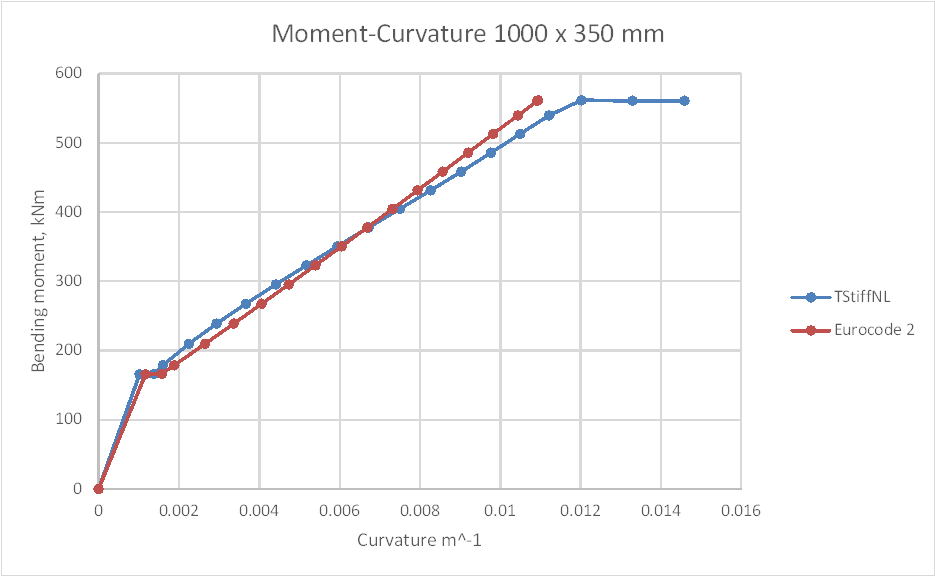
Typical results are shown in the graph below:

Solve2var-12

The MomCurveTS function uses the function CurveMA to find the section curvature at just above the cracking moment.  It then increases the compressive face strain in equal increments and returns the associated moment and curvature.  CurveMA uses the Function MSolve to find the compressive face strain and depth of Neutral Axis for any combination of axial load and bending moment (within the section capacity), and these functions may be called directly from the spreadsheet as shown below:

Solve2var-13

MSolve calls the function SectForceMP to find the section axial force and bending moment for any given Neutral Axis depth and compression face strain.  An equivalent function, SectForceMV, may be called directly from the spreadsheet as shown below, together with two further functions: EC2ForceM which calculates the force and moment in the concrete, and Stressatx, which calculates the compressive stress in the concrete at distance X from the Neutral Axis, according to Eurocode 2 Figure 3.2:

Solve2var-14a

Posted in Beam Bending, Concrete, Excel, Maths, Newton, UDFs, VBA | Tagged , , , , , , , , | 1 Comment

Solving non-linear equations with two or more unknowns – 3

For the next stage of the non-linear solver saga I am looking at the same problem as in the previous post (finding the curvature or a reinforced concrete section under specified bending moment and axial load), but with more realistic materials properties.

For concrete in compression I will use the curve from Eurocode 2, recommended for structural analysis:

Solve2var-7

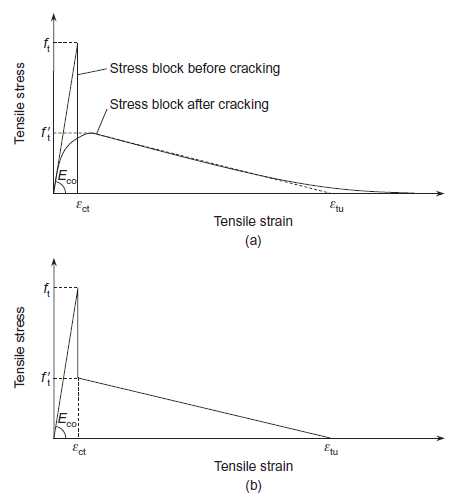
For concrete in tension I will use a modified version of the curve used in a previous post:
TStiffICE

The paper this curve was taken from suggested using the stepped linear form (labelled b above) for both cracked and uncracked sections, but some testing suggests that better results are obtained using linear properties until cracking (at a stress of ft), then the tri-linear line (with a plateau at f’t) after cracking.  At this stage a simple bi-linear approach was used for the steel stress-strain; i.e. a constant E up to the yield point, then constant stress with increasing strain.

The following VBA functions are used in the calculation:

  • Stressatx and xStressatx call EC2Stress and return the stress and stress times x, at distance x from the Neutral Axis, for any given x, strain at the compression face, and concrete properties.
  • The total force and moment about the section centroid are found by SectForceMV, which calls EC2ForceM for the concrete force and moment, and SForceM for the actions in the steel.  EC2ForceM calls GaussIntF to integrate the stresses returned by Stressatx and xStressatx.
  • CurveatMA  returns the section curvature for any specified axial load, moment and concrete properties, using MSolve to find the required depth of neutral axis and compression face strain, calling SectForceMV.
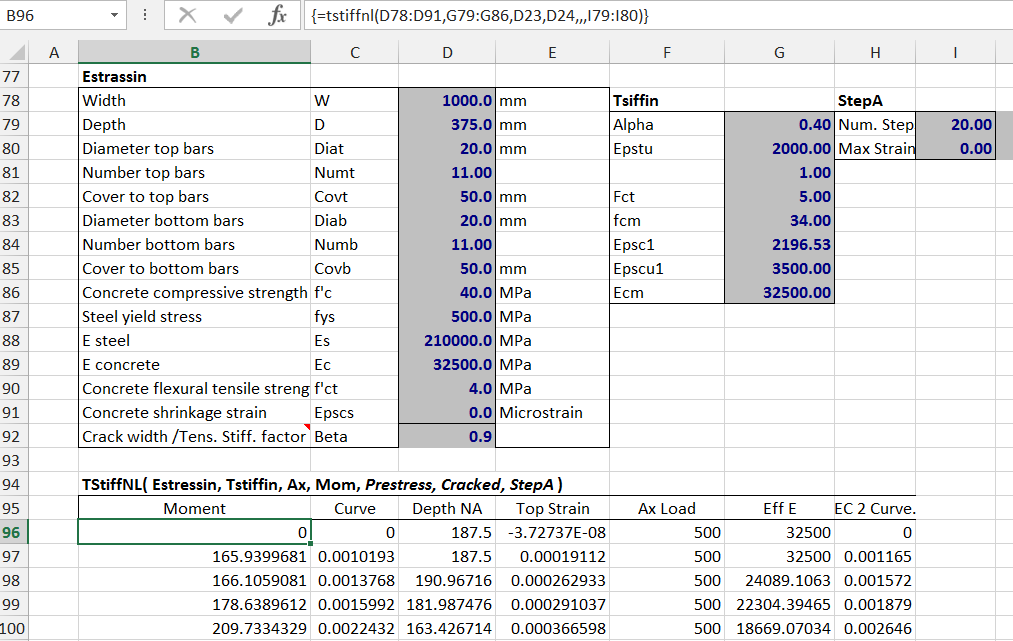
  • MSolve is also used by TStiffNL, which returns the bending moment and curvature immediately before and after cracking, then at uniform strain increments up to any specified maximum compressive strain. Msolve is used in finding the compression face strain and neutral axis depth immediately after cracking.  Thereafter the top face strain is incremented in equal steps, and the depth of the neutral axis is found using the function QuadBrentPA.

Typical output from TSiffNL is shown in the screen-shot below, followed by a graph comparing results with curvature calculated with the Eurocode 2 formula:
Solve2var-8

Solve2var-9

The RC Design Functions spreadsheet will be re-issued in the next few days, including open-source code for all the functions listed above.

Posted in Beam Bending, Excel, Maths, Newton, UDFs, VBA | Tagged , , , , , , , | 1 Comment