Installing dlls on 64 bit Windows

Several of the spreadsheets available here include routines linking to compiled code written in C#, C++ or Fortran, which require the installation and registration of dll files.  The procedures for doing this are significantly different on machines with 64 bit versions of Windows.  These procedures are not complicated, but they are not well documented, and the naming conventions used are confusing.  The instructions given below are based on my own inexpert investigations; if anyone has any corrections, clarifications, or a better way of doing things, I’d be glad to hear from you.

All the compiled applications available here (so far) are compiled as 32 bit dlls. These should be copied to the Windows\SysWOW64 folder, not Windows\System32, so:

  • 32 bit applications go in SysWOW64
  • 64 bit applications go in System32

OK?

The applications written C++ or Fortran are then registered using the version of Regsvr32.exe in the SysWOW64 folder.

Applications written in C# use the COM (Component Object Model) and the .Net framework, and are installed using the Regasm application, as described here. In this case use the version of regasm found in the latest folder found under c:\Windows\Microsoft.NET\Framework\, not c:\Windows\Microsoft.NET\Framework64\.

Following these instructions the applications should successfully install on machines with 64 bit Windows, and be available to either 32 bit or 64 bit versions of Office.

For a good clear description of the background to these things see: http://www.samlogic.net/articles/32-64-bit-windows-folder-x86-syswow64.htm (link provided by Dennis Wallentin).
Posted in Computing - general, Excel, Link to dll, VBA | Tagged , , , | 10 Comments

3DFrame Ver 1.03 and Frame4 Ver 3.07

Updated versions of my 2D and 3D frame analysis spreadsheets are now available for download from:
3DFrame.zip
Frame4.zip

The download files include full open-source VBA code, and dll files for compiled solvers for much better performance with large models. See https://newtonexcelbach.wordpress.com/2012/11/16/frame4-now-with-added-alglib/ for instructions on installing and linking to the dll files.  The VBA code does not require any special installation.

Changes common to both spreadsheets are:

  • The check for a reference to the compiled solver dll files previously caused the VBA solver to crash if the dll files were not found.  This has now been fixed so that the VBA solver will run if the compiled solver files are not installed.
  • A check has been added that the resultant reaction forces are equal to the total resultant applied loads.

In addition the following changes have been made to individual spreadsheets:

Frame4:

  • The three solvers available in 3DFrame (compiled Alglib sparse solver, compiled skyline solver, and VBA solver) are now also available in Frame4.

3DFrame:

  • Calculation of shear deflections is now supported.
  • Member end releases are now supported.
  • The plot functions have been updated for easier use and better performance
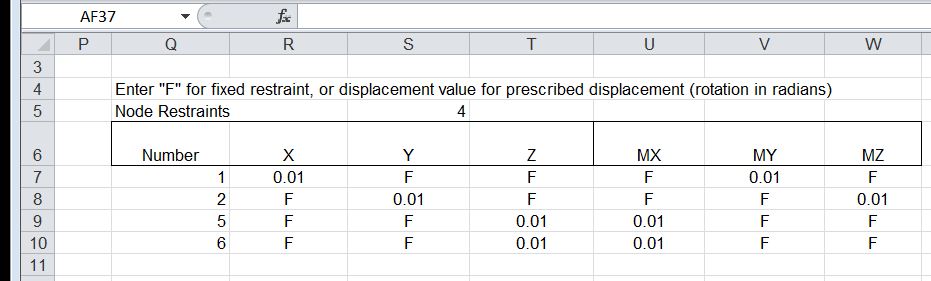
  • Specified support displacements may now be input.
  • Members may now be specified as truss elements, transferring axial load only.

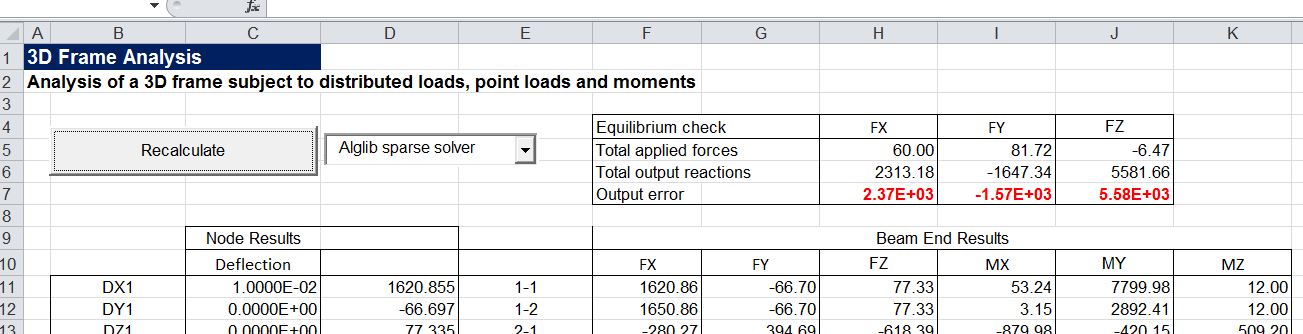
Note that specified support displacements are modelled by adding a virtual large stiffness in the direction of the displacement, and this solution method is not compatible with the iterative solution method used in the Alglib sparse solver.  For this reason models with specified support displacements should be solved with the compiled solver or the VBA solver.

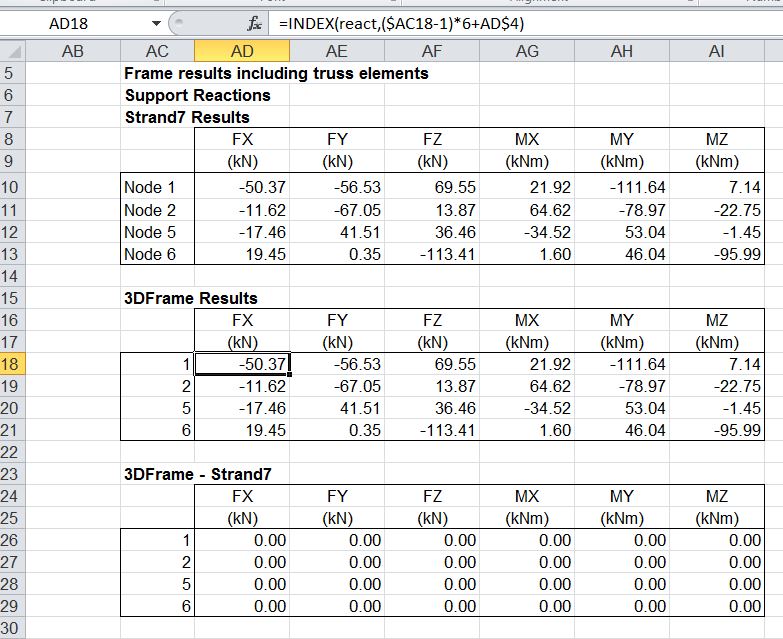
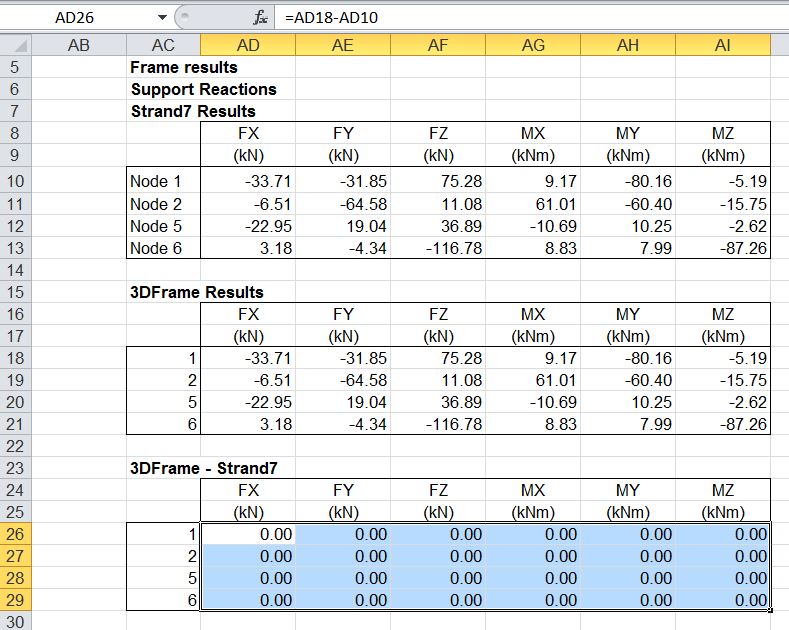
Examples of input and output using the new features in 3DFrame are shown in the screenshots below:

Support reactions without specified deflections or truss members:

3dFrame results compared with Strand7 results

3dFrame results compared with Strand7 results

Change Property Number 3 to truss element (set I1, I2 and J to zero).

3DFrame2-2a

Reaction results

3DFrame2-2

Add support displacements

3DFrame2-3a
Reaction results
3DFrame2-3

Equilibrium check for Alglib sparse solver used with specified support displacements:

3DFrame2-4

Correct results with compiled solver option:

3DFrame2-5

Posted in Excel, Finite Element Analysis, Frame Analysis, Link to dll, Newton, VBA | Tagged , , , | 34 Comments

Tanh-Sinh Quadrature V4.1

The latest update to the Tanh-Sinh Quadrature spreadsheet from Graeme Dennes is now available for download from: Tanh-Sinh. As usual, the download includes full open-source code and extensive documentation.

Version 4.1 Release Notes

 1.   Small but useful accuracy improvements have been made to the Tanh-Sinh and DE programs through increasing the size of the node/weight arrays, thus allowing the array generators to terminate based on the magnitude of the calculated nodes and weights rather than on the size of the arrays.

2.   Small but useful accuracy improvements made by utilising the MinRealNumber constant in the array generators wherever possible.

 3.   Small speed improvements made to all programs.

 4.   Small improvements made to the parameters used by the function plotter on the Tanh-Sinh worksheet.

 5.   Taken together, these changes have provided improvements to the utility of the workbook.


Graeme Dennes

Posted in Excel, Maths, Newton, Numerical integration, UDFs, VBA | Tagged , , , , | 1 Comment

Clearing excess formats

I have recently been getting messages about “too many different cell formats”, particularly when saving  a 2007/10 format file as Excel 97-2003 format.  Some searching revealed that the source of the problem was a bug that caused unused styles to be copied when copying data between different worksheets.

The problem (and resolution) is described at: You receive a “Too many different cell formats” error message in Excel.

This provides a download for an add-in to automatically remove the custom formats: Remove Styles Add-in

and a couple of links with information on the style-copying problem, with a “hot-fix” download to fix it:

2553085 Unused styles are copied from one workbook to another workbook in Excel 2007

2598127 Unused styles are copied from one workbook to another in Excel 2010

I have now run the Remove Styles add-in (once I found the new “Remove Styles” button on the Home tab), and it seems to work as advertised.  I have yet to try the “hot-fix”.

Posted in Excel | Tagged , , | 6 Comments

what Microsoft think VBA is good for …

The front page of Excel for Developers now has a link entitled VBA, which takes you to:

VBA for Excel developers

which has a link entitled When to use VBA and why which says:

There are three principal reasons to consider VBA programming in Office 2010.

Automation & Repetition

VBA is effective and efficient when it comes to repetitive solutions to formatting or correction problems. For example, have you ever changed the style of the paragraph at the top of each page in Word? Have you ever had to reformat multiple tables that were pasted from Excel into a Word document or an Outlook e-mail? Have you ever had to make the same change in multiple Outlook contacts?

If you have a change that you have to make more than ten or twenty times, it may be worth automating it with VBA. If it is a change that you have to do hundreds of times, it certainly is worth considering. Almost any formatting or editing change that you can do by hand, can be done in VBA.

Extensions to User Interaction

There are times when you want to encourage or compel users to interact with the Office 2010 application or document in a particular way that is not part of the standard application. For example, you might want to prompt users to take some particular action when they open, save, or print a document.

Interaction between Office 2010 Applications

Do you need to copy all of your contacts from Outlook 2010 to Word 2010 and then format them in some particular way? Or, do you need to move data from Excel 2010 to a set of PowerPoint 2010 slides? Sometimes simple copy and paste does not do what you want it to do, or it is too slow. You can use VBA programming to interact with the details of two or more Office 2010 applications at the same time and then modify the content in one application based on the content in another.

That’s all very well; certainly those are three things that VBA is good for, but do Microsoft really think that encompasses all the principal things you can do with VBA? What about the ability to greatly extend the maths functionality of Excel with User Defined Functions that can for instance:

What about creating engineering applications that would be cumbersome and very limited if relying entirely on built-in functions on the worksheet, such as:

What about linking to non-office applications such as:

The reason for Microsoft continuing to undersell the versatility, power and convenience of Excel when combined with VBA remains a mystery to me.

Posted in Excel, UDFs, VBA | Tagged , , | 9 Comments