Automatic download of csv files

I was recently asked if I could assist with preparing a spreadsheet to automatically download .csv files from an internet location, with the filename incorporating the date of issue.  The process turned out to be quite straightforward, and works well even with huge files (860,000+ rows), so I am sharing it here.  The file may be downloaded from Web-Download1.xlsb, and includes a link to a csv file with some ancient stock data for trial purposes.

The download macro carries out the following steps:

  • Read the filename
  • Open the file
  • Read the data to a Variant array
  • Close the file
  • Erase old data
  • Resize the data range for the new data
  • Write the new data to the spreadsheet
Sub ImportFromWeb()
Dim FullName As String, ImpName As String, DataRange As Variant, NumRows As Long, NumCols As Long

FullName = Range("fullname").Value

  Workbooks.Open Filename:=FullName
  DataRange = ActiveCell.CurrentRegion.Value
  NumRows = UBound(DataRange)
  NumCols = UBound(DataRange, 2)
  ImpName = Application.ActiveWorkbook.Name
  Workbooks(ImpName).Close SaveChanges:=False

  With Range("importrange")
  .ClearContents
  .Resize(NumRows, NumCols).Name = "importrange"
    End With

  Range("importrange").Value = DataRange

End Sub

The screenshot below shows the generation of the full filename and path, including the specified date:

Generation of filename

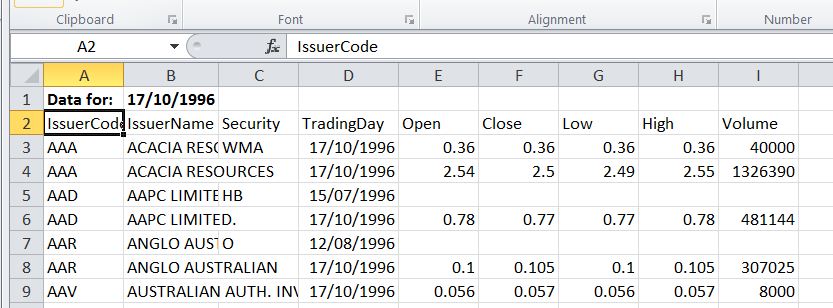
And the resulting data, import to sheet2:

Data imported from Internet


Posted in Excel, VBA | Tagged , , , | 21 Comments

The Dome of Santa Maria del Fiore – Stress Analysis 2

Following on from the previous post I have uploaded the Strand7 data and results files and an animation of the stresses as the construction proceeds.  Strand7 users can just download the files and load them into Strand7 (or those with a slow connection or smll download limit might prefer to just download the data file then run a non-linear static analysis).  Others who want to have a look see below for links to the free Strand7 viewer and animation player programs.

I will upload revised files and results as work proceeds.

Posted in Dome Structures, Finite Element Analysis, Newton, Strand7 | Tagged , , , , , , | Leave a comment

The Dome of Santa Maria del Fiore – Stress Analysis 1

It’s time to get back to the analysis of the stresses and strains in the dome of the Cathedral of Santa Maria del Fiore in Florence.

Since the last installment I have purchased “Brunelleschi’s Cupola” by Giovanni and Michele Fanelli, which is an excellent two part book covering in Part 1 the architecture and history of the structure, and in Part 2 an account of the engineering aspects of the structure, including a detailed account of finite element analysis studies carried out in recent years.  This book provides an excellent source for the structural details of the cathedral, of which it has proved difficult to find reliable information elsewhere.  The book is an english translation of an italian text, which makes it heavy going in places, but the plentiful and excellent illustrations more than make up for that.  On the question of whether “cupola” is the right term for the world’s largest masonry dome, see Just What IS a Cupola Anyway?.

In the analysis which I will be reporting here, rather than just repeat the work already covered in the book, I will be building up a progressively more detailed model, starting with the dome alone, then adding the supporting structures, and finally investigating the effects of long term changes such as creep and the effect of seasonal temperature changes.  All analyses were carried out using the program Strand7.

The model used for the first stage is almost the same as presented previously, the only difference being that a second material type has been introduced, so that the lower 6 metres can be modelled as stone construction, and the remainder as brickwork.  Two analyses have been run with two different base support conditions:

  • All base nodes fixed in all directions
  • All base nodes fixed vertically, end face nodes fixed in the Z (circumfrential) direction, and one central node fixed in the X direction

In both cases the end face nodes were fixed in the Z direction over the full height to provide symmetry  conditions.  The two models represent the possible extremes of the restraint provided by the supporting structure in the radial direction; that is either fully fixed or no restraint.  Later models will come closer to modelling the actual degree of restraint in the radial direction, and also include the effect of variable support in the vertical direction. 

Each of the two basic models were analysed by two different procedures:

  • Linear elastic with all loads applied to the complete model in one stage.
  • Staged construction, with the model built up in layers, following a simplified model of the actual construction sequence.  Linear elastic material properties were also used for this analysis.

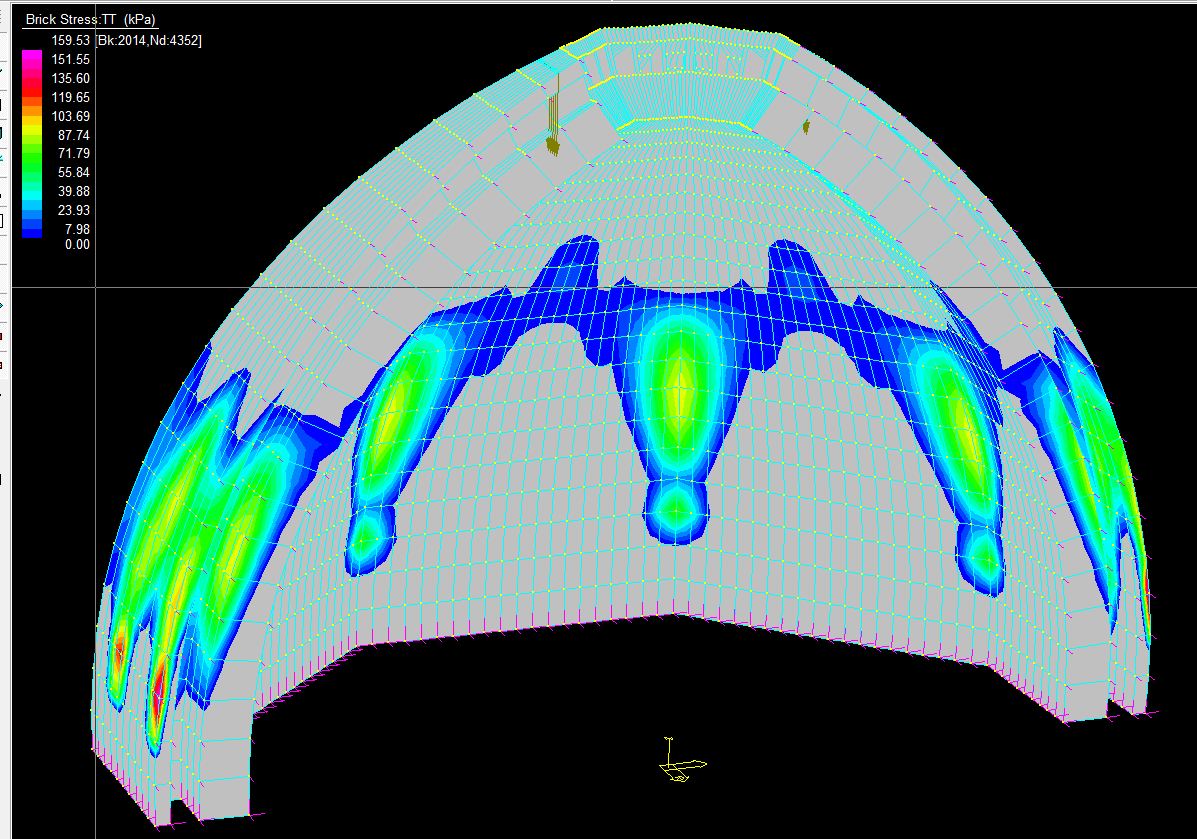
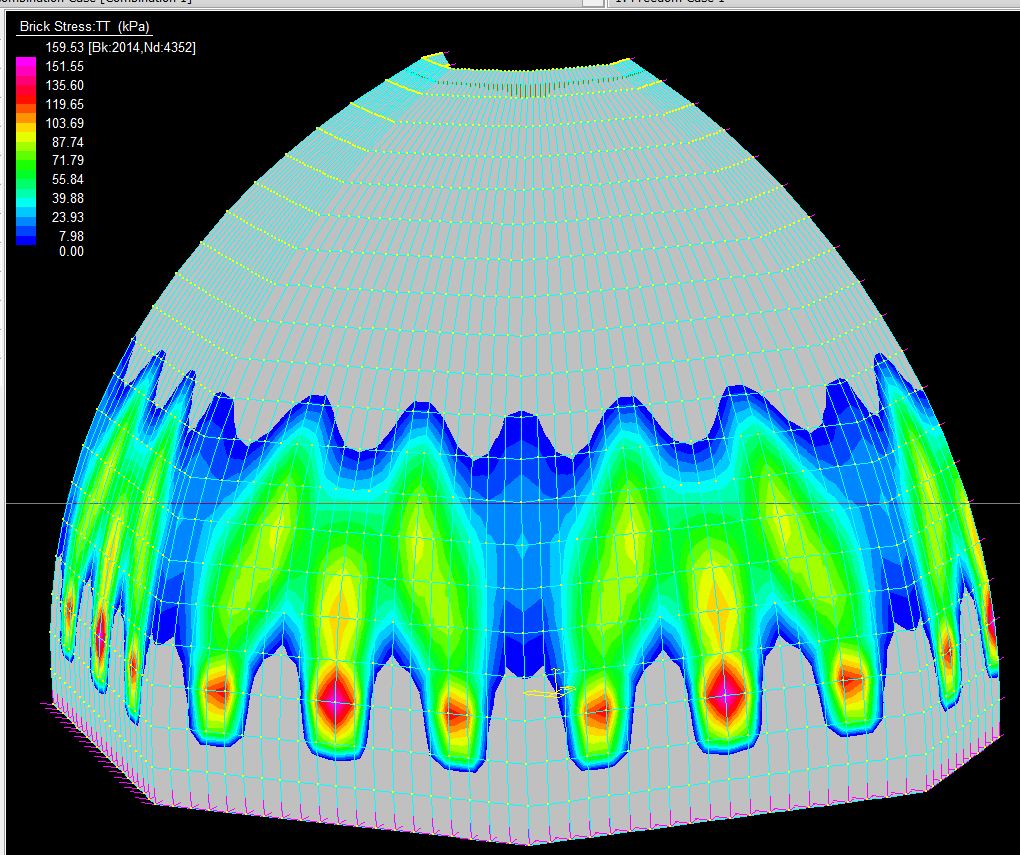
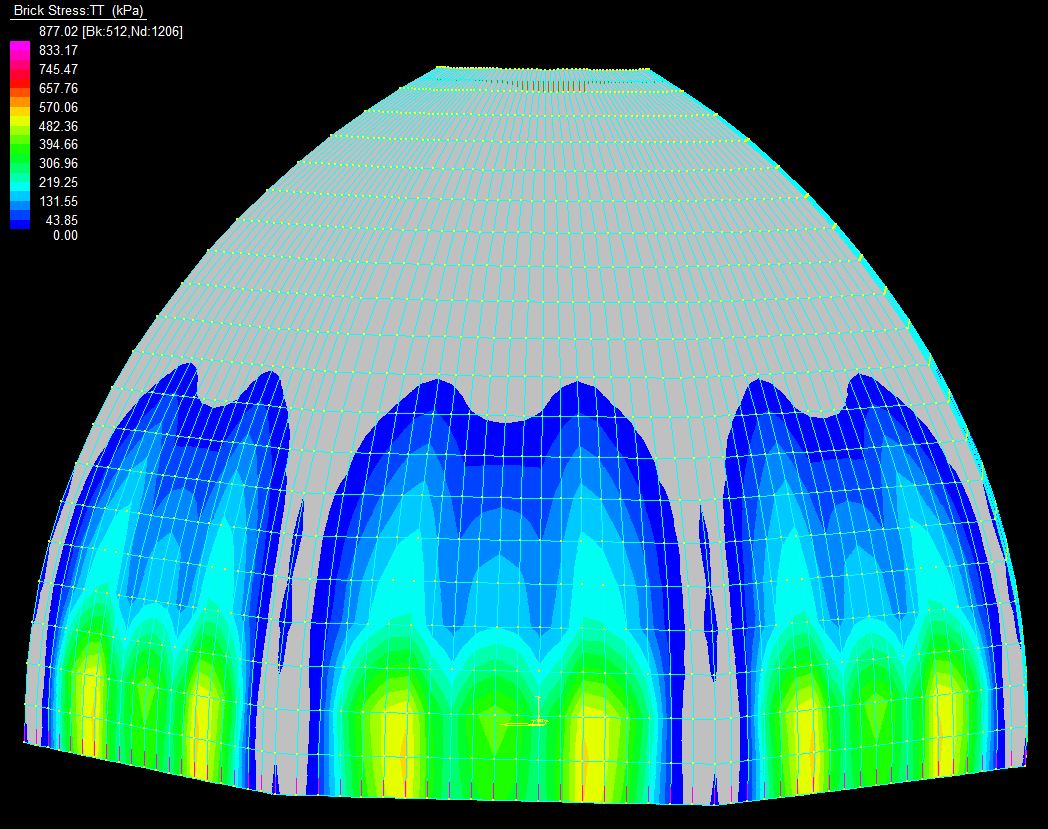
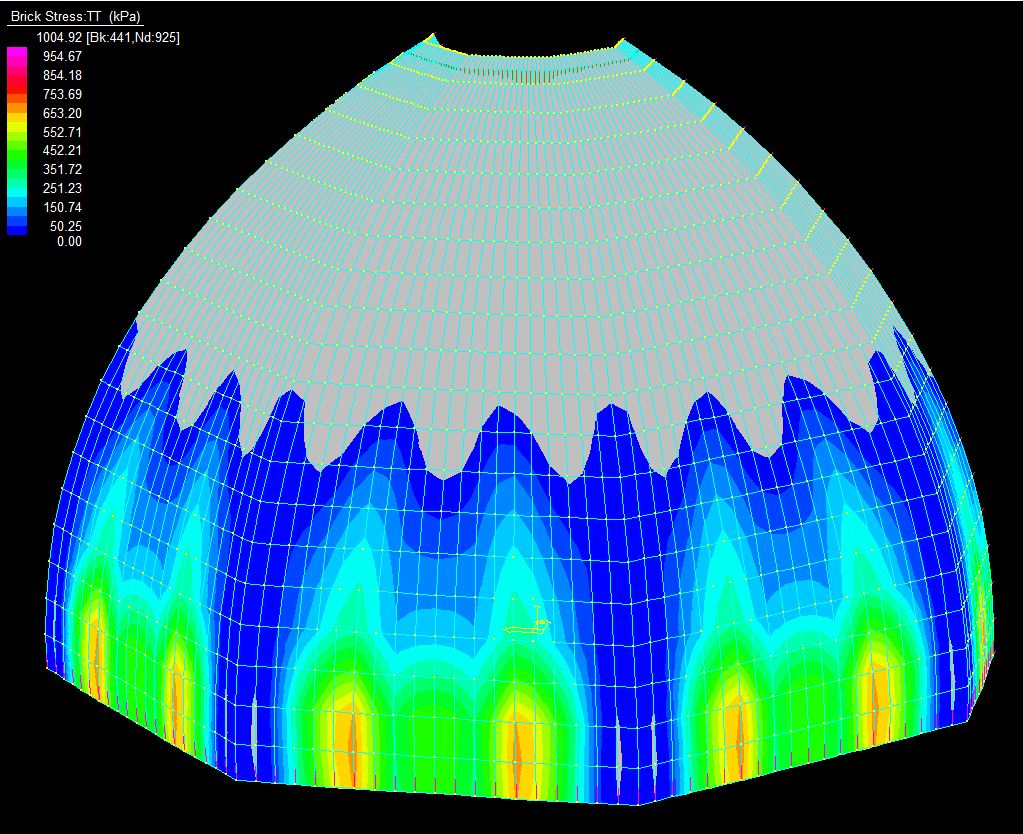
The results of the single stage analyses are shown below.  Since the purpose of the analyses is to reproduce the cracking pattern seen in the actual structure the results will concentrate on the circumferential stresses (stress TT), and only tensile stress contours are plotted:

Single Stage, Fixed Base, Inside Face

Single stage, fixed base, outside face

Single stage, free base, inside face

Single stage, free base, outside face

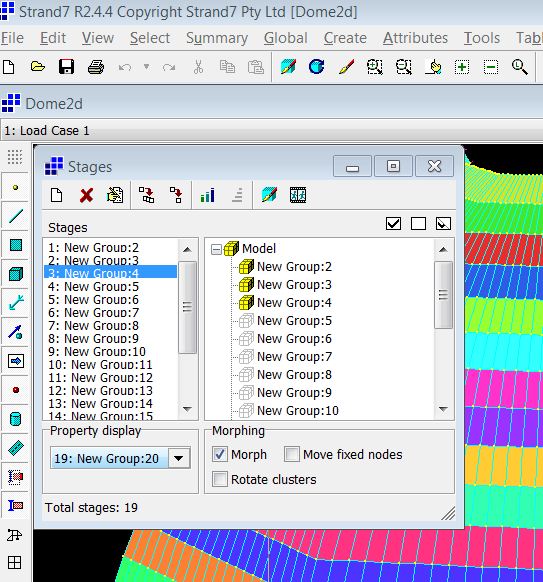
To carry out a staged analysis the structure is divided into groups, which are then allocated to a sequence of construction stages, and finally load and freedom cases are allocated to each construction stage.  In Strand7 it is possible to set up the stages automatically, but it is important to ensure that the various options are set correctly.  With the default settings applied to this case the staged analysis (with linear material properties and linear geometry) gives exactly the same results as the single stage linear elastic analysis.  The reason is that by default when each new group of elements is added to the model they are stretched and compressed to match the strains in the elements they are connected to.  To model the construction of structures in masonry or concrete or similar materials the “morph” option must be selected, as shown below, so that the new elements are re-sized to match the deformed shape of the structure, without introducing additional stresses into the new elements.

Morph option under Global-Stages menu

See the Strand7 for details of the other morphing options.

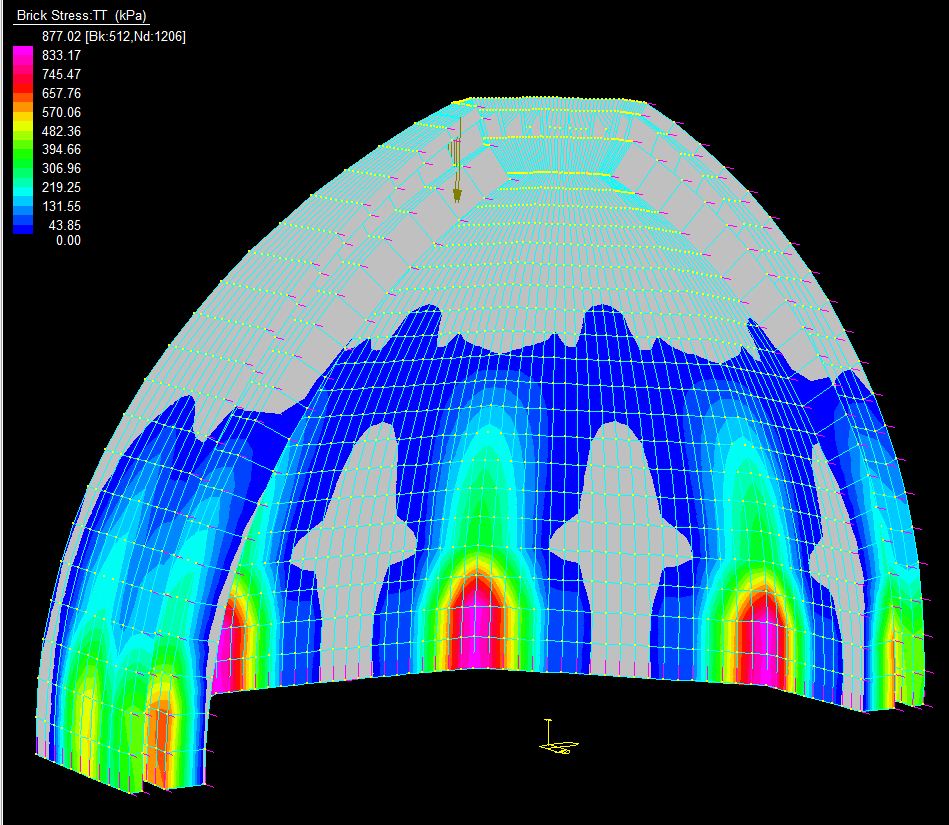
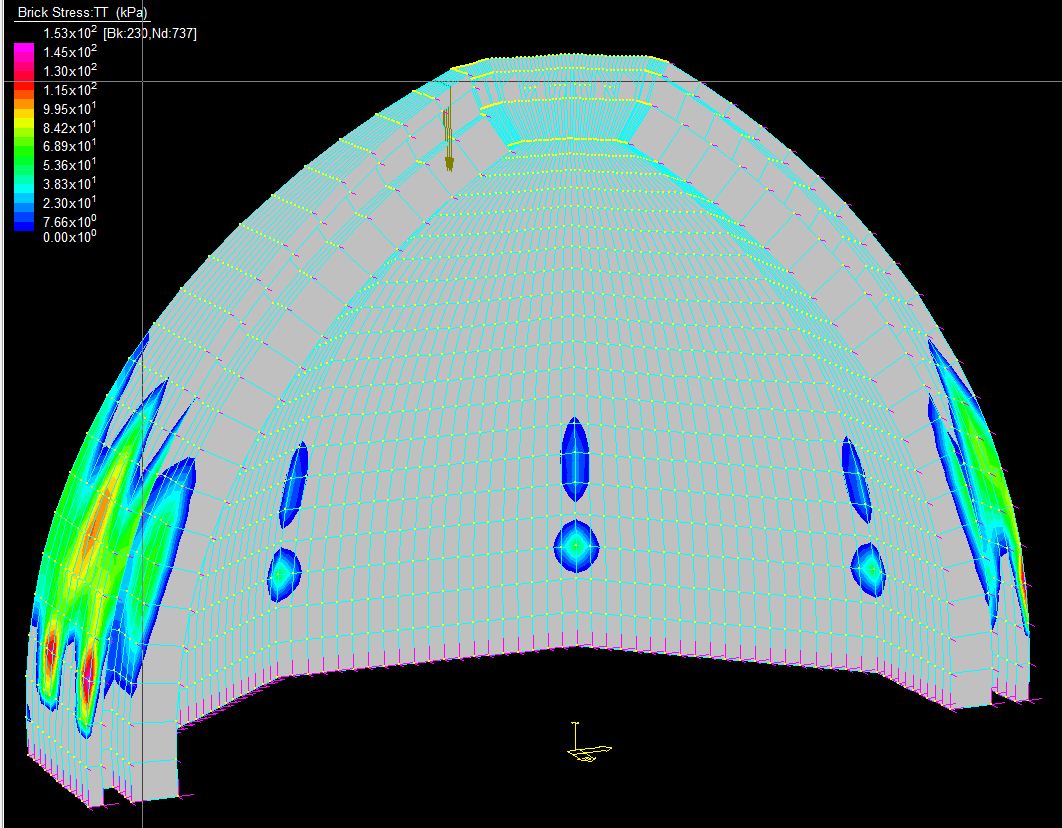
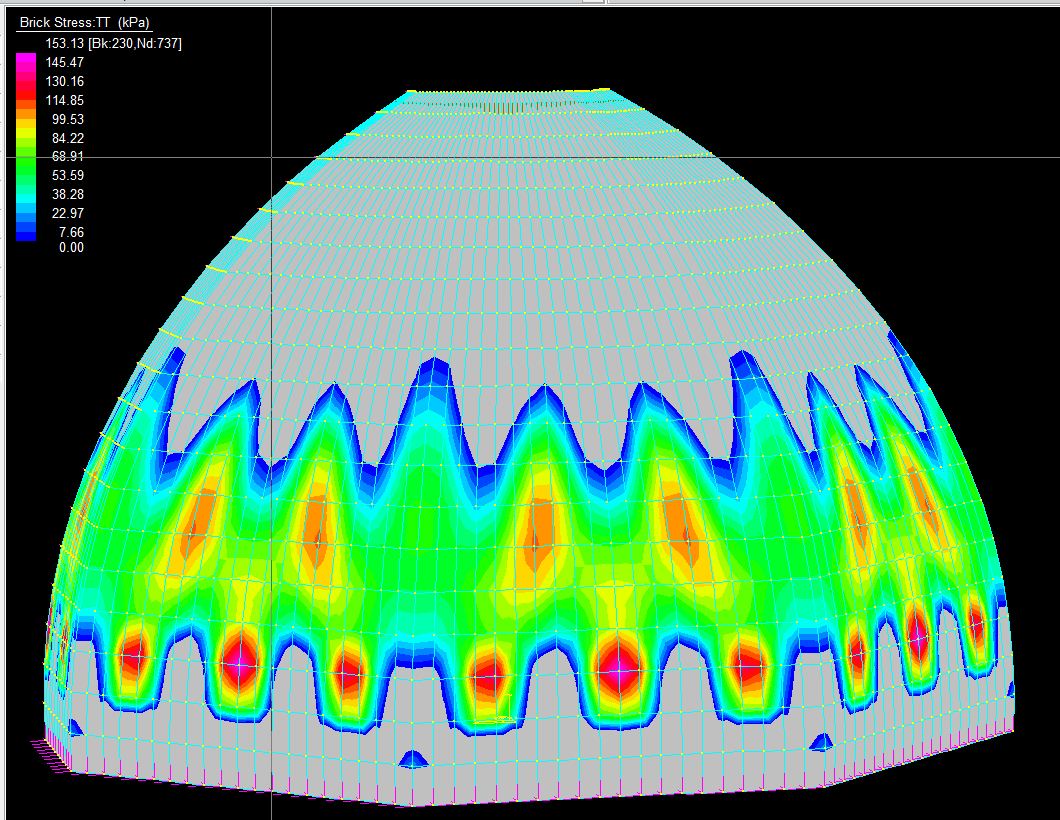
Having set the morph option for all stages other than the first, the analysis gives significantly different results for both the fixed and free base options, as shown below:

Staged analysis, fixed base, inside face

Staged analysis, fixed base, outside face

Staged analysis, free base, inside face

Staged analysis, free base, outside face

It can be seen that with the alternative options for construction stages and base fixity the maximum stress ranges from 60 kPa to 1000 kPa on the inside face, and 150 kPa to 750 kPa on the outside face.  In the next instalment we will look at the effect of including the supporting structure in the analysis to narrow down this stress range, and also to model significant effects not included in these preliminary analyses.

Posted in Dome Structures, Finite Element Analysis, Newton | Tagged , , , , , , | 1 Comment

ULS Analysis of Concrete Beams; now with added units

The spreadsheet for Ultimate Limit State Analysis of reinforced or prestressed concrete beams, previously presented here, has been combined with the Units4Excel spreadsheet to allow the program to work with any selected units, SI or non-SI.  Provision for the American Concrete Institute code ACI318 has also been added.  The revised spreadsheet, including full open source code, can be downloaded from ULS Design Functions.zip.

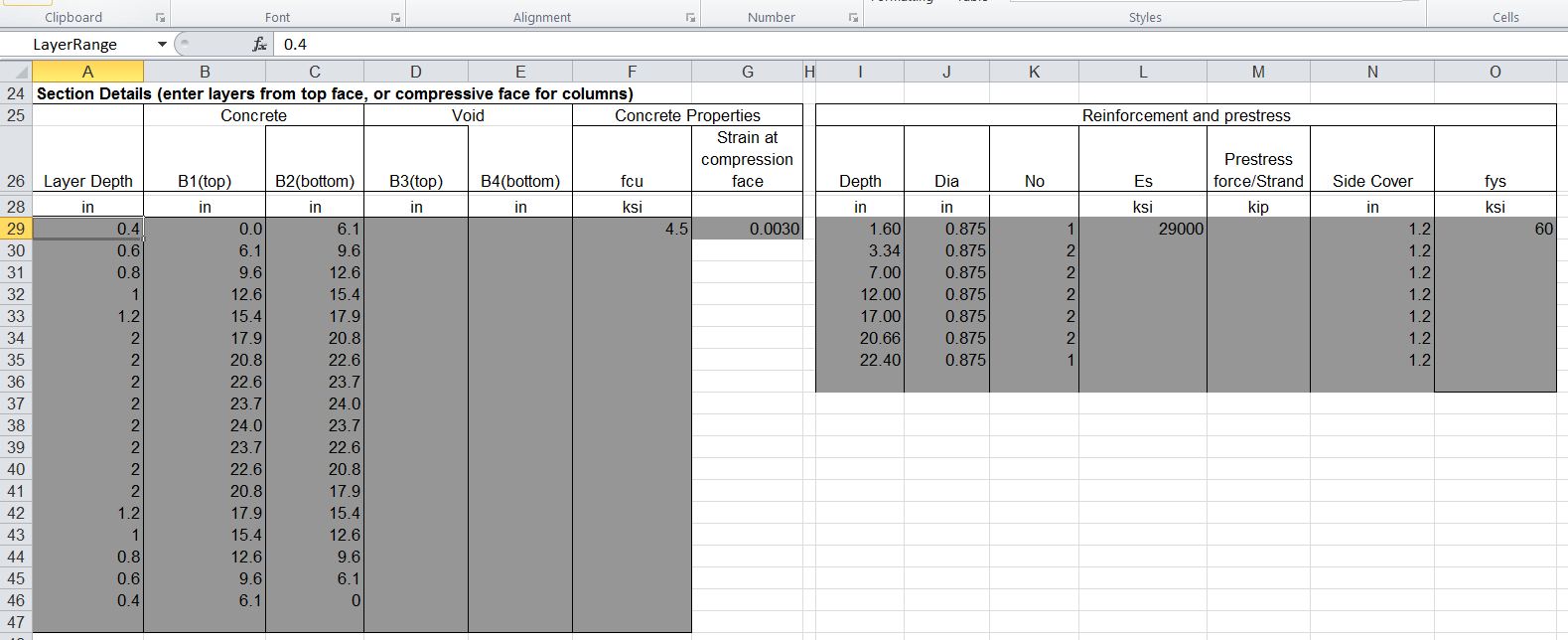
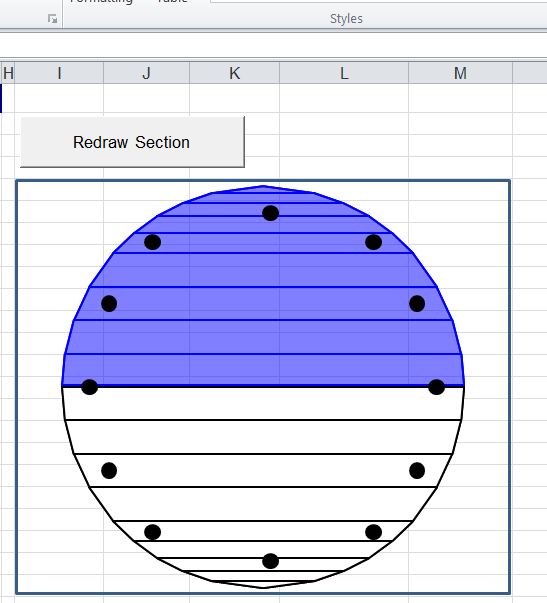
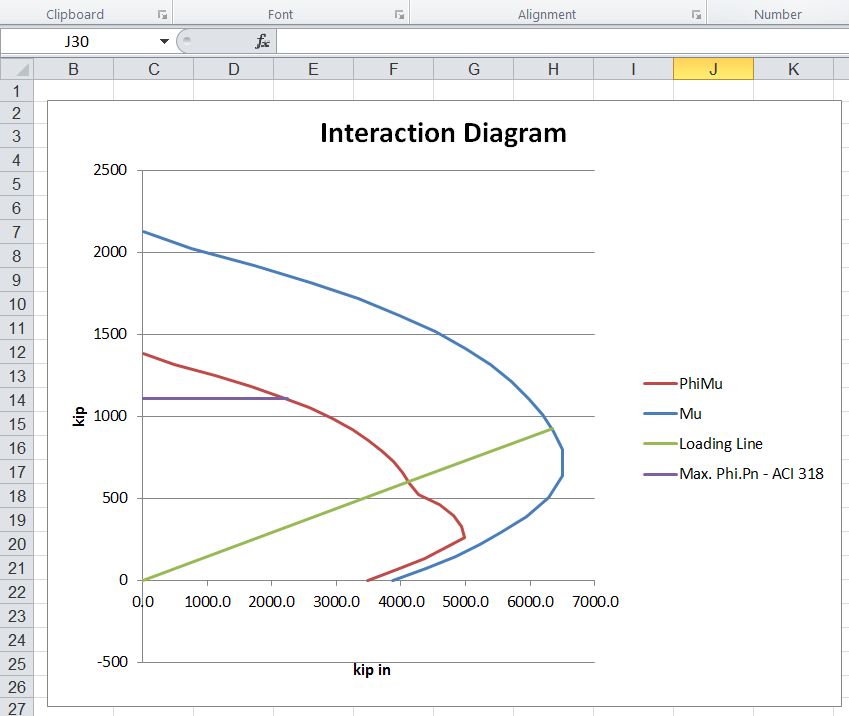
The screenshots below show the input for an analysis of a circular reinforced section in kip and inch units, to the ACI 318 code:
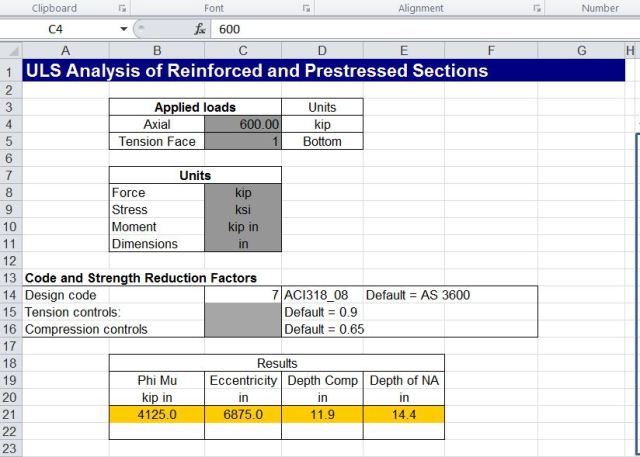
Input with kip and inch units to ACI 318
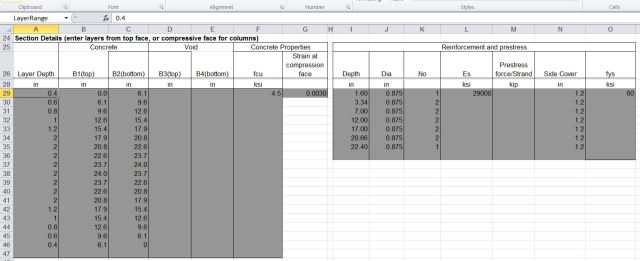
Concrete and reinforcement details in inch and kip units

Concrete section showing neutral axis position
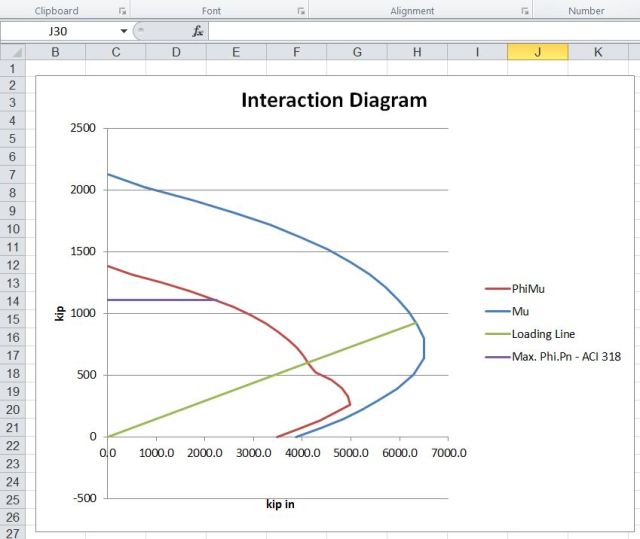
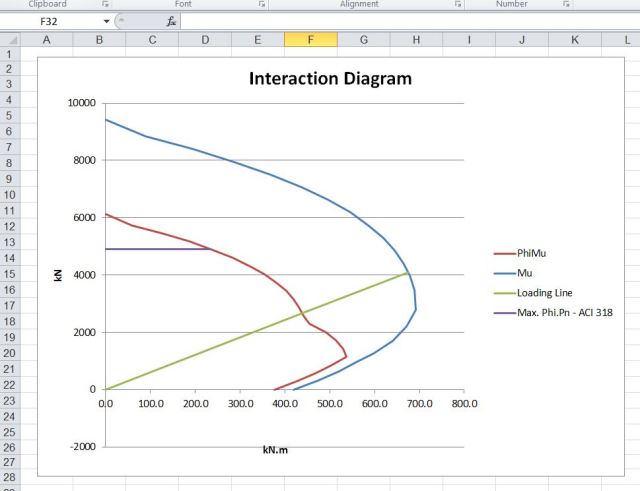
Interaction Diagram in kip-inch units

Input and output for the same section in kN, mm and MPa units is shown below:
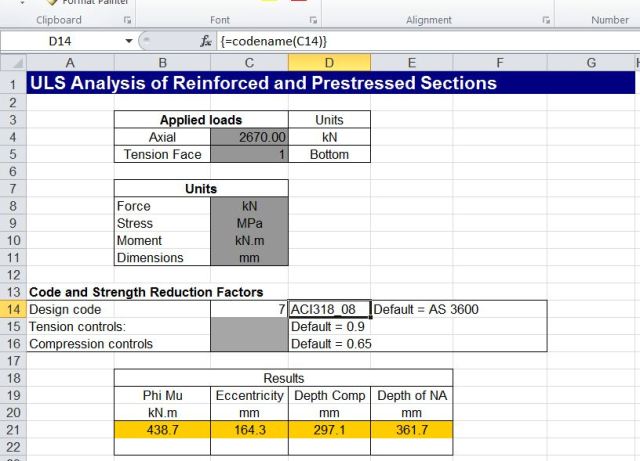
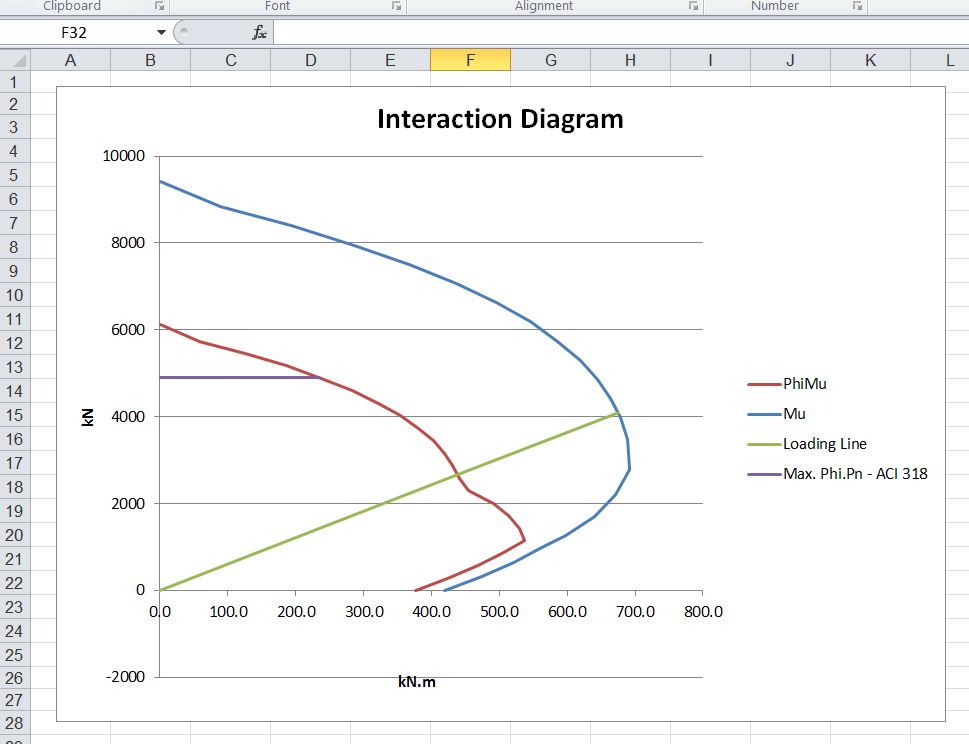
Input for mm, kN, Knm and MPa units
Extracts from the code to combine the unit conversion functions into the analysis code are shown below:

' Generate unit abbreviations for default units, or blanks to allow unspecified consistent units, or read units from spreadsheet
   If IsNumeric(UnitsA(1, 1)) = True Then
        If UnitsA(1, 1) = 0 Then
            ForceUnitA(1, 2) = "kN"
            StressUnitA(1, 2) = "MPa"
            MomUnitA(1, 2) = "kN.m"
            LunitA(1, 2) = "mm"
        Else
            ForceUnitA(1, 2) = ""
            StressUnitA(1, 2) = ""
            MomUnitA(1, 2) = ""
            LunitA(1, 2) = ""
        End If
    Else
        ForceUnitA(1, 2) = UnitsA(1, 1)
        StressUnitA(1, 2) = UnitsA(2, 1)
        MomUnitA(1, 2) = UnitsA(3, 1)
        LunitA(1, 2) = UnitsA(4, 1)
    End If
...


' Generate factors to convert input units to N, mm and MPa
    If UnitsA(1, 1) <> 1 Then
        If MomUnitA(1, 2) <> "N.mm" Then Momfact = ToSi2(MomUnitA, "N.mm")(1, 1) Else Momfact = 1
        If ForceUnitA(1, 2) <> "N" Then ForceFact = ToSi2(ForceUnitA, "N")(1, 1) Else ForceFact = 1
        If LunitA(1, 2) <> "mm" Then LFact = ToSi2(LunitA, "mm")(1, 1) Else LFact = 1
        If StressUnitA(1, 2) <> "MPa" Then StressFact = ToSi2(StressUnitA, "MPa")(1, 1) Else StressFact = 1

' Apply factors to concrete and reinforcement data
      For i = 1 To NumSects
            For j = 1 To 5
                Conc(i, j) = Conc(i, j) * LFact
            Next j
            Conc(i, 6) = Conc(i, 6) * StressFact
            Conc(i, 7) = Conc(i, 7)
        Next i

        For i = 1 To NumReo
            For j = 1 To 2
                Reo(i, j) = Reo(i, j) * LFact
            Next j
            Reo(i, 4) = Reo(i, 4) * StressFact
            Reo(i, 5) = Reo(i, 5) * ForceFact
            Reo(i, 6) = Reo(i, 6) * LFact
            Reo(i, 7) = Reo(i, 7) * StressFact
        Next i
    Else
        Momfact = 1
        ForceFact = 1
        LFact = 1
        StressFact = 1
    End If
...


   ' Factor results to return to input units
    Select Case Out_Index
    Case 1
        ReDim Umoma(1 To 3, 1 To 2)
        Umoma(1, 1) = XA(7, 1) * Phiax / ForceFact
        Umoma(2, 1) = XA(9, 1) * Phiax / ForceFact
        Umoma(3, 1) = XA(11, 1) * Phiax / ForceFact

        For i = 1 To 3
            Umoma(i, 2) = ForceUnitA(1, 2)
        Next i

    Case 2
        ReDim Umoma(1 To 3, 1 To 2)
        Umoma(1, 1) = XA(8, 1) * Phi / Momfact
        Umoma(2, 1) = XA(10, 1) * Phi / Momfact
        Umoma(3, 1) = XA(12, 1) * Phi / Momfact

        For i = 1 To 3
            Umoma(i, 2) = MomUnitA(1, 2)
        Next i
    ...
Posted in Beam Bending, Concrete, Excel, Newton, UDFs, VBA | Tagged , , , , , | 10 Comments

Units for Excel 4: Scripting dictionaries

As mentioned in the previous post I have now updated the Units4Excel spreadsheet with the use of scripting dictionaries to speed up the process of finding units in the lists, and also to simplify the process of adding or deleting units.  The revised spreadsheet may be downloaded from Units4Excel including full open source code.

The use of scripting dictionaries has been described previously at Working with FEM data and using the dictionary object:

  • Each entry in the dictionary has a string “key” and an associated “item” which may be any data type. In this application the item is used to store the index number of each unit in the unit lists.
  • The “Exists” method is used to determine if a unit is included in the dictionary object, and if so its position in the table.

Generation of the dictionary for the Non-SI units list is shown below:

...
NumNonSI = UBound(NonSIUnits)
  Set NonSIDict = New Scripting.Dictionary
  For i = 1 To NumNonSI
  NonSIAbbr = NonSIUnits(i, 2)
  If NonSIDict.Exists(Key:=NonSIAbbr) = False Then NonSIDict.Add NonSIAbbr, i
  Next i
...

And the dictionary is used to return the index number for the specified unit, then read the required details from the NonSIUnits array, as shown below:

...
 ' If the NonSIUnits array is empty, run the ReadUnits function
  On Error GoTo UnitErr
  NumRows = UBound(NonSIUnits)
  If NumRows = 0 Then GoTo UnitErr
  On Error GoTo RtnError

  If NonSIDict.Exists(UnitName) Then
  i = NonSIDict.Item(UnitName)
        For j = 1 To 5
  UnitA(1, j) = NonSIUnits(i, j)
        Next j
    Else

  UnitA(1, 1) = "Unit Not listed"
    End If
  NonSI = UnitA

Having implemented the dictionaries, the row numbers previously generated on the spreadsheet to locate each unit category in the Non-SI Units list have become redundant and have been deleted, removing a possible source of error.

In the next post I will describe how the units UDFs can be incorporated in other functions to give them the ability to work with any of the units listed; using the concrete beam design spreadsheet as an example (see Reinforced Concrete Section Analysis – 6; Ultimate Limit State).

Posted in Excel, Newton, UDFs, VBA | Tagged , , , , , , | 6 Comments