Spreadsheet Link – Abbott Aerospace Consultants

Abbott Aerospace has a wide range of spreadsheets available for free download.

Many are intended for specific aerospace design applications, but some are for general purpose engineering applications, such as calculation of section properties.

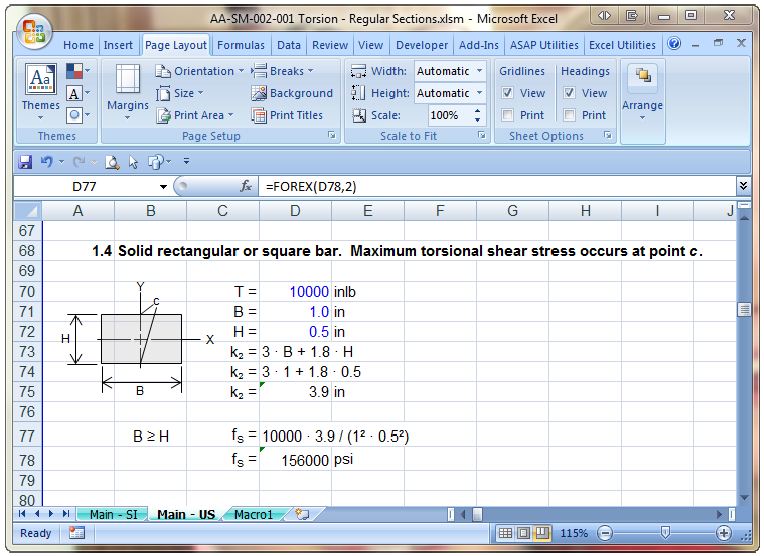
A general purpose add-in of particular interest is AA-SM-99-001 Equations.xlam, a macro for display of equations for report writing in Excel 2007.  This add-in provides two User Defined Functions (UDFs) which allow Excel equations to be displayed as text strings with cell references replaced by either numerical values or variable names.  See below for simple examples:

Forvar Function

Forex Function

Posted in Excel, Newton, UDFs, VBA | Tagged , , , , | 1 Comment

Composite Beam Spreadsheet – 2

The previous post on this topic presented a spreadsheet performing elastic analysis of composite reinforced or prestressed composite beams, available for download from: Composite Design Functions-GS.zip.  This post will look in more detail at how the spreadsheet works, and a preview of changes that will be presented in future versions.

The basis of the spreadsheet is the CompForceMom User Defined Function (UDF):

 =CompForceMom(DNACurveA, Conc, Reo)

The three inputs for this function are:

  • DNACurveA, a 2×2 range containing the calculated neutral axis depth and curvature of the Stage 1 beam under self weight and weight of the wet in-situ concrete for Stage 2 in column 1, and the estimated neutral axis depth and curvature of the composite beam under the incremental Stage 2 loading (i.e. live load plus any additional dead load applied to the composite beam after curing of the second stage concrete).
  • Conc – a six column range with details of the composite section concrete, listed from top to bottom
  • Reo – a six column range with details of the composite section reinforcement, listed from top to bottom, with the reinforcement depth of the Stage 1 beam measured from the top of the beam.

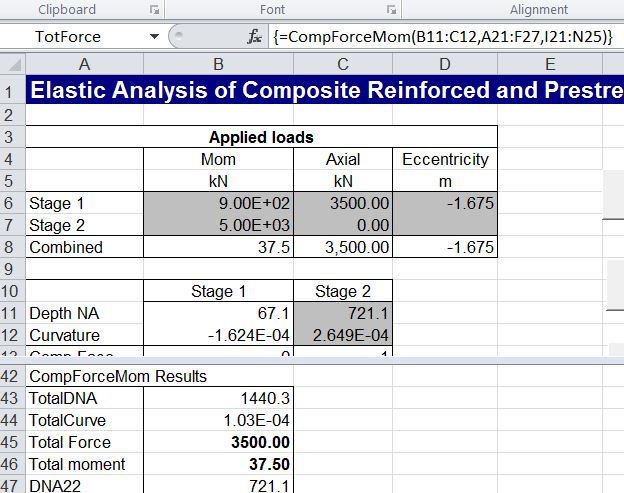
DNACurve input (B11:C12); Stage 1 values are calculated, Stage 2 are use input

Concrete data range (A21:F27); top row is Stage 2 (in-situ) concrete

Reinforcement input range (I21:N25); Top 2 rows are for Stage 2 concrete

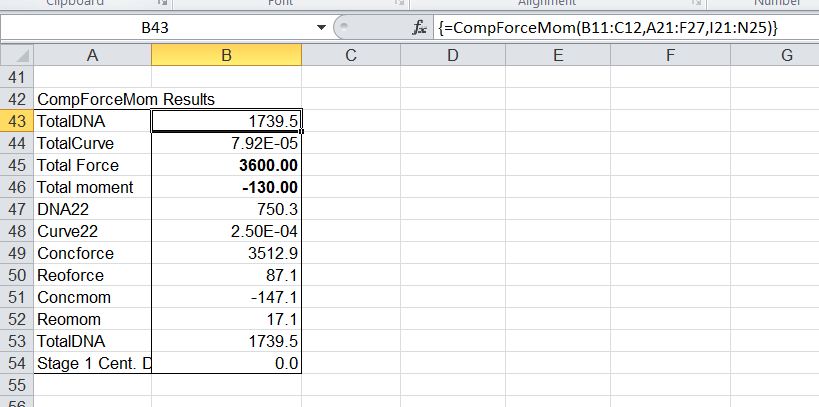
CompForceMom Function Results

Note that:

  1. The Stage 2 concrete (shaded light grey) must be a single rectangular layer with one or two layers of reinforcement.
  2. The Stage 1 concrete (shaded darker grey) may have any number of trapezoidal layers, specified as a continuous layer or with a central trapezoidal void.
  3. The elastic modulus for the Stage 2 concrete (Ec) and reinforcement (Es) must be specified in the top row.  All other layers may be specified, or will be taken as equal to the row above.

Based on the specified neutral axis positions and section curvatures the CompForceMom function calculates the strains and stresses in each layer of concrete and steel (assuming concrete takes no tension), and hence the total axial force and bending moment for both Stage 1 and Stage 2 (composite section).

The Stage 1 neutral axis depth and curvature are calculated by the spreadsheet (using the Elastic UDF), but in general the Stage 2 values (input by the user) will not result in load values matching the specified combined loads on the section:

Calculated Force and Moment (B45, B46) do not match the specified values (B8, C8)

Note that the “combined moment” is the sum of the Stage 1 and Stage 2 applied moments, plus the moment due to the axial load about the the top face of the Stage 1 beam.

The Stage 2 neutral axis depth and curvature may now be adjusted by clicking the “Find NA and Curvature” button, which calls the SeekDNA routine.  SeekDNA simply calls the Excel GoalSeek function to adjust first the Neutral Axis depth to match the input and calculated axial loads, then the curvature to match the input and calculated bending moments.  This is repeated until both axial load and bending moment match within the specified tolerance.

After iterative solution of NA Depth and Curvature; calculated force and moments match input values

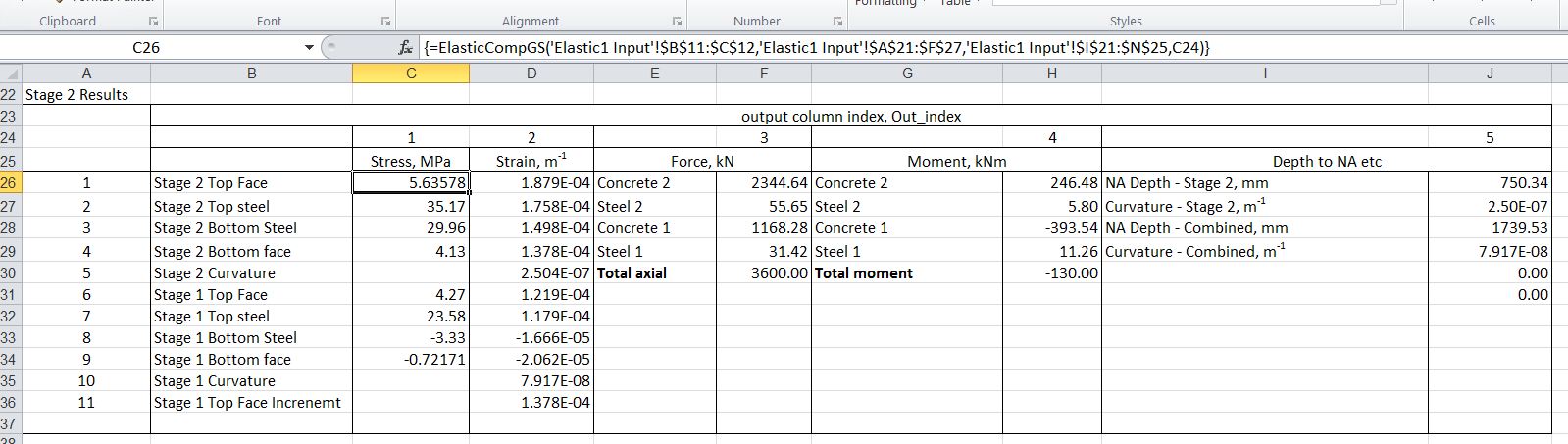
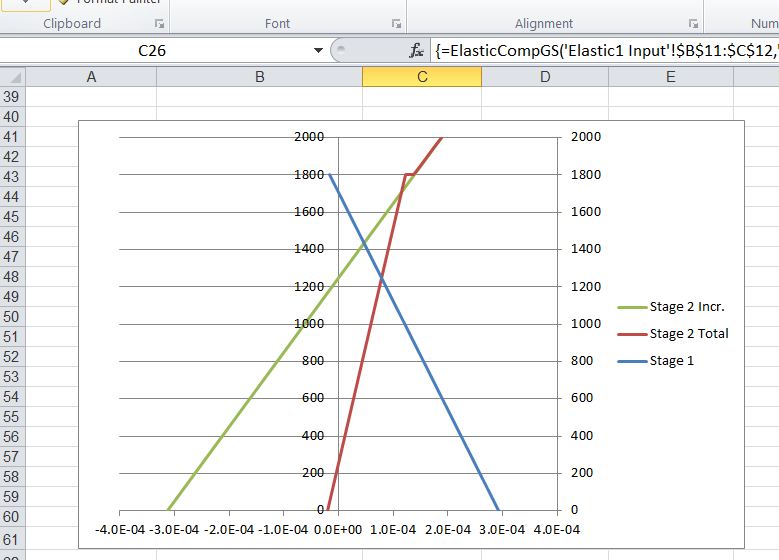
Having found the final neutral axis depth and curvature the “ElasticCompGS” UDF is used to return details of stresses, strains, forces and moments on the section:

Display results using ElasticCompGS

Proposed future developments of this spreadsheet are:

  • Replace the Goalseek routine with the QuadBrent UDF, allowing the entire analysis to be encapsulated in a single UDF, for better performance and flexibility.
  • Allow specified tension stresses in the concrete.
  • Allow for specified differential strains between Stage 1 and Stage 2 concrete, and within each beam.
  • Allow non-rectangular Stage 2 concrete slabs.

Any other requests?  Please post a comment!

Posted in Beam Bending, Concrete, Excel, Newton, UDFs, VBA | Tagged , , , , , , | 4 Comments

Girl

GIRL is the first single off March of the Real Fly’s highly anticipated first studio EP.

Directed by Kerinne Jenkins
Shot and Graded by Emma Paine
Edited by Keri and Marnie
Produced by Marnie Vaughn
2nd Camera – Marnie Vaughn
Camera Assistant – Nicky Bartos

Posted in Bach, Films | Tagged , | Leave a comment

Modifying spreadsheet data with VBA – the quick way

A question recently came up (here) asking how to speed up the process of scanning a large range of data on one sheet, and wherever a cell had a value of zero, deleting the data in the same cell address on another sheet.  A macro selecting cells one at a time was taking up to 7 minutes for this task in Excel 2007.

The secret to completing tasks of this type as quickly as possible is to transfer all the data into VBA arrays in as few operations as possible (two in this case), modify the array from the second sheet enirely in VBA, then write the modified array back to the worksheet in one operation.  In this case a 7 minute task was reduced to less than half a second, about 1000 times faster!

The “quick and dirty” code that did the job is shown below:

Sub DeleteZeros()
Dim Sheet1Vals As Variant, Sheet2Vals As Variant, i As Long, j As Long

Sheet1Vals = Sheets("Sheet1").Range("A2:UN901").Value2
Sheet2Vals = Sheets("Sheet2").Range("A2:UN901").Value2

For i = 1 To 900
For j = 1 To 560
If Sheet1Vals(i, j) = 0 Then Sheet2Vals(i, j) = ""
Next j
Next i

Sheets("Sheet2").Range("A2:UN901") = Sheet2Vals

End Sub

Note that using the “.Value2” property of the ranges, rather than “.Value”, speeds up the operation by about 50%. Not really important in this case, but in other situations it can be.

Posted in Arrays, Excel, VBA | Tagged , , , | 1 Comment

Composite Beam Spreadsheet

As promised in the previous post, a spreadsheet for designing reinforced or prestressed concrete composite beams has now been uploaded to my web site.  It can be downloaded from: Composite Design Functions-GS.zip .  As usual, the spreadsheet includes full open-source code.

In this first version of the spreadsheet the Excel Goal Seek function is used to find the neutral axis depth and curvature of the section under the second stage (composite) loading.  A later version will use the QuadBrent Function to perform this task, which will provide much better performance, and will allow the entire procedure to be encapsulated in a User Defined Function (UDF).

The procedure for using the current version is:

  • Enter load details for both stages of loading, and section details
  • The spreadsheet will calculate the Neutral Axis depth and curvature for the first stage (non-composite), but estimated values must be entered by hand for these values in the composite section.
  • Click the “Find NA and Curvature” button: the spreadsheet will use Goal Seek to find the values that provide equilibrium for the specified loading and cross section.
  • If Goal Seek fails to find a solution try different starting values for the Neautral Axis depth and section curvature.
  • Concrete and reinforcement strains, stresses, forces, and bending moments are then reported on the next sheet, for both Stage 1 and Stage 2 loading, using two UDFs.

Screen-shots showing the analysis of a precast pretensioned bridge girder with in-situ top slab are shown below.  More details of the usage of the program, and the VBA coding will be provided in later posts.

Note that this is a beta release and the spreadsheet has had only limited testing.  As always, if results are to be used for other than evaluation purposes it is essential that they are verified using an independent analysis.

Input Concrete and Reinforcement details from top to bottom (Stage 2 section in lighter grey)

Click the "Find NA and Curvature" button to find the Neutral Axis and Curvature that will provide equilibrium under composite loading.

The Stage 1 and Composite sections may be plotted, showing the Neutral Axis positions

Typical output showing Stage 2 (composite) results

Strain diagrams for Stage 1, increment under Stage 2, and combined Stage 1 + 2 strains

Posted in Beam Bending, Concrete, Excel, Newton, UDFs, VBA | Tagged , , , , , , | 3 Comments