Composite Beam Spreadsheet

As promised in the previous post, a spreadsheet for designing reinforced or prestressed concrete composite beams has now been uploaded to my web site.  It can be downloaded from: Composite Design Functions-GS.zip .  As usual, the spreadsheet includes full open-source code.

In this first version of the spreadsheet the Excel Goal Seek function is used to find the neutral axis depth and curvature of the section under the second stage (composite) loading.  A later version will use the QuadBrent Function to perform this task, which will provide much better performance, and will allow the entire procedure to be encapsulated in a User Defined Function (UDF).

The procedure for using the current version is:

  • Enter load details for both stages of loading, and section details
  • The spreadsheet will calculate the Neutral Axis depth and curvature for the first stage (non-composite), but estimated values must be entered by hand for these values in the composite section.
  • Click the “Find NA and Curvature” button: the spreadsheet will use Goal Seek to find the values that provide equilibrium for the specified loading and cross section.
  • If Goal Seek fails to find a solution try different starting values for the Neautral Axis depth and section curvature.
  • Concrete and reinforcement strains, stresses, forces, and bending moments are then reported on the next sheet, for both Stage 1 and Stage 2 loading, using two UDFs.

Screen-shots showing the analysis of a precast pretensioned bridge girder with in-situ top slab are shown below.  More details of the usage of the program, and the VBA coding will be provided in later posts.

Note that this is a beta release and the spreadsheet has had only limited testing.  As always, if results are to be used for other than evaluation purposes it is essential that they are verified using an independent analysis.

Input Concrete and Reinforcement details from top to bottom (Stage 2 section in lighter grey)
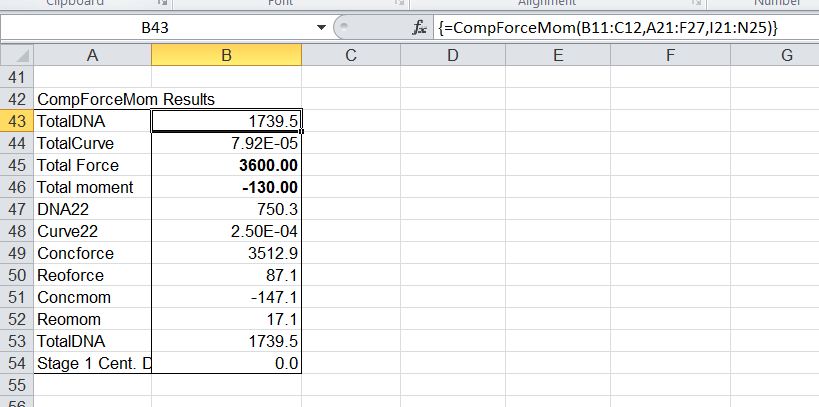
Click the "Find NA and Curvature" button to find the Neutral Axis and Curvature that will provide equilibrium under composite loading.

The Stage 1 and Composite sections may be plotted, showing the Neutral Axis positions
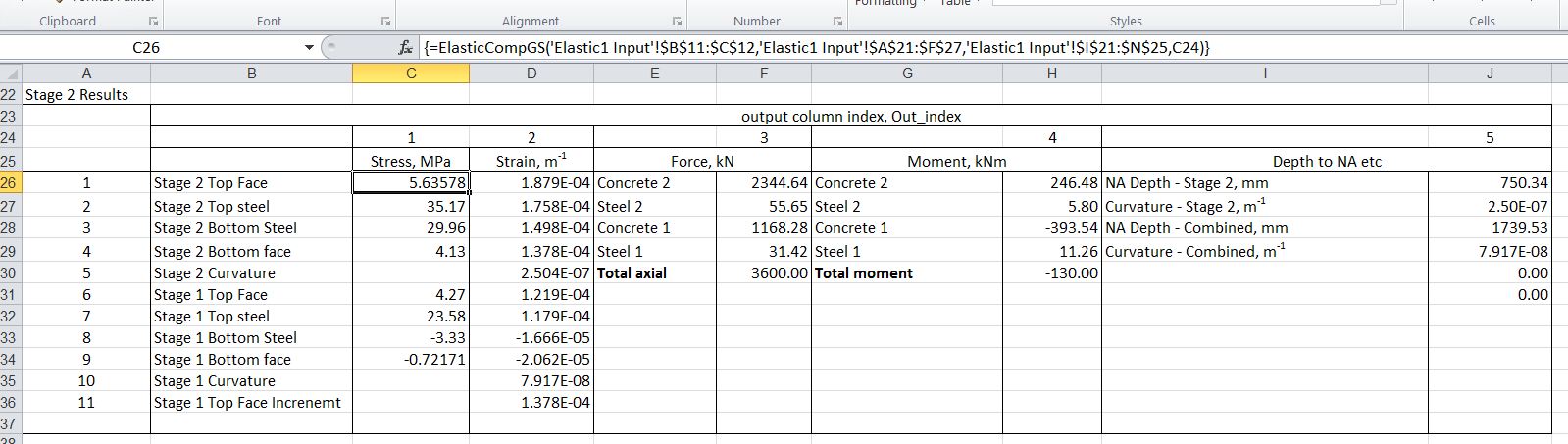
Typical output showing Stage 2 (composite) results
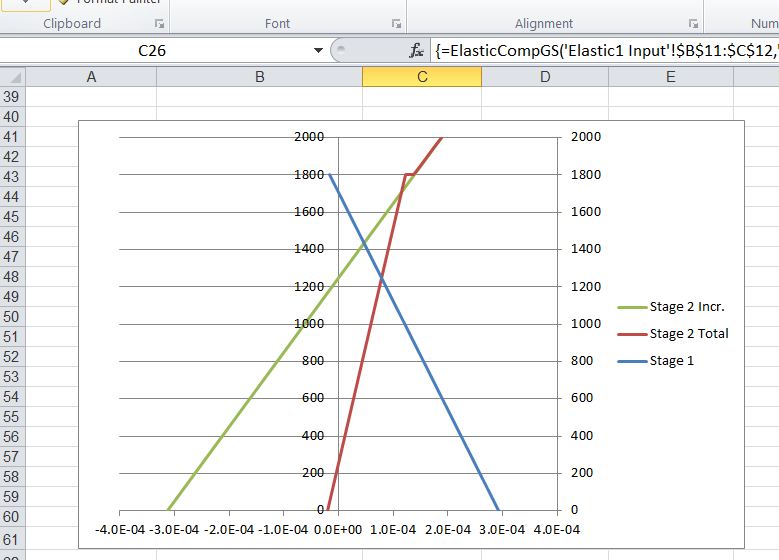
Strain diagrams for Stage 1, increment under Stage 2, and combined Stage 1 + 2 strains
Posted in Beam Bending, Concrete, Excel, Newton, UDFs, VBA | Tagged , , , , , , | 3 Comments

Composite Concrete Beam Analysis

Composite concrete beams are widely used in both building and bridge structures; typically precast pretensioned beams are combined with an in-situ reinforced concrete slab to provide structures that are both efficient in use of materials and fast and easy to construct.

If pre-stressed beams are used for the first stage, and if the section remains uncracked under all stages of loading, then analysis is straightforward since each stage may be analysed separately and linearly combined.  On the other hand if the section is cracked at any stage the bending behaviour becomes non-linear, and the closed form solutions presented previously in the Beam Design Functions spreadsheet, are no longer applicable.

In this post I will describe an iterative procedure for this analysis, and in the following post I will cover a spreadsheet to carry out the analysis using a VBA User Defined Function (UDF).

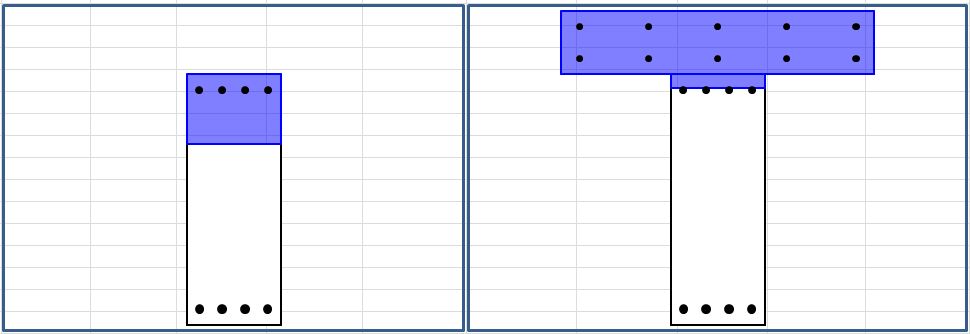
The section below shows a simple reinforced concrete composite beam consisting of a first stage rectangular section of 800 deep x 300 wide, with a second stage slab of 200 deep x 1000 wide.

Stage 1 and Composite Section

Analysis of the first stage is straightforward, allowing for the self weight of the beam, the weight of the in-situ top slab wet concrete, plus any permanent formwork and any other loads applied at the time of  pouring the second stage concrete.  This can be done with the Beam Design Functions spreadsheet (link above), or for a rectangular section the RC Design Functions spreadsheet can be used.

The graph below shows the strain distribution at each stage:

  • Self-weight plus wet in-situ concrete load on Stage 1 (blue line).
  • The incremental strain due to the additional Stage 2 load on the composite section (green line).
  • The combined strain due to the total load (red line)

Strain Distribution

The procedure used to generate these strain diagrams was:

  1. Find the Neutral Axis depth and section curvature (top face strain/depth of NA) using one of the closed form solutions linked above.
  2. For a first estimate of the strain increment due to the Stage 2 loads on the composite section apply the incremental load to the composite section using one of the closed form solutions.  Note that this will not give the correct final result unless the section is uncracked at both stages of loading.
  3. Adjust the Neutral Axis depth and section curvature for the Stage 2 loading so that the total stress distribution in the composite section is in equilibrium with the total applied loading.

The next post will provide an Excel UDF that will perform this analysis for a Stage 1 beam of any cross section, with or without prestress, and for any combination of applied moment and axial load.

Posted in Concrete, Newton | Tagged , , | 4 Comments

Altan – Blackwaterside, and more from Anne Briggs

Another version of Blackwaterside from Irish Group Altan followed by two Anne Briggs songs accompanied by very nice home made videos.

Official video for the song, Blackwaterside, from the album ‘Blackwater’ (1996)

Photos taken around Shanklin on the Isle of Wight Music by Anne Briggs

The Snow it Melts the Soonest by Anne Briggs


And I’ve just found this version by Sting:

Posted in Bach | Tagged , , | Leave a comment

Geometry for Joiners

A question came up on the ABC Self-Service-Science Forum, asking for a solution to find the dimensions of a diagonal brace looking like the diagram below:

The solution is not as simple as it might look because the angle of the brace is not equal to the angle of the diagonal. The solution I came up with is shown below:

The length of the diagonal of the brace is equal to the diagonal of the opening it fits in. The side length of the brace, before cutting is then found by pythagoras:

(Diagonal^2 – Brace Width^2)^0.5

The end of the brace is then at the intersection of a circle centred at the bottom left corner, with radius equal to the brace length, and a circle centred at the top right corner, with radius equal to the brace width (green lines in the diagram).  I already had a User-Defined Function (UDF) to find the intersection point  of two circles, so it was a simple matter to copy the code into a new spreadsheet, and set up the required input and length calculations.

Having found the coordinates of this point the position of the skew cuts can be found by simple proportion.

The spreadsheet (including open source code) can be downloaded from FrameBrace.xlsb, and the UDF to find the circles intersection point (along with many other geometrical and interpolation functions) can be downloaded from IP2.Zip

Posted in Coordinate Geometry, Excel, Newton, UDFs, VBA | Tagged , , , , , , | 1 Comment

Another Post About Everything

We had a post about everything from xkcd before, but this one is a bit more sophisticated.  You can zoom in from this:

The Universe

down to this:

A tiny little bit of the Universe

and everything in between, at HTwins.net (if you get an ad for a game, click on the skip-ad button).

Posted in Newton | Tagged , | Leave a comment