A great song with an excellent video from Sydney based band The Former Love (formerly The former Love Pirates):
(Click on Vimeo to visit site, or click play, then full screen button:
Family Tree by The Former Love from Kerinne Jenkins on Vimeo.

A great song with an excellent video from Sydney based band The Former Love (formerly The former Love Pirates):
(Click on Vimeo to visit site, or click play, then full screen button:
Family Tree by The Former Love from Kerinne Jenkins on Vimeo.
Some of the issues raised in this post:
https://newtonexcelbach.wordpress.com/2011/12/20/when-does-35-not-equal-35/
arose when writing the functions for the previous post on combining arrays. In particular, when values from the two arrays are “equal” the function should create one entry in the combined array, not two, and I wanted the user to have some control over the tolerance that would be regarded as equal.
The result was three new User Defined Functions (UDFs), EqualT(), LTEqualT(), and GTEqualT(). The input and criteria for the new functions are shown in the screenshot below:

Floating Point comparison UDFs, click for full size view
The basis of the function is to find the value abs(a/b -1), where b is the lesser of the two values, and a is the greater. Is this value is less than the specified tolerance then the two values are treted as being equal. If the tolerance is not specified it defaults to 1E-14.
The use of a relative tolerance raises a problem if both numbers are very close to the minimum values allowed by the floating point number system. For this reason the numbers are treated as being equal if the absolute value of the difference is less than a constant, MinReal, currently set to 1E-300. The code for the EqualT function is shown below, anad all code is available in the download file: https://www.interactiveds.com.au/software/CombineArray.zip
Private Const MinReal As Double = 1E-300 Private Const DefaultTol As Double = 0.00000000000001 Function EqualT(Value1 As Variant, Value2 As Variant, Optional Tol As Double = DefaultTol) As Boolean ' Test if Value1 is equal to Value2 within Tol If Abs(Value1 - Value2) EqualT = True Exit Function End If If DiffRatio(Value1, Value2) < Tol Then EqualT = True Else EqualT = False End If End Function Function DiffRatio(Value1 As Variant, Value2 As Variant) As Double Dim BVal As Double, TVal As Double If Abs(Value1) > Abs(Value2) Then BVal = Value1 TVal = Value2 Else BVal = Value2 TVal = Value1 End If DiffRatio = Abs((TVal / BVal) - 1) End FunctionFinally, in a comment on the previous post Lori Miller provided an on-sheet solution that will combine multi-column arrays in the same way as the UDF, other than that the precision of the comparison is fixed. The formulas are included in the spreadsheet, and the output is shown, compared with the CombineArray function in the screenshot below:
CombineArray UDF and on-sheet functions
Note that the on sheet formulas return values a 5 from the first array, and just over 5 from the second, whereas for the UDF results the tolerance has been set high enough for these two values to be treated as equal.
Two of my daughter’s short films are now available on the Web:
Precious
In a dystopian future, two men meet in an underground tunnel for an exchange of stolen goods.
Liam lives in the stacks, making small black market deals and dreaming of getting out of the city walls. The natural world is a distant memory for those who live in the slums of the city and the passes out are restricted to those with money. Conrad is young, rich and brash and thinks he can buy anything he wants. To him the world is there for his taking and those who aren’t as well off as him are just lazy.
Conrad has promised Liam a way out of the city and a better status in life, middle class status. The upgrade will give him a clean room, a small pension and a cremation service. For this and the transport pass Liam manages to steal an item for Conrad that he has been coveting.
The exchange seems set to give both parties what they want until Liam realises that Conrad has only come through on part of his deal. Ignoring Liam’s desperation and actual needs leads to a heated situation and neither party will leave with what they came for.
Culling is at the AFTRS site. You need to register (click on the AFTRS link to the left, then on the Register Now link at the AFTRS site), but this is free and gives you access to over 30 films.
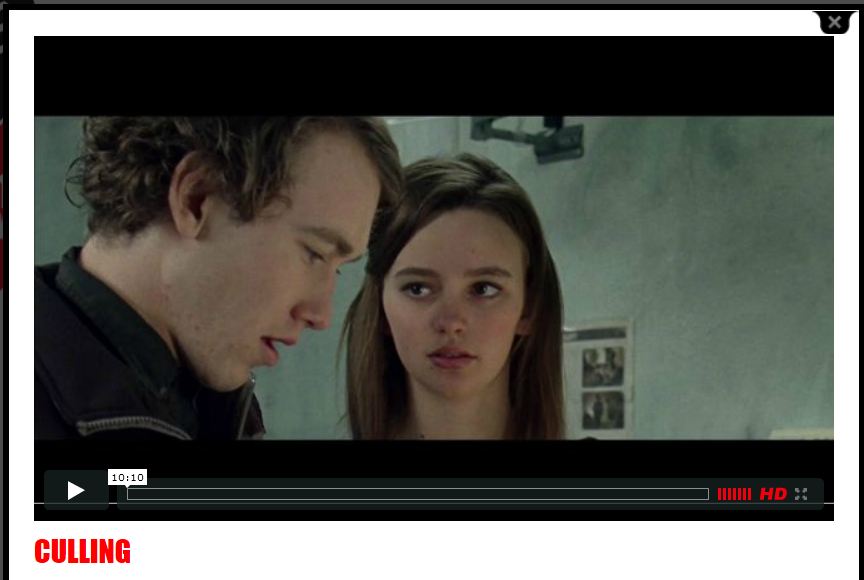
Culling
Culling
*This film can only be viewed within Australia
In an irradiated subterranean future where the unproductive are marked for death, a young man faces a terrifying choice between his duty to his father and his feelings for the girl he is supposed to terminate.
Part of the Macaulay spreasheet presented in recent posts required the formation of a list of points along a beam where the functions needed to be evaluated. These are: The support points, the changes of cross section, and the output points specified by the user. These points are in three separate arrays which must be combined into one, maintaining the correct order from left to right, and without duplication of any point.
I have now converted the function that performs the combination so that it can also be used as a User Defined Function (UDF) in a worksheet. The result (including full open source code) may be downloaded from: http://www.interactiveds.com.au/software/CombineArray.xls
The function works with single column or multiple column arrays, exmples of which are shown in the screenshots below:

CombineArray documetation and input ranges

Output for single and twin column arrays
Note that CombineArray works as an array function, and must be entered with the correct procedure:
The Macaulay Spreadsheet has now been modified to optionally include shear deflections, as well as a new option to output support reactions, and fixes to minor bugs.
The revised spreadsheet (including full open source code) can be downloaded from:
The screenshots below show an example (included in the download file) of a three span beam with spring supports and shear deflections included, compared with output from the Strand7 FEA program. It can be seen that there is near exact agreement for both beam actions and deflections.
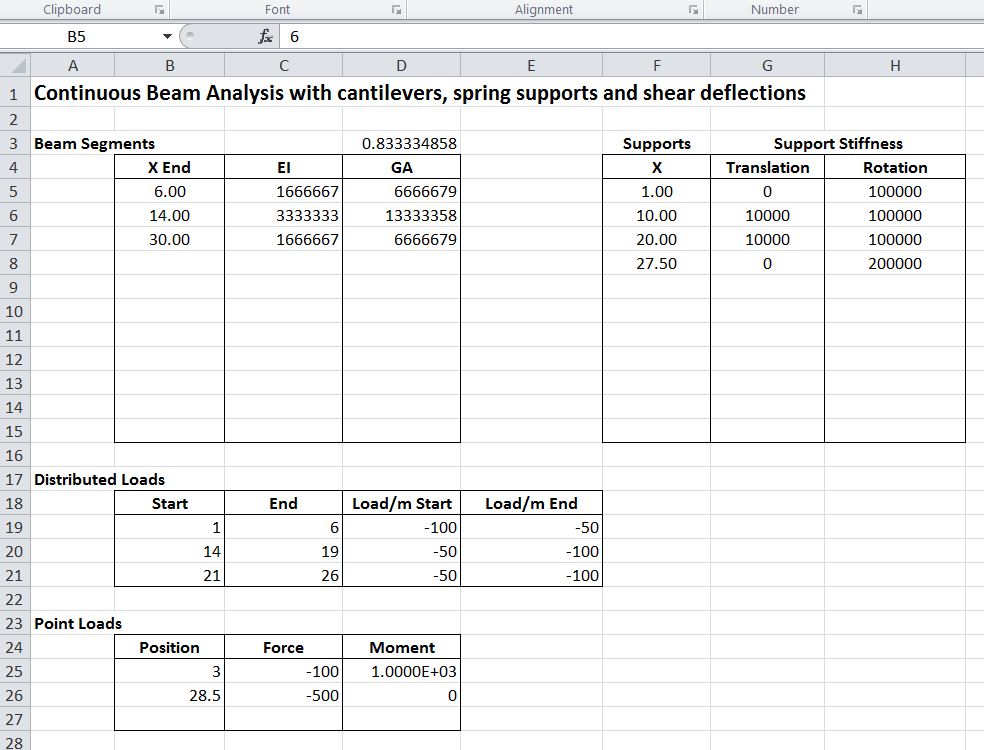
Conbeam function input, including shear stiffness
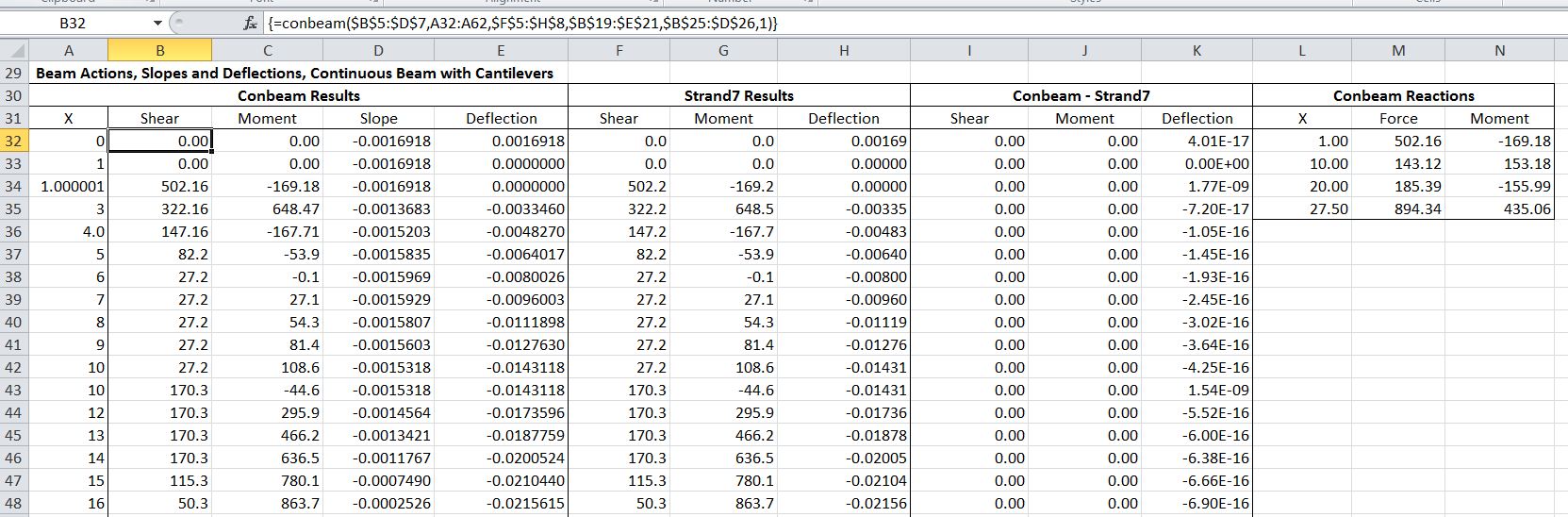
Part of Conbeam function output, compared with Strand7 (click for full size view)

Graphical output comparing ConBeam and Strand7 results


 Newton Excel Bach, not (just) an Excel Blog