Faster Ferns

I have modified the fern input parameters in the spreadsheet presented in the previous post to match the layout used by Barnsley and others, so that examples such as those given at the Wikipedia article can be entered directly.  The new file can be downloaded from: Fern chart-Barnsley.zip :

Modified Fern Parameter Input

In doing so I also tidied up the VBA matrix multiplication algorithm, and compared it with using the worksheetfunction.MMULT function.  The example above is for calculating and plotting 1 million rows, using Excel 2010.  It can be seen that:

  • The VBA function is about 7 times faster than using the built-in function.
  • Transferring the data from VBA to the spreadsheet takes about 50% longer than it does to generate the data.
  • Plotting the data remains very slow, taking nearly 90% of the total time. (time for plotting the 1 million point chart was about 10 seconds the first time, and about 20 seconds thereafter.  It seems likely there is scope for considerable improvements here in future releases).

Edit 4th Oct 10: I meant to mention that the times recorded here were done on a Dell laptop computer with an Intel P8700 processor (2.53 GHz) and 4 MB RAM, and with a finite element analysis program running in the background, using the full resources of one core virtually all the time.  Re-running without any hungry background processes made virtually no difference to the VBA running time (as would be expected since VBA only uses one core), but also made very little difference to the times for the calculation using the MMULT function, or for the re-plotting time.  That is surprising since Microsoft say they put a lot of effort into improving the performance of Excel 2010 (compared with 2007).  It looks to me like there is plenty of scope for further improvement here.

Times for plotting 40,000 rows are shown below:
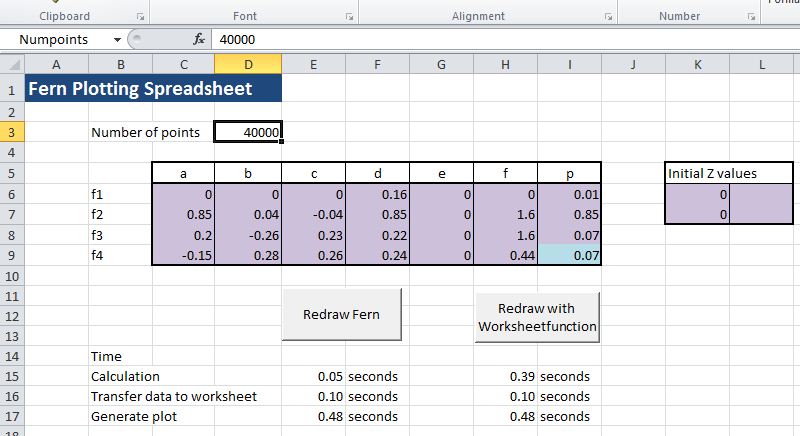
Plot times for 40,000 rows

The Wikipedia article links to more examples at: http://www.home.aone.net.au/~byzantium/ferns/fractal.html .  Some of the different fern varieties reported in that paper have been plotted in the spreadsheet:

Parameters for four different fern types

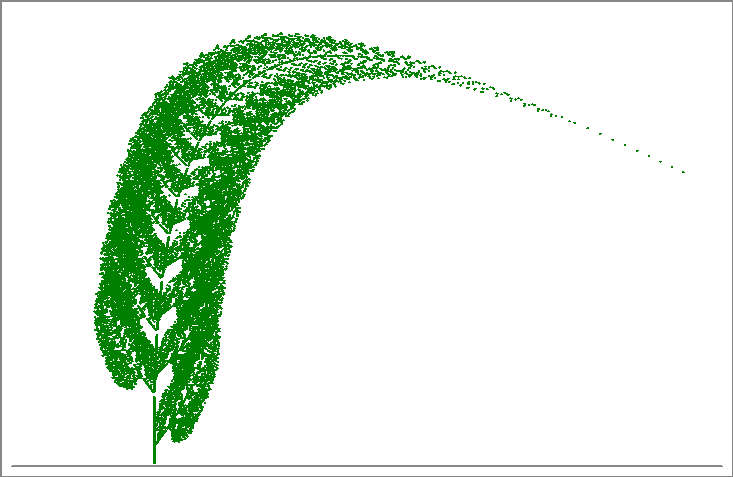
Modified Barnsley Fern

Culcita Dubia
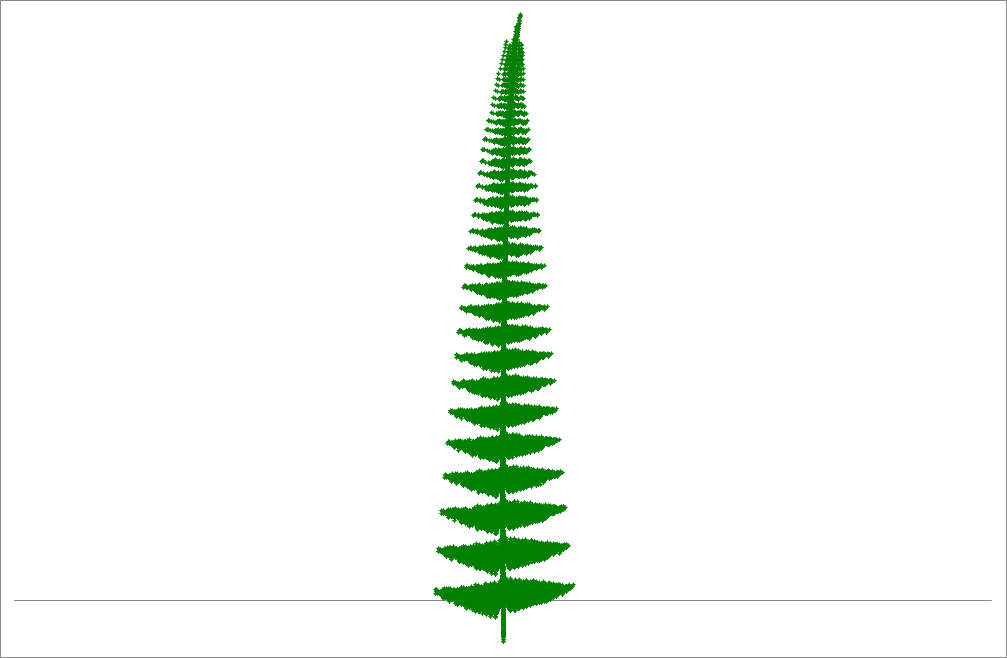
"Fishbone" Fern
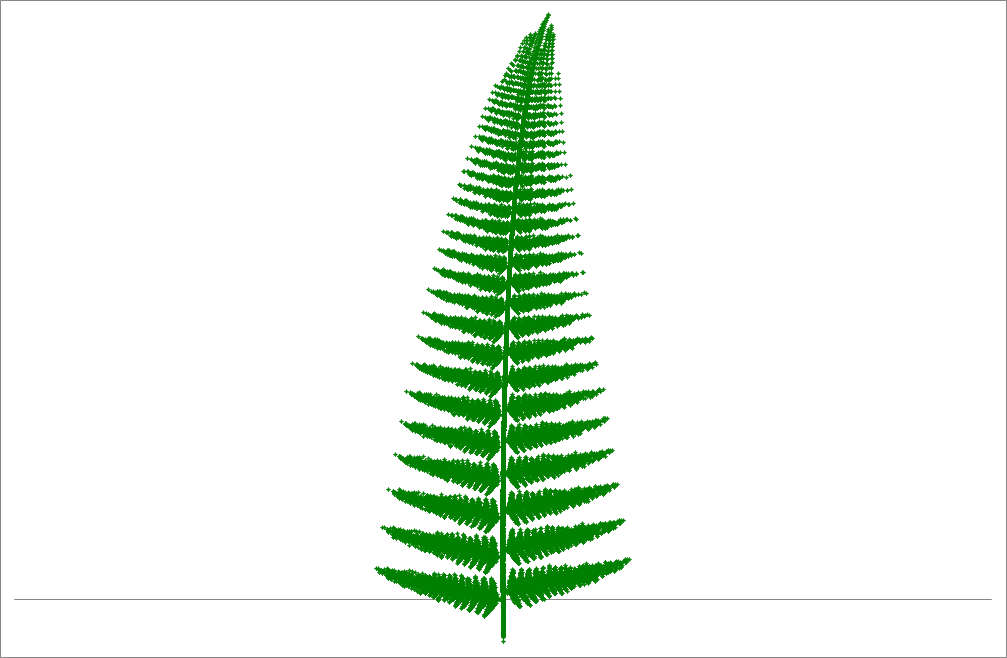
Cyclosorus Fern

Posted in Arrays, Charts, Charts, Drawing, Excel, Maths, Newton, VBA | Tagged , , , | 4 Comments

Plotting Ferns

Over at Daily-Dose-of-Excel mrt has posted an interesting VBA version of a Matlab program that used an Iterated Transfer Function to plot a graph resembling a fern.  The original Matlab code came from Dr Tom Wood, and Michael’s VBA version works just fine, but I took the liberty of making a few changes to suit my own tastes: 

  • Michael’s code was pre-set to generate 32,000 points, which is the chart limit in pre-2007 versions of Excel.  I have changed this to an input from the spreadsheet, and in Excel 2010 it will happily plot over 1 million points.
  • The fern shape is governed by a four 2×2 matrices which were hard coded.  I also changed these to be read from the spreadsheet, so that it was easy to experiment with different parameters.
  • I added a check to see if the chart sheet existed, and if so to re-use it.
  • The algorithm involves a large number of matrix multiplications.  These are handled in the original code by using the Application.Worksheetfunction method.  This tends to be slower than keeping the code in VBA (especially in Excel 2007), so I added a short sub to handle the matrix multiplication.
  • Finally I wanted to check if there was a significant speed difference between operating entirely with Variant arrays or by copying the variant data input from the spreadsheet into double arrays, so I set up two different versions of the code and added to buttons to the spreadsheet, with calculation time reported underneath (actual time is considerably longer, because generating the chart takes over half the time).

The resulting spreadsheet, including full open source code, can be downloaded from Fern Chart.zip.  Note that I have changed the number of points to 1000 to keep the file size down.  Around 30,000 points will work with pre 2007 Excel, and also gives the most pleasing results. 

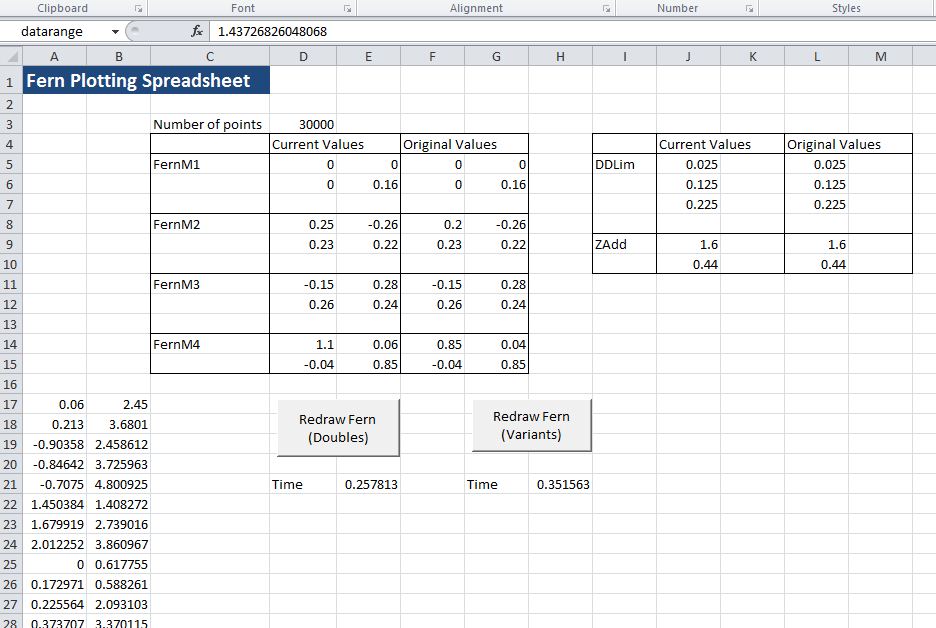
Here’s what the input screen looks like: 

Input and top of output values for 30,000 points


And four different ferns generated with the FernM4(2,2) parameter varied between 0.8 and 1.05 

FernM4(2,2) = 0.8


FernM4(2,2) = 0.85


FernM4(2,2) = 0.9


FernM4(2,2) = 1.05

Posted in Arrays, Charts, Drawing, Excel, Maths, Newton, VBA | Tagged , , , , | 5 Comments

Working with FEM data and using the dictionary object

This post features an Excel User Defined Function (UDF) to count the number of different element types (beams, plates, bricks and links) and the number of node restraints at each end of listed beams from a finite element model.  The example uses data from the FEM package Strand7, but could easily be adapted to data from other packages.  The most convenient way to transfer data from a Strand7 data file into an Excel spreadsheet is using the Strand7 API, which allows the data file to be read directly from VBA.  This will be examined in more detail in later posts, but for maximum generality this post will describe how the data may be easily transferred by copying and pasting, using the on-line editor. A spreadsheet including full open source code for the described UDF may be downloaded from BeamEnds.xls

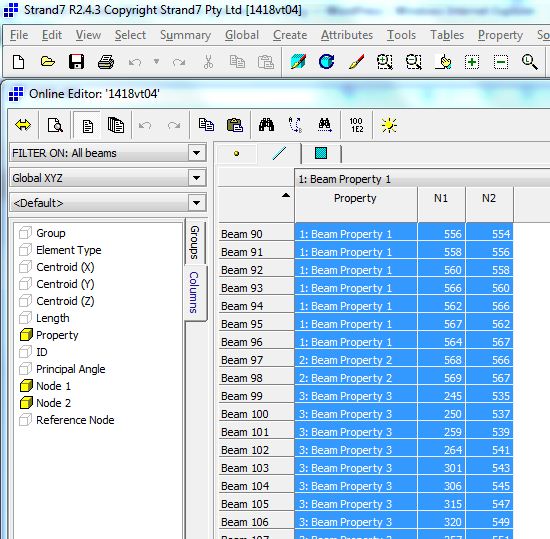
The screen shot below shows the Strand7 on-line editor displaying beam details.  The details to be displayed may be selected in the “Columns” tab, and for the present purposes the only ones required are the beam property type and the two end node numbers.  Having selected these columns for display the data may be selected using Ctrl-A and copied to the clipboard with Ctrl-Shift-C (or Ctrl-C to copy without beam numbers and column headers).

Copying beam data from Strand7

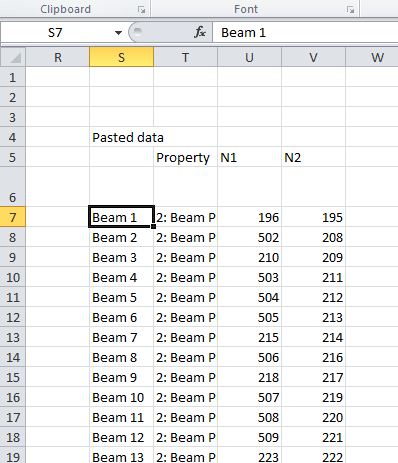
The data may then be pasted directly into the spreadsheet:

Beam data pasted into Excel

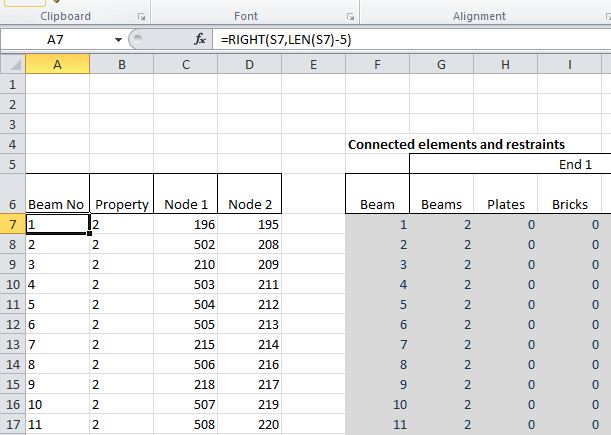
Note that the beam numbers and property types are pasted as text strings, rather than numbers.  The required values may be extracted with a simple string formula:

Extracting Beam numbers and property numbers as values

A similar procedure is used to import details of the other element types included in the model (plates, bricks, and links) and a list of restrained nodes.

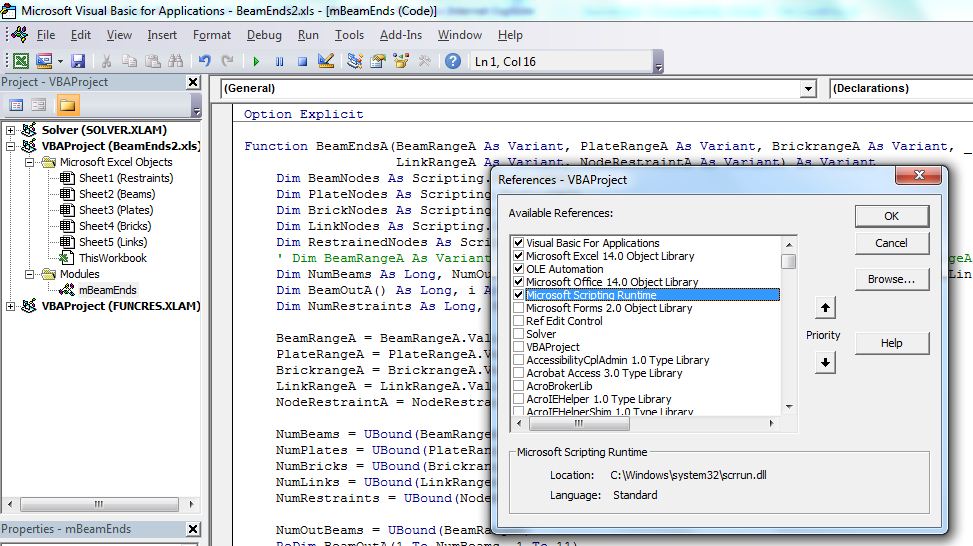
Having imported the data into Excel the nodes defining each element are read into a “dictionary object”.  The advantage of the dictionary object is that it has an “exists” method allowing the presence of any specific node in a list to be determined quickly and efficiently.  The dictionary object is part of the Microsoft Scripting Library, which is not enabled by default.  The library must therefore be selected in the Tools-References dialog of the VBE, as shown below:

Enabling Microsoft Scripting Library

Typical use of the dictionary object is shown in the code below:

  Dim BeamNodes As Scripting.Dictionary
..
    ' Set up element node dictionaries
  Set BeamNodes = New Scripting.Dictionary

  For i = 1 To NumBeams
        For j = 3 To 4
  sNodeNum = BeamRangeA(i, j)
  If BeamNodes.Exists(Key:=sNodeNum) = False Then
  BeamNodes.Add sNodeNum, 1
            Else
  ItemVal = BeamNodes.Item(sNodeNum) + 1
  BeamNodes.Remove sNodeNum
  BeamNodes.Add sNodeNum, ItemVal
            End If
        Next j
  Next i
..

      ' For each beam node, check if node exits in any element dictionaries

    For j = 3 To 4
  For i = 1 To NumOutBeams
  BeamOutA(i, 1) = BeamRangeA(i, 1)
  sNodeNum = BeamRangeA(i, j)
            If BeamNodes.Exists(sNodeNum) Then
  BeamOutA(i, (j - 3) * 5 + 2) = BeamNodes.Item(sNodeNum) - 1
            End If
  Next i

Note that:

  • Each entry in the dictionary has a string “key” and an associated “item” which may be any data type.  In this application the item is used to store the number of occurrences of the node number.  Since there is no provision to edit a dictionary item it must be deleted and recreated.
  • The “Exists” method is used to determine if each node is included in the dictionary object.  In the case of the beams the nodes at each end of the beams being checked are included in the count, so the node connection count is reduced by 1.

Full code is included in the download file.

Use of the BeamEndsA function is illustrated in the screen show below:

BeamEndsA Function

Note that the function returns an array with 1 row for each beam in the input range, and 11 columns and must be entered as an array function:

  • Enter the function
  • Select the output range
  • Press F2 to enter edit mode
  • Press ctrl-shift-enter
Posted in Arrays, Excel, Finite Element Analysis, Newton, UDFs, VBA | Tagged , , , , , | 5 Comments

PyXLL Links

This is really just a bookmark for me and anyone else who may be interested.

“PyXLL is an Excel addin that enables functions written in Python to be called in Excel.”

That’s all I know, but it looks interesting, and the few comments I’ve found on the Web have been positive.

Here’s the PyXLL Site

Any users out there like to comment?

Posted in Computing - general, Excel, Link to dll, UDFs | Tagged , | 1 Comment

Complex Numbers and Solving Quartic Polynomial Equations

It was recently pointed out to me that the User Defined Function (UDF) for solving quartic polynomial equations presented in this post returned an error for some input values.  In tracking down the source of the error I decided that it would be useful to have a UDF that would evaluate a polynomial for complex roots, and in writing that I added some new functions to the ALGLIB complex number spreadsheet presented in this post.  The end result of this work is:

Three new functions for the AL-Complex spreadsheet (as always, all the spreadsheets mentioned here are available for download, including full open source code)

ALGLIB Complex number functions, click for full size view

A new complex number function for the EvalPoly spreadsheet:

EvalPoly spreadsheet

And corrected code for the Quartic function in the Polynomial Spreadsheet, plus evaluation of the maximum error in the input function using the roots generated by the Quartic and CubicC functions:

Quartic spreadsheet

Posted in AlgLib, Excel, Maths, Newton, UDFs, VBA | Tagged , , , , , , | 3 Comments