Keyboard shortcuts

Having been born and raised using a different spreadsheet I’m sometimes a bit set in my ways and don’t use keyboard shortcuts as much as I could.  The trouble is there are so many of them. 

 I’ve just discovered a list of  Useful Keyboard Shortcuts from Bob Umlas that strikes me as being an excellent short selection of  really useful shortcuts, most of which I didn’t know about.

Screenshot; click on the image or the link to see full list

Any suggestions for any other shortcuts, not on Bob’s list, that I should really know about?

Posted in Excel | Tagged , , | 1 Comment

SplineBeam update

Previous SplineBeam post

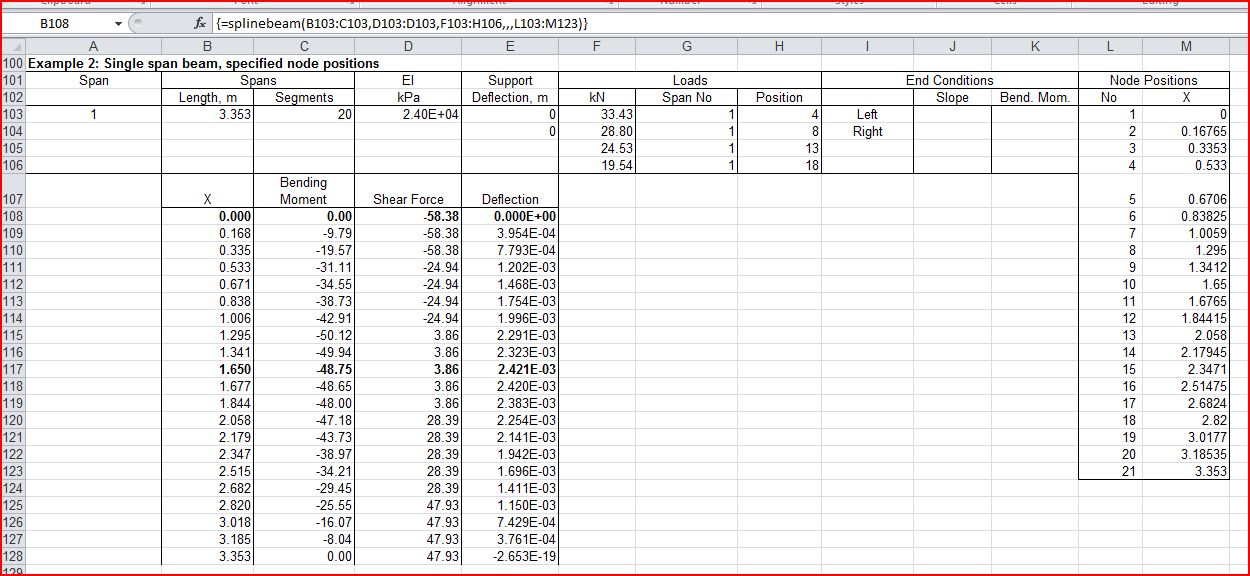
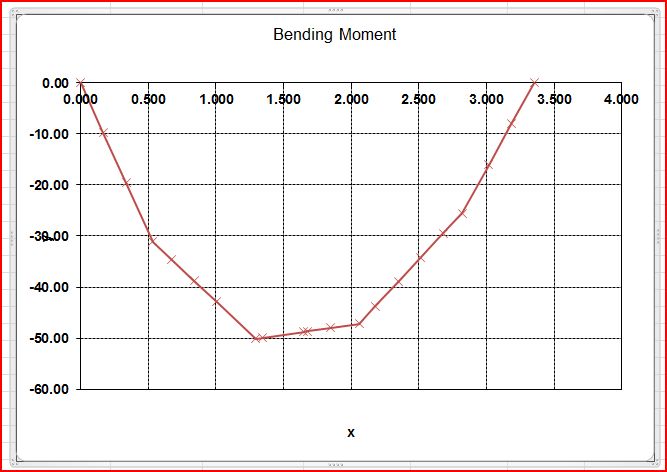
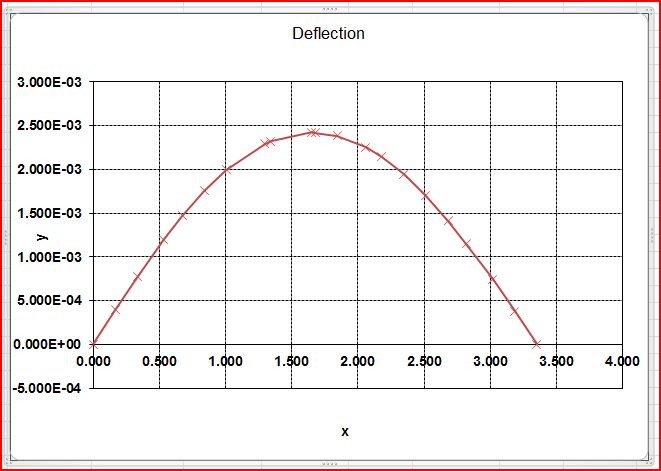
I have modified the SplineBeam spreadsheet to allow input of a single span (simply supported or with end constraints), and to optionally allow input of the position of intermediate nodes, rather than dividing each span into equal segment lengths.  This allows loads to be applied at their precise location, and output of results at the point of maximum deflection. 

Download SplineBeam2_2.zip (includes full open source code)

Input of single span beam with specified node locations (click for full size view)


Posted in Arrays, Beam Bending, Excel, Frame Analysis, Newton, UDFs, VBA | Tagged , , , , | 1 Comment

Elegant solutions, Column buckling, and the hole through the middle of the Earth

The previous post presented some examples of solution of differential equations using an iterative process, including the simple harmonic motion problem of a ball falling through an evacuated hole through the middle of the Earth.  The final example was concerned with finding the deflection and buckling load of a column subject to an axial load with a small eccentricity.  This problem, which appears entirely unconnected at first sight, was solved with exactly the same differential equation as the oscillating ball problem, suggesting that the exact analytical solution of the two problems should also have the same form.

The equivalent terms in the applicable differential equations for the two problems are shown below:

Simple Harmonic Motion Column Buckling
Period, T Column Length
Half amplitude, R Transverse Deflection
Velocity Slope
Acceleration, g Curvature

For the case of the ball through the middle of the Earth it was shown that the period of oscillation was given by:

T = 2π(R/g)0.5

This can be rearranged as:

g = R(2π/T)2

To give the initial acceleration required for a given radius and period.

If we substitute in the equivalent terms for column buckling, noting that:

  • Curvature = M/EI = F.Delta/EI (where Delta is the eccentricity of the applied load, F, relative to the centroid of the base of the column, E is the elastic modulus of the column, and I is the second moment of area of the cross section)
  • In simple harmonic motion the period is the time for the ball to travel the distance from the surface of the Earth to the centre four times.  In the case of the column the column length is therefore equivalent to the Period/4.
  • We wish to find the axial force at the top of the column, F, at which the deflection due to the force (ignoring second order effects) is equal to the initial eccentricity at the base.

F.Delta/EI = Delta(π/2L)2

F = EI(π/2L)2   which is the Euler equation for the buckling load of a cantilever column.

But what is the physical significance of this equation, and how does it relate to the acceleration of a ball falling through the Earth, and the orbital velocity of a body with the same period?

This can be  seen if we consider a cylinder of radius delta, centred on the top of the column, with a vertical axis, as shown below:

This diagram shows the deflected column centroidal axis (red line), and the imaginary cylinder.

Consider a line coincident with the centroid of the column at the base (green line), and spiralling up the surface of the cylinder at a constant slope, so that at the top of the column it has passed through a right angle around the cylinder.  If this line is projected onto the XY plane (the plane of the deflected column) it will exactly follow the deflected shape of the column centroid.  It can be seen that:

  • The slope of the line from the vertical, around the surface of the cylinder = (Delta.π/2)/L =  (Delta.π)/2L
  • The curvature of the line in the XY plane at the base = Slope2/Delta =  ((Delta.π)/2L)2/Delta = Delta(π/2L)2
  • Therefore at the buckling load F.Delta/EI =  Delta(π/2L)2
  • Buckling load, F = EI(π/2L)2
Posted in Beam Bending, Differential Equations, Newton | Tagged , , | 5 Comments

Using the AlgLib ODE (Runge-Kutta) Solver with Excel

Or to be more correct, the AlgLib Cash-Karp Solver, Cash-Karp being a refinement of the Runge-Kutta method of solving ordinary differential equations.

Solution of differential equations is an iterative process requiring the repeated application of the solver routine followed by evaluation of the differential equation using an external routine.  This is performed in AlgLib by a process known as reverse communication, whereby an initialisation routine creates a “State” object which is used to transfer data between the solver routine and the external equation evaluation routine (which is in this case a VBA function).  The steps required to wrap this process in an Excel User Defined Function (UDF) are:

  1. Read the name of the ODE evaluation routine and the required input data from the spreadsheet.
  2. Convert data in spreadsheet ranges to variant arrays.
  3. Convert variant arrays (which will always be base 1, 2 dimension arrays) into the form required by the AlgLib routines, which will always be base 0, and may be 1 or 2 dimensional.
  4. Evaluate any additional values required by the AlgLib routines
  5. Set up any required output arrays
  6. Call the appropriate AlgLib routine to initialise the State object
  7. Loop through the AlgLib solver routine and the external ODE evaluation routine until the solver routine returns “False”, which indicates that it has finished.  The VBA function named in “FuncName” is called using the Application.Run method.
  8. Extract the desired results from the State object using the appropriate AlgLib routine
  9. If necessary convert the AlgLib output arrays to a form suitable for Excel.
  10. Assign the output array to the function return value.
  11. Import the necessary AlgLib routines; in this case the only required modules are ODESolver.bas and ap.bas

This process is illustrated in the code for the UDF ODE() shown below (may take some time to display correctly). 

 This code and all the related AlgLib and other routines are included in the file ODESolver.zip.

Function ODE(FuncName As String, Initial As Variant, XA As Variant, _
CoeffA As Variant, Optional Eps As Double = 0.000001, _
Optional Step As Double = 0, Optional MaxIts As Long = 100)
Dim M As Long, N As Long, State As ODESolverState, _
YA() As Double, XA2() As Double, YA2() As Double, i As Long, _
Rtn As Boolean, Rep As ODESolverReport, NC As Long

' The VBA function arguments are the name of the VBA
' ODE evaluation routine, followed by the required input data.

' Convert data in spreadsheet ranges to variant arrays
Initial = GetArray(Initial)
XA = GetArray(XA)
CoeffA = GetArray(CoeffA)

' Convert variant arrays (which will always be base
' 1, 2 dimension arrays) into the form required by the AlgLib
' routines, which will always be base 0, and may be 1 or 2 dimensional.
Rtn = VarAtoDouble1D_0(Initial, YA, N, NC)
If N = 1 And NC > 1 Then N = NC
Rtn = VarAtoDouble1D_0(XA, XA2, M, NC)

' Evaluate any additional values required by the AlgLib routines
MaxIts = MaxIts * M

'Set up any required output arrays
ReDim YA2(0 To M - 1, 0 To N - 1)

'Call the appropriate AlgLib routine to initialise the State object
Call ODESolverRKCK(YA(), N, XA2, M, Eps, Step, State)

' Loop through the AlgLib solver routine and the external ODE
' evaluation routine until the solver routine returns "False",
' which indicates that it has finished.
' The VBA function named in "FuncName" is called using
' the Application.Run method.
Rtn = True
i = 0
Do While Rtn = True And i < MaxIts
Rtn = ODESolverIteration(State)
State.DY = Application.Run(FuncName, State.X, State.Y, CoeffA)
i = i + 1
Loop

 ' Extract the desired results from the State
 ' object using the appropriate AlgLib routine
 Call ODESolverResults(State, M, XA2, YA2, Rep)

' If necessary convert the AlgLib output array(s) to
' a form suitable for Excel. In this case YA2 is
' a 2D base 0 array, which may be assigned to the
' function return value without further processing.

' Assign the output array to the function return value
 ODE = YA2

End Function

The screen shots below show examples of the application of the ODE() function (more details of the final example, buckling of a strut, will be given in the next post):

ODE input and output details, click for full size view
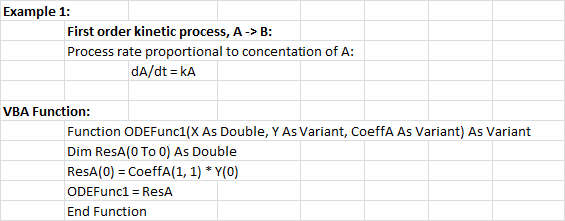
Example 1; First Order kinetic process
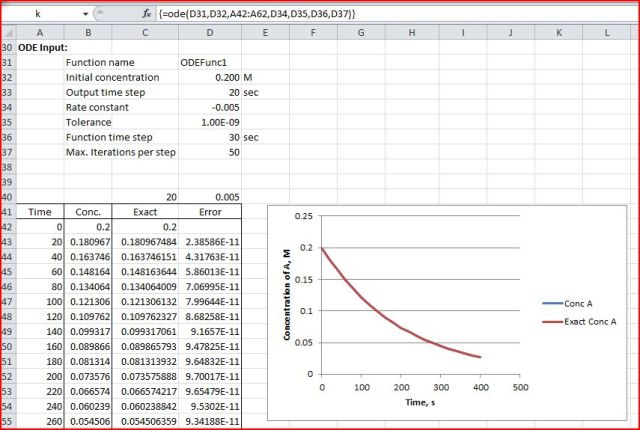
Example 1 Output
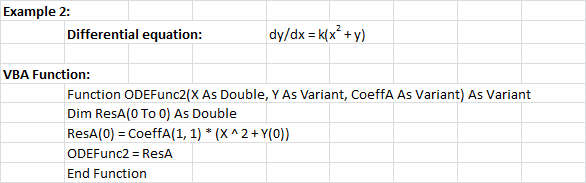
Example 2; Process dependent on X and Y
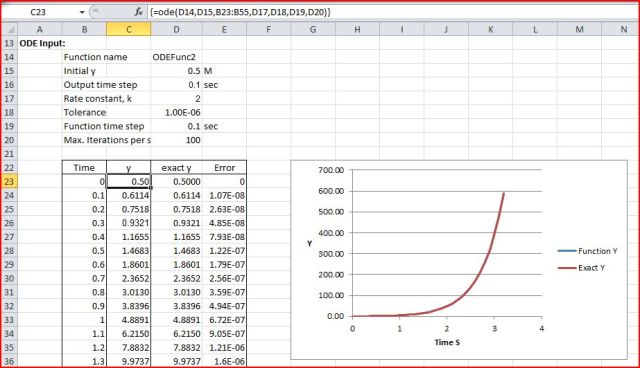
Example 2 results
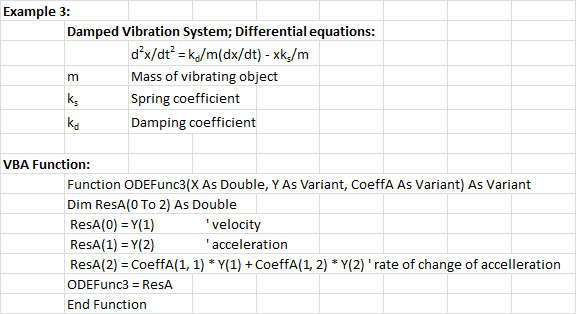
Example 3; damped vibration system

Example 3 output

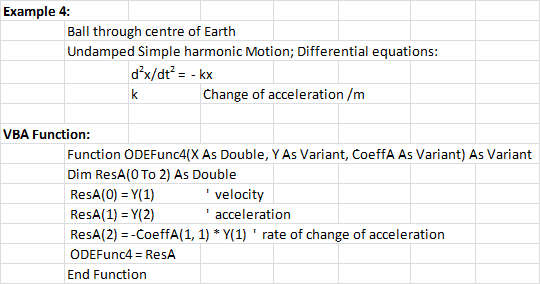
Example 4; Undamped SHM, ball through the centre of the Earth

Example 4 results
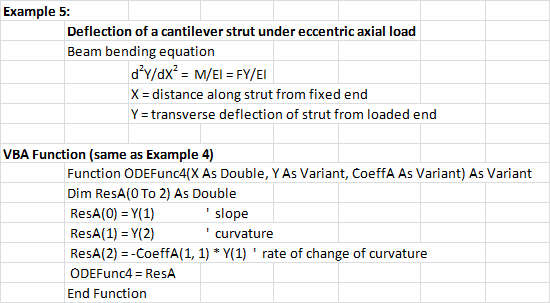
Example 5; deflection of a cantilever strut and buckling load
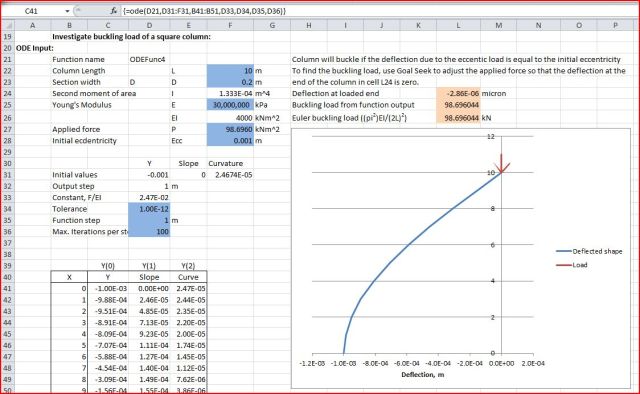
Example 5 results

Posted in AlgLib, Beam Bending, Differential Equations, Excel, Maths, Newton, UDFs, VBA | Tagged , , , , , , , , | 8 Comments

Elegant solutions, Simple Harmonic Motion, and the hole through the middle of the Earth

No, not the hole (beloved of conspiracy theorists everywhere) where our alien overlords keep their UFO’s, but rather the equally imaginary hole from Pole to Pole (beloved of physics teachers everywhere) where we can drop in objects and watch them travel to the opposite end of the hole and back again, as an example of bodies moving with simple harmonic motion.  In reality it’s not so simple, and in future posts I will develop spreadsheet tools to allow us to analyse the motion of a mass dropped into this hole in more detail to see what they would really do, but for now we will look at why, with suitable simplifying assumptions, the mass will move with simple harmonic motion, and what it’s period of oscillation will be.

The simplifying assumptions are:

  • The hole passes exactly along the axis of rotation of the Earth, and this line is moving through space with constant velocity (so we can ignore tidal effects)
  • The Earth is a perfect sphere of uniform density
  • The hole is a perfect vacuum

We want to show firstly that an object dropped into this hole will move with simple harmonic motion, and secondly to calculate how long it will take to pass through the hole, and back again to exactly the point from which it was dropped.

Simple harmonic motion is the motion of a body attached to an ideal spring, with no other forces acting, so that the force on the body is proportional to the extension or compression of the spring (according to Hooke’s Law) and is directed towards the point at which the spring has zero extension.

How does the gravitational force vary along the length of the hole through the middle of the Earth?  This can be simply determined by dividing the sphere of the Earth into two concentric parts at any depth down the hole; an outer shell and an inner ball.  It can be shown that the gravitational field inside a spherical shell is zero for any thickness of shell, so that the gravitational field at any point down the hole is equal to that due to the sphere below that level.  If this sphere has a radius R the mass of the sphere is proportional to R3, and gravitational force at the surface of the sphere is proportional to mass / R2, the gravitational force at distance R from the centre is therefore proportional to R3/ R2 = R, and the resulting motion will be simple harmonic.

To determine the period of oscillation of a body dropped down the hole, consider a second body moving at orbital velocity at the surface of the Earth, that is with a radial acceleration, ar, equal to the acceleration due to gravity at the surface, g.  As this body moves around the Earth, if the radial line to the body forms an angle θ with the axis of the hole (i.e. the polar axis) then:

  • The component of its radial acceleration parallel to the polar axis will be gCosθ
  • Its perpendicular distance from the equatorial plane will be RCosθ
  • Its acceleration towards the equatorial plane is therefore proportional to its distance from this plane
  • Since its initial acceleration was equal to that of an object dropped down the Polar hole, and its component of acceleration in the direction of the hole is proportional to its distance from the plane through the centre of the hole, it follows that the path of the orbiting body projected onto the Polar Axis follows exactly the same path as an object dropped down the hole

Radial acceleration of a body moving with velocity V in a circle of radius R = V2/R
For orbital velocity, radial acceleration = g, therefore V = (gR)0.5
Circumference of a sphere = 2πR, therefore orbital period = 2πR / (gR)0.5 = 2π(R/g)0.5 = Period of oscillation of a body through the Polar hole.

Taking g = 9.81 m/s2 and R = 6,371,000 m, the period of oscillation of the mass dropped down the hole through the middle of the Earth is therefore:
2π(6,371,000/9.81)0.5 = 5063 seconds, or 84 minutes and 23 seconds.

The maximum speed of the object falling down the hole will be when it reaches the centre, at which point it will have zero acceleration and will be travelling parallel to the orbiting body, and will therefore have a speed equal to orbital velocity, i.e. (9.81*6,371,000)0.5 = 7906 m/s.

Posted in Differential Equations, Maths, Newton | Tagged , , , | 5 Comments